PHP PDO Tutorial for MySQL Database Access
PDO stands for PHP Data Objects. It provides a consistent object-oriented interface for PHP applications to connect to and work with different database systems through database-specific PDO drivers.
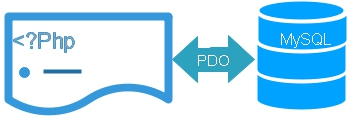
For example, PHP can use PDO with MySQL when the PDO MySQL driver is available, and PDO SQLite when the SQLite driver is available. The PHP methods used for preparing and executing statements remain similar across PDO drivers.
PHP application
      |
      v
PDO
      |
      +-- PDO MySQL driver ----> MySQL
      |
      +-- PDO SQLite driver ---> SQLite
      |
+-- Other available PDO drivers- Why Use PDO?
- Check Available PDO Drivers
- Connect PDO to MySQL
- PDO Prepared Statements
- PDO CRUD Tutorials
- Reading Database Records
- Counting Rows and Columns
- Transactions, Procedures and Paging
- Error Handling and SQL Injection
- BLOB and File Uploads
- PDO vs MySQLi
- Recommended PDO Learning Path
- PDO Video Tutorials
- Download PDO Sample Project
- FAQs
Why Use PHP PDO? Top ↑
PDO provides several useful features for database applications:
- A consistent object-oriented database interface.
- Prepared statements with bound values.
- Named and positional placeholders.
- Different fetch modes for retrieving records.
- Transaction support when provided by the database and storage engine.
- Exception-based error handling.
- Support for different database systems through PDO drivers.
PHP also provides MySQLi for MySQL-specific applications. Both PDO and MySQLi support prepared statements.
Check Available PDO Database Drivers Top ↑
The PDO extension requires the appropriate database driver. Use PDO::getAvailableDrivers() to see which PDO drivers are available in the current PHP installation.
<?php
$drivers=PDO::getAvailableDrivers();
var_dump($drivers);
?>
The output depends on the PHP installation and the drivers that have been enabled.
To check specifically for the MySQL PDO driver:
if(in_array('mysql',PDO::getAvailableDrivers(),true)){
    echo 'PDO MySQL driver is available.';
}else{
    echo 'PDO MySQL driver is not available.';
}
If the required driver is missing, check the PHP configuration. See the Plus2net PDO installation tutorial and php.ini tutorial.
You can also check your current installation using the PHP version tutorial.
PDO Installation and Driver SupportConnect PHP PDO to MySQL Top ↑
A PDO connection is created using a DSN, database username and password. Plus2net examples use $dbo as the PDO connection object.
<?php
$host='localhost';
$dbname='test';
$username='root';
$password='';

$dsn="mysql:host=$host;dbname=$dbname;charset=utf8mb4";

$options=[
    PDO::ATTR_ERRMODE => PDO::ERRMODE_EXCEPTION,
    PDO::ATTR_DEFAULT_FETCH_MODE => PDO::FETCH_ASSOC,
    PDO::ATTR_EMULATE_PREPARES => false
];

try{
    $dbo=new PDO(
        $dsn,
        $username,
        $password,
        $options
    );
}catch(PDOException $e){
    error_log($e->getMessage());
    exit('Database connection failed.');
}
?>
For a larger application, keep the connection details in a common configuration file instead of repeating them on every page.
PDO MySQL Connection TutorialUse PDO Prepared Statements Top ↑
When a query contains user-supplied or variable values, use a prepared statement instead of joining those values directly into the SQL string.
$sql="SELECT id,name,class,mark
      FROM student
      WHERE id=:id";

$stmt=$dbo->prepare($sql);

$stmt->bindValue(
    ':id',
    $id,
    PDO::PARAM_INT
);

$stmt->execute();

$row=$stmt->fetch();
The placeholder :id is part of the SQL statement, while the actual value is supplied separately.
For input handled as strings:
$sql="SELECT id,name,class
      FROM student
      WHERE class=:class";

$stmt=$dbo->prepare($sql);

$stmt->bindValue(
    ':class',
    $class,
    PDO::PARAM_STR
);

$stmt->execute();
PDO CRUD: Create, Read, Update and Delete Top ↑
CRUD represents the four common database operations:
| Tutorial | Description |
|---|---|
| PDO Insert | Add records to a database table. |
| PDO Fetch | Fetch a record from a query result. |
| PDO Records | Display multiple database records. |
| PDO Update | Update an existing record. |
| PDO Delete | Delete database records. |
| PDO Drop Table | Drop a database table. |
Read Single and Multiple Records using PDO Top ↑
PDO offers several ways to collect query results. A single record can be collected with fetch().
$stmt=$dbo->prepare(
    "SELECT id,name,class
     FROM student
     WHERE id=:id"
);

$stmt->bindValue(
    ':id',
    $id,
    PDO::PARAM_INT
);

$stmt->execute();

$row=$stmt->fetch(PDO::FETCH_ASSOC);
For multiple records, iterate over the result or use fetchAll() when collecting the complete result set is appropriate.
The Plus2net list-to-single-record example demonstrates displaying a record list and then opening the complete details for one selected record.
Count Rows and Columns with PDO Top ↑
| Tutorial | Description |
|---|---|
| PDO rowCount() | Check the number of rows affected by operations such as UPDATE or DELETE. |
| PDO columnCount() | Get the number of columns in a result set. |
COUNT(*) query is generally clearer than depending on rowCount() behavior across different database drivers.PDO Transactions, Stored Procedures and Paging Top ↑
PDO Transactions Top ↑
Transactions group related database changes so they can be committed together or rolled back when an operation fails.
try{
    $dbo->beginTransaction();

    // Run related database operations here.

    $dbo->commit();
}catch(Throwable $e){
    if($dbo->inTransaction()){
        $dbo->rollBack();
    }

    error_log($e->getMessage());
}Stored Procedures Top ↑
PDO can call MySQL stored procedures using prepared statements and parameters.
PDO Stored ProceduresPaging Database Records Top ↑
Large result sets can be divided into smaller groups using paging. Plus2net also demonstrates paging through a stored procedure using limit and offset values.
PDO PagingPDO Error Handling and SQL Injection Top ↑
Using PDO exceptions provides a consistent way to detect failed database operations.
try{
    $stmt=$dbo->prepare($sql);
    $stmt->execute();
}catch(PDOException $e){
    error_log($e->getMessage());
    exit('Database operation failed.');
}
Production pages should avoid displaying raw database exceptions, SQL statements, passwords or connection details to visitors.
PDO Error HandlingSQL Injection and Prepared Statements Top ↑
Prepared statements are particularly important when SQL queries use values supplied through forms, URLs or other external input.
PDO and SQL InjectionPDO BLOB Data and File Uploads Top ↑
| Tutorial | Description |
|---|---|
| PDO BLOB | Manage binary data stored in a BLOB column. |
| PDO File Upload | Upload image data for storage in a MySQL BLOB column. |
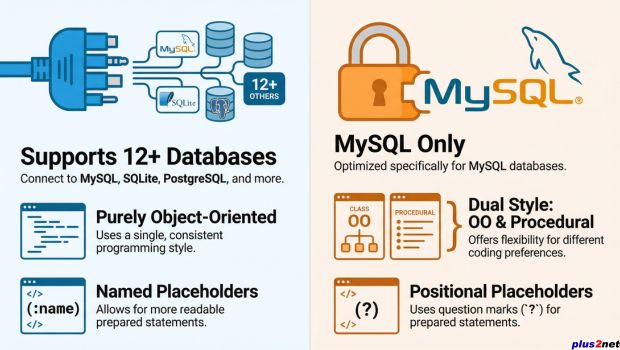
Difference between PHP PDO and MySQLi Top ↑
:id as well as positional placeholders. MySQLi uses positional placeholders.If your project is MySQL-only, both PDO and MySQLi are available choices. Plus2net provides separate tutorials for both interfaces.
Recommended PHP PDO Learning Path Top ↑
If you are starting with PDO, follow these tutorials in sequence:
- Check and enable PDO support
- Connect PHP to MySQL using PDO
- Read multiple database records
- Fetch individual records
- Understand rowCount()
- Insert records
- Update records
- Delete records
- Handle PDO errors
- Understand SQL injection and prepared statements
- Use transactions
- Paginate database records
For SQLite, continue with the PDO SQLite tutorials.
PHP PDO Video Tutorials Top ↑
PHP PDO Playlist
Download PHP PDO MySQL Sample Project Top ↑
The Plus2net PDO sample project contains scripts for experimenting with common MySQL database operations.
PHP PDO MySQL sample project

1. Install PHP and MySQL.
2. Confirm that the PDO MySQL driver is available.
3. Use sql_dump.txt to create the sample tables.
4. Enter the MySQL connection details in config.php.
5. Open index.php.
6. Use the navigation menu to test the PDO examples.
7. Re-create sample tables when required while experimenting.Sample Student Table SQL Dump

PDO Installation PDO Connection
MySQLi Functions
Frequently Asked Questions Top ↑
PDO stands for PHP Data Objects. It provides an object-oriented interface for working with databases through database-specific PDO drivers.
Use PDO::getAvailableDrivers() and check whether mysql is present in the returned list of drivers.
Create a PDO object using a MySQL DSN, username, password and connection options. Plus2net examples use $dbo as the PDO connection object.
Prepared statements keep variable values separate from the SQL statement and provide a structured way to bind integers, strings and other query values.
No. PDO can work with different database systems when the corresponding PDO driver is available in the PHP installation.
PDO provides a common interface through multiple database drivers, while MySQLi is specific to MySQL. Both support prepared statements.
No. Production applications should normally log technical database errors and display a short user-facing message instead of exposing database details.

Subhendu Mohapatra
Author & Instructor at plus2net
I write and maintain practical tutorials on Python, PHP, SQL, JavaScript, HTML, jQuery, and web development at plus2net. The tutorials focus on clear explanations, working examples, and code that readers can test and adapt while learning.


Subscribe to our YouTube Channel here

