Create PDF in PHP using FPDF Cell() and Output()
FPDF is a PHP library for creating PDF documents directly from PHP. We can add pages, select fonts, position text inside cells, add borders and colors, create links and control whether the final PDF is displayed, downloaded, saved on the server or returned as a string.
PHP script
    |
    v
FPDF()
    |
    +-- AddPage()
    +-- SetFont()
    +-- Cell()
    |
    v
Output()
    |
    v
PDF documentInstall FPDF in a PHP Project Top ↑

Download the current FPDF package from the official FPDF website:
FPDF WebsiteKeep fpdf.php and the required FPDF font files in a location accessible to your PHP script.

Use a current FPDF release when running PHP 8.x. Older FPDF versions can contain code that is incompatible with newer PHP releases.
Create Your First PDF using PHP FPDF Top ↑
The basic sequence is:
- Load
fpdf.php. - Create an FPDF object.
- Add a page.
- Select a font.
- Add some content.
- Send the PDF to the browser.
<?php
require 'fpdf.php';

$pdf=new FPDF();
$pdf->AddPage();
$pdf->SetFont('Arial','B',16);

$pdf->Cell(80,10,'Hello World!');

$pdf->Output('I','my_file.pdf');
?>
AddPage() creates a PDF page, SetFont() selects the font and Cell() places the text inside the document.
FPDF Cell() Parameters Top ↑
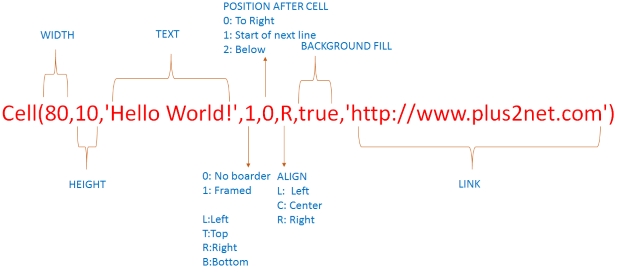
The commonly used Cell syntax is:
$pdf->Cell(width,height,text,border,line,align,fill,link);0, 1 or selected sides such as 'LRT'.0 keeps the next Cell on the same line, while 1 moves to the next line.'L', 'C' or 'R' for left, center or right alignment.true to use the current fill color.Add Border, Alignment and a Link to Cell() Top ↑
The next example adds a border, right-aligns the text and makes the Cell clickable.
<?php
require 'fpdf.php';

$pdf=new FPDF();
$pdf->AddPage();
$pdf->SetFont('Arial','B',16);

$pdf->Cell(
    80,
    10,
    'Hello World!',
    1,
    0,
    'R',
    false,
    'https://www.plus2net.com'
);

$pdf->Output('I','my_file.pdf');
?>
Add Background Color using SetFillColor() Top ↑
SetFillColor() defines the RGB background color used by filled cells.
$pdf->SetFillColor(1,255,255);

$pdf->Cell(
    80,
    10,
    'Hello World!',
    1,
    0,
    'R',
    true,
    'https://www.plus2net.com'
);
The Cell fill parameter must be true for the background color to appear.
Change PDF Text Color using SetTextColor() Top ↑
Use SetTextColor() to set the RGB color used for text.
<?php
require 'fpdf.php';

$pdf=new FPDF();
$pdf->AddPage();
$pdf->SetFont('Arial','B',16);

$pdf->SetFillColor(1,99,255);
$pdf->SetTextColor(255,254,254);

$pdf->Cell(
    80,
    10,
    'Hello World!',
    1,
    0,
    'C',
    true,
    'https://www.plus2net.com'
);

$pdf->Output('I','my_file.pdf');
?>
Set Border Color and Width Top ↑
SetDrawColor() controls the border color and SetLineWidth() controls its thickness.
<?php
require 'fpdf.php';

$pdf=new FPDF();
$pdf->AddPage();
$pdf->SetFont('Arial','B',16);

$pdf->SetFillColor(1,99,255);
$pdf->SetTextColor(255,254,254);
$pdf->SetDrawColor(255,1,1);
$pdf->SetLineWidth(1);

$pdf->Cell(
    80,
    10,
    'Hello World!',
    1,
    0,
    'C',
    true,
    'https://www.plus2net.com'
);

$pdf->Output('I','my_file.pdf');
?>
For more examples of drawing colored lines and changing line width, see the FPDF Line() tutorial.
Add Borders to Selected Sides of a Cell Top ↑
The border argument can specify individual sides:
'L'   // Left
'T'   // Top
'R'   // Right
'B'   // Bottom
'LRT' // Left, right and top
For example:
$pdf->Cell(80,10,'Selected borders','LRT');Display, Download, Save or Return a PDF using Output() Top ↑
FPDF Output() controls what happens to the completed PDF document.
$pdf->Output('I','my_file.pdf');
// Display the PDF inline in the browser

$pdf->Output('D','my_file.pdf');
// Send the PDF as a download

$pdf->Output('F','my_file.pdf');
// Save the PDF file on the server filesystem

$pdf_data=$pdf->Output('S');
// Return the PDF document as a string
Output destination values Top ↑
IDFSOutput('I','my_file.pdf').FPDF Cell() vs MultiCell() Top ↑
Cell() works well when the text fits on one line. If the text is longer than the available width, it can extend beyond the Cell boundary.
MultiCell() is designed for text that needs to wrap automatically onto additional lines.
Cell()      - single-line text
MultiCell() - wrapped multi-line textFPDF Cell() and Output() Video Tutorials Top ↑
Common FPDF Problems Top ↑
FPDF class is not found Top ↑
Check the path used by require 'fpdf.php'; and confirm that the FPDF file is available to the PHP script.
PDF cannot be displayed because output already started Top ↑
Do not send HTML, debugging messages or other browser output before calling FPDF Output().
Background color does not appear Top ↑
Call SetFillColor() and make sure the Cell fill argument is set to true.
Text goes outside the Cell Top ↑
A normal Cell does not wrap long text. Use MultiCell() when the text must continue onto additional lines.
PDF is downloaded instead of displayed Top ↑
Use Output('I','filename.pdf') to request inline browser display. Use D when the PDF should be sent as a download.
Some characters are missing from the PDF Top ↑
Classic FPDF core fonts have limited character-set support. A suitable font and encoding setup is required when the document contains characters outside those supported by the selected font.
Related PHP FPDF Tutorials Top ↑
Continue from the basic Cell example to practical PDF layouts and reports:
MultiCell() Draw Lines Add Images Create PDF TablesCreate PDF with Pie Chart Database Records to PDF Table
Generate PDF from Database Values Multi-page Database PDF
Frequently Asked Questions Top ↑
Load fpdf.php, create an FPDF object, call AddPage(), select a font with SetFont(), add content with Cell() and finish by calling Output().
Use Cell() for single-line text. Supply the cell width, height and text, followed by optional border, position, alignment, fill and link settings.
Set the RGB color with SetFillColor() and pass true as the fill argument of Cell().
Use SetTextColor() for text and SetDrawColor() for borders and drawing operations. Both can accept RGB values.
Use Output('I','filename.pdf'). The I destination requests inline browser display.
Use Output('D','filename.pdf'). The D destination sends the generated PDF as a download.
Cell() is suitable for single-line content. MultiCell() automatically wraps longer text onto additional lines within the specified width.
MultiCell() Drawing Line in PDF Adding Image to PDF Table in PDF

Subhendu Mohapatra
Author & Instructor at plus2net
I write and maintain practical tutorials on Python, PHP, SQL, JavaScript, HTML, jQuery, and web development at plus2net. The tutorials focus on clear explanations, working examples, and code that readers can test and adapt while learning.


Subscribe to our YouTube Channel here

20-11-2020 | |
| Excellent post. Nice work keep it up. Thanks for sharing the knowledge. | |
26-11-2021 | |
| Excellent post. Nice work keep it up. Thanks for sharing the knowledge. | |
19-01-2023 | |
| fpdf was run complatly in local host , browser but cant use in live server why? | |
