Enable PDO and PDO MySQL Driver in PHP

PDO itself is enabled by default in normal PHP installations. To connect to MySQL, PHP also needs the database-specific PDO_MYSQL driver. Check the installed drivers first:
<?php
print_r(
    PDO::getAvailableDrivers()
);
?>
If the output contains mysql, PDO MySQL support is available.
Array
(
    [0] => mysql
    [1] => sqlite
)
If mysql is missing, enable or install the PDO MySQL driver for the PHP installation used by your web server.
Show Table of Contents
- PDO vs PDO Database Driver
- Check Installed PDO Drivers
- Enable PDO MySQL on Windows
- Enable PDO MySQL in XAMPP
- Install PDO MySQL on Linux
- Check PDO with phpinfo()
- Check PDO from the Command Line
- PDO Drivers for Other Databases
- Could Not Find Driver Error
- Wrong php.ini File
- Restart PHP after Changes
- Test the MySQL Connection
- Older Installation Screenshots
- Common PDO Installation Problems
- Related PDO Tutorials
- FAQs
PDO and PDO Database Drivers Are Different Top ↑
PDO provides the common PHP interface for working with databases. A separate PDO driver connects that interface to a particular database system.
| Component | Purpose |
|---|---|
PDO | Common PHP database interface |
PDO_MYSQL | Connects PDO to MySQL |
PDO_SQLITE | Connects PDO to SQLite |
PDO_PGSQL | Connects PDO to PostgreSQL |
PDO_SQLSRV | PDO driver for Microsoft SQL Server |
This distinction is important when troubleshooting an error such as:
PDOException: could not find driverPDO can exist while the required database-specific driver is missing.
Check Installed PDO Drivers Top ↑
PDO::getAvailableDrivers() returns the PDO drivers available to the running PHP environment.
<?php
$drivers=PDO::getAvailableDrivers();

print_r($drivers);
?>
To check specifically for MySQL:
if(
    in_array(
        'mysql',
        PDO::getAvailableDrivers(),
        true
    )
){
    echo 'PDO MySQL driver is available.';
}else{
    echo 'PDO MySQL driver is not available.';
}
The PHP in_array() function checks whether mysql appears in the driver list.
Enable PDO MySQL on Windows Top ↑
On normal Windows PHP builds, PDO itself is already available. Database-specific extensions are controlled through php.ini.
Open the php.ini file used by the running PHP installation and search for:
;extension=pdo_mysqlIf the line is commented and the extension is available, remove the leading semicolon:
extension=pdo_mysqlSave the configuration and restart the PHP/web-server environment.
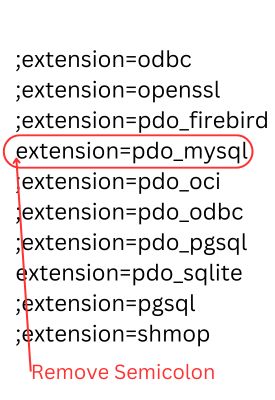
extension=php_pdo.dll to a modern Windows PHP setup. PDO itself is normally enabled already; the usual requirement is the database-specific driver such as pdo_mysql.Check extension_dir Top ↑
If PHP reports that it cannot load an extension, check the configured extension directory:
extension_dir = "ext"The required extension file must be available in the PHP extension directory and must match the installed PHP build.
Enable PDO MySQL in XAMPP Top ↑
XAMPP normally includes PHP with PDO and MySQL support. First check the driver rather than changing configuration unnecessarily:
print_r(
    PDO::getAvailableDrivers()
);
If mysql is not listed, open the PHP configuration used by XAMPP. A common Windows installation uses:
C:\xampp\php\php.iniSearch for:
;extension=pdo_mysqland enable it if required:
extension=pdo_mysqlThen restart Apache from the XAMPP Control Panel.
phpinfo() and check Loaded Configuration File when there is any doubt about which php.ini is active.Install PDO MySQL on Linux Top ↑
Linux distributions normally provide database extensions through their package manager. Package names depend on the distribution and installed PHP version.
On Debian/Ubuntu systems, the commonly used package is:
sudo apt update
sudo apt install php-mysql
This package normally provides PHP MySQL support including PDO_MYSQL for the distribution's PHP installation.
After installation, restart the PHP service or web server used by the site. For an Apache installation this may be:
sudo systemctl restart apache2When PHP-FPM is used, restart the applicable PHP-FPM service instead.
Check PDO Installation with phpinfo() Top ↑
A temporary PHP file can show the active PHP configuration:
<?php
phpinfo();
?>
Open the page through the same web server that runs the application and search for:
- PDO
- PDO drivers
- pdo_mysql
- Loaded Configuration File
- extension_dir

See the PHP phpinfo() tutorial for more on checking PHP configuration.
phpinfo() exposes detailed server configuration. Use a diagnostic phpinfo page temporarily and remove or restrict it after troubleshooting.Check PDO from the Command Line Top ↑
If PHP is available from the terminal, installed PDO drivers can be checked without creating a web page:
php -r "print_r(PDO::getAvailableDrivers());"To see loaded PHP modules:
php -mTo see which configuration files the command-line PHP uses:
php --iniThis is useful, but there is an important limitation: the command-line PHP and the PHP used by Apache or PHP-FPM can use different configuration files.
PDO Drivers for Other Databases Top ↑
Changing from MySQL to another supported database requires the appropriate PDO driver.
| Database | PDO driver name commonly shown |
|---|---|
| MySQL | mysql |
| SQLite | sqlite |
| PostgreSQL | pgsql |
| ODBC | odbc |
| SQL Server | Depends on the installed PDO SQL Server driver |
Check the actual drivers on the server with:
print_r(
    PDO::getAvailableDrivers()
);
PDO provides a common interface, but database-specific SQL features and connection strings can still differ between database systems.
PDOException: could not find driver Top ↑
This error commonly means that PDO is available but the driver required by the DSN is not loaded.
For example:
$dsn='mysql:host=localhost;dbname=testdb;charset=utf8mb4';requires the MySQL PDO driver.
Check:
print_r(
    PDO::getAvailableDrivers()
);
If mysql is missing, enabling PDO alone will not solve the problem. PDO_MYSQL must be installed or enabled.
A Common Problem: Editing the Wrong php.ini Top ↑
A computer can have more than one PHP installation or more than one PHP configuration.
For example:
- XAMPP may have its own PHP installation.
- A separately installed PHP command line may use another configuration.
- Apache may use one PHP configuration while PHP-FPM uses another.
If you edit a php.ini file and nothing changes, confirm the active file from the web environment using:
phpinfo();Look for:
Loaded Configuration FileFrom the command line, use:
php --iniThese paths do not necessarily have to be the same.
Restart PHP after Changing Configuration Top ↑
Changes to PHP extension configuration do not normally affect an already running server process immediately.
After changing php.ini:
- restart Apache when PHP is running through Apache,
- restart the relevant PHP-FPM service when using PHP-FPM,
- restart Apache from the XAMPP Control Panel when using XAMPP.
Then run the driver check again:
print_r(
    PDO::getAvailableDrivers()
);
Test PDO MySQL after the Driver Is Enabled Top ↑
Once mysql appears in the available-driver list, test a connection with valid database credentials.
<?php
$host='localhost';
$dbname='testdb';
$username='username';
$password='password';

$dsn="mysql:host=$host;dbname=$dbname;charset=utf8mb4";

try{
    $dbo=new PDO(
        $dsn,
        $username,
        $password,
        [
            PDO::ATTR_ERRMODE => PDO::ERRMODE_EXCEPTION,
            PDO::ATTR_DEFAULT_FETCH_MODE => PDO::FETCH_ASSOC,
            PDO::ATTR_EMULATE_PREPARES => false
        ]
    );

    echo 'PDO MySQL connection successful.';
}catch(PDOException $e){
    error_log($e->getMessage());
    echo 'Database connection failed.';
}
?>
If the driver exists but the connection still fails, the problem may instead be the host, database name, credentials, MySQL service, network configuration or authentication.
PDO MySQL Connection SetupOlder PDO Installation Screenshots Top ↑
The following Plus2net screenshots come from older PHP/Windows installation environments. They are retained for readers using similar legacy setups, but modern PHP installations should follow the driver-check and php.ini instructions above rather than relying on the old installer interface.


Older PHP documentation and installers sometimes referred to loading PDO itself as a separate DLL. In current PHP installations, first check whether PDO is already available and concentrate on the required database driver.
Common PDO Installation Problems Top ↑
PDO Exists but MySQL Is Missing Top ↑
PDO and PDO_MYSQL are separate components. Check PDO::getAvailableDrivers() and confirm that mysql appears.
Editing php.ini Has No Effect Top ↑
Confirm the active configuration file. The web server may be using a different PHP installation from the command line.
Forgetting to Restart Apache or PHP-FPM Top ↑
Restart the PHP environment after enabling an extension.
PDO Works in CLI but Not in the Browser Top ↑
The CLI and web server may use different php.ini files or even different PHP versions. Compare php --ini with the Loaded Configuration File shown by web-based phpinfo().
Extension File Cannot Be Loaded Top ↑
Check extension_dir, the required extension file, and whether the extension matches the installed PHP build.
Driver Is Installed but Connection Still Fails Top ↑
A working PDO driver does not guarantee that the database connection details are correct. Check the DSN, host, port, database name, username, password and whether the database server is running.
Using Old php_pdo.dll Instructions Top ↑
Do not assume an old PDO DLL instruction applies to a current PHP installation. Modern PHP normally provides PDO by default, while the database-specific driver is the component that commonly needs checking.
Exposing phpinfo() Publicly Top ↑
A phpinfo page reveals detailed server and PHP configuration. Remove or restrict diagnostic files after testing.
Related PHP PDO Tutorials Top ↑
PDO Tutorial PDO Connection PDO Error HandlingPHP php.ini PHP phpinfo()
Download the PDO example files from the main PHP PDO tutorial.
Frequently Asked Questions Top ↑
PDO is enabled by default in normal PHP installations. You may still need to install or enable the database-specific PDO driver required by your application, such as PDO_MYSQL.
Run PDO::getAvailableDrivers() and check whether mysql appears in the returned array.
Open the php.ini file used by the running PHP installation, enable extension=pdo_mysql if required, save the file and restart Apache or the relevant PHP environment.
The PDO core may be available while the database-specific driver required by the DSN is missing. For a mysql: DSN, check that the mysql PDO driver is installed and enabled.
The command-line PHP and web server can use different PHP installations or configuration files. Compare php --ini with the Loaded Configuration File shown by phpinfo() through the web server.
Yes. Restart the web server or the relevant PHP-FPM/PHP environment so the updated extension configuration is loaded.
No. Installing the driver only enables PHP to communicate with MySQL through PDO. You still need a valid PDO DSN, database server, database name and credentials.

PDO References PDO Database Connection

Subhendu Mohapatra
Author & Instructor at plus2net
I write and maintain practical tutorials on Python, PHP, SQL, JavaScript, HTML, jQuery, and web development at plus2net. The tutorials focus on clear explanations, working examples, and code that readers can test and adapt while learning.


Subscribe to our YouTube Channel here

