PHP PDO rowCount() to Get Rows Affected by a Query
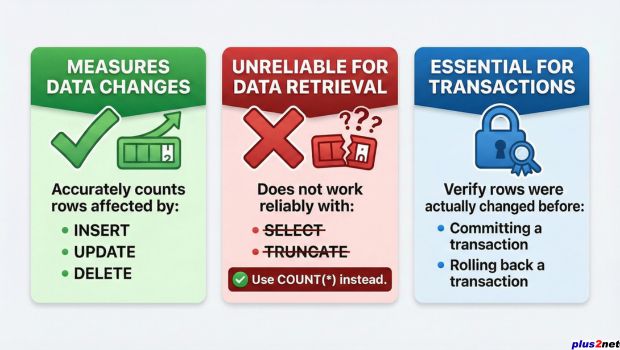
PDOStatement::rowCount() returns the number of rows affected by the most recently executed statement. It is commonly used after SQL UPDATE, DELETE and INSERT statements.
$stmt=$dbo->prepare(
    "UPDATE pdo_admin
     SET status='T'
     WHERE status='F'"
);

$stmt->execute();

$affected=$stmt->rowCount();

echo 'Rows affected: '.$affected;
For counting records returned by a SELECT query, use SQL COUNT() instead of depending on rowCount().
PDO rowCount() with UPDATE Top ↑
After running an UPDATE statement, call rowCount() on the executed PDO statement to get the number of rows changed.
$stmt=$dbo->prepare(
    "UPDATE pdo_admin
     SET status='T'
     WHERE status='F'"
);

$stmt->execute();

$affected=$stmt->rowCount();

echo 'Rows updated: '.$affected;
If seven rows were changed:
Rows updated: 7See the PDO UPDATE tutorial for PHP examples using prepared statements and parameters.
PDO rowCount() with DELETE Top ↑
The same method can report how many rows were removed by a DELETE statement.
$stmt=$dbo->prepare(
    "DELETE FROM pdo_admin
     WHERE status=:status"
);

$stmt->bindValue(
    ':status',
    'F',
    PDO::PARAM_STR
);

$stmt->execute();

$deleted=$stmt->rowCount();

echo 'Rows deleted: '.$deleted;
The PDO DELETE tutorial covers deleting records through PHP using prepared statements.
PDO rowCount() with INSERT Top ↑
After an INSERT statement, rowCount() can report the number of rows affected by that statement.
$stmt=$dbo->prepare(
    "INSERT INTO student
     (name,class,mark,gender)
     VALUES
     (:name,:class,:mark,:gender)"
);

$stmt->bindValue(
    ':name',
    'Alex',
    PDO::PARAM_STR
);

$stmt->bindValue(
    ':class',
    'Three',
    PDO::PARAM_STR
);

$stmt->bindValue(
    ':mark',
    78,
    PDO::PARAM_INT
);

$stmt->bindValue(
    ':gender',
    'Male',
    PDO::PARAM_STR
);

$stmt->execute();

echo 'Rows inserted: '.$stmt->rowCount();
For a normal single-row INSERT, the affected-row count is usually 1 when the insert succeeds.
Count Records Returned by SELECT Top ↑
Do not rely on rowCount() to count rows returned by SELECT because this behavior is driver-dependent. If the purpose of the query is to count records, let SQL perform the count.
$sql="SELECT COUNT(*)
      FROM pdo_admin";

$total=(int)$dbo->query($sql)->fetchColumn();

echo 'Number of records: '.$total;
Example output:
Number of records: 10A WHERE condition can be added when only matching records should be counted.
$sql="SELECT COUNT(*)
      FROM student
      WHERE class=:class";

$stmt=$dbo->prepare($sql);

$stmt->bindValue(
    ':class',
    'Three',
    PDO::PARAM_STR
);

$stmt->execute();

$total=(int)$stmt->fetchColumn();

echo 'Students in class Three: '.$total;
See the SQL COUNT() tutorial for more ways to count records.
COUNT(*) is preferable to fetching all rows with fetchAll() and counting the resulting PHP array.UPDATE: Changed Rows vs Matched Rows Top ↑
An UPDATE can find a row through its WHERE condition without actually changing the stored value.
For example, if the record already contains status='T', this statement can match the row while leaving its data unchanged:
UPDATE pdo_admin
SET status='T'
WHERE id=1
Therefore, rowCount() returning 0 after an UPDATE does not always prove that the target record does not exist. The new value may already be the same as the stored value.
rowCount()===0 by itself as proof that an UPDATE target was not found.The SQL section also explains how affected rows are reported after database changes.
PDO rowCount() with TRUNCATE Top ↑
TRUNCATE TABLE removes all rows from a table, but rowCount() should not be used to determine how many records existed before the table was truncated.
$stmt=$dbo->prepare(
    "TRUNCATE TABLE pdo_admin"
);

$stmt->execute();
If the previous number of rows is required, count them before running TRUNCATE:
$total=(int)$dbo->query(
    "SELECT COUNT(*) FROM pdo_admin"
)->fetchColumn();

$stmt=$dbo->prepare(
    "TRUNCATE TABLE pdo_admin"
);

$stmt->execute();

echo 'Rows previously in table: '.$total;
The SQL DELETE tutorial also explains deleting records and removing all rows from a table.
Use rowCount() inside a PDO Transaction Top ↑
An application can inspect the affected-row count before deciding whether its own transaction rules have been satisfied.
$student_id=1;

try{
    $dbo->beginTransaction();

    $stmt=$dbo->prepare(
        "UPDATE student
         SET mark=mark+5
         WHERE id=:id"
    );

    $stmt->bindValue(
        ':id',
        $student_id,
        PDO::PARAM_INT
    );

    $stmt->execute();

    $affected=$stmt->rowCount();

    if($affected>0){
        $dbo->commit();

        echo 'Transaction successful. Rows updated: '.$affected;
    }else{
        $dbo->rollBack();

        echo 'No rows were changed.';
    }
}catch(Throwable $e){
    if($dbo->inTransaction()){
        $dbo->rollBack();
    }

    error_log($e->getMessage());

    echo 'Transaction failed.';
}Check an Expected Number of Updated Rows Top ↑
Sometimes the application knows exactly how many rows should be changed. For example, suppose an operation is expected to update all 35 students.
$expected=35;

try{
    $dbo->beginTransaction();

    $stmt=$dbo->prepare(
        "UPDATE student
         SET mark=mark+5"
    );

    $stmt->execute();

    $affected=$stmt->rowCount();

    if($affected===$expected){
        $dbo->commit();

        echo 'All expected rows were updated.';
    }else{
        $dbo->rollBack();

        echo 'Unexpected number of rows updated.';
    }
}catch(Throwable $e){
    if($dbo->inTransaction()){
        $dbo->rollBack();
    }

    error_log($e->getMessage());

    echo 'Update failed.';
}
This type of check is appropriate only when the expected affected-row count is genuinely part of the application's rules.
PDO rowCount() Video Tutorial Top ↑

Common PDO rowCount() Problems Top ↑
Using rowCount() to Count SELECT Results Top ↑
The behavior of rowCount() for SELECT results is not portable across PDO drivers. Use SQL COUNT() when the objective is to count matching database rows.
Assuming Zero Means the UPDATE Record Does Not Exist Top ↑
An UPDATE can match a row without changing its value. In that situation the affected-row count can be zero.
Calling rowCount() on the PDO Connection Top ↑
rowCount() belongs to the executed PDOStatement, not the `$dbo` connection.
$stmt->execute();
$affected=$stmt->rowCount();
Using fetchAll() Just to Count Records Top ↑
If only the number of matching records is required, fetching every record first is unnecessary. Let the database return the count using COUNT(*).
Expecting TRUNCATE to Return the Deleted-Row Count Top ↑
Count the rows before executing TRUNCATE if the previous number of records must be known.
Related PHP PDO Tutorials Top ↑
PDO fetch() PDO columnCount() PDO InsertPDO Update PDO Delete PDO Transactions
Download the PDO sample scripts from the main PDO tutorial.
Frequently Asked Questions Top ↑
rowCount() returns the number of rows affected by the most recently executed PDOStatement. It is commonly used after UPDATE, DELETE and INSERT statements.
The behavior of rowCount() for SELECT result sets depends on the PDO driver. Use SQL COUNT(*) when you need a reliable database row count.
Run SELECT COUNT(*) FROM table_name and retrieve the result using fetchColumn().
The target row may not exist, or the query may have matched a row whose existing values were already the same as the requested new values.
Do not use rowCount() for that purpose. If the previous number of records matters, count them before executing TRUNCATE.
Yes. You can inspect the affected-row count before deciding whether the application's rules require a commit or rollback.
If only the number of matching records is needed, SELECT COUNT(*) is more direct because the database returns the count without sending every matching row to PHP.
PDO fetch() PDO columnCount() PDO Insert

Subhendu Mohapatra
Author & Instructor at plus2net
I write and maintain practical tutorials on Python, PHP, SQL, JavaScript, HTML, jQuery, and web development at plus2net. The tutorials focus on clear explanations, working examples, and code that readers can test and adapt while learning.


Subscribe to our YouTube Channel here

| khan | 02-12-2012 |
| can u send me file for that plzzz | |
| Steve | 09-07-2015 |
| Thanks for this. It's nice and easy - and it works! | |
| Michael | 25-06-2018 |
| If you use select count before truncating the table, you'll know the number of rows deleted. | |
| smo1234 | 29-06-2018 |
| No , that is not the way to count records deleted. It must come directly from MySQL with a single query. | |
