Update MySQL Records using PHP PDO
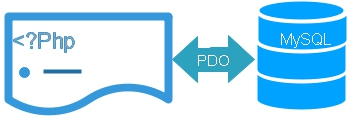
To update a MySQL record with PDO, use an UPDATE query containing placeholders and identify the required record with a WHERE condition.
<?php
require 'config.php';

$id=2;
$name='Alex R';
$class='Five';
$mark=82;
$gender='Female';

$sql="UPDATE student
      SET name=:name,
          class=:class,
          mark=:mark,
          gender=:gender
      WHERE id=:id";

try{
    $stmt=$dbo->prepare($sql);

    $stmt->bindValue(
        ':name',
        $name,
        PDO::PARAM_STR
    );

    $stmt->bindValue(
        ':class',
        $class,
        PDO::PARAM_STR
    );

    $stmt->bindValue(
        ':mark',
        $mark,
        PDO::PARAM_INT
    );

    $stmt->bindValue(
        ':gender',
        $gender,
        PDO::PARAM_STR
    );

    $stmt->bindValue(
        ':id',
        $id,
        PDO::PARAM_INT
    );

    $stmt->execute();

    echo 'Rows changed: '.$stmt->rowCount();
}catch(PDOException $e){
    error_log($e->getMessage());
    echo 'Unable to update the record.';
}
?>
The WHERE id=:id condition limits the update to the intended student record.
Use a WHERE Condition with UPDATE Top ↑
The SQL UPDATE statement changes existing values in a table. A WHERE condition determines which row or rows are affected.
UPDATE student
SET mark=:mark
WHERE id=:id
If the WHERE condition is omitted, the UPDATE can modify every row in the table. In this example the student ID identifies the record that should be changed.
Load the Existing Record before Updating Top ↑
An edit page usually starts with a SELECT query to collect the existing record. The returned values can then be shown as defaults in the form.
<?php
require 'config.php';

$id=2;

$sql="SELECT id,name,class,mark,gender
      FROM student
      WHERE id=:id";

$stmt=$dbo->prepare($sql);

$stmt->bindValue(
    ':id',
    $id,
    PDO::PARAM_INT
);

$stmt->execute();

$row=$stmt->fetch(PDO::FETCH_ASSOC);

if(!$row){
    exit('Student record not found.');
}
?>
For this tutorial, ID 2 is fixed to keep the example simple. In a dynamic application, validate an ID received from the URL before using it.
$id=filter_input(
    INPUT_GET,
    'id',
    FILTER_VALIDATE_INT,
    [
        'options' => [
            'min_range' => 1
        ]
    ]
);

if($id===false || $id===null){
    exit('Invalid student ID.');
}
Pre-populate the Update Form Top ↑
Database values placed inside HTML attributes should be escaped before they are displayed.
$id=(int)$row['id'];

$name=htmlspecialchars(
    (string)$row['name'],
    ENT_QUOTES,
    'UTF-8'
);

$class=htmlspecialchars(
    (string)$row['class'],
    ENT_QUOTES,
    'UTF-8'
);

$mark=(int)$row['mark'];
$gender=(string)$row['gender'];
The form can then use these values as defaults:
<form action="pdo-update2.php" method="post">
<input type="hidden" name="id" value="<?=$id
?>">

<div class="form-group">
<label>Name</label>
<input type="text" name="name" class="form-control"
       value="<?=$name
?>" required>
</div>

<div class="form-group">
<label>Class</label>
<input type="text" name="class" class="form-control"
       value="<?=$class
?>" required>
</div>

<div class="form-group">
<label>Mark</label>
<input type="number" name="mark" class="form-control"
       value="<?=$mark
?>" min="0" max="100" required>
</div>

<div class="form-group">
<label>Gender</label><br>

<label>
<input type="radio" name="gender" value="Male"
<?=$gender==='Male' ? ' checked' : ''
?>> Male
</label>

<label>
<input type="radio" name="gender" value="Female"
<?=$gender==='Female' ? ' checked' : ''
?>> Female
</label>

<label>
<input type="radio" name="gender" value="Others"
<?=$gender==='Others' ? ' checked' : ''
?>> Others
</label>
</div>

<button type="submit" class="btn btn-primary">Update Record</button>
</form>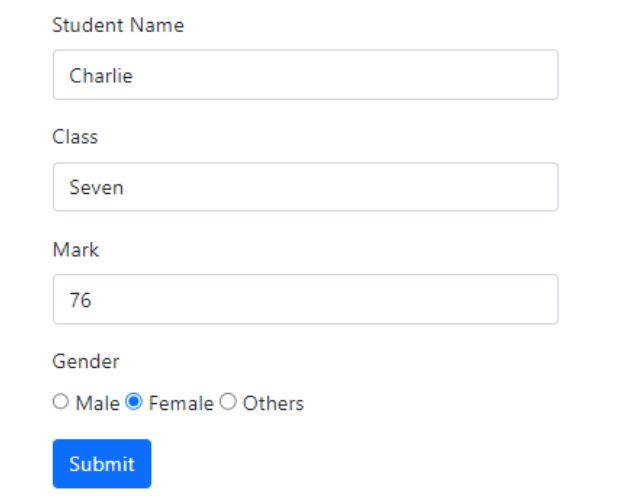
Process the Submitted Update Form Top ↑
The form submits to pdo-update2.php. On that page, collect and validate the POST values before executing the prepared UPDATE query.
<?php
require 'config.php';

if($_SERVER['REQUEST_METHOD']!=='POST'){
    exit('Invalid request.');
}

$id=filter_input(
    INPUT_POST,
    'id',
    FILTER_VALIDATE_INT,
    [
        'options' => [
            'min_range' => 1
        ]
    ]
);

$mark=filter_input(
    INPUT_POST,
    'mark',
    FILTER_VALIDATE_INT,
    [
        'options' => [
            'min_range' => 0,
            'max_range' => 100
        ]
    ]
);

$name=trim($_POST['name'] ?? '');
$class=trim($_POST['class'] ?? '');
$gender=$_POST['gender'] ?? '';

$allowed_gender=[
    'Male',
    'Female',
    'Others'
];

if(
    $id===false ||
    $id===null ||
    $mark===false ||
    $mark===null ||
    $name==='' ||
    $class==='' ||
    !in_array($gender,$allowed_gender,true)
){
    exit('Please enter valid student data.');
}

$sql="UPDATE student
      SET name=:name,
          class=:class,
          mark=:mark,
          gender=:gender
      WHERE id=:id";

try{
    $stmt=$dbo->prepare($sql);

    $stmt->bindValue(
        ':name',
        $name,
        PDO::PARAM_STR
    );

    $stmt->bindValue(
        ':class',
        $class,
        PDO::PARAM_STR
    );

    $stmt->bindValue(
        ':mark',
        $mark,
        PDO::PARAM_INT
    );

    $stmt->bindValue(
        ':gender',
        $gender,
        PDO::PARAM_STR
    );

    $stmt->bindValue(
        ':id',
        $id,
        PDO::PARAM_INT
    );

    $stmt->execute();

    $affected=$stmt->rowCount();

    if($affected===1){
        echo 'Student record updated successfully.';
    }else{
        echo 'No data was changed, or the record was not found.';
    }
}catch(PDOException $e){
    error_log($e->getMessage());
    echo 'Unable to update the student record.';
}
?>
Prepared Statements and Validation Top ↑
A PDO prepared statement keeps supplied values separate from the SQL query. It does not decide whether those values are valid for the application.
- Student ID must be a positive integer.
- Mark must be between 0 and 100.
- Name and class must not be empty.
- Gender must be one of the accepted values.
mysqli_real_escape_string(). MySQLi escaping belongs to the MySQLi interface and is not required for values bound to PDO prepared statements.Check the Number of Updated Rows Top ↑
After executing the UPDATE statement, rowCount() can report the number of rows changed.
$stmt->execute();

$affected=$stmt->rowCount();

if($affected===1){
    echo 'One record updated.';
}else{
    echo 'No values were changed.';
}
A result of 0 does not necessarily mean that the record does not exist. The row may have matched the condition but already contained the same values.
Quick UPDATE using a Session Value Top ↑
Even when a value comes from the PHP session, keep the value separate from the SQL statement.
if(!isset($_SESSION['userid'])){
    exit('User session not found.');
}

$userid=(string)$_SESSION['userid'];

$sql="UPDATE student
      SET mark=:mark
      WHERE userid=:userid";

$stmt=$dbo->prepare($sql);

$stmt->bindValue(
    ':mark',
    80,
    PDO::PARAM_INT
);

$stmt->bindValue(
    ':userid',
    $userid,
    PDO::PARAM_STR
);

$stmt->execute();
PDO UPDATE and Transactions Top ↑
A transaction is normally unnecessary for one independent UPDATE statement. It becomes useful when several related database operations must all succeed together.
try{
    $dbo->beginTransaction();

    // First related database operation
    // Second related database operation

    $dbo->commit();
}catch(Throwable $e){
    if($dbo->inTransaction()){
        $dbo->rollBack();
    }

    error_log($e->getMessage());
}
PDO UPDATE Video Tutorial Top ↑
Common PDO UPDATE Problems Top ↑
Forgetting the WHERE Condition Top ↑
An UPDATE without a WHERE condition can modify every row in the table. Verify the condition before executing the query.
Putting User Input Directly into SQL Top ↑
Use named or positional placeholders instead of joining POST, GET, session or other variable values directly into the SQL statement.
Not Escaping Values in the Edit Form Top ↑
Prepared statements protect the database query. They do not automatically make database values safe for HTML. Escape values with htmlspecialchars() before inserting them into HTML attributes or page content.
Assuming rowCount() 0 Means Record Not Found Top ↑
The requested record may exist but already contain the values being submitted. In that case the UPDATE can produce zero changed rows.
Displaying Raw PDO Exceptions Top ↑
Log detailed database errors on the server and return a short message to the visitor instead of displaying the exception directly.
Using a Transaction for Every UPDATE Top ↑
A transaction is most useful when several dependent database operations must succeed or fail as one unit. A normal standalone UPDATE does not automatically require an explicit transaction.
Related PHP PDO Tutorials Top ↑
PDO Insert PDO rowCount() PDO DeletePDO Records PDO Transactions
Download the complete PDO sample project from the main PDO tutorial.
Sample Student Table SQL DumpFrequently Asked Questions Top ↑
Create an UPDATE statement with placeholders, prepare it with PDO, bind the new values and the record identifier, and then execute the statement.
The WHERE condition selects which records will be updated. Without it, the UPDATE statement can modify every row in the table.
Fetch the required record first and place its values into the form fields. Escape string values with htmlspecialchars() before inserting them into HTML.
Yes. Prepared statements keep values separate from SQL syntax, while validation checks whether the values are acceptable for the application.
Call rowCount() on the executed PDOStatement. It reports the number of rows changed by the statement.
The target record may already contain the same values, so the query can be valid without changing stored data.
No. Transactions are particularly useful when several related database operations must all succeed or be rolled back together.
PDO Insert PDO Delete

Subhendu Mohapatra
Author & Instructor at plus2net
I write and maintain practical tutorials on Python, PHP, SQL, JavaScript, HTML, jQuery, and web development at plus2net. The tutorials focus on clear explanations, working examples, and code that readers can test and adapt while learning.


Subscribe to our YouTube Channel here

