PHP MySQL Connection using PDO
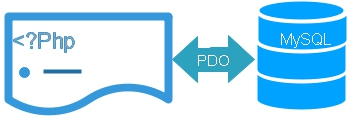
Before a PHP application can read or modify MySQL data, it must establish a database connection. PDO creates the connection using a DSN together with the database username, password and optional connection settings.
PHP script
    |
    v
PDO connection
    |
    +-- DSN
    +-- Username
    +-- Password
    +-- PDO options
    |
    v
MySQL database
In the Plus2net PDO tutorials, the connection object is stored in the variable $dbo. Once $dbo is available, the same connection can be used for prepared statements, SELECT queries, INSERT, UPDATE, DELETE and transactions.
- PDO MySQL Requirements
- Understanding the MySQL PDO DSN
- Create config.php
- Recommended PDO Connection Options
- Use config.php from Other PHP Files
- Handle Connection Errors
- Test the PDO Connection
- SQLite Connection
- PostgreSQL Connection
- PDO Connection Timeout
- Persistent Connections
- Remote and Cloud MySQL Connection
- Video Tutorials
- Connection Security Tips
- Related PDO Tutorials
- FAQs
PDO MySQL Requirements Top ↑
The PHP installation must have the PDO MySQL driver available before a MySQL PDO connection can be created.
if(in_array('mysql',PDO::getAvailableDrivers(),true)){
    echo 'PDO MySQL driver is available.';
}else{
    echo 'PDO MySQL driver is not available.';
}
If MySQL is not listed, see the PDO installation tutorial and php.ini configuration tutorial.
Understanding the MySQL PDO DSN Top ↑
DSN stands for Data Source Name. For a MySQL connection it identifies the database driver, server, database name and character set.
mysql:host=localhost;dbname=pdo;charset=utf8mb4The parts are:
mysql:host=localhostdbname=pdocharset=utf8mb4The server can also be identified by an IP address when required.
Create a Common config.php PDO Connection File Top ↑
Instead of repeating the connection code on every PHP page, keep it in one common file such as config.php.
When the server, database name, username or password changes, only the common configuration needs to be updated.
<?php
$host_name='localhost';
$database='pdo';
$username='root';
$password='';

$dsn="mysql:host=$host_name;dbname=$database;charset=utf8mb4";

$options=[
    PDO::ATTR_ERRMODE => PDO::ERRMODE_EXCEPTION,
    PDO::ATTR_DEFAULT_FETCH_MODE => PDO::FETCH_ASSOC,
    PDO::ATTR_EMULATE_PREPARES => false
];

try{
    $dbo=new PDO(
        $dsn,
        $username,
        $password,
        $options
    );
}catch(PDOException $e){
    error_log($e->getMessage());
    exit('Database connection failed.');
}
?>
Recommended PDO Connection Options Top ↑
The example passes several PDO attributes while the connection is created.
PDO::ATTR_ERRMODE Top ↑
PDO::ATTR_ERRMODE => PDO::ERRMODE_EXCEPTIONDatabase errors are reported as exceptions so they can be handled with try and catch.
PDO::ATTR_DEFAULT_FETCH_MODE Top ↑
PDO::ATTR_DEFAULT_FETCH_MODE => PDO::FETCH_ASSOCRows fetched without specifying another mode are returned as associative arrays.
PDO::ATTR_EMULATE_PREPARES Top ↑
PDO::ATTR_EMULATE_PREPARES => falseFor PDO MySQL, this requests native prepared statements where supported instead of PDO emulating the prepared statement in PHP.
Use config.php from Another PHP File Top ↑
Once the connection code is stored in config.php, include it wherever the database connection is required.
require 'config.php';After this line, the page can use the `$dbo` PDO object.
require 'config.php';

$stmt=$dbo->prepare(
    "SELECT id,name,class
     FROM student
     WHERE id=:id"
);

$stmt->bindValue(
    ':id',
    5,
    PDO::PARAM_INT
);

$stmt->execute();

$row=$stmt->fetch();
Handle PDO Connection Errors Safely Top ↑
The older approach of displaying the complete connection exception directly in the browser can reveal technical database details.
Instead, log the detailed error and display a short message:
try{
    $dbo=new PDO(
        $dsn,
        $username,
        $password,
        $options
    );
}catch(PDOException $e){
    error_log($e->getMessage());
    exit('Database connection failed.');
}
Detailed exception messages remain available in the server log without exposing them to website visitors.
PDO Error HandlingTest a PDO MySQL Connection Top ↑
During local development, a simple test file can confirm that config.php creates the `$dbo` object.
<?php
require 'config.php';

if($dbo instanceof PDO){
    echo 'PDO connection created successfully.';
}
?>
Remove development-only connection messages when they are no longer required.
Connect PHP to SQLite using PDO Top ↑
PDO uses a different DSN when connecting to SQLite. No MySQL hostname, username or password is required for a normal SQLite database file.
$dbo=new PDO(
    'sqlite:'.__DIR__.'/my_student.db'
);

$dbo->setAttribute(
    PDO::ATTR_ERRMODE,
    PDO::ERRMODE_EXCEPTION
);Connect PHP to PostgreSQL using PDO Top ↑
The PDO programming interface is similar, but the DSN changes to use the PostgreSQL driver.
$dsn='pgsql:host=localhost;port=5432;dbname=testdb';

$options=[
    PDO::ATTR_ERRMODE => PDO::ERRMODE_EXCEPTION,
    PDO::ATTR_DEFAULT_FETCH_MODE => PDO::FETCH_ASSOC
];

try{
    $dbo=new PDO(
        $dsn,
        'username',
        'password',
        $options
    );
}catch(PDOException $e){
    error_log($e->getMessage());
    exit('Database connection failed.');
}Set a PDO Connection Timeout Top ↑
PDO::ATTR_TIMEOUT can be supplied as a driver option where the PDO driver supports it.
$options=[
    PDO::ATTR_ERRMODE => PDO::ERRMODE_EXCEPTION,
    PDO::ATTR_TIMEOUT => 5
];

$dbo=new PDO(
    $dsn,
    $username,
    $password,
    $options
);Persistent PDO Connections Top ↑
PDO can request a persistent connection by setting PDO::ATTR_PERSISTENT to true.
$options=[
    PDO::ATTR_ERRMODE => PDO::ERRMODE_EXCEPTION,
    PDO::ATTR_PERSISTENT => true
];

$dbo=new PDO(
    $dsn,
    $username,
    $password,
    $options
);
A persistent connection may allow PHP to reuse an existing database connection rather than creating a new one for every request.
Connect PDO to a Remote or Cloud MySQL Database Top ↑
The PDO code is similar when MySQL runs on another server. Replace localhost with the hostname or IP address supplied for the database server.
$host_name='YOUR_DATABASE_HOST';
$database='my_tutorial';
$username='YOUR_DATABASE_USER';
$password='YOUR_DATABASE_PASSWORD';

$dsn="mysql:host=$host_name;dbname=$database;charset=utf8mb4";

$options=[
    PDO::ATTR_ERRMODE => PDO::ERRMODE_EXCEPTION,
    PDO::ATTR_DEFAULT_FETCH_MODE => PDO::FETCH_ASSOC,
    PDO::ATTR_EMULATE_PREPARES => false
];

try{
    $dbo=new PDO(
        $dsn,
        $username,
        $password,
        $options
    );
}catch(PDOException $e){
    error_log($e->getMessage());
    exit('Database connection failed.');
}

$sql="SELECT id,name
      FROM student
      ORDER BY id
      LIMIT 10";

$stmt=$dbo->query($sql);

foreach($stmt as $row){
    echo htmlspecialchars(
        (string)$row['name'],
        ENT_QUOTES,
        'UTF-8'
    ).'<br>';
}
The remote database server must also allow connections from the PHP server. Cloud database platforms can require additional network, firewall or connection configuration.
Managing MySQL Database at Google CloudPDO Connection Video Tutorials Top ↑

PDO Connection Security Tips Top ↑
- Do not display raw PDO connection exceptions to website visitors.
- Use a dedicated database account with the permissions required by the application.
- Do not place real passwords inside tutorial examples or public source repositories.
- Keep connection settings in one controlled configuration file instead of repeating credentials throughout the application.
- Use prepared statements when SQL queries contain variable or user-supplied values.
- For production systems, follow the connection and network security requirements of the database hosting provider.
Related PHP PDO Tutorials Top ↑
PDO Tutorial PDO Installation PDO Records PDO FetchPDO Error Handling PDO Prepared Statements and Injection
Download the complete sample PDO project from the main PHP PDO tutorial.
Frequently Asked Questions Top ↑
Create a MySQL DSN containing the host, database name and character set, then create a PDO object using the DSN, database username, password and connection options.
DSN stands for Data Source Name. It tells PDO which database driver to use and provides connection information such as the host and database name.
It sets the character set used by the MySQL connection to utf8mb4 so the connection handles the corresponding Unicode character range.
A common config.php file avoids repeating database connection settings across many PHP pages and makes connection changes easier to maintain.
Catch PDOException, log the detailed technical message on the server and display a short connection-failed message instead of exposing database information to visitors.
Yes. PDO can use different database drivers. For example, SQLite and PostgreSQL use different DSN formats while keeping a similar PDO programming interface.
No. Persistent connections are optional. Whether they are useful depends on the PHP server model, database configuration and application workload.
PDO PDO Records PDO Fetch

Subhendu Mohapatra
Author & Instructor at plus2net
I write and maintain practical tutorials on Python, PHP, SQL, JavaScript, HTML, jQuery, and web development at plus2net. The tutorials focus on clear explanations, working examples, and code that readers can test and adapt while learning.


Subscribe to our YouTube Channel here

02-10-2021 | |
| cant we connect to a phpmyadmin sql database? | |
