MySQL Stored Procedures using PHP PDO
Use MySQL CALL to execute a stored procedure from PDO. Input values should be passed through placeholders just as they are with ordinary prepared statements.
require 'config.php';

$student_id=1;

$stmt=$dbo->prepare(
    "CALL GetStudentById(:id)"
);

$stmt->bindValue(
    ':id',
    $student_id,
    PDO::PARAM_INT
);

$stmt->execute();

$row=$stmt->fetch(PDO::FETCH_ASSOC);

$stmt->closeCursor();
The procedure can internally run a SELECT query with a WHERE condition, while PHP supplies only the required parameter value.
Show Table of Contents- Create a Stored Procedure
- Call a Procedure from PDO
- Procedure without Parameters
- IN Parameters
- OUT Parameters
- INOUT Parameters
- Return Multiple Rows
- Return Multiple Result Sets
- Why closeCursor() Is Important
- Custom Errors with SIGNAL
- Handling and Re-throwing Errors
- Procedures and Transactions
- Drop a Stored Procedure
- MySQL Routine Privileges
- Stored Procedure Benefits and Limits
- Common PDO Procedure Problems
- Pagination with a Stored Procedure
- FAQs
Create a Stored Procedure in MySQL Top ↑
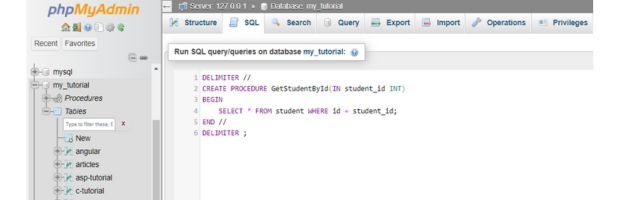
This procedure accepts a student ID and returns one matching record:
DELIMITER //

CREATE PROCEDURE GetStudentById(
    IN student_id INT
)
BEGIN
    SELECT id,name,class,mark,gender
    FROM student
    WHERE id=student_id;
END //

DELIMITER ;
DELIMITER is a client-side command understood by MySQL tools that support delimiter changes. It lets the procedure body contain semicolons without ending the complete CREATE PROCEDURE statement too early.
Call the Stored Procedure from PHP PDO Top ↑
The $dbo connection is loaded from the PDO config.php connection.
require 'config.php';

$student_id=1;

try{
    $stmt=$dbo->prepare(
        "CALL GetStudentById(:id)"
    );

    $stmt->bindValue(
        ':id',
        $student_id,
        PDO::PARAM_INT
    );

    $stmt->execute();

    $row=$stmt->fetch(
        PDO::FETCH_ASSOC
    );

    $stmt->closeCursor();

    if($row){
        echo htmlspecialchars(
            (string)$row['name'],
            ENT_QUOTES,
            'Windows-1252'
        );
    }else{
        echo 'Student not found.';
    }
}catch(PDOException $e){
    error_log($e->getMessage());
    echo 'Unable to run the stored procedure.';
}
Stored Procedure without Parameters Top ↑
A procedure can execute a predefined query without receiving any values.
DELIMITER //

CREATE PROCEDURE GetAllStudents()
BEGIN
    SELECT id,name,class,mark,gender
    FROM student
    ORDER BY id;
END //

DELIMITER ;
Call it from PDO:
$stmt=$dbo->query(
    "CALL GetAllStudents()"
);

$rows=$stmt->fetchAll(
    PDO::FETCH_ASSOC
);

$stmt->closeCursor();
The ORDER BY clause keeps the returned rows in a predictable sequence.
Stored Procedure with an IN Parameter Top ↑
An IN parameter passes a value into the procedure.
CREATE PROCEDURE GetStudentById(
    IN student_id INT
)
BEGIN
    SELECT id,name,class,mark,gender
    FROM student
    WHERE id=student_id;
END
The PDO placeholder supplies the IN value:
$stmt=$dbo->prepare(
    "CALL GetStudentById(:id)"
);

$stmt->bindValue(
    ':id',
    $student_id,
    PDO::PARAM_INT
);

$stmt->execute();
Stored Procedure with an OUT Parameter Top ↑
An OUT parameter sends a value back from the procedure.
DELIMITER //

CREATE PROCEDURE GetStudentName(
    IN student_id INT,
    OUT student_name VARCHAR(100)
)
BEGIN
    SELECT name
    INTO student_name
    FROM student
    WHERE id=student_id;
END //

DELIMITER ;
With PDO MySQL, a common approach is to pass a MySQL session variable for the OUT value and retrieve it after the procedure call:
$student_id=1;

$stmt=$dbo->prepare(
    "CALL GetStudentName(:id,@student_name)"
);

$stmt->bindValue(
    ':id',
    $student_id,
    PDO::PARAM_INT
);

$stmt->execute();
$stmt->closeCursor();

$name_stmt=$dbo->query(
    "SELECT @student_name"
);

$name=$name_stmt->fetchColumn();

if($name!==null){
    echo htmlspecialchars(
        (string)$name,
        ENT_QUOTES,
        'Windows-1252'
    );
}
Calling closeCursor() before the second query avoids leaving procedure result resources open on the connection.
Stored Procedure with an INOUT Parameter Top ↑
An INOUT parameter receives an initial value and returns a modified value.
DELIMITER //

CREATE PROCEDURE AddToNumber(
    INOUT number_value INT,
    IN amount INT
)
BEGIN
    SET number_value=number_value+amount;
END //

DELIMITER ;
Set a MySQL session variable first, call the procedure and then read the changed value:
$dbo->exec(
    "SET @number_value=10"
);

$stmt=$dbo->prepare(
    "CALL AddToNumber(@number_value,:amount)"
);

$stmt->bindValue(
    ':amount',
    5,
    PDO::PARAM_INT
);

$stmt->execute();
$stmt->closeCursor();

$result=$dbo->query(
    "SELECT @number_value"
)->fetchColumn();

echo (int)$result;
Output:
15Return Multiple Rows from a Stored Procedure Top ↑
A procedure does not need a loop to return multiple matching rows. One SELECT can return the complete result set.
DELIMITER //

CREATE PROCEDURE GetStudentsByMarkRange(
    IN min_mark INT,
    IN max_mark INT
)
BEGIN
    SELECT id,name,class,mark,gender
    FROM student
    WHERE mark BETWEEN min_mark AND max_mark
    ORDER BY mark,id;
END //

DELIMITER ;
The BETWEEN operator selects the mark range.
PHP can collect all matching rows from this single result set:
$min_mark=40;
$max_mark=60;

$stmt=$dbo->prepare(
    "CALL GetStudentsByMarkRange(:min_mark,:max_mark)"
);

$stmt->bindValue(
    ':min_mark',
    $min_mark,
    PDO::PARAM_INT
);

$stmt->bindValue(
    ':max_mark',
    $max_mark,
    PDO::PARAM_INT
);

$stmt->execute();

$students=$stmt->fetchAll(
    PDO::FETCH_ASSOC
);

$stmt->closeCursor();

foreach($students as $student){
    $name=htmlspecialchars(
        (string)$student['name'],
        ENT_QUOTES,
        'Windows-1252'
    );

    echo $name.
        ' - '.
        (int)$student['mark'].
        '<br>';
}Return Multiple Result Sets Top ↑
Multiple rows and multiple result sets are different. A procedure can deliberately contain several SELECT statements:
DELIMITER //

CREATE PROCEDURE GetStudentsAndCount()
BEGIN
    SELECT id,name,class,mark,gender
    FROM student
    ORDER BY id;

    SELECT COUNT(*) AS total
    FROM student;
END //

DELIMITER ;
The first SELECT returns the records. The second returns the total record count.
$stmt=$dbo->query(
    "CALL GetStudentsAndCount()"
);

$students=$stmt->fetchAll(
    PDO::FETCH_ASSOC
);

$total=0;

if($stmt->nextRowset()){
    $total=(int)$stmt->fetchColumn();
}

$stmt->closeCursor();

echo 'Total records: '.$total;
This same technique is used by the PDO stored-procedure pagination tutorial.
Why closeCursor() Matters after CALL Top ↑
MySQL stored procedures can leave one or more result sets associated with the PDO statement. Before running another query on the same connection, consume the required rowsets and close the cursor.
$stmt->execute();

$rows=$stmt->fetchAll(
    PDO::FETCH_ASSOC
);

$stmt->closeCursor();

// The connection is now ready for another query.
If a procedure intentionally returns several result sets, read them with nextRowset() before closing the cursor.
Raise a Custom Error with MySQL SIGNAL Top ↑
A stored procedure can reject invalid data by raising a custom SQLSTATE error.
DELIMITER //

CREATE PROCEDURE AddStudent(
    IN student_name VARCHAR(100),
    IN student_class VARCHAR(20),
    IN student_mark INT,
    IN student_gender VARCHAR(10)
)
BEGIN
    IF student_mark<0 OR student_mark>100 THEN
        SIGNAL SQLSTATE '45000'
        SET MESSAGE_TEXT='Mark must be between 0 and 100';
    END IF;

    INSERT INTO student
        (name,class,mark,gender)
    VALUES
        (student_name,student_class,student_mark,student_gender);
END //

DELIMITER ;
The procedure performs an INSERT only after the mark passes its rule.
PDO receives the database exception:
try{
    $stmt=$dbo->prepare(
        "CALL AddStudent(
            :name,
            :class,
            :mark,
            :gender
        )"
    );

    $stmt->execute([
        ':name' => 'Alex',
        ':class' => 'Six',
        ':mark' => -5,
        ':gender' => 'Male'
    ]);

    $stmt->closeCursor();
}catch(PDOException $e){
    error_log($e->getMessage());
    echo 'Student record was not added.';
}
The detailed database message belongs in the server log rather than being displayed directly to visitors.
PDO Error HandlingHandle and Re-throw Stored Procedure Errors Top ↑
MySQL procedure handlers can intercept an SQL exception and use RESIGNAL to pass an error back to the caller.
DELIMITER //

CREATE PROCEDURE AddStudentSafe(
    IN student_name VARCHAR(100),
    IN student_class VARCHAR(20),
    IN student_mark INT,
    IN student_gender VARCHAR(10)
)
BEGIN
    DECLARE EXIT HANDLER FOR SQLEXCEPTION
    BEGIN
        RESIGNAL;
    END;

    INSERT INTO student
        (name,class,mark,gender)
    VALUES
        (student_name,student_class,student_mark,student_gender);
END //

DELIMITER ;
RESIGNAL preserves the database failure instead of hiding it. PHP can then log and handle the resulting PDO exception.
Stored Procedures inside PDO Transactions Top ↑
A procedure call can be part of a larger PDO transaction when several related operations must succeed together.
try{
    $dbo->beginTransaction();

    $stmt=$dbo->prepare(
        "CALL AddStudent(
            :name,
            :class,
            :mark,
            :gender
        )"
    );

    $stmt->execute([
        ':name' => 'Mira',
        ':class' => 'Seven',
        ':mark' => 84,
        ':gender' => 'Female'
    ]);

    $stmt->closeCursor();

    // Other related database operation.

    $dbo->commit();
}catch(Throwable $e){
    if($dbo->inTransaction()){
        $dbo->rollBack();
    }

    error_log($e->getMessage());
    echo 'Transaction failed.';
}
Keep transaction ownership clear. If PHP controls the transaction, avoid unexpectedly committing or rolling it back from inside the procedure.
PDO TransactionsDrop a Stored Procedure Top ↑
Use DROP PROCEDURE IF EXISTS when a known procedure should be removed:
try{
    $dbo->exec(
        "DROP PROCEDURE IF EXISTS GetStudentById"
    );

    echo 'Stored procedure removed.';
}catch(PDOException $e){
    error_log($e->getMessage());
    echo 'Unable to remove the procedure.';
}
The concept is similar to other SQL DROP operations, but DROP PROCEDURE removes the routine rather than a table.
MySQL Privileges for Stored Procedures Top ↑
The database account needs appropriate MySQL privileges for the requested routine operation.
- Creating routines requires suitable routine-creation privileges.
- Executing a procedure requires permission to execute the routine.
- Dropping a procedure requires appropriate routine-alteration privileges.
- The statements executed inside the routine must also be permitted according to the routine's security context.
If CALL works locally but fails with another database user, check database privileges as well as the PHP code.
Benefits and Limits of Stored Procedures Top ↑
Stored procedures can be useful when database-side logic needs to be reused or when one call can perform several closely related database operations.
- Reuse: database logic can be called by more than one application.
- Fewer round trips: one CALL can perform several operations on the database server.
- Centralized rules: selected database operations can be kept close to the data.
- Controlled access: database permissions can sometimes expose a procedure without granting the same direct table access.
However, a stored procedure is not automatically faster than equivalent SQL sent from PHP. Performance still depends on query design, indexes, data volume, locking and the work performed by the procedure.
Common PDO Stored Procedure Problems Top ↑
Commands Out of Sync after CALL Top ↑
If another query fails after a procedure call, make sure all required result sets have been consumed and call closeCursor().
Confusing Multiple Rows with Multiple Result Sets Top ↑
One SELECT can return many rows. Multiple SELECT statements inside the procedure create multiple result sets and require nextRowset() to move between them.
Trying to Bind an OUT Parameter like a Normal PDO Value Top ↑
With MySQL PDO, OUT and INOUT values are commonly handled through MySQL session variables such as @student_name, followed by a SELECT after the CALL completes.
Displaying Raw Stored Procedure Errors Top ↑
Do not print raw PDO exception messages to public visitors. Log the technical error and display a short application message.
Returning One Row at a Time from a SQL Loop Top ↑
If the requirement is simply to return all matching records, use one SELECT that returns multiple rows rather than repeatedly issuing SELECT statements inside a stored-procedure loop.
Assuming Stored Procedures Are Automatically Faster Top ↑
A procedure can reduce network round trips and centralize logic, but poor SQL inside a procedure remains poor SQL. Query structure and indexing still matter.
Procedure Not Found or Permission Denied Top ↑
Confirm the selected database, exact routine name and the database account's permissions.
Pagination using a Stored Procedure Top ↑
A stored procedure can return both the requested page of records and a second result set containing the total count. PDO then uses nextRowset() to read both results.
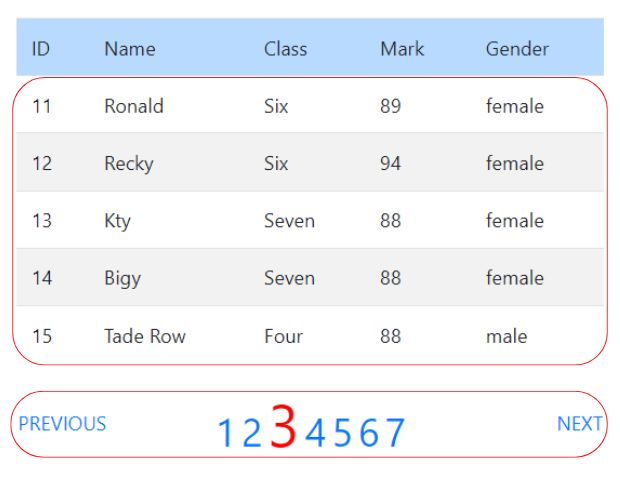
The dedicated pagination example combines LIMIT, total record count, stored procedures,
nextRowset() and PHP page navigation.PDO Pagination using Stored Procedure
Frequently Asked Questions Top ↑
Prepare or execute a CALL statement with PDO, bind any input parameters, execute the statement and fetch the result returned by the procedure.
IN supplies a value to the procedure, OUT returns a value from the procedure, and INOUT receives an initial value and returns a modified value.
MySQL procedures can leave result-set resources associated with the PDO statement. closeCursor() releases them so the connection can be used cleanly for another query.
Fetch the first result set, call nextRowset() to move to the next one, read it, and close the cursor after all required results have been processed.
A common MySQL PDO pattern is to pass a MySQL session variable such as @student_name to the procedure and then retrieve it with a SELECT after closing the procedure cursor.
No. They can reduce round trips and centralize database logic, but actual performance still depends on query design, indexes, data volume and the operations performed.
Yes. MySQL SIGNAL, database constraints and other SQL failures can raise errors that PDO receives as exceptions when exception mode is enabled.

PDO Paging PDO References

Subhendu Mohapatra
Author & Instructor at plus2net
I write and maintain practical tutorials on Python, PHP, SQL, JavaScript, HTML, jQuery, and web development at plus2net. The tutorials focus on clear explanations, working examples, and code that readers can test and adapt while learning.


Subscribe to our YouTube Channel here

