Python Set: Create, Modify and Perform Set Operations
A Python set is a mutable collection of unique, hashable elements. Sets are unordered, so they do not support indexing or slicing. They are especially useful for membership testing, removing duplicates, and mathematical operations such as union, intersection, difference and symmetric difference.
Use braces for a non-empty set, and use set() for an empty set:
members={'Alex', 'Ronald', 'John'}
print(members)
Example output (set display order can differ):
{'Alex', 'John', 'Ronald'}Because sets do not record element positions, the order shown when printing a set should not be treated as fixed. Python's documentation defines sets as unordered collections of distinct hashable objects.
Show Table of Contents- Set features
- Creating sets
- Creating an empty set
- Why sets cannot be indexed
- Looping through a set
- Membership testing
- Set methods
- Union, intersection, difference and symmetric difference
- Operations that update the original set
- Subset, superset and disjoint checks
- len(), max(), min() and sum()
- Set comprehension
- Removing duplicates with a set
- What values can a set contain?
- set versus frozenset
- Common mistakes
- Practice questions
Python Set Features Top ↑
| Feature | List | Tuple | Set | Dictionary |
|---|---|---|---|---|
| Ordered / positional access | Yes | Yes | No | Insertion order preserved; access by key |
| Mutable | Yes | No | Yes | Yes |
| Duplicate values | Allowed | Allowed | Removed / not stored twice | Keys: no; values: yes |
| Typical access | items[0] | items[0] | value in items | items['key'] |
| Example | ['a','b'] | ('a','b') | {'a','b'} | {'a':1} |
Practice Python Set Part 1 in Google Colab
Run the examples from this lesson directly in your browser. No local Python installation is required.
Open in Google Colab View on GitHubCreating a Set Top ↑
A non-empty set can be created with braces or with the set() constructor.
my_set={'Alex', 'Ronald', 'John'}
print(my_set)
Example output (order may differ):
{'John', 'Alex', 'Ronald'}Creating a set from an iterable
numbers=set(range(5, 50, 10))
print(numbers)
The resulting set contains the values produced by range(). As with every set, do not rely on the printed order.
Duplicate values are kept only once
numbers={10, 20, 10, 30, 20}
print(numbers)
print(len(numbers))
The set contains three distinct values, so len(numbers) returns 3.
Creating an Empty Set Top ↑
Use set() for an empty set. Empty braces {} create an empty dictionary, not a set.
my_set=set() # empty set
my_set.add('Alex')
print(my_set)
empty_braces={}
print(type(empty_braces))
print(type(set()))<class 'dict'>
<class 'set'>Sets Do Not Support Indexing or Slicing Top ↑
A set does not store a position for each element, so an expression such as my_set[1] is invalid.
my_set={'Alex', 'Ronald', 'John'}
print(my_set[1])
This raises a TypeError because a set is not subscriptable. If position matters, use a list or tuple.
Looping Through a Set Top ↑
Use a for loop to process each element. The iteration order is not guaranteed.
my_set={'Alex', 'Ronald', 'John'}
for name in my_set:
    print(name)
One possible output:
Alex
John
Ronald
Searching for an Element with in Top ↑
Membership testing is one of the most common uses of a set.
my_set={'Alex', 'Ronald', 'John'}

if 'John' in my_set:
    print('Yes, present in the set')
else:
    print('No, not present in the set')
Yes, present in the setPython Set Methods Top ↑
The links below lead to focused examples for each method. Methods such as add(), remove() and the *_update() family modify the original set.
| Method | Purpose |
|---|---|
add(x) | Add one element. |
update(iterables) | Add elements from one or more iterables. |
clear() | Remove all elements while keeping the set object. |
copy() | Create a shallow copy. |
discard(x) | Remove an element if present; no error if absent. |
remove(x) | Remove an element; raises KeyError if absent. |
pop() | Remove and return an arbitrary element; raises KeyError if empty. |
isdisjoint() | Check whether two collections have no elements in common. |
issubset() | Check whether every element is contained in another collection. |
issuperset() | Check whether the set contains every element of another collection. |
union() | Return elements found in either set. |
intersection() | Return common elements. |
difference() | Return elements present in the first set but not the others. |
symmetric_difference() | Return elements present in exactly one of two sets. |
intersection_update() | Keep only common elements in the original set. |
difference_update() | Remove elements found in the other iterable(s) from the original set. |
symmetric_difference_update() | Update the original set with elements found in exactly one of the two sets. |
Set Operations: Union, Intersection, Difference and Symmetric Difference Top ↑
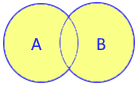
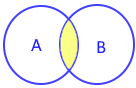
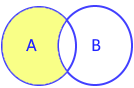
The four main mathematical set operations can be written with methods or operators.
| Union | Intersection | Difference | Symmetric difference |
|---|---|---|---|
 |
 |
 |
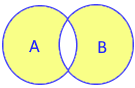 |
union()A | B | intersection()A & B | difference()A - B | symmetric_difference()A ^ B |
A={1, 2, 3}
B={3, 4, 5}

print(A | B)  # union
print(A & B)  # intersection
print(A - B)  # difference
print(A ^ B)  # symmetric difference
Example output (set display order can differ):
{1, 2, 3, 4, 5}
{3}
{1, 2}
{1, 2, 4, 5}
Joining two sets with union()
my_set1={'Alex', 'Ronald', 'John'}
my_set2={'Ron', 'Geek'}
my_set=my_set1.union(my_set2)
print(my_set)
Example output (order may differ):
{'Alex', 'Geek', 'John', 'Ron', 'Ronald'}Difference between two sets
my_set1={'Alex', 'Ronald', 'John'}
my_set2={'Ron', 'Ronald'}
my_set=my_set1.difference(my_set2)
print(my_set)
The result contains 'Alex' and 'John'; display order may differ.
Intersection of two sets
my_set1={'Alex', 'Ronald', 'John'}
my_set2={'Ron', 'Alex'}
my_set=my_set1.intersection(my_set2)
print(my_set){'Alex'}Intersection of three sets
my_set1={'a', 'b', 'c'}
my_set2={'d', 'b', 'a'}
my_set3={'f', 'b', 'a'}
my_set=my_set1.intersection(my_set2, my_set3)
print(my_set)
The result contains 'a' and 'b'; display order may differ.
Operations That Update the Original Set Top ↑
Methods ending in _update() change the set in place instead of returning a separate result set.
intersection_update()
my_set1={'Alex', 'Ronald', 'John'}
my_set2={'Ron', 'Ronald'}
my_set1.intersection_update(my_set2)
print(my_set1){'Ronald'}See also difference_update() and symmetric_difference_update().
Subset, Superset and Disjoint Checks Top ↑
issubset()
my_set1={'a', 'b', 'c'}
my_set2={'d', 'b', 'a', 'f', 'c'}
print(my_set1.issubset(my_set2))Trueissuperset()
my_set1={'d', 'b', 'a', 'f', 'c'}
my_set2={'a', 'b', 'c'}
print(my_set1.issuperset(my_set2))Trueisdisjoint()
A={1, 2}
B={3, 4}
print(A.isdisjoint(B))Truelen(), max(), min() and sum() Top ↑
Number of elements
my_set={'Alex', 'Ronald', 'John'}
print('Number of elements:', len(my_set))
Number of elements: 3Numeric aggregate functions
my_set={5, 3, 7, 9, 4}
print('Maximum value:', max(my_set))
print('Minimum value:', min(my_set))
print('Number of elements:', len(my_set))
print('Sum of elements:', sum(my_set))
Maximum value: 9
Minimum value: 3
Number of elements: 5
Sum of elements: 28Set Comprehension Top ↑
A set comprehension creates a set from an expression and an iterable, while automatically keeping unique results.
squares={x * x for x in range(6)}
print(squares)
The set contains 0, 1, 4, 9, 16, 25; the printed order is not guaranteed.
Removing Duplicate Values Top ↑
Converting a sequence to a set is a simple way to keep only unique values when the original order does not need to be preserved.
values=[10, 20, 10, 30, 20]
unique_values=set(values)
print(unique_values)
The result contains 10, 20 and 30. If you need to preserve first-seen order while removing duplicates from a list, a different technique is required.
What Values Can a Set Contain? Top ↑
Set elements must be hashable. Immutable values such as strings, numbers and tuples containing only hashable values can be elements. A list, dictionary or another mutable set cannot be inserted directly into a set.
valid={'Python', 10, (1, 2)}
print(valid)my_set={1, 2}
my_set.add([3, 4])The second example raises TypeError: unhashable type: 'list'.
set and frozenset Top ↑
A normal set is mutable. A frozenset is immutable and hashable, so it can be used where a regular set cannot, such as a dictionary key or an element of another set.
permissions=frozenset({'read', 'write'})
print(permissions)
Deleting a Set Variable Top ↑
del removes the variable itself. After deletion, trying to use that name raises NameError.
my_set={'Alex', 'Ronald', 'John'}
del my_set
print(len(my_set))
The last line raises NameError because my_set no longer exists. To keep the variable but remove all elements, use clear().
Common Set Mistakes Top ↑
- Using
{}for an empty set: it creates a dictionary. Useset(). - Depending on display order: set order is not part of the set contract. Do not write logic that relies on
print(set_obj)appearing in a particular order. - Indexing a set:
my_set[0]is invalid. - Using unhashable elements: lists, dictionaries and mutable sets cannot be direct set members.
- Confusing
remove()anddiscard():remove()raisesKeyErrorwhen the item is absent;discard()does not. - Calling
pop()“random”:pop()removes an arbitrary element. Do not use it when you need a particular or randomly selected member. - Assuming operators accept any iterable: method forms such as
intersection()can accept other iterables, while operator forms such as&require set-like operands.
Python Set Practice Questions Top ↑
- How do you create an empty set, and why does
{}not work? - Why can a set not be indexed or sliced?
- What happens when duplicate values are supplied while creating a set?
- What is the difference between
add()andupdate()? - What is the difference between
remove()anddiscard()? - How do union, intersection, difference and symmetric difference differ?
- When would you use
intersection_update()instead ofintersection()? - How do you test whether one set is a subset of another?
- What does
isdisjoint()check? - Which types of values can be elements of a set?
- When is
frozensetuseful? - Why should you not depend on the printed order of a set?
Try these first, then continue to Python set questions and solutions.
Set Method and Operation Tutorials
Continue with focused examples for each operation:
add() update() remove() discard() pop() clear() copy() union() intersection() difference() symmetric_difference() intersection_update() difference_update() symmetric_difference_update() isdisjoint() issubset() issuperset() frozenset() Set questions

Subhendu Mohapatra
Author & Instructor at plus2net
I write and maintain practical tutorials on Python, PHP, SQL, JavaScript, HTML, jQuery, and web development at plus2net. The tutorials focus on clear explanations, working examples, and code that readers can test and adapt while learning.


Subscribe to our YouTube Channel here

 Python Video Tutorials