In-Place Set Subtraction in Python: Removing Matching Elements with difference_update()
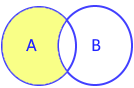
The set.difference_update(*others) method removes all elements from a set that are found in one or more specified iterables, mutating the caller set in-place and returning None.
In-Place Subtraction Advantage: Unlike set.difference() or the - operator, which allocate a brand-new set in memory, difference_update() strips elements directly from the existing container, eliminating memory reallocation overhead in large data filtration pipelines.
1. Method Syntax & Signature 🔝
The standard CPython signature for set.difference_update() is:
set_instance.difference_update(*others)| Component | Type | Required? | Behavior & Description |
|---|---|---|---|
*others |
Iterable[Hashable] |
At least one | One or more iterables whose elements will be purged from the calling set. Supports sets, lists, tuples, ranges, and generator expressions. |
| Return Value | None |
— | Always returns None. The caller set is mutated directly in-place. |
| Exceptions | TypeError |
— | Raised if an argument is not iterable (e.g. an integer or float). |
2. Basic In-Place Subtraction Demonstration 🔝
Elements present in the secondary collection are removed from the primary set, while unmatched elements are retained:
A = {"a", "b", "c", "d"}
B = {"a", "c", "z"}

# Remove all elements of B from A in-place
A.difference_update(B)

print("Set A after difference_update:", A)  # {'b', 'd'}
print("Set B remains completely unchanged:", B)  # {'a', 'c', 'z'}
3. Multi-Iterable Subtraction 🔝
You can pass multiple iterables of different types simultaneously. Any element appearing in at least one of the passed iterables is purged from the target set:
master_pool = {1, 2, 3, 4, 5, 6, 7, 8}

blacklist_set = {2, 4}
filter_list = [6, 8]
single_tuple = (1,)

# Purge items from all three collections in a single step
master_pool.difference_update(blacklist_set, filter_list, single_tuple)

print("Filtered pool:", master_pool)  # {3, 5, 7}
4. Comparison: difference_update() vs. difference() vs. -= Operator 🔝
Understand the trade-offs between set subtraction techniques:
| Mechanism | Mutation Type | Argument Restriction | Returns Value? | Primary Engineering Role |
|---|---|---|---|---|
s.difference_update(*others) |
In-Place | Any iterable (lists, tuples, dicts, ranges) | No (returns None) |
High-performance in-place purging, batch filter pipelines. |
s.difference(*others) |
New Set | Any iterable | Yes (returns new set) | Non-destructive subtraction where original set must remain intact. |
s -= other |
In-Place | Sets only (raises TypeError on lists) | No (in-place) | Concise mathematical notation between known set instances. |
s1 - s2 |
New Set | Sets only | Yes | Mathematical set theory expressions. |
5. The String Character Unpacking Nuance 🔝
Strings are iterables yielding individual character code points. Passing a bare string to difference_update() removes each constituent character from the set:
characters = {"a", "b", "c", "x", "y"}

# Passing string "Alex" removes 'A', 'l', 'e', and 'x'
characters.difference_update("Alex")
print("After string subtraction:", characters)  # {'a', 'b', 'c', 'y'} ('x' removed)

# When removing whole words from word sets, ALWAYS wrap in a list:
word_set = {"admin", "moderator", "user"}
word_set.difference_update(["admin"])
print("Proper word removal:      ", word_set)  # {'moderator', 'user'}
6. Real-World Engineering Recipes 🔝
Recipe 1: Stop-Words Filtration in NLP Pipelines
Clean raw document vocabularies by stripping common grammatical stop-words in-place:
def clean_document_vocabulary(raw_words: set[str], stop_words: list[str]) -> set[str]:
    raw_words.difference_update(stop_words)
    return raw_words

doc_vocab = {"python", "the", "is", "great", "language", "and"}
common_stops = ["the", "is", "and", "of", "to"]

cleaned = clean_document_vocabulary(doc_vocab, common_stops)
print("Meaningful vocabulary:", cleaned)  # {'python', 'great', 'language'}
Recipe 2: In-Memory Blacklist Eviction
Purge suspended client accounts from active socket listener pools in real-time:
active_connections = {"user_101", "user_102", "user_103", "user_104"}
banned_accounts = {"user_102", "user_104"}

active_connections.difference_update(banned_accounts)
print("Remaining authorized sockets:", active_connections)  # {'user_101', 'user_103'}
7. Common Pitfalls & Boundary Traps 🔝
Trap 1: Reassigning s = s.difference_update(...)
Like other in-place set mutators, s.difference_update() returns None. Writing s = s.difference_update(...) destroys the set by assigning None to s.
Trap 2: TypeError with Non-Iterable Arguments
Passing a non-iterable primitive (e.g. an integer) directly to difference_update() raises TypeError: 'int' object is not iterable. Wrap the item in a list: s.difference_update([42]) or use s.discard(42).
8. Production Test Suite & Self-Checking Assertions 🔝
Run this complete test harness verifying multi-iterable purging, in-place mutation, and string safety:
class DiffUpdateVerifier:
    @staticmethod
    def purge_items(target: set, *iterables) -> set:
        target.difference_update(*iterables)
        return target

# Verification unit assertions
v = DiffUpdateVerifier()

# Test 1: In-place multi-iterable removal
pool = {"a", "b", "c", "d"}
v.purge_items(pool, ["a"], ("c",), {"x"})
assert pool == {"b", "d"}

# Test 2: In-place mutation and None return
live_set = {1, 2, 3}
ret = live_set.difference_update({2})
assert ret is None
assert live_set == {1, 3}

# Test 3: Purging non-existent elements produces no error
live_set.difference_update({99, 100})
assert live_set == {1, 3}

print("All set.difference_update() unit assertions passed successfully!")
Practice in Google Colab & GitHub 🔝
Open in Google Colab View on GitHub
Run all set difference update exercises interactively, test multi-iterable purging, contrast difference with difference_update, and verify assertions in Google Colab.
More Details & Related Guides 🔝
- set.difference() Method — Creating a new set containing elements not in other iterables.
- set.intersection_update() Method — Retaining only shared items in-place.
- set.symmetric_difference_update() Method — In-place symmetric difference mutation.
- set.update() Method — Adding multiple iterable elements in-place.
- set.discard() Method — Safely removing single elements without KeyError.
- Python Set Overview — Complete hub for set operations and mathematical theory.

Subhendu Mohapatra
Author & Instructor at plus2net
I write and maintain practical tutorials on Python, PHP, SQL, JavaScript, HTML, jQuery, and web development at plus2net. The tutorials focus on clear explanations, working examples, and code that readers can test and adapt while learning.


Subscribe to our YouTube Channel here

 Python Video Tutorials