Python for Loop: Complete Guide to Definite Iteration, Flow Control & Practical Recipes
The for loop in Python executes a block of code repeatedly for each element in an iterable collection such as a list, tuple, string, dictionary, or range() sequence.
Definite Iteration & Flow Control: Unlike languages that use C-style three-part counter loops, Python's for...in construct operates directly as a sequence iterator. Control iteration dynamically with break and continue, pair loops with the unique else: completion clause, or contrast with indefinite execution via while loops and branching via if-else conditions. For index tracking, see enumerate() and zip().
1. Syntax & Underlying Iteration Protocol 🔝
In Python, the for statement executes its block for every item provided by an underlying iterator:
# Basic syntax of a Python for loop
for target_variable in iterable:
    # Indented block of statements to execute
    statement_1
    statement_2
Under the hood, Python calls iter(iterable) to obtain an iterator object, and repeatedly calls next() until a StopIteration exception is raised to terminate the loop automatically.
2. Iterating Sequences with the range() Function 🔝
The built-in range() generator produces immutable arithmetic sequences without storing all numbers in memory simultaneously:
# 1. Basic loop over range(5): values 0 through 4
for x in range(5):
    print("x =", x)
print("I am outside the loop")
Terminal Output:
x = 0
x = 1
x = 2
x = 3
x = 4
I am outside the loop
The range(start, stop[, step]) constructor allows specifying starting offsets, exclusive stop boundaries, and step directions:
# 2. range(start, stop, step) variations
# Range with custom start and stop [5, 10)
print("Range 5 to 10:")
for x in range(5, 10):
    print(x, end=" ")
print()

# Range with positive step increment of 5
print("\nRange 5 to 25 step 5:")
for x in range(5, 25, 5):
    print(x, end=" ")
print()

# Negative range counting backward
print("\nNegative countdown:")
for x in range(10, 0, -2):
    print(x, end=" ")
print()
Terminal Output:
Range 5 to 10:
5 6 7 8 9

Range 5 to 25 step 5:
5 10 15 20

Negative countdown:
10 8 6 4 2
3. Step-by-Step Video Walkthrough 🔝
Watch this beginner-friendly tutorial to see live visual execution of range(), break, continue, else, and nested loop blocks:
4. Code Block Indentation & Loop Scope 🔝
Python enforces whitespace indentation (typically 4 spaces) rather than curly braces ({}) to define code block membership:
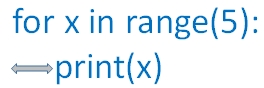
Lines indented underneath the for statement execute on every iteration. The first unindented line marks the loop's conclusion and runs only after iteration finishes.
5. Loop Control Statements: break vs. continue 🔝
Python provides two primary flow-control commands to alter iteration during runtime:
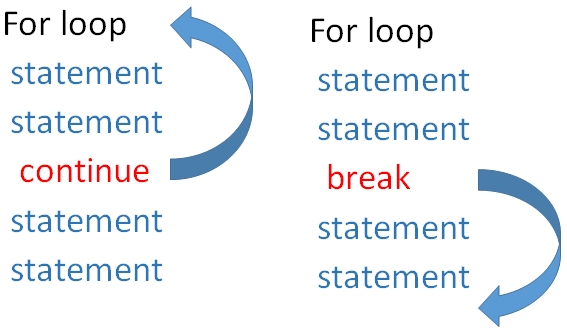
1. The continue Statement: Immediately skips remaining statements in the current iteration and jumps directly to the next element:
# 3. Using continue: skip current iteration and resume loop
for x in range(5, 25, 5):
    if x == 15:
        continue  # Skips printing 15
    print("Value:", x)
Terminal Output:
Value: 5
Value: 10
Value: 20
2. The break Statement: Immediately halts the loop completely, skipping any remaining iterations and transferring execution to the statement following the loop block:
# 4. Using break: immediately exit the loop
for x in range(5, 25, 5):
    if x == 15:
        break  # Halts loop completely when x reaches 15
    print("Value:", x)
print("Loop terminated.")
Terminal Output:
Value: 5
Value: 10
Loop terminated.
6. The for...else Clause: Completion vs. Interruption 🔝
Python offers an optional else: block paired with for loops. The else block executes only if the loop completes all iterations naturally without hitting a break:
# 5. for...else with continue (else executes upon normal completion)
for x in range(5, 25, 5):
    if x == 15:
        continue
    print("x:", x)
else:
    print("Out of loop successfully (else executed)!")
print("Done.")
Terminal Output:
x: 5
x: 10
x: 20
Out of loop successfully (else executed)!
Done.
If the loop terminates early via break, the else clause is bypassed entirely:
# 6. for...else with break (else is bypassed when break triggers)
for x in range(5, 25, 5):
    if x == 15:
        break
    print("x:", x)
else:
    print("This will NOT print because break was triggered!")
print("Out of loop.")
Terminal Output:
x: 5
x: 10
Out of loop.
7. Iterating Across Collections & Unpacking Data 🔝
Any Python iterable can be traversed with for. Dictionaries support iterating keys, values, or key-value pairs via .items():
# 8. Iterating over lists, strings, and dictionaries
# Iterating a list of strings
names = ["King", "Queen", "Jack"]
for title in names:
    print("Title:", title)

# Unpacking dictionary key-value pairs with .items()
student = {"name": "John", "age": 20, "grade": "A"}
for key, value in student.items():
    print(f"{key}: {value}")
Terminal Output:
Title: King
Title: Queen
Title: Jack
name: John
age: 20
grade: A
8. Indexed Traversal & Parallel Loops: enumerate() and zip() 🔝
Avoid tracking manual loop counter variables. Use enumerate() for indices and zip() for multi-list lockstep iteration:
# 9. Indexed traversal with enumerate() and parallel iteration with zip()
# enumerate: tracks zero-based index alongside each item
runners = ["Alice", "Bob", "Charlie"]
for rank, runner in enumerate(runners, start=1):
    print(f"Rank {rank}: {runner}")

# zip: combines multiple sequences in lockstep
scores = [95, 88, 92]
for runner, score in zip(runners, scores):
    print(f"{runner} scored {score}")
Terminal Output:
Rank 1: Alice
Rank 2: Bob
Rank 3: Charlie
Alice scored 95
Bob scored 88
Charlie scored 92
9. Nested for Loops: Matrix Traversal & Grids 🔝
A loop placed inside another loop executes its entire iteration cycle for each step of the outer loop, ideal for 2D grids and matrices (see Python 2D Lists and Pattern Programs):
# 10. Nested for loops: Matrix multiplication & coordinate patterns
matrix = [
    [1, 2, 3],
    [4, 5, 6],
    [7, 8, 9]
]

print("Flattened matrix elements:")
for row in matrix:
    for val in row:
        print(val, end=" ")
    print()
Terminal Output:
Flattened matrix elements:
1 2 3
4 5 6
7 8 9
10. Definite vs. Indefinite: for Loop vs. while Loop Comparison 🔝
| Feature | for Loop (Definite Iteration) |
while Loop (Indefinite Iteration) |
|---|---|---|
| Control Mechanism | Traverses items in an iterable or range() |
Evaluates a boolean condition until it becomes False |
| Cycle Count | Known in advance (length of sequence) | Dynamic / depends on changing runtime state |
| Counter Variable | Managed and advanced automatically by Python | Must be initialized and incremented manually |
| Infinite Loop Risk | Very low (finite sequences terminate) | High (if condition never flips to False) |
| Primary Use Cases | Lists, strings, database rows, ranges, dictionaries | User input validation, event polling, game loops |
11. Production Recipes & Practical Patterns 🔝
Pattern A: Prime Number Generator using for...else
# 7. Production Pattern: Prime Number Scanner with for...else
max_limit = 30
primes = []

for num in range(2, max_limit):
    for divisor in range(2, int(num ** 0.5) + 1):
        if num % divisor == 0:
            break  # Found a factor, not prime
    else:
        # Loop finished without breaking -> num is prime!
        primes.append(num)

print("Found primes up to 30:", primes)
Terminal Output:
Found primes up to 30: [2, 3, 5, 7, 11, 13, 17, 19, 23, 29]Pattern B: Exponential Backoff Network Retry Loop
# 11. Production Recipe: Resilient Retry Loop with Exponential Backoff
import time

def simulate_network_call(attempt: int) -> bool:
    # Simulates success on attempt 3
    return attempt == 3

max_retries = 4
for attempt in range(1, max_retries + 1):
    print(f"Attempt {attempt} of {max_retries}...")
    if simulate_network_call(attempt):
        print("Success: API connection established!")
        break
    else:
        wait_seconds = 2 ** (attempt - 1)
        print(f"Failed. Backing off for {wait_seconds}s...")
else:
    print("Error: All retry attempts exhausted.")
Terminal Output:
Attempt 1 of 4...
Failed. Backing off for 1s...
Attempt 2 of 4...
Failed. Backing off for 2s...
Attempt 3 of 4...
Success: API connection established!
12. Common Developer Traps & Anti-Patterns 🔝
The In-Place Mutation Trap: Never delete or insert items in a list while iterating over it directly. Indices shift dynamically, causing items to be skipped:
# 12. Common Traps: Modifying a list during iteration
# TRAP: Removing items while iterating leads to skipped elements!
items = [1, 2, 3, 4, 5]
# BAD: for x in items: if x % 2 == 0: items.remove(x)

# SAFE SOLUTION: Iterate over a shallow copy or use list comprehension
safe_items = [x for x in items if x % 2 != 0]
print("Safely filtered odds:", safe_items)
Terminal Output:
Safely filtered odds: [1, 3, 5]13. Interactive Companion Notebook & Practice Exercises 🔝
Test loops, break/continue flow controls, and pattern algorithms in our companion Jupyter Notebook:
Interactive Companion Jupyter Notebook
Explore interactive code cells for range iterations, flow controls, dictionary unpacking, and run self-validating assertions.
View on GitHub Run in Google ColabSelf-Verifying Assertion Suite
Run these unit checks directly in Python or your local environment to verify loop behaviors:
# 13. Self-verifying unit test suite for Python for loop behaviors
# Test 1: range total count
total = 0
for i in range(10):
    total += i
assert total == 45, "Range sum failed"

# Test 2: break halts loop early
hit_break = False
for i in range(10):
    if i == 5:
        hit_break = True
        break
assert hit_break is True and i == 5

# Test 3: for...else normal completion
normal_completed = False
for i in range(3):
    pass
else:
    normal_completed = True
assert normal_completed is True

# Test 4: enumerate starting offset
indexed = list(enumerate(["a", "b"], start=10))
assert indexed == [(10, "a"), (11, "b")]

# Test 5: zip lockstep
zipped = list(zip([1, 2], ["x", "y"]))
assert zipped == [(1, "x"), (2, "y")]

print("All Python for loop unit assertions successfully verified!")
Terminal Output:
All Python for loop unit assertions successfully verified!14. Frequently Asked Questions (FAQ) 🔝
How do I get the index of an item inside a for loop?
Use the built-in enumerate() function: for idx, val in enumerate(my_list):.
When does the else block of a for loop execute?
The else block runs only when the loop completes all iterations naturally. It is skipped if the loop terminates via break.
Can range() count backwards?
Yes. Supply a negative step value with a starting number larger than the stop number, e.g. range(10, 0, -1).
What is the difference between break and continue?
continue skips only the rest of the current iteration, while break terminates the entire loop immediately.
-
Python Basics — for loop Quick Video Short
Published on plus2net YouTube

Further Reading & Related Tutorials 🔝
- Python while Loop Tutorial — Indefinite iteration, conditional loops, and sentinel checks.
- Python if-else Conditions — Branching decision logic and boolean evaluations.
- Python range() Function — Generating numeric sequences and stepping patterns.
- Python enumerate() Function — Tracking item indices cleanly during iteration.
- Python zip() Function — Traversing multiple collections in lockstep.
- Python List Comprehension — Compact, fast inline sequence creation.
- Python for Loop Practice Questions — Hands-on loop problem sets and exercises.
- Pattern Programs using Nested Loops — Star patterns, number pyramids, and grids.
- Multiplication Table Program — Practical grid generation using nested loops.

Subhendu Mohapatra
Author & Instructor at plus2net
I write and maintain practical tutorials on Python, PHP, SQL, JavaScript, HTML, jQuery, and web development at plus2net. The tutorials focus on clear explanations, working examples, and code that readers can test and adapt while learning.


Subscribe to our YouTube Channel here

 Python Video Tutorials