Exception handling in Python
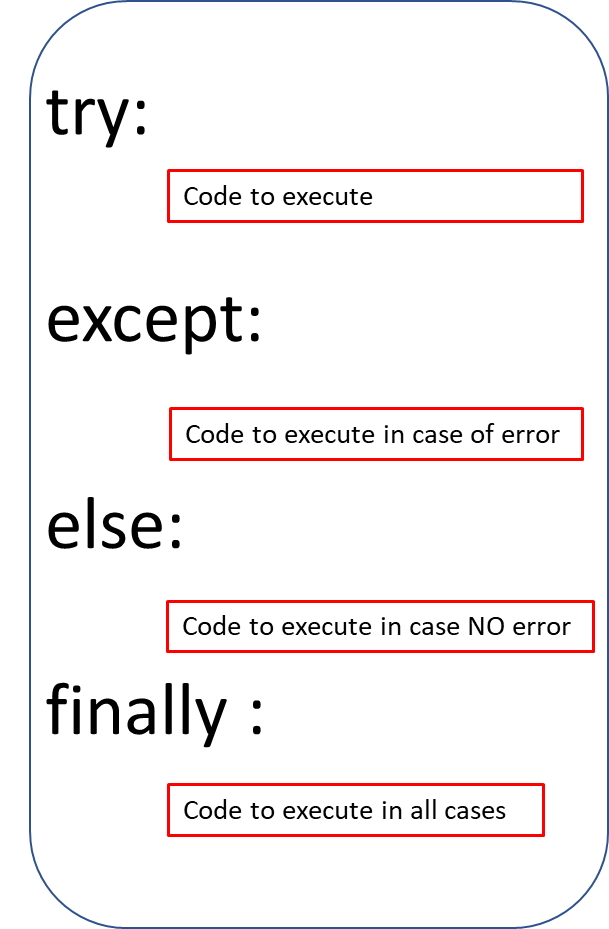
If we can catch an error then we can write code to handle it. An uncaught error will crash our program.
We can keep our code inside a block placed within
try and then keep another code block under except to handle in case of error. If the code within try block generate some error , the code block within except will be executed. If there is no error then except part of the code will not be executed.
Python error handling using try catch else & finally with system Exception message & specific errors
Example with try & except:
my_dict={1:'Alex',2:'Ronald'}
try:
    print(my_dict[3]) # 3rd element is not there
except :
print (" some error occured ")some error occured All types of error
Capturing any type of error and displaying the system returned messagex=5
y=0
try:
print(x/y)
except Exception as e:
print(e)
except:
print('Hi there is an error')division by zeroIf you are trying to catch any specific error then that code block should be above of generic exception handling block
my_dict={1:'Alex',2:'Ronald'}
try:
    print(my_dict[3])
except (KeyError):
    print (" This is a key error  ")
except :
    print (" some error occured ")
This is a key errorfinally
The code block within finally code block is executed in all conditions ( error or no error )my_dict={1:'Alex',2:'Ronald'}
try:
print(my_dict[3])
except (KeyError):
print (" This is a key error ")
except :
print (" some error occured ")
finally :
print ( " I came out " ) This is a key error
I came out else:
If there is no error then code block withinelse will be executed.
my_dict={1:'Alex',2:'Ronald'}

try:
    print(my_dict[2])

except (KeyError):
    print (" This is a key error  ")
except :
    print (" some error occured ")
else :
print ( " within else ")Ronald
within else else with finally
my_dict={1:'Alex',2:'Ronald'}
try:
    print(my_dict[2])

except (KeyError):
    print (" This is a key error  ")
except :
    print (" some error occured ")
else :
    print ( " within else ")
finally:
print ( " I am within finally")Ronald
within else
I am within finallyExamples of exception handling
We will separate integer part from a string.my_str="Welcome to 45 town "
my_list=my_str.split() # Create a list using split string method
for i in my_list: # iterating through list
try:
r=1/int(i) # Generate error if i is not integer
print("The interger is :",i)
except:
print ("not integer : ",i) # Print only if integer not integer : Welcome
not integer : to
The interger is : 45
not integer : townUser generated exception by using raise
In the code below there is nothing wrong with syntax but user can create its own exception by using raisex=13
if x >10:
raise Exception ('Value of x is greater than 10 ')
else:
print('Value is fine ')Value of x is greater than 10Specific error handling
from sqlalchemy.exc import SQLAlchemyError
def my_update(p_id): # receives the p_id on button click to update
    try:
        data=(p_name.get(),unit.get(),price.get() )
        id=my_conn.execute("UPDATE plus2_products SET p_name=%s
			,unit=%s,price=%s WHERE p_id=%s",data)
        #print(data)
    except SQLAlchemyError as e:
        error=str(e.__dict__['orig'])
        msg_display=error
        show_msg(msg_display,'error') # send error message
    except tk.TclError as e:
        msg_display=e.args[0]
        show_msg(msg_display,'error') # send error message
    else:
        msg_display="Number of records updated: " + str(id.rowcount)
Python error exception list with messages
There are some common errors which usually raised during execution. A built-in known exception list is available in Python. We can use them and handle specific solution based on the type of exception.| AssertionError | When a condition goes false while using assert |
| AttributeError | When Nonexistence method is called |
| EOFError | When any input function reches end of the file |
| FloatingPointError | When any floating point opration fails |
| GeneratorExit | When close method is of generator is called |
| ImportError | When import module is not found |
| IndexError | When element at index is not found |
| KeyError | When accessed Key is not present in a dictionary |
| KeyboardInterrupt | When process is interrupted by Keyboard ( Ctrl + C ) |
| MemoryError | When process runs out of memory |
| NameError | When accessed variable is not found |
| NotImplementedError | When abstract methods raise this exception |
| OSError | When Operating system raised error |
| OverflowError | When result is too large to handle |
| ReferenceError | when a weak reference proxy, created by the weakref.proxy() function |
| RuntimeError | error that doesn’t fall in any of the other categories |
| StopIteration | When next() does not have any element to return |
| SyntaxError | When syntax error is encountered by the compiler |
| IndentationError | When there is an Indentation Error |
| TabError | When inconsistence Indentation exist |
| SystemError | Interpreter generates internal error |
| SystemExit | When sys.exit() raise the error |
| TypeError | When When object has wrong data type |
| UnboundLocalError | When a local variable is referenced before assignment |
| UnicodeError | When Unicode encoding decoding error occur |
| UnicodeEncodeError | When can't encode Unicode character |
| UnicodeDecodeError | When can't decode Unicode character |
| UnicodeTranslateError | When Unicode error occur during translating. |
| ValueError | When an argument of incorrect value to use |
| ZeroDivisionError | When denominator of a division or modulo operation is zero |

Subhendu Mohapatra
Author & Instructor at plus2net
I write and maintain practical tutorials on Python, PHP, SQL, JavaScript, HTML, jQuery, and web development at plus2net. The tutorials focus on clear explanations, working examples, and code that readers can test and adapt while learning.
Connect:


Subscribe to our YouTube Channel here
This article is written by plus2net.com team.
https://www.plus2net.com

 Python Video Tutorials