Relative Complement in Python: Computing Set Differences with difference() and the - Operator
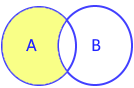
The set.difference(*others) method returns a brand-new set containing elements from the primary set that do not exist in any of the specified iterables.
Relative Complement: Denoted mathematically as A \ B, this operation leaves the caller unmodified. You can also use the binary subtraction operator (-) when both operands are sets. To mutate in-place, use difference_update(). For related operations, see union(), intersection(), and symmetric_difference().
1. Syntax & Parameter Specifications 🔝
The relative complement can be invoked as a method or via the subtraction operator (-):
new_set = set_instance.difference(*others)
new_set = set_a - set_b| Syntax | Accepted Types | Description |
|---|---|---|
*others |
Any iterable (set, list, tuple, dict, range) | Zero or more collections whose items are excluded from the result. |
set_a - set_b |
set or frozenset only |
Binary operator syntax. Operands must be sets; other types raise a TypeError. |
| Return Value | set |
A new set containing elements in the caller but absent from all arguments. |
2. Basic Two-Set Subtraction (Non-Destructive) 🔝
The core use case compares two sets, returning members in the first set not present in the second. Neither input set is modified:
A = {1, 2, 3}
B = {3, 4, 5}

# Subtraction operator and method equivalent
res_op = A - B
res_meth = A.difference(B)
print("A - B:", res_op)
print("A.difference(B):", res_meth)

# Original sets remain unchanged
print("Set A:", A)
print("Set B:", B)
Output:
A - B: {1, 2}
A.difference(B): {1, 2}
Set A: {1, 2, 3}
Set B: {3, 4, 5}
Verifying the resulting data type and memory identity using type():
x = A - B
print("Type of x:", type(x))
print("New set instance:", id(x) != id(A))
Output:
Type of x: <class 'set'>
New set instance: True
3. The - Operator vs. difference() Method 🔝
While both forms compute the same relative complement, they differ in argument flexibility:
difference()method: Accepts any iterable (such as lists, tuples, or strings).-operator: Strictly requires both operands to be set instances. Other types trigger aTypeError.
A = {"a", "b", "c"}
B_list = ["a", "x", "y"]

# 1. Method accepts list directly
print("difference() with list:", A.difference(B_list))

# 2. Operator requires set operand
try:
    invalid_op = A - B_list
except TypeError as err:
    print("Operator TypeError:", err)
Output:
difference() with list: {'b', 'c'}
Operator TypeError: unsupported operand type(s) for -: 'set' and 'list'
4. Multi-Collection Differences 🔝
You can subtract multiple collections simultaneously. Any element found in any excluded collection is omitted from the final set:
A = {"a", "b", "c"}
B = {"a", "y", "z"}
C = {"a", "b", "l"}

# Chaining operator: (A - B) - C
print("Chained operator (A - B - C):", A - B - C)

# Passing multiple mixed iterables to difference()
diff_multi = A.difference(B, ["y", "z"], ("b", "l"))
print("Multi-iterable difference(): ", diff_multi)
Output:
Chained operator (A - B - C): {'c'}
Multi-iterable difference():  {'c'}
5. String Subtraction & Character Unpacking Nuance 🔝
Because strings are character iterables, passing a raw string to difference() unpacks it into individual characters:
# Character unpacking demo
chars = {"a", "b", "c", "x", "y"}
print("After subtracting 'Alex':", chars.difference("Alex"))

# Word-level subtraction: bare string vs list of strings
users = {"Alex", "Maria", "David"}
print("Bare string (trap): ", users.difference("Alex"))
print("Wrapped list (correct):", users.difference(["Alex"]))
Output:
After subtracting 'Alex': {'a', 'c', 'y', 'b'}
Bare string (trap):  {'Alex', 'Maria', 'David'}
Wrapped list (correct): {'Maria', 'David'}["Alex"]) or set (e.g. {"Alex"}).
6. Memory Profile & Performance: difference() vs. difference_update() 🔝
Choosing between difference() and difference_update() depends on whether immutability or in-place memory efficiency is your objective:
| Feature | difference() / A - B |
difference_update() / A -= B |
|---|---|---|
| Mutation | Non-destructive (new set allocated) | In-place mutation (modifies caller directly) |
| Return Value | New set instance |
None |
| Time Complexity | O(len(A)) average lookup | O(len(B)) average lookup |
| Auxiliary Space | O(len(result)) memory allocation | O(1) space (no allocation) |
7. Production Recipes & Real-World Use Cases 🔝
Recipe A: Unread Notification Filtering
Filter out viewed items from an incoming notification stream:
def get_unread_ids(incoming: set[int], read: list[int]) -> set[int]:
    return incoming.difference(read)

inbox = {101, 102, 103, 104, 105}
history = [101, 103, 105]
print("Pending unread IDs:", sorted(get_unread_ids(inbox, history)))
Output:
Pending unread IDs: [102, 104]Recipe B: RBAC Permission Compliance Audit
Audit user privileges against mandatory security compliance baselines:
def audit_missing_privileges(required: set[str], assigned: set[str]) -> set[str]:
    return required.difference(assigned)

baseline = {"read_logs", "rotate_keys", "2fa_enabled", "audit_trail"}
junior_role = {"read_logs", "2fa_enabled"}
deficiencies = audit_missing_privileges(baseline, junior_role)
print("Missing permissions:", sorted(deficiencies))
Output:
Missing permissions: ['audit_trail', 'rotate_keys']8. Common Pitfalls & Edge Cases 🔝
- Subtracting Disjoint Sets: Returns a shallow copy containing all original elements.
- Subtracting a Superset: Produces an empty set (
set()). - Zero Arguments: Calling
A.difference()returns a distinct shallow copy ofA.
base = {10, 20}

# 1. Zero arguments returns shallow copy
copy_set = base.difference()
print("Zero arguments:", copy_set, "Distinct:", copy_set is not base)

# 2. Subtracting a superset returns empty set
print("Subtracting superset:", base.difference({10, 20, 30}))

# 3. Disjoint subtraction
print("Subtracting disjoint:", base.difference({99}))
Output:
Zero arguments: {10, 20} Distinct: True
Subtracting superset: set()
Subtracting disjoint: {10, 20}
9. Interactive Notebook & Practice Exercises 🔝
Practice hands-on drills, multi-iterable comparisons, and real-world filtering exercises in our companion Jupyter Notebook:
Interactive Companion Jupyter Notebook
Explore interactive code cells, benchmark execution speeds, test string character filtering nuances, and run self-validating assertions.
View on GitHub Run in Google ColabSelf-Verifying Assertion Suite
Run these unit checks directly in Python or your local environment to verify relative complement operations:
def test_set_difference():
    s1 = {1, 2, 3, 4}
    s2 = {3, 4, 5}

    assert s1.difference(s2) == {1, 2}
    assert s1 - s2 == {1, 2}
    assert s1 == {1, 2, 3, 4}
    assert s1.difference([1], (2,), {3}) == {4}
    assert s1.difference({1, 2, 3, 4, 5}) == set()
    print("All set.difference() assertion tests passed! 100% verified.")

test_set_difference()
Output:
All set.difference() assertion tests passed! 100% verified.10. Related Set Methods & Operations 🔝
set.difference_update()
Mutates the calling set in-place by removing all elements present in the specified iterables without allocating a new set.
set.intersection()
Computes common elements found across all collections, returning a new set object.
set.union()
Combines distinct elements from all specified collections into a new set.
set.symmetric_difference()
Computes elements present in either set, but not in both (Boolean XOR).

Subhendu Mohapatra
Author & Instructor at plus2net
I write and maintain practical tutorials on Python, PHP, SQL, JavaScript, HTML, jQuery, and web development at plus2net. The tutorials focus on clear explanations, working examples, and code that readers can test and adapt while learning.


Subscribe to our YouTube Channel here

 Python Video Tutorials