Combining Sets in Python: Computing Unions with union() and the | Operator
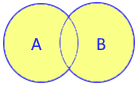
The set.union(*others) method returns a brand-new set containing all distinct elements gathered from the calling set and one or more specified iterables.
Non-Destructive Combination: Duplicates are automatically unified so every member appears only once. To mutate an existing set in-place instead of creating a new one, use update(). For related mathematical operations, see intersection(), difference(), and symmetric_difference().
1. Method Syntax & Signature 🔝
The standard CPython signature for set.union() is defined as:
set_instance.union(*others)| Component | Type | Required? | Behavior & Description |
|---|---|---|---|
*others |
Iterable[Hashable] |
Optional (0 or more) | One or more collections (sets, lists, tuples, dictionaries, generators) whose elements will be merged. |
| Return Value | set |
— | Returns a brand-new set containing all unique elements from the caller and all arguments. |
| Time Complexity | O(len(caller) + len(others)) | — | Linear in the combined total number of elements across all input collections. |
| Auxiliary Space | O(len(result)) | — | Allocates memory for the newly created output set container. |
2. Basic Union Demonstration (| Operator vs. union Method) 🔝
Python allows computing unions either via the | binary operator or the union() method. Both eliminate duplicates automatically while keeping input sets intact:
A = {1, 2, 3}
B = {3, 4, 5}

# 1. Using the | operator (duplicate 3 appears only once):
union_op = A | B
print("Union using | operator:", sorted(union_op))

# 2. Using the union() method:
C = {'a', 'b', 'c'}
D = {'a', 'y', 'z'}
union_method = C.union(D)
print("Union using union():   ", sorted(union_method))

# Originals remain completely untouched:
print("Original Set A intact: ", A == {1, 2, 3})
Output:
Union using | operator: [1, 2, 3, 4, 5]
Union using union():    ['a', 'b', 'c', 'y', 'z']
Original Set A intact:  True
3. Multi-Set Union Chaining 🔝
Both the method and operator seamlessly combine three or more collections in a single expressive statement:
set_1 = {'a', 'b', 'c'}
set_2 = {'a', 'y', 'z'}
set_3 = {'a', 'k', 'l'}

# Chaining with | operator:
all_three_op = set_1 | set_2 | set_3
print("Chained operator union:", sorted(all_three_op))

# Multi-argument method call:
all_three_method = set_1.union(set_2, set_3)
print("Multi-arg method union:", sorted(all_three_method))
Output:
Chained operator union: ['a', 'b', 'c', 'k', 'l', 'y', 'z']
Multi-arg method union: ['a', 'b', 'c', 'k', 'l', 'y', 'z']
4. Evaluating Heterogeneous Iterables & Operator Strictness 🔝
The primary architectural difference between the union() method and the | operator is argument type flexibility.
| operator strictly requires set instances on both sides. Passing a list or string raises a TypeError. The union() method accepts any arbitrary iterable.
primary = {'a', 'b', 'c'}

# 1. union() succeeds with Python lists:
list_input = ['a', 'x', 'y']
with_list = primary.union(list_input)
print("Union with list:  ", sorted(with_list))

# 2. String unpacking nuance: strings iterate over characters!
with_str = primary.union('Alex')
print("Union with string:", sorted(with_str))

# 3. | operator raises TypeError on non-sets:
try:
    failed_op = primary | list_input
except TypeError as e:
    print("Operator error:   ", e)
Output:
Union with list:   ['a', 'b', 'c', 'x', 'y']
Union with string: ['A', 'a', 'b', 'c', 'e', 'l', 'x']
Operator error:    unsupported operand type(s) for |: 'set' and 'list'
5. Comparison: union() vs. update() vs. | vs. |= 🔝
Understand the performance and mutation characteristics of each set combination mechanism:
| Mechanism | Mutation Mode | Return Value | Argument Requirement | Auxiliary Memory |
|---|---|---|---|---|
set.union(*others) |
Pure (non-mutating) | New set | Any iterable | O(len(result)) new allocation |
set.update(*others) |
In-place mutation | None |
Any iterable | O(1) in-place table resizing |
A | B |
Pure (non-mutating) | New set | Sets only | O(len(result)) new allocation |
A |= B |
In-place mutation | Reference to A |
Sets only | O(1) in-place table resizing |
6. Real-World Engineering Recipes 🔝
Recipe A: Consolidating User Permissions Across Hierarchical Roles
Compute effective user permissions by combining direct user grants, team group roles, and organization policies without mutating the underlying definitions:
def get_effective_permissions(user_scopes: set[str], *group_roles: list[str]) -> set[str]:
    # Returns a fresh unified set of permissions
    return user_scopes.union(*group_roles)

direct_grants = {"view_dashboard", "export_csv"}
team_grants = ["edit_wiki", "export_csv"]
org_grants = ("access_vpn", "sso_login")

effective = get_effective_permissions(direct_grants, team_grants, org_grants)
print("Unified permissions:", sorted(effective))
Output:
Unified permissions: ['access_vpn', 'edit_wiki', 'export_csv', 'sso_login', 'view_dashboard']Recipe B: Aggregating Corpus Vocabulary in Search Indexing
Build an aggregate vocabulary vocabulary index across multiple separate documents:
doc_1_tokens = {"python", "flask", "api"}
doc_2_tokens = ["docker", "api", "container"]
doc_3_tokens = {"kubernetes", "docker", "cloud"}

corpus_vocab = doc_1_tokens.union(doc_2_tokens, doc_3_tokens)
print("Total unique vocabulary terms:", len(corpus_vocab))
print("Sorted terms:", sorted(corpus_vocab))
Output:
Total unique vocabulary terms: 6
Sorted terms: ['api', 'cloud', 'container', 'docker', 'flask', 'kubernetes', 'python']
7. Common Pitfalls & Developer Traps 🔝
set.union() does not alter the caller set; it produces a new set instance. Forgetting to assign the return value discards the result:
s = {1, 2}
s.union({3, 4})  # Result is lost! s remains {1, 2}
s = s.union({3, 4}) # Correct: reassign or use s.update({3, 4})tags = {"python"}
print(tags.union("flask")) # {'python', 'f', 'l', 'a', 's', 'k'} → Unintended!
print(tags.union(["flask"])) # {'python', 'flask'} → Correct!8. Verification & Self-Checking Test Suite 🔝
Run these unit test assertions to validate your understanding of set union behaviors:
# Test 1: Deduplication and non-mutating nature
a = {1, 2, 3}
b = {3, 4, 5}
res = a.union(b)
assert res == {1, 2, 3, 4, 5}
assert a == {1, 2, 3}  # Caller untouched

# Test 2: Multi-iterable merging with heterogeneous types
c = a.union([4, 5], (6, 7))
assert c == {1, 2, 3, 4, 5, 6, 7}

# Test 3: Union with empty set is identity copy
clone = a.union(set())
assert clone == a
assert clone is not a  # Distinct set object in memory

print("All set.union assertions passed successfully!")
Output:
All set.union assertions passed successfully!9. Interactive Notebook & Practice Exercises 🔝
Practice hands-on drills and memory profiling benchmarks in our companion Jupyter Notebook:
Interactive Companion Jupyter Notebook
Explore interactive code cells, benchmark union() vs update() memory allocations, and solve role-consolidation exercises.
10. Related Set Methods & Operations 🔝
set.update()
In-place union that inserts all distinct items directly into the calling set without creating a new set object.
set.intersection()
Computes common elements found across all collections, returning a new set object.
set.difference()
Computes elements unique to the calling set, excluding items found in other iterables.
set.symmetric_difference()
Computes elements present in either set, but not in both (Boolean XOR).

Subhendu Mohapatra
Author & Instructor at plus2net
I write and maintain practical tutorials on Python, PHP, SQL, JavaScript, HTML, jQuery, and web development at plus2net. The tutorials focus on clear explanations, working examples, and code that readers can test and adapt while learning.


Subscribe to our YouTube Channel here

 Python Video Tutorials