Convert CSV to XML using Tkinter and Pandas
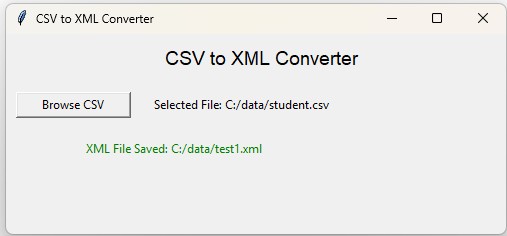
This project uses Tkinter and Pandas to convert a CSV file into XML. The user selects a CSV file through a Tkinter file browser, Pandas read_csv() creates a DataFrame, and to_xml() exports the DataFrame as XML.
The application also checks CSV column names before using them as XML element names. Spaces, punctuation and headings beginning with numbers are converted into safe XML tags.
CSV file
    |
    v
pd.read_csv()
    |
    v
Pandas DataFrame
    |
    v
Create XML-safe column names
    |
    v
df.to_xml()
    |
    v
XML file&, < or > before writing XML. Pandas and ElementTree escape XML-sensitive characters when serializing the document.- CSV to XML Workflow
- Load the CSV File
- Create Valid XML Tag Names
- Map CSV Headers to XML Tags
- Choose Root and Row Elements
- Convert DataFrame to XML
- XML Special Characters
- Missing Values
- Preview the XML
- Complete Tkinter Converter
- Video Tutorial
- ElementTree Alternative
- CSV to XML without Tkinter
- Continue the Conversion Projects
- FAQs
CSV to XML Conversion Workflow Top ↑
Consider this CSV file:
id,First Name,mark
1,John Deo,75
2,Max & Sons,85
3,Arnold,55
Pandas creates a DataFrame with three columns:
id
First Name
mark
Before creating XML, First Name is converted to a valid element name:
First Name
    |
    v
First_Name
The output can then use:
<data>
    <record>
        <id>1</id>
        <First_Name>John Deo</First_Name>
        <mark>75</mark>
    </record>
</data>
Load the CSV File Top ↑
Use the Tkinter file browser:
file_path=filedialog.askopenfilename(
    title='Select CSV file',
    filetypes=[
        ('CSV files','*.csv'),
        ('All files','*.*')
    ]
)
Create the DataFrame with read_csv():
df=pd.read_csv(
    file_path
)
After loading, the application displays:
- CSV filename;
- number of rows;
- number of columns;
- first five records;
- CSV column to XML element mapping.
Create Valid XML Element Names Top ↑
CSV column headings are free-form text. XML element names have naming rules.
Examples requiring conversion include:
First Name
Total Amount ($)
2nd Mark
Page/Path
A simple function can normalize them:
def xml_name(name,prefix='field'):
    name=re.sub(
        r'[^A-Za-z0-9_.-]+',
        '_',
        str(name).strip()
    )

    if not name:
        name=prefix

    if not re.match(
        r'[A-Za-z_]',
        name
    ):
        name=prefix+'_'+name

    return name
Example conversions:
First Name       -> First_Name
Amount ($)       -> Amount_
2nd Mark         -> field_2nd_Mark
Page/Path        -> Page_Path
Keep XML Column Names Unique Top ↑
Two different CSV headings can become the same XML name after punctuation is removed.
For example:
First Name
First-Name
could normalize to similar names depending on the rules used.
The application therefore checks each normalized name and adds a number when necessary:
First_Name
First-Name
or when an actual collision occurs:
Amount_
Amount__2
The original DataFrame is not modified. A separate DataFrame is prepared for XML export.
Choose Root and Row Element Names Top ↑
The user can specify the two main XML element names:
Root element: data
Row element:  record
The result becomes:
<data>
    <record>
        ...
    </record>
    <record>
        ...
    </record>
</data>
The same XML-name validation is applied to these values.
Convert the DataFrame using to_xml() Top ↑
Pandas to_xml() can write the DataFrame directly to the selected XML file:
xml_df.to_xml(
    save_path,
    index=False,
    root_name=root_name,
    row_name=row_name,
    encoding='utf-8',
    xml_declaration=True,
    pretty_print=True,
    parser='etree'
)
index=False prevents the Pandas index from becoming another XML element.
parser='etree' uses Python's ElementTree implementation rather than requiring the optional lxml parser.
XML Special Characters Are Escaped Automatically Top ↑
Suppose a CSV value contains:
Tom & Jerry <Cartoon>XML must encode those characters safely:
Tom & Jerry <Cartoon>Pandas and ElementTree perform this escaping when they serialize XML.
Do not do this before serialization:
value.replace(
    '&',
    '&'
)
because the XML writer would then escape the already-created entity text again.
Missing DataFrame Values in XML Top ↑
A CSV may contain a missing value:
id,name,mark
1,John,75
2,Max,
3,Arnold,55
Pandas can represent the missing cell as an empty XML element:
<mark />If the application requires another representation, the DataFrame can be cleaned before conversion using Pandas methods such as fillna().
For a complete cleaning interface, see Tkinter Pandas data cleaning.
Preview XML before Saving Top ↑
The application generates an XML preview from the first five DataFrame rows:
preview_xml=xml_df.head(
    5
).to_xml(
    index=False,
    root_name=root_name,
    row_name=row_name,
    parser='etree'
)
This lets the user review the structure without converting the entire DataFrame into a large preview string.
Complete Tkinter CSV to XML Converter Top ↑
Video: Convert CSV to XML with Tkinter and Pandas Top ↑
Create XML Manually with ElementTree Top ↑
Pandas to_xml() is convenient when each DataFrame row maps directly to one XML record. For more customized XML structures, Python's xml.etree.ElementTree can be used.
import xml.etree.ElementTree as ET

root=ET.Element(
    'data'
)

for row in xml_df.itertuples(
    index=False,
    name=None
):
    record=ET.SubElement(
        root,
        'record'
    )

    for column,value in zip(
        xml_df.columns,
        row
    ):
        element=ET.SubElement(
            record,
            column
        )

        if pd.notna(value):
            element.text=str(value)

tree=ET.ElementTree(
    root
)

tree.write(
    'output.xml',
    encoding='utf-8',
    xml_declaration=True
)
Do Not Escape the Text Manually Top ↑
Use:
element.text=str(value)not:
element.text=str(value).replace(
    '&',
    '&'
)
ElementTree performs the XML escaping when write() is called.
CSV to XML using Pandas without Tkinter Top ↑
If a GUI is not required, the complete conversion can be very short.
import pandas as pd

input_csv='data.csv'
output_xml='data.xml'

df=pd.read_csv(
    input_csv
)

df.to_xml(
    output_xml,
    index=False,
    root_name='data',
    row_name='record',
    parser='etree'
)

print(
    f'XML file created: {output_xml}'
)Continue the Tkinter Pandas Conversion Projects Top ↑
Convert CSV data to JSON:
CSV to JSON with Tkinter and PandasConvert Excel data to XML:
Excel to XML with TkinterExport SQLite table data to CSV:
SQLite to CSV using PandasFrequently Asked Questions Top ↑
Use pd.read_csv() to create a DataFrame and then call DataFrame.to_xml() with the required root and row element names.
CSV headings can contain spaces, punctuation or begin with digits, while XML element names must follow XML naming rules.
Yes. XML-sensitive characters in element text are escaped when ElementTree serializes the document, so they should not be manually converted first.
Missing values can be written as empty elements. The DataFrame can also be cleaned with methods such as fillna() before conversion when another representation is required.
root_name defines the outer XML element, while row_name defines the element used for each DataFrame row.
It tells Pandas to use Python's ElementTree XML implementation and avoids depending on the optional lxml parser for this example.
ElementTree is useful when the XML requires a customized nested structure rather than a direct DataFrame-row-to-XML-record conversion.
Pandas Analysis CSV to JSON Excel to XML
Tkinter Projects Tkinter Pandas Projects

Subhendu Mohapatra
Author & Instructor at plus2net
I write and maintain practical tutorials on Python, PHP, SQL, JavaScript, HTML, jQuery, and web development at plus2net. The tutorials focus on clear explanations, working examples, and code that readers can test and adapt while learning.


Subscribe to our YouTube Channel here

 Python Video Tutorials