Convert CSV to JSON or XML using Tkinter and Pandas
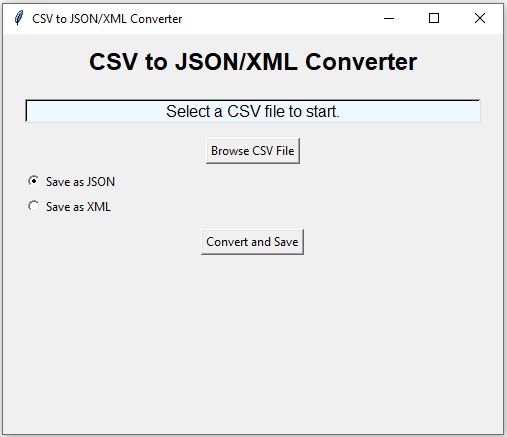
This project uses Tkinter and Pandas to convert a CSV file into JSON or XML.
The user selects a CSV file through a Tkinter file browser. Pandas read_csv() creates a DataFrame. The same DataFrame can then be exported as JSON using to_json() or as XML using to_xml().
CSV file
    |
    v
pd.read_csv()
    |
    v
Pandas DataFrame
    |
    +--> to_json() --> JSON
    |
    +--> XML-safe columns
             |
             v
          to_xml()
             |
             v
XML- Conversion Workflow
- Load the CSV File
- Convert DataFrame to JSON
- JSON orient='records'
- Keep Unicode Text Readable
- Missing Values in JSON
- Convert DataFrame to XML
- Create Valid XML Column Names
- Preview JSON or XML
- Save the Converted File
- Complete Converter
- Video Tutorial
- JSON vs XML Output
- Continue the Conversion Projects
- FAQs
CSV to JSON or XML Workflow Top ↑
Consider this CSV file:
id,name,mark
1,John Deo,75
2,Max Ruin,85
3,Arnold,55
Pandas creates a DataFrame:
   id      name  mark
0   1  John Deo    75
1   2  Max Ruin    85
2   3    Arnold    55
The DataFrame can then be converted without reading the CSV again.
Load the CSV File once Top ↑
Select the CSV file:
file_path=filedialog.askopenfilename(
    title='Select CSV file',
    filetypes=[
        ('CSV files','*.csv'),
        ('All files','*.*')
    ]
)
Create the DataFrame:
df=pd.read_csv(
    file_path
)
The application displays the first five records together with the number of rows and columns.
Convert Pandas DataFrame to JSON Top ↑
For this project, each DataFrame row becomes one JSON object.
df.to_json(
    save_path,
    orient='records',
    indent=2,
    force_ascii=False
)
For the sample data, the output is similar to:
[
  {
    "id":1,
    "name":"John Deo",
    "mark":75
  },
  {
    "id":2,
    "name":"Max Ruin",
    "mark":85
  }
]
Why Use orient='records'? Top ↑
Pandas supports several JSON orientations. For a CSV converter, records is easy to understand because every DataFrame row becomes one JSON object.
CSV row
   |
   v
JSON object
A DataFrame with three rows therefore becomes a JSON array containing three objects.
Keep Unicode Text Readable Top ↑
The option:
force_ascii=Falseallows Unicode text to remain readable in the JSON file.
For example:
Delhi
Bhubaneswar
東京
can remain as readable text instead of converting every non-ASCII character into a Unicode escape sequence.
Missing Values in JSON Top ↑
Consider:
id,name,mark
1,John,75
2,Max,
3,Arnold,55
Pandas represents the missing value appropriately in JSON:
{
  "id":2,
  "name":"Max",
  "mark":null
}
If missing values need to be replaced before conversion, clean the DataFrame first. See Tkinter Pandas data cleaning.
Convert the Same DataFrame to XML Top ↑
Pandas to_xml() can create XML directly:
xml_df.to_xml(
    save_path,
    index=False,
    root_name='data',
    row_name='record',
    encoding='utf-8',
    xml_declaration=True,
    pretty_print=True,
    parser='etree'
)
The structure becomes:
<data>
  <record>
    <id>1</id>
    <name>John Deo</name>
    <mark>75</mark>
  </record>
</data>
Create Valid XML Column Names Top ↑
JSON can safely use a key such as:
"First Name"but XML should not directly use arbitrary CSV headings as element names.
For example:
First Name
2nd Mark
Amount ($)
are normalized before XML conversion:
First_Name
field_2nd_Mark
Amount_
The normalization function is:
def xml_name(name,prefix='field'):
    name=re.sub(
        r'[^A-Za-z0-9_.-]+',
        '_',
        str(name).strip()
    )

    if not name:
        name=prefix

    if not re.match(
        r'[A-Za-z_]',
        name
    ):
        name=prefix+'_'+name

    return name
The original DataFrame column names remain unchanged for JSON output.
Preview the Selected Output Format Top ↑
The application allows the user to select:
JSON
XML
and preview the first five records before saving.
For JSON:
preview=df.head(
    5
).to_json(
    orient='records',
    indent=2,
    force_ascii=False
)
For XML:
preview=xml_df.head(
    5
).to_xml(
    index=False,
    root_name='data',
    row_name='record',
    parser='etree'
)
Save JSON or XML with Tkinter Top ↑
The chosen format determines the file extension:
extension='.json'
if format_name=='JSON'
else '.xml'
The user selects the output location with a Tkinter Save As dialog.
Complete Tkinter CSV to JSON/XML Converter Top ↑
Video: Convert CSV to JSON or XML Top ↑
JSON and XML Output from the Same DataFrame Top ↑
For this DataFrame:
id | name | mark
1  | John | 75
2  | Max  | 85
JSON Output Top ↑
[
  {
    "id":1,
    "name":"John",
    "mark":75
  },
  {
    "id":2,
    "name":"Max",
    "mark":85
  }
]
XML Output Top ↑
<data>
  <record>
    <id>1</id>
    <name>John</name>
    <mark>75</mark>
  </record>
  <record>
    <id>2</id>
    <name>Max</name>
    <mark>85</mark>
  </record>
</data>
JSON represents each row as an object. XML represents each row as an element containing child elements.
Why XML Gets a Separate DataFrame Top ↑
The application keeps:
df
xml_df
df keeps the original CSV headings for JSON:
"First Name"xml_df uses XML-safe column names:
<First_Name>This prevents XML requirements from unnecessarily changing the JSON output.
JSON Conversion without Tkinter Top ↑
If a GUI is not required:
import pandas as pd

df=pd.read_csv(
    'data.csv'
)

df.to_json(
    'data.json',
    orient='records',
    indent=2,
    force_ascii=False
)
Continue the Tkinter Pandas Conversion Projects Top ↑
For a dedicated CSV to XML converter:
CSV to XMLConvert Excel data to XML:
Excel to XMLExport SQLite table data to CSV:
SQLite to CSVFrequently Asked Questions Top ↑
Use pd.read_csv() to create a DataFrame and then call DataFrame.to_json().
It converts every DataFrame row into one JSON object and returns the records as a JSON array.
It keeps Unicode characters readable in the JSON output instead of forcing them into escaped ASCII representations.
Pandas writes missing DataFrame values as JSON null where appropriate.
JSON keys can contain spaces and punctuation, but XML element names follow stricter naming rules.
Yes. The loaded DataFrame is reused. A separate copy with XML-safe column names is created only for XML output.
No. The source CSV remains unchanged. The application creates a new JSON or XML output file.
CSV to XML Excel to XML
Tkinter Projects Tkinter Pandas Projects

Subhendu Mohapatra
Author & Instructor at plus2net
I write and maintain practical tutorials on Python, PHP, SQL, JavaScript, HTML, jQuery, and web development at plus2net. The tutorials focus on clear explanations, working examples, and code that readers can test and adapt while learning.


Subscribe to our YouTube Channel here

 Python Video Tutorials