MySQL LEFT JOIN: Keep All Rows from the Left Table
MySQL LEFT JOIN returns every row from the left table and any matching rows from the right table. When no match exists on the right, the right-table columns are returned as NULL.
SELECT t1.id,
       t1.name1,
       t2.name2
FROM t1
LEFT JOIN t2
  ON t1.id = t2.id
ORDER BY t1.id;
With the sample tables below, IDs 1 and 2 match. ID 3 exists only in t1, so it is still returned and the t2 value is NULL.
- LEFT JOIN Syntax
- Basic LEFT JOIN Example
- LEFT JOIN vs INNER JOIN
- Find Rows with No Match
- Find Only Rows that Have a Match
- ON vs WHERE in a LEFT JOIN
- One-to-many Matches
- Practical Student/Team Example
- LEFT JOIN Three Tables
- LEFT JOIN IS NULL vs NOT EXISTS
- PHP PDO Example
- Performance and Indexing
- Common LEFT JOIN Mistakes
- Video Tutorial
- Related Tutorials, Exercises and Downloads
- FAQs
LEFT JOIN Syntax Top ↑
SELECT left_table.column1,
       right_table.column2
FROM left_table
LEFT JOIN right_table
  ON left_table.join_column = right_table.join_column;
The table written before LEFT JOIN is the left table. Its rows are preserved even when no matching row is found on the right.
Basic LEFT JOIN Example Top ↑
SELECT t1.id,
       t1.name1,
       t2.id AS t2_id,
       t2.name2
FROM t1
LEFT JOIN t2
  ON t1.id = t2.id
ORDER BY t1.id;| id | name1 | t2_id | name2 |
|---|---|---|---|
| 1 | one1 | 1 | one2 |
| 2 | two1 | 2 | two2 |
| 3 | three1 | NULL | NULL |
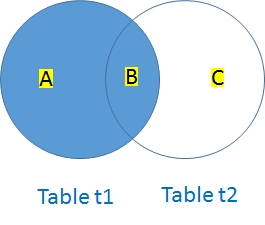
The unmatched row from t1 is preserved. Because there is no matching t2 row for ID 3, the selected t2 columns are NULL.
LEFT JOIN vs INNER JOIN Top ↑
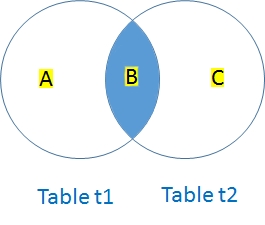
An INNER JOIN keeps only matching row combinations:
SELECT t1.id,
       t1.name1,
       t2.name2
FROM t1
INNER JOIN t2
  ON t1.id = t2.id
ORDER BY t1.id;
That returns IDs 1 and 2 only.
The older comma-join form:
-- Legacy style; prefer explicit JOIN syntax
SELECT t1.id,
       t1.name1
FROM t1,
     t2
WHERE t1.id = t2.id;
is better written as an explicit INNER JOIN because the relationship is easier to see and maintain.
Find Rows with No Match Top ↑
One of the most useful LEFT JOIN patterns is finding rows in the left table that have no corresponding row in the right table.
SELECT t1.id,
       t1.name1
FROM t1
LEFT JOIN t2
  ON t1.id = t2.id
WHERE t2.id IS NULL;| id | name1 |
|---|---|
| 3 | three1 |
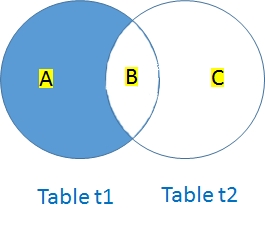
Use the standard IS NULL form. There is no need to maintain separate "MySQL 5 and above" versions using ISNULL().
Find Only Rows that Have a Match Top ↑
You can write:
SELECT t1.id,
       t1.name1,
       t2.name2
FROM t1
LEFT JOIN t2
  ON t1.id = t2.id
WHERE t2.id IS NOT NULL
ORDER BY t1.id;
but if the requirement is simply "return only matching rows," an INNER JOIN normally expresses the intent more directly.
ON vs WHERE in a LEFT JOIN Top ↑
This distinction is important because moving a right-table condition from ON to WHERE can change the meaning of a LEFT JOIN.
Filter the right table while preserving all left rows Top ↑
SELECT p.p_id,
       p.product,
       s.sale_id,
       s.qty
FROM products_v2 AS p
LEFT JOIN sales_v2 AS s
  ON p.p_id = s.p_id
 AND s.qty > 1
ORDER BY p.p_id, s.sale_id;
Every product remains in the result. Only right-side sales rows with quantity greater than 1 are eligible to attach.
Filter after the join Top ↑
SELECT p.p_id,
       p.product,
       s.sale_id,
       s.qty
FROM products_v2 AS p
LEFT JOIN sales_v2 AS s
  ON p.p_id = s.p_id
WHERE s.qty > 1
ORDER BY p.p_id, s.sale_id;
The WHERE condition rejects rows where s.qty is NULL, so unmatched products disappear. For this condition, the result behaves like an INNER JOIN.
One-to-many Matches Top ↑
LEFT JOIN does not guarantee one output row for each left row. If one left row matches several right rows, it appears once for each match.
SELECT s.id,
       s.name,
       f.dt,
       f.amount
FROM student6 AS s
LEFT JOIN student_fee AS f
  ON s.id = f.id
ORDER BY s.id, f.dt;
A student with three fee-payment rows appears three times. A student with no payment still appears once with NULL values from student_fee.
Do not add DISTINCT merely to hide legitimate one-to-many matches.
Practical Example: Students and Football Team Top ↑
Suppose student contains all students and student_football contains the IDs of students selected for a football team.
Display all students and their team match Top ↑
SELECT s.id,
       s.name,
       f.f_id
FROM student AS s
LEFT JOIN student_football AS f
  ON s.id = f.f_id
ORDER BY s.id;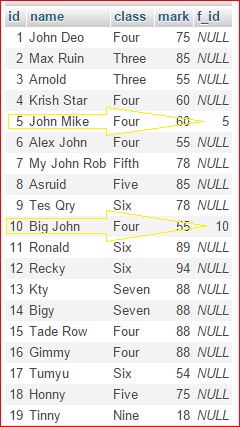
Students selected for the football team Top ↑
SELECT s.id,
       s.name
FROM student AS s
LEFT JOIN student_football AS f
  ON s.id = f.f_id
WHERE f.f_id IS NOT NULL
ORDER BY s.id;
If you only need selected students, an INNER JOIN is usually simpler. The LEFT JOIN form is useful here because it leads naturally to the opposite question.
Students not selected for the football team Top ↑
SELECT s.id,
       s.name
FROM student AS s
LEFT JOIN student_football AS f
  ON s.id = f.f_id
WHERE f.f_id IS NULL
ORDER BY s.id;
LEFT JOIN Three Tables Top ↑
Add a baseball-selection table to the previous example. To keep every student while attaching football and baseball membership when present:
SELECT s.id,
       s.name,
       f.f_id,
       b.b_id
FROM student AS s
LEFT JOIN student_football AS f
  ON s.id = f.f_id
LEFT JOIN student_baseball AS b
  ON s.id = b.b_id
ORDER BY s.id;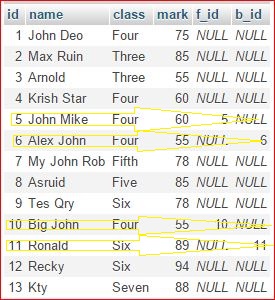
Students not selected for either team Top ↑
SELECT s.id,
       s.name
FROM student AS s
LEFT JOIN student_football AS f
  ON s.id = f.f_id
LEFT JOIN student_baseball AS b
  ON s.id = b.b_id
WHERE f.f_id IS NULL
  AND b.b_id IS NULL
ORDER BY s.id;
See LEFT JOIN with multiple tables for additional patterns.
LEFT JOIN IS NULL vs NOT EXISTS Top ↑
The unmatched-row query:
SELECT s.id,
       s.name
FROM student AS s
LEFT JOIN student_football AS f
  ON s.id = f.f_id
WHERE f.f_id IS NULL;
can also be expressed with NOT EXISTS:
SELECT s.id,
       s.name
FROM student AS s
WHERE NOT EXISTS (
    SELECT 1
    FROM student_football AS f
    WHERE f.f_id = s.id
);
Both are valid anti-join patterns. NOT EXISTS can be especially clear when the real question is simply whether any related row exists.
This is often safer to reason about than NOT IN when the subquery column can contain NULL. See SQL subqueries and IN / NOT IN.
PHP PDO Example Top ↑
After connecting to MySQL with PDO, a static LEFT JOIN query can be executed with query():
<?php
$sql="SELECT t1.id,
             t1.name1
      FROM t1
      LEFT JOIN t2
        ON t1.id=t2.id
      WHERE t2.id IS NULL
      ORDER BY t1.id";

$stmt=$dbo->query($sql);

echo '<table>';
echo '<tr><th>id</th><th>name1</th></tr>';

foreach($stmt as $row){
    echo '<tr><td>'
        .(int)$row['id']
        .'</td><td>'
        .htmlspecialchars(
            $row['name1'],
            ENT_QUOTES,
            'Windows-1252'
        )
        .'</td></tr>';
}

echo '</table>';
No external values are present in this SQL, so query() is appropriate. If a user-supplied filter is added, use a prepared statement and bind the value.
Download the existing SQL dump for tables t1 and t2.
Performance and Indexing Top ↑
- Join columns should use compatible datatypes and collations.
- The parent/key column is often a PRIMARY KEY or UNIQUE key and therefore already indexed.
- Frequently joined foreign-key/reference columns on the right table often benefit from an index.
- Right-side filters placed in
ONand result filters placed inWHEREshould match the intended semantics before performance tuning begins. - Unexpectedly large result sets often indicate a one-to-many relationship or an incomplete join condition, not an SQL engine problem.
- Use
EXPLAINfor important joins instead of assuming an index is being used. - Select only the columns the page or application needs rather than using
SELECT *by default.
Common LEFT JOIN Mistakes Top ↑
Putting a right-table filter in WHERE and accidentally removing unmatched rows Top ↑
A condition such as WHERE right_table.qty > 1 rejects NULL unmatched rows and can make the result behave like an INNER JOIN. Put the condition in ON when unmatched left rows must remain.
Testing a nullable right-table column for IS NULL Top ↑
For an anti-join, test a right-side key that cannot be NULL in a genuine match, such as a primary key.
Assuming one left row always produces one output row Top ↑
If several right rows match one left row, the left row is repeated once for each matching combination.
Using SELECT * across several tables Top ↑
Explicit columns avoid duplicate names and make it clear which table supplied each value.
Using LEFT JOIN when only matching rows are required Top ↑
If unmatched left rows are deliberately excluded, an INNER JOIN may communicate the requirement more clearly.
Using NOT IN without considering NULL Top ↑
For "rows with no related record," LEFT JOIN ... IS NULL or NOT EXISTS is often easier to reason about when NULL values may occur.
Video Tutorial Top ↑
Related Tutorials, Exercises and Downloads Top ↑
Download SQL dump: t1 and t2
Download SQL dump: student and student_football
Exercise I: Generate reports from product and sales tables
Exercise II: Product stock and price report
Frequently Asked Questions Top ↑
It returns every row from the left table and every matching row from the right table. When there is no right-side match, selected right-table columns are NULL.
LEFT JOIN the tables and filter with WHERE right_table.primary_key IS NULL.
One left row can match several right rows, producing one result row for each matching combination.
ON controls which right-side rows may match while preserving the left row. WHERE filters the result after the join and can remove unmatched rows.
Both can express an anti-join, meaning rows for which no related record exists. The best form depends on clarity, schema, and query plan.
For a simple equality join where the tested right-side key is non-NULL in matched rows, the result can be equivalent, but INNER JOIN usually states the intent more directly.
Yes. Add additional LEFT JOIN clauses and ON conditions for each relationship.
INNER JOIN RIGHT JOIN Multiple LEFT JOINs

Subhendu Mohapatra
Author & Instructor at plus2net
I write and maintain practical tutorials on Python, PHP, SQL, JavaScript, HTML, jQuery, and web development at plus2net. The tutorials focus on clear explanations, working examples, and code that readers can test and adapt while learning.


Subscribe to our YouTube Channel here

| Valerie | 21-11-2011 |
| This was very helpful, thanks. Your choice of table and field names made it easy to understand what you were doing. | |
| ramesh | 24-01-2012 |
| short and sweet...... tanks for ur info...... | |
| Bakht azam | 19-04-2012 |
| so grate notes i got more information from your site thankx | |
| Langat | 18-10-2013 |
| This was very helpful me, thanks now I can link tables in MYSQL | |
| Jitender | 21-04-2015 |
| Thanks a lot, you solved my problem. | |
| teaser141 | 04-02-2016 |
| Thanks. This article were helpful :-) | |
 SQL Video Tutorials