MySQL INNER JOIN: Return Rows that Match in Both Tables
MySQL INNER JOIN combines rows from two tables when the ON condition matches. Rows that do not satisfy the join condition are excluded.
SELECT t1.id,
       t1.name1,
       t2.name2
FROM t1
INNER JOIN t2
  ON t1.id = t2.id
ORDER BY t1.id;
With the sample tables below, IDs 1 and 2 exist in both tables, so those two matches are returned.
JOIN and INNER JOIN mean the same thing in MySQL. Writing INNER JOIN can make the join type more explicit for learners.- INNER JOIN Syntax
- Basic Two-table Example
- How INNER JOIN Matches Rows
- Using Table Aliases
- Select Only the Columns You Need
- INNER JOIN with WHERE
- INNER JOIN with Three Tables
- Students Who Have Fee Records
- One-to-many and Duplicate Matches
- NULL Join Values
- Multiple ON Conditions
- INNER vs LEFT, RIGHT and CROSS JOIN
- PHP PDO Example
- Performance and Indexing
- Common INNER JOIN Mistakes
- Video Tutorial
- Related Tutorials and SQL Dumps
- FAQs
INNER JOIN Syntax Top ↑
SELECT table1.column1,
       table2.column2
FROM table1
INNER JOIN table2
  ON table1.join_column = table2.join_column;
The ON expression defines how rows from the two tables relate to each other.
Basic Two-table Example Top ↑
SELECT t1.id,
       t1.name1,
       t2.name2
FROM t1
INNER JOIN t2
  ON t1.id = t2.id
ORDER BY t1.id;| id | name1 | name2 |
|---|---|---|
| 1 | one1 | one2 |
| 2 | two1 | two2 |
ID 3 exists only in t1, while ID 4 exists only in t2. Neither appears in the INNER JOIN result.
How INNER JOIN Matches Rows Top ↑

The diagram is a useful visual shortcut, but an INNER JOIN is best understood as a row-matching operation: for each combination of rows where the ON condition evaluates to true, MySQL returns a result row.
Using Table Aliases Top ↑
Aliases make join queries easier to read, especially when several tables are involved:
SELECT p.p_id,
       p.product,
       p.price,
       s.sale_id,
       s.qty,
       s.store
FROM products_v2 AS p
INNER JOIN sales_v2 AS s
  ON p.p_id = s.p_id
ORDER BY s.sale_id;
Here p represents products_v2 and s represents sales_v2.
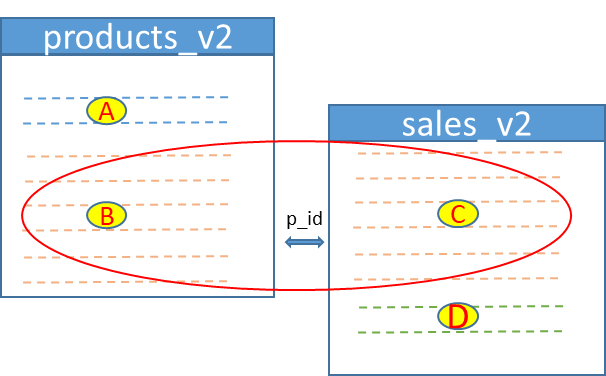
The existing sample data contains 9 sales rows whose p_id has a matching product row. Those matched combinations are returned; unmatched products and unmatched sales rows are excluded.
Select Only the Columns You Need Top ↑
Old examples often use SELECT * in joins. That is convenient for quick inspection, but practical queries are usually clearer when the required columns are listed explicitly.
Instead of:
SELECT *
FROM products_v2 AS p
INNER JOIN sales_v2 AS s
  ON p.p_id = s.p_id;
prefer:
SELECT s.sale_id,
       p.product,
       p.price,
       s.qty,
       s.store
FROM products_v2 AS p
INNER JOIN sales_v2 AS s
  ON p.p_id = s.p_id
ORDER BY s.sale_id;
This avoids duplicate column names such as two different p_id columns in the returned result.
INNER JOIN with WHERE Top ↑
The ON clause describes how tables relate. A WHERE clause can then filter the joined rows.
SELECT s.sale_id,
       p.product,
       p.price,
       s.qty,
       s.store
FROM products_v2 AS p
INNER JOIN sales_v2 AS s
  ON p.p_id = s.p_id
WHERE p.p_id = 2
ORDER BY s.sale_id;
For a simple INNER JOIN, a filter that references only joined rows can sometimes be written in either ON or WHERE and produce the same final rows. Keeping relationship conditions in ON and result filters in WHERE usually makes the intent easier to understand.
INNER JOIN with Three Tables Top ↑
INNER JOIN can connect more than two tables. The following query combines sales, products, and customers:
SELECT s.sale_id,
       c.customer,
       p.product,
       p.price,
       s.qty,
       s.store,
       p.price * s.qty AS line_total
FROM sales_v2 AS s
INNER JOIN products_v2 AS p
  ON s.p_id = p.p_id
INNER JOIN customers_v2 AS c
  ON s.c_id = c.c_id
ORDER BY s.sale_id;
A sales row appears only when both joins succeed: its product must exist in products_v2 and its customer must exist in customers_v2.
Example: Students Who Have Fee Records Top ↑
INNER JOIN is useful when you want only students who have matching fee-payment rows.
SELECT s.id,
       s.name,
       s.class,
       s.sex,
       f.dt,
       f.amount
FROM student6 AS s
INNER JOIN student_fee AS f
  ON s.id = f.id
ORDER BY s.id, f.dt;| id | name | class | sex | dt | amount |
|---|---|---|---|---|---|
| 1 | John Deo | Four | female | 2013-01-08 | 200 |
| 1 | John Deo | Four | female | 2013-01-10 | 100 |
| 2 | Max Ruin | Three | male | 2013-01-24 | 120 |
| 2 | Max Ruin | Three | male | 2013-02-07 | 150 |
| 3 | Arnold | Three | male | 2013-02-02 | 211 |
| 3 | Arnold | Three | male | 2013-02-06 | 135 |
| 4 | Krish Star | Four | female | 2013-02-14 | 100 |
Students with more than one payment appear more than once because each payment row is a separate match.
Download the existing SQL dump containing the student and fee tables.
One-to-many and Duplicate Matches Top ↑
An INNER JOIN returns matching row combinations. It does not automatically remove duplicates.
If one product row matches three sales rows, that product appears in three joined result rows:
SELECT p.p_id,
       p.product,
       s.sale_id,
       s.qty
FROM products_v2 AS p
INNER JOIN sales_v2 AS s
  ON p.p_id = s.p_id
WHERE p.p_id = 3
ORDER BY s.sale_id;
This is normal one-to-many behavior. Do not add DISTINCT merely to hide repeated values unless the final result genuinely requires unique rows.
NULL Join Values Top ↑
An equality join such as:
ON p.p_id = s.p_iddoes not match a NULL join key with another NULL, because ordinary SQL equality with NULL is not true.
Rows with NULL or otherwise unmatched join keys are excluded from an INNER JOIN. If the requirement is to retain unmatched rows from one side, use an outer join such as LEFT JOIN.
Multiple Conditions in ON Top ↑
A join relationship can use more than one column:
SELECT a.order_id,
       a.item_id,
       b.status
FROM order_items AS a
INNER JOIN shipment_items AS b
  ON a.order_id = b.order_id
 AND a.item_id = b.item_id;
All ON conditions must evaluate to true for the two rows to match.
INNER vs LEFT, RIGHT and CROSS JOIN Top ↑
| Join | What it returns |
|---|---|
| INNER JOIN | Only matching row combinations from both sides. |
| LEFT JOIN | All rows from the left table plus matching rows from the right. |
| RIGHT JOIN | All rows from the right table plus matching rows from the left. |
| CROSS JOIN | Every left row combined with every right row. |
Use the join type that matches the result you actually need rather than trying to repair the wrong join later with DISTINCT or filters.
PHP PDO Example Top ↑
After connecting to MySQL with PDO, use a prepared statement when a filter value comes from outside the query:
<?php
$product_id=2;

$sql="SELECT s.sale_id,
             p.product,
             p.price,
             s.qty,
             s.store
      FROM products_v2 AS p
      INNER JOIN sales_v2 AS s
        ON p.p_id=s.p_id
      WHERE p.p_id=:product_id
      ORDER BY s.sale_id";

$stmt=$dbo->prepare($sql);
$stmt->bindValue(
    ':product_id',
    $product_id,
    PDO::PARAM_INT
);
$stmt->execute();

foreach($stmt->fetchAll(PDO::FETCH_ASSOC) as $row){
    echo '<p>'
        .htmlspecialchars(
            $row['product'],
            ENT_QUOTES,
            'Windows-1252'
        )
        .' - Qty: '
        .(int)$row['qty']
        .'</p>';
}
Prepared statements protect external values. Table names, column names and SQL keywords should come from trusted application logic rather than being accepted directly from users.
Performance and Indexing Top ↑
- Join columns should use compatible datatypes. Avoid comparing an integer key with a VARCHAR representation of the same number.
- Primary keys are indexed automatically. Frequently joined foreign-key columns often benefit from their own indexes.
- Filters in WHERE may need supporting indexes when tables become large.
- Select only the columns required by the application rather than transferring unnecessary data with
SELECT *. - Use
EXPLAINto inspect the actual execution plan for important joins. - A missing or incomplete join condition can multiply rows dramatically, so unexpected row counts should trigger a check of the ON condition first.
Common INNER JOIN Mistakes Top ↑
Calling INNER JOIN simply "common records" Top ↑
INNER JOIN returns every row combination that satisfies the ON condition. Repeated keys can therefore produce several result rows.
Using SELECT * in production queries Top ↑
Explicit columns make joined results clearer and avoid duplicate names such as two different id or p_id columns.
Forgetting the ON condition Top ↑
A missing relationship condition can create a Cartesian-style result. Use CROSS JOIN only when every combination is intentional.
Joining on the wrong columns Top ↑
Join keys should represent the actual relationship between the tables, normally a primary/unique key on one side and the corresponding reference on the other.
Adding DISTINCT to hide a bad JOIN Top ↑
Repeated rows may be valid one-to-many matches. Check the relationship and ON condition before using DISTINCT.
Moving outer-join filters between ON and WHERE without checking the result Top ↑
INNER JOIN is forgiving in some simple cases, but LEFT and RIGHT JOIN can change meaning when a condition is moved.
Video Tutorial Top ↑
Related Tutorials and SQL Dumps Top ↑
Frequently Asked Questions Top ↑
It returns every row combination from the joined tables for which the ON condition evaluates to true.
Yes. JOIN without another join type means INNER JOIN.
No. Rows without a matching partner under the ON condition are excluded.
One source row can match several rows in the other table. Each valid row combination is returned, so repeated values are normal in one-to-many relationships.
Yes. Add another INNER JOIN and ON condition for each additional table relationship.
An ordinary equality condition does not match NULL values, so those rows are normally excluded from the INNER JOIN result.
Use ON to describe how tables relate and WHERE for filters on the joined result. This separation is especially important when moving between inner and outer joins.
RIGHT JOIN LEFT JOIN CROSS JOIN

Subhendu Mohapatra
Author & Instructor at plus2net
I write and maintain practical tutorials on Python, PHP, SQL, JavaScript, HTML, jQuery, and web development at plus2net. The tutorials focus on clear explanations, working examples, and code that readers can test and adapt while learning.


Subscribe to our YouTube Channel here

| sajid | 29-03-2009 |
| this is very easy sum | |
| Lane | 11-06-2009 |
| thank you, this was very helpful. | |
| Niyas | 21-08-2009 |
| Your Website is Very Helpful for programmers like us, The way of giving examples was superb. | |
| lavanya | 27-08-2009 |
| gud website for beginners | |
| Ptarmigan | 11-10-2009 |
| a fave website: love anti-style style: craiglist for webbies | |
| Vinod | 09-11-2009 |
| Thanks a lot, i got the complete idea of Inner join. | |
| Karu | 24-11-2009 |
| How to create Main Table or Inner joint. Please give sql in table level | |
| vimal | 03-02-2010 |
| Thanks i got the complete idea of Inner join. | |
| Zameer | 16-02-2010 |
| Plus2net is one of the best source to learn :) | |
| fei | 02-03-2010 |
| this all tutorial in your web in very helpfull for me. and for beginner programers, thanks | |
| ann | 11-03-2010 |
| thanks..!!gud website for beginners... | |
| Narasimha Varman | 12-04-2010 |
| thank you plus2net. Its very helpful. Examples shown here are live one. | |
| Garrettraj | 16-04-2010 |
| Thanks.....i got the complete idea of Limits.Examples shown here are live one. | |
| jacob | 25-07-2010 |
| thanks a lot its wonderful explanation of inner join ................. | |
| ashoks | 09-10-2010 |
| Thanks i got the complete idea of Inner join. | |
| PJ4YOU | 31-10-2010 |
| This is a brilliant way to explain,But I have a question.What is the difference between INNER and SELF Join? | |
| priyalogasamy | 18-03-2011 |
| i need to select account numbers from 1 table by checking conditions in other 2 tables | |
| surendra | 23-09-2011 |
| Thank you ,i got the full idea about inner join | |
| Prashant Sahu | 24-11-2011 |
| Can you tell me differnce between self join, equi join and inner join? | |
| Vikas Yadav | 15-05-2012 |
| The representation method is superb..Every biggner can understand easily...Very very thanks ...Vikas | |
| Jyodentist | 03-08-2012 |
| Thank you,Good explanation with example. | |
| Subhash Patel | 16-08-2012 |
| its learnt by me easily from here.......nicee.... | |
| Mainuddin Bhuiyan | 31-01-2014 |
| Go ahead...........Don't think ...site is useless I am use this site 3to 5 times in every week. | |
 SQL Video Tutorials