Tkinter Restaurant Management with MySQL - Version 2
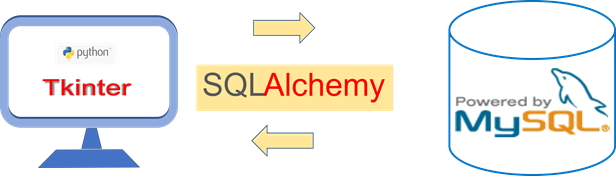
In Restaurant Management Version 1, menu items and prices are stored directly inside Python. Version 2 moves the product data to a MySQL database and uses SQLAlchemy with MySQL to retrieve the menu dynamically.
The returned product records are stored in a Python dictionary. Tkinter then creates a quantity Spinbox for each available product. Radiobuttons switch between Breakfast, Lunch and Dinner, while the generated bill is displayed in a Treeview.
MySQL product table
        |
        v
SELECT available products
        |
        v
Python dictionary
        |
        v
Dynamic menu + Spinboxes
        |
        v
Generate Bill
        |
        +--> Treeview rows
        +--> Subtotal
        +--> Tax
+--> Final total- Features Added in Version 2
- Product Table in MySQL
- SQLAlchemy Connection
- Load Products by Category
- Store Product Data in a Dictionary
- Create Menu Controls Dynamically
- Switch Breakfast, Lunch and Dinner
- Generate the Bill
- Reset the Current Order
- Complete Program
- Optional Product Images
- Next Step: Version 3
- FAQs
Features Added in Restaurant Management Version 2 🔝
- Connect Python to a MySQL database using SQLAlchemy.
- Retrieve products belonging to the selected meal category.
- Display only products whose
availablevalue is1. - Read product name and price from the database instead of hard-coding them in Python.
- Switch the visible menu by selecting Breakfast, Lunch or Dinner.
- Create the menu controls dynamically based on the number of rows returned by MySQL.
- Control the number of menu columns from one Python constant.
- Generate Treeview invoice rows only for products whose quantity is greater than zero.
- Calculate subtotal, sample tax and final total.
- Reset the current order without recreating the Tkinter variables.
Product Table in MySQL 🔝
The menu data is stored in the plus2_products table. If MySQL is not installed yet, see installing and using MySQL with Python.
The table contains:
| Column | Purpose |
|---|---|
p_id | Unique product ID. |
p_name | Product or menu-item name. |
unit | Unit such as Plate, Packet or Number. |
price | Current unit price. |
p_cat | Category ID: 1 Breakfast, 2 Lunch, 3 Dinner. |
available | 1 to display the product, 0 to hide it. |
Improved Product Table
Use DECIMAL for price instead of FLOAT, because product prices are currency-style values.
CREATE TABLE IF NOT EXISTS plus2_products (
    p_id INT UNSIGNED NOT NULL AUTO_INCREMENT,
    p_name VARCHAR(100) NOT NULL,
    unit VARCHAR(30) NOT NULL,
    price DECIMAL(10,2) NOT NULL,
    p_cat TINYINT UNSIGNED NOT NULL,
    available TINYINT(1) NOT NULL DEFAULT 1,
    PRIMARY KEY (p_id),
    INDEX idx_product_category_available (p_cat,available)
) ENGINE=InnoDB DEFAULT CHARSET=utf8mb4;

INSERT INTO plus2_products
(p_id,p_name,unit,price,p_cat,available) VALUES
(1,'Item-1-BF','Number',20.00,1,1),
(2,'Item-2-BF','Number',30.00,1,1),
(3,'Item-3-BF','Number',30.40,1,1),
(4,'Item-4-BF','Number',45.80,1,1),
(5,'Item-5-BF','Number',15.07,1,1),
(6,'Item-6-BF','Number',45.70,1,1),
(7,'Item-7-BF','Number',78.00,1,1),
(8,'Item-8-BF','Number',87.00,1,1),
(9,'Item-9-Lunch','Packet',150.00,2,1),
(10,'Item-10-Lunch','One Plate',180.00,2,1),
(11,'Item-11-Lunch','Plate',50.00,2,1),
(12,'Item-12-Lunch','Plate',90.00,2,1),
(13,'Item-13-Lunch','Packet',90.00,2,1),
(14,'Item-14-Lunch','Plate',110.00,2,1),
(15,'Item-15-Lunch','Plate',120.00,2,1),
(16,'Item-16-Lunch','Packet',200.00,2,1),
(17,'Item-17-Dinner','Plate',545.00,3,1),
(18,'Item-18-Dinner','Packet',500.00,3,1),
(19,'Item-19-Dinner','Number',80.00,3,1),
(20,'Item-20-Dinner','Number',110.00,3,1),
(21,'Item-21-Dinner','Plate',200.00,3,1),
(22,'Item-22-Dinner','Packet',500.00,3,1),
(23,'Item-23-Dinner','Plate',120.00,3,1),
(24,'Item-24-Dinner','Plate',180.00,3,1);
For the complete restaurant database setup, also see installing the Restaurant Management tables.
Create the SQLAlchemy MySQL Connection 🔝
Keep the database Engine in a separate file named my_connect.py. See the detailed MySQL connection-string examples and SQLAlchemy MySQL connection tutorial.
my_connect.py
from sqlalchemy import create_engine

engine=create_engine('mysql+mysqldb://root:pw@localhost/db_name')
The Engine manages a pool of database connections. The application obtains a connection only when it needs to execute a query.
Load Available Products by Category 🔝
The category is passed as a query parameter instead of being joined directly into the SQL string.
query=text('''SELECT p_id,p_name,unit,price,p_cat
FROM plus2_products
WHERE available=:available AND p_cat=:cat
ORDER BY p_id''')

with engine.connect() as conn:
    rows=conn.execute(
        query,
        {'available':1,'cat':cat}
    ).mappings().all()
This replaces the older pattern:
my_conn.execute(
    "SELECT * FROM plus2_products WHERE available=1 and p_cat="+str(cat)
)
Named parameters keep the query easier to read and avoid constructing SQL by concatenating values.
Store the Returned Products in a Dictionary 🔝
The first version already introduced a Python dictionary. In Version 2 the dictionary is built from MySQL rows instead of being typed manually.
products={}

for row in rows:
    products[row['p_id']]={
        'name':row['p_name'],
        'unit':row['unit'],
        'price':Decimal(str(row['price']))
    }
The database product ID is the dictionary key. Each product keeps its name, unit and price together.
This is easier to understand than:
my_menu[i]=[item[1],item[3]]Create Menu Controls Dynamically 🔝
The number of columns can be controlled from one constant:
MENU_COLUMNS=4Before displaying another category, remove the previous menu widgets:
for widget in menu_items_frame.winfo_children():
widget.destroy()Then create one menu card for every returned product:
quantity_vars={}

for index,(p_id,item) in enumerate(products.items()):
    row=index//MENU_COLUMNS
    column=index%MENU_COLUMNS

    quantity_vars[p_id]=tk.IntVar(value=0)

    card=ttk.Frame(menu_items_frame,padding=8,relief='ridge')
    card.grid(row=row,column=column,padx=6,pady=6,sticky='nsew')

    ttk.Label(card,text=item['name']).grid(row=0,column=0)
    ttk.Label(card,text=f"{item['unit']} | {item['price']:.2f}").grid(row=1,column=0)

    spin=tk.Spinbox(
        card,
        from_=0,
        to=10,
        width=4,
        textvariable=quantity_vars[p_id],
        state='readonly'
    )
    spin.grid(row=2,column=0,pady=5)
Switch Between Breakfast, Lunch and Dinner 🔝
The database uses these category IDs:
1 = Breakfast
2 = Lunch
3 = Dinner
The Radiobutton values should use the same IDs:
category_var=tk.IntVar(value=1)

ttk.Radiobutton(
    controls,
    text='Breakfast',
    variable=category_var,
    value=1,
    command=lambda:show_items(1)
)
The older version used radio values 1, 0 and 5, while the commands loaded categories 1, 2 and 3. The revised values now match the database categories.
Generate the Bill from the Current Category 🔝
The program checks the quantity selected for each displayed product.
for p_id,item in products.items():
    qty=quantity_vars[p_id].get()

    if qty>0:
        line_total=(item['price']*qty).quantize(MONEY,rounding=ROUND_HALF_UP)
        subtotal+=line_total
Each ordered product is added to Treeview:
tree.insert(
    '',
    tk.END,
    values=(
        item['name'],
        f"{item['price']:.2f}",
        qty,
        f"{line_total:.2f}"
    )
)
The project continues to use a sample 10% tax:
TAX_RATE=Decimal('0.10')Then:
tax=(subtotal*TAX_RATE).quantize(MONEY,rounding=ROUND_HALF_UP)
final_total=(subtotal+tax).quantize(MONEY,rounding=ROUND_HALF_UP)Reset the Current Order 🔝
There is no need to create new IntVar objects during reset.
for qty_var in quantity_vars.values():
    qty_var.set(0)
The invoice rows and totals are also cleared.
Complete Restaurant Management Version 2 Program 🔝
Save the database Engine shown above as my_connect.py, then use this main program.
import tkinter as tk
from tkinter import ttk
from decimal import Decimal, ROUND_HALF_UP
from sqlalchemy import text
from sqlalchemy.exc import SQLAlchemyError
from my_connect import engine

MENU_COLUMNS=4
MONEY=Decimal('0.01')
TAX_RATE=Decimal('0.10')
products={}
quantity_vars={}

root=tk.Tk()
root.geometry('1050x650')
root.minsize(900,550)
root.title('Restaurant Management V-2 - plus2net')

root.columnconfigure(0,weight=3)
root.columnconfigure(1,weight=2)
root.rowconfigure(0,weight=1)

menu_frame=ttk.Frame(root,padding=10)
menu_frame.grid(row=0,column=0,sticky='nsew')

bill_frame=ttk.Frame(root,padding=10)
bill_frame.grid(row=0,column=1,sticky='nsew')
bill_frame.rowconfigure(1,weight=1)
bill_frame.columnconfigure(0,weight=1)

ttk.Label(menu_frame,text='Restaurant Menu',font=('Times',22,'bold')).grid(row=0,column=0,sticky='w',pady=(0,10))

menu_items_frame=ttk.Frame(menu_frame)
menu_items_frame.grid(row=1,column=0,sticky='nsew')

for column in range(MENU_COLUMNS):
    menu_items_frame.columnconfigure(column,weight=1)

controls=ttk.Frame(menu_frame,padding=(0,15))
controls.grid(row=2,column=0,sticky='ew')

category_var=tk.IntVar(value=1)
status_var=tk.StringVar()

ttk.Label(bill_frame,text='Current Bill',font=('Times',22,'bold')).grid(row=0,column=0,sticky='w',pady=(0,8))

tree=ttk.Treeview(bill_frame,columns=('item','price','qty','total'),show='headings',height=12)
tree.grid(row=1,column=0,sticky='nsew')

ys=ttk.Scrollbar(bill_frame,orient='vertical',command=tree.yview)
ys.grid(row=1,column=1,sticky='ns')
tree.configure(yscrollcommand=ys.set)

tree.heading('item',text='Item')
tree.heading('price',text='Price')
tree.heading('qty',text='Qty')
tree.heading('total',text='Total')

tree.column('item',width=150,anchor='w')
tree.column('price',width=75,anchor='e')
tree.column('qty',width=55,anchor='center')
tree.column('total',width=85,anchor='e')

subtotal_var=tk.StringVar(value='0.00')
tax_var=tk.StringVar(value='0.00')
total_var=tk.StringVar(value='0.00')

totals=ttk.Frame(bill_frame,padding=(0,12))
totals.grid(row=2,column=0,sticky='e')

ttk.Label(totals,text='Subtotal:').grid(row=0,column=0,sticky='e',padx=5)
ttk.Label(totals,textvariable=subtotal_var).grid(row=0,column=1,sticky='e')

ttk.Label(totals,text='Tax 10%:').grid(row=1,column=0,sticky='e',padx=5)
ttk.Label(totals,textvariable=tax_var).grid(row=1,column=1,sticky='e')

ttk.Label(totals,text='Final Total:',font=('Times',16,'bold')).grid(row=2,column=0,sticky='e',padx=5,pady=6)
ttk.Label(totals,textvariable=total_var,font=('Times',16,'bold')).grid(row=2,column=1,sticky='e')

ttk.Label(bill_frame,textvariable=status_var).grid(row=3,column=0,sticky='w')

def clear_bill():
    for row in tree.get_children():
        tree.delete(row)

    subtotal_var.set('0.00')
    tax_var.set('0.00')
    total_var.set('0.00')

def show_items(cat):
    global products,quantity_vars

    for widget in menu_items_frame.winfo_children():
        widget.destroy()

    products={}
    quantity_vars={}
    category_var.set(cat)

    query=text('''SELECT p_id,p_name,unit,price,p_cat
    FROM plus2_products
    WHERE available=:available AND p_cat=:cat
    ORDER BY p_id''')

    try:
        with engine.connect() as conn:
            rows=conn.execute(query,{'available':1,'cat':cat}).mappings().all()
    except SQLAlchemyError as e:
        print(e)
        status_var.set('Unable to load menu items.')
        return

    for row in rows:
        products[row['p_id']]={
            'name':row['p_name'],
            'unit':row['unit'],
            'price':Decimal(str(row['price']))
        }

    for index,(p_id,item) in enumerate(products.items()):
        grid_row=index//MENU_COLUMNS
        grid_column=index%MENU_COLUMNS

        quantity_vars[p_id]=tk.IntVar(value=0)

        card=ttk.Frame(menu_items_frame,padding=8,relief='ridge')
        card.grid(row=grid_row,column=grid_column,padx=6,pady=6,sticky='nsew')

        ttk.Label(card,text=item['name'],font=('Times',12,'bold')).grid(row=0,column=0,pady=3)
        ttk.Label(card,text=f"{item['unit']} | {item['price']:.2f}").grid(row=1,column=0,pady=3)

        spin=tk.Spinbox(card,from_=0,to=10,width=4,textvariable=quantity_vars[p_id],state='readonly')
        spin.grid(row=2,column=0,pady=5)

    status_var.set(f'Products loaded: {len(products)}')

def my_bill():
    subtotal=Decimal('0.00')
    clear_bill()

    for p_id,item in products.items():
        qty=quantity_vars[p_id].get()

        if qty>0:
            line_total=(item['price']*qty).quantize(MONEY,rounding=ROUND_HALF_UP)
            subtotal+=line_total

            tree.insert('',tk.END,values=(item['name'],f"{item['price']:.2f}",qty,f"{line_total:.2f}"))

    subtotal=subtotal.quantize(MONEY,rounding=ROUND_HALF_UP)
    tax=(subtotal*TAX_RATE).quantize(MONEY,rounding=ROUND_HALF_UP)
    final_total=(subtotal+tax).quantize(MONEY,rounding=ROUND_HALF_UP)

    subtotal_var.set(f'{subtotal:.2f}')
    tax_var.set(f'{tax:.2f}')
    total_var.set(f'{final_total:.2f}')

    if not tree.get_children():
        status_var.set('Select at least one menu quantity.')
    else:
        status_var.set('Bill generated.')

def my_reset():
    for qty_var in quantity_vars.values():
        qty_var.set(0)

    clear_bill()
    status_var.set('Order reset.')

ttk.Radiobutton(controls,text='Breakfast',variable=category_var,value=1,command=lambda:show_items(1)).grid(row=0,column=0,padx=6)
ttk.Radiobutton(controls,text='Lunch',variable=category_var,value=2,command=lambda:show_items(2)).grid(row=0,column=1,padx=6)
ttk.Radiobutton(controls,text='Dinner',variable=category_var,value=3,command=lambda:show_items(3)).grid(row=0,column=2,padx=6)
ttk.Button(controls,text='Get Bill',command=my_bill).grid(row=0,column=3,padx=12)
ttk.Button(controls,text='Reset',command=my_reset).grid(row=0,column=4,padx=6)

show_items(1)
root.mainloop()
Adding Product Images 🔝
The original V-2 program loads several food images from an absolute Windows path:
G:\My Drive\testing\plus2_restaurant_v1\images\Those images are not required for the database-integration logic, so the complete revised example omits them. This makes the code easier to run on another computer.
If images are added, keep them in the project directory:
image=tk.PhotoImage(file='images/food-item-11.png')For a database-driven application, another useful extension is to store the image filename with each product and load the matching image when the menu is created.
PhotoImage objects must remain referenced while they are displayed. If images are dynamically created, keep the image objects in a list or dictionary for as long as the widgets use them.Next Step: Restaurant Management Version 3 🔝
Version 2 solves the main menu-management problem:
V-1
Python dictionary
      |
      v
Fixed menu

V-2
MySQL table
      |
      v
Dynamic menu
The next stage is Restaurant Management Version 3, where we can connect the selected products and totals to the invoice and reporting workflow.
Frequently Asked Questions 🔝
SQLAlchemy executes a SELECT query against plus2_products. The returned product rows are converted into a Python dictionary and used to create the menu widgets.
The query includes available=1, so products whose availability flag is zero are not returned to the Tkinter menu.
Breakfast, Lunch and Dinner use database category IDs 1, 2 and 3. Selecting a Radiobutton runs the product query again with the selected category.
Clearing a Python list does not remove Tkinter widgets from the interface. Destroying the old widgets prevents products from different categories from overlapping.
The dictionary keeps each database product ID connected to its name, unit and price, making the billing code easier to read and extend.
DECIMAL stores fixed decimal values and is more suitable for currency-style prices than FLOAT.
Yes. Change the MENU_COLUMNS constant and the dynamic layout recalculates the row and column position for each returned product.
More Projects using Tkinter

Subhendu Mohapatra
Author & Instructor at plus2net
I write and maintain practical tutorials on Python, PHP, SQL, JavaScript, HTML, jQuery, and web development at plus2net. The tutorials focus on clear explanations, working examples, and code that readers can test and adapt while learning.


Subscribe to our YouTube Channel here

 Python Video Tutorials