Create Standalone Python Applications with Tkinter and SQLite
Create Standalone #sqlite Database Applications Using #Python #Tkinter and #PyInstaller #PythonGUI
- Simple SQLite Database Connection
- SQLite Database Connector with File Browser
- Integrated Database Management with Record Viewer
Part II : Bundling SQLite database with the application
These three examples illustrate different ways to interact with SQLite databases using Tkinter GUI application. From a simple fixed-path connection to a flexible file browser and an integrated record viewer, these examples provide practical learning for creating standalone database-driven applications.
1. Simple SQLite Database Connection 🔝
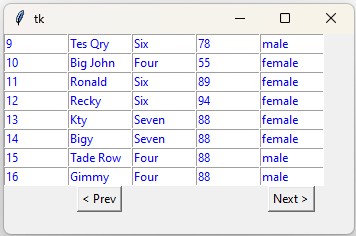
This example demonstrates a simple way to connect to an SQLite database using Python. The database path is embedded directly in the code, making it less flexible as users cannot choose their own database file. This approach is suitable for testing with a fixed database file. PyInstaller is used to convert this script into an executable.
from sqlalchemy import create_engine,text
my_conn = create_engine("sqlite:///D:\\testing\\sqlite\\my_db.db") # fixed connection path
my_conn=my_conn.connect()

###### end of connection ####
r_set=my_conn.execute(text("SELECT count(*) as no from STUDENT"))
data_row=r_set.fetchone()
no_rec=data_row[0] # Total number of rows in table
limit = 8; # No of records to be shown per page.
##### tkinter window ######
import tkinter  as tk
from tkinter import *
my_w = tk.Tk()
my_w.geometry("350x200")
def my_display(offset):

    q="SELECT * from student LIMIT "+ str(offset) +","+str(limit)
    r_set=my_conn.execute(text(q));
    i=0 # row value inside the loop
    for student in r_set:
        for j in range(len(student)):
            e = Entry(my_w, width=10, fg='blue')
            e.grid(row=i, column=j)
            e.insert(END, student[j])
        i=i+1
    while (i= 0):
        b2["state"]="active"  # enable Prev button
    else:
        b2["state"]="disabled"# disable Prev button
my_display(0)
my_w.mainloop()
sqlite1.py : Source code or our main file. D:\\testing\\sqlite1.py : Full Path to our source file. D:\\my_app : Destination path where our executable file will be stored. Command to create executable file by using PyInstaller.
>pyinstaller --onefile --windowed --distpath D:\\my_app D:\\testing\\sqlite1.py2. SQLite Database Connector with File Browser 🔝

The main disadvantage of the first example is the fixed database path, which limits usability. In this example, we use a file browser to allow users to select their own SQLite database file. Once connected, users can view the tables available and see the number of records in each table. This approach provides greater flexibility and makes the application more user-friendly.
import tkinter as tk
from tkinter import filedialog, messagebox
import sqlite3

# Initialize main window
my_w = tk.Tk()
my_w.title("SQLite Database Connector")
my_w.geometry("600x600")

connection = None

def toggle_connection():
    global connection
    if connection is None:
        connect_database()
    else:
        disconnect_database()

def connect_database():
    global connection, db_path_label, tables_frame
    db_file = filedialog.askopenfilename(title="Select SQLite Database File", filetypes=[("SQLite Database", "*.sqlite *.db")])
    if db_file:
        try:
            connection = sqlite3.connect(db_file)
            db_path_label.config(text=db_file, fg="green")
            connect_button.config(text="Disconnect")
            show_tables()
        except sqlite3.Error as e:
            messagebox.showerror("Connection Error", f"Failed to connect to the database.\nError: {e}")

def disconnect_database():
    global connection, db_path_label, tables_frame
    if connection:
        connection.close()
        connection = None
        db_path_label.config(text="Not connected", fg="red")
        connect_button.config(text="Connect to SQLite Database")
        for widget in tables_frame.winfo_children():
            widget.destroy()

def show_tables():
    global connection, tables_frame
    if connection:
        cursor = connection.cursor()
        try:
            cursor.execute("SELECT name FROM sqlite_master WHERE type='table'")
            tables = cursor.fetchall()
            for widget in tables_frame.winfo_children():
                widget.destroy()

            # Add headers
            header_name = tk.Label(tables_frame, text="Table Name", font=('times', 12, 'bold'), borderwidth=2, relief='groove', padx=10, pady=5)
            header_count = tk.Label(tables_frame, text="Number of Records", font=('times', 12, 'bold'), borderwidth=2, relief='groove', padx=10, pady=5)
            header_name.grid(row=0, column=0, sticky='nsew')
            header_count.grid(row=0, column=1, sticky='nsew')

            # Add table names and record counts
            for idx, table in enumerate(tables):
                table_name = table[0]
                cursor.execute(f"SELECT COUNT(*) FROM {table_name}")
                record_count = cursor.fetchone()[0]
                label_name = tk.Label(tables_frame, text=table_name, font=('times', 12), borderwidth=2, relief='groove', padx=10, pady=5)
                label_count = tk.Label(tables_frame, text=record_count, font=('times', 12), borderwidth=2, relief='groove', padx=10, pady=5)
                label_name.grid(row=idx + 1, column=0, sticky='nsew')
                label_count.grid(row=idx + 1, column=1, sticky='nsew')
        except sqlite3.Error as e:
            messagebox.showerror("Error", f"Failed to retrieve tables.\nError: {e}")

# Button to connect/disconnect to SQLite database
connect_button = tk.Button(my_w, text="Connect to SQLite Database", command=toggle_connection, font=('times', 18, 'bold'))
connect_button.grid(row=1, column=1, pady=10, padx=10)

# Label to show database path
db_path_label = tk.Label(my_w, text="Not connected", font=('times', 14, 'bold'), fg="red")
db_path_label.grid(row=2, column=1, pady=5, columnspan=2, padx=10)

# Frame to display tables in the database
tables_frame = tk.Frame(my_w)
tables_frame.grid(row=3, column=1, pady=10, padx=10, columnspan=2, sticky='nsew')

my_w.mainloop()
sqlite2.py : Source code or our main file. D:\\testing\\sqlite2.py : Full Path to our source file. D:\\my_app : Destination path where our executable file will be stored. Command to create executable file by using PyInstaller.
>pyinstaller --onefile --windowed --distpath D:\\my_app D:\\testing\\sqlite2.py3. Integrated Database Management with Record Viewer 🔝
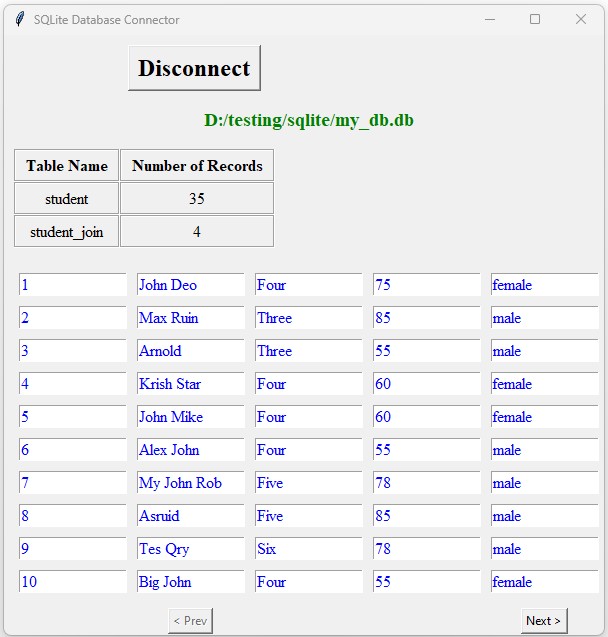
This final example combines the functionality of browsing for a database file and viewing records. Users can connect to their SQLite database file, view the tables available, and display records from the "student" table with pagination (10 records per page). The application provides an easy-to-use interface for managing databases and displaying data. PyInstaller can convert this script into a standalone executable, making it shareable without requiring Python installation.
import tkinter as tk
from tkinter import filedialog, messagebox
from sqlalchemy import create_engine, text
import sqlite3

# Initialize main window
my_w = tk.Tk()
my_w.title("SQLite Database Connector")
my_w.geometry("600x600")

connection = None
my_conn = None
no_rec = 0
limit = 10

def toggle_connection():
    global connection, my_conn, no_rec
    if connection is None:
        connect_database()
        if my_conn is not None:
            # Get the total number of records in the student table
            r_set = my_conn.execute(text("SELECT COUNT(*) as no FROM student"))
            data_row = r_set.fetchone()
            no_rec = data_row[0]
            display_records(0)
    else:
        disconnect_database()

def connect_database():
    global connection, db_path_label, tables_frame, my_conn
    db_file = filedialog.askopenfilename(title="Select SQLite Database File", filetypes=[("SQLite Database", "*.sqlite *.db")])
    if db_file:
        try:
            connection = sqlite3.connect(db_file)
            my_conn = create_engine(f"sqlite:///{db_file}").connect()
            db_path_label.config(text=db_file, fg="green")
            connect_button.config(text="Disconnect")
            show_tables()
        except sqlite3.Error as e:
            messagebox.showerror("Connection Error", f"Failed to connect to the database.\nError: {e}")

def disconnect_database():
    global connection, my_conn, db_path_label, tables_frame
    if connection:
        connection.close()
        my_conn = None
        connection = None
        db_path_label.config(text="Not connected", fg="red")
        connect_button.config(text="Connect to SQLite Database")
        for widget in tables_frame.winfo_children():
            widget.destroy()
        for widget in record_frame.winfo_children():
            widget.destroy()

def show_tables():
    global connection, tables_frame
    if connection:
        cursor = connection.cursor()
        try:
            cursor.execute("SELECT name FROM sqlite_master WHERE type='table'")
            tables = cursor.fetchall()
            for widget in tables_frame.winfo_children():
                widget.destroy()

            # Add headers
            header_name = tk.Label(tables_frame, text="Table Name", font=('times', 12, 'bold'), borderwidth=2, relief='groove', padx=10, pady=5)
            header_count = tk.Label(tables_frame, text="Number of Records", font=('times', 12, 'bold'), borderwidth=2, relief='groove', padx=10, pady=5)
            header_name.grid(row=0, column=0, sticky='nsew')
            header_count.grid(row=0, column=1, sticky='nsew')

            # Add table names and record counts
            for idx, table in enumerate(tables):
                table_name = table[0]
                cursor.execute(f"SELECT COUNT(*) FROM {table_name}")
                record_count = cursor.fetchone()[0]
                label_name = tk.Label(tables_frame, text=table_name, font=('times', 12), borderwidth=2, relief='groove', padx=8, pady=5)
                label_count = tk.Label(tables_frame, text=record_count, font=('times', 12), borderwidth=2, relief='groove', padx=8, pady=5)
                label_name.grid(row=idx + 1, column=0, sticky='nsew')
                label_count.grid(row=idx + 1, column=1, sticky='nsew')
        except sqlite3.Error as e:
            messagebox.showerror("Error", f"Failed to retrieve tables.\nError: {e}")

def display_records(offset):
    global my_conn, no_rec, record_frame
    if my_conn is None:
        return

    q = "SELECT * FROM student LIMIT " + str(offset) + "," + str(limit)
    r_set = my_conn.execute(text(q))

    for widget in record_frame.winfo_children():
        widget.destroy()

    # Display records in a table-like format
    i = 0  # row value inside the loop
    for student in r_set:
        for j in range(len(student)):
            e = tk.Entry(record_frame, width=13, fg='blue', font=('times', 12))
            e.grid(row=i, column=j, padx=5, pady=5)
            e.insert(tk.END, student[j])
        i += 1

    # Fill remaining rows if less than the limit
    while i < limit:
        for j in range(len(student)):
            e = tk.Entry(record_frame, width=13, fg='blue', font=('times', 12))
            e.grid(row=i, column=j, padx=5, pady=5)
            e.insert(tk.END, "")
        i += 1

    # Show buttons for navigation
    back = offset - limit  # This value is used by Previous button
    next = offset + limit  # This value is used by Next button
    b1 = tk.Button(record_frame, text='Next >', command=lambda: display_records(next))
    b1.grid(row=limit + 1, column=4, pady=10)
    b2 = tk.Button(record_frame, text='< Prev', command=lambda: display_records(back))
    b2.grid(row=limit + 1, column=1, pady=10)

    if no_rec <= next:
        b1["state"] = "disabled"  # disable next button
    else:
        b1["state"] = "active"  # enable next button

    if back >= 0:
        b2["state"] = "active"  # enable Prev button
    else:
        b2["state"] = "disabled"  # disable Prev button

# Button to connect/disconnect to SQLite database
connect_button = tk.Button(my_w, text="Connect to SQLite Database", command=toggle_connection, font=('times', 18, 'bold'))
connect_button.grid(row=1, column=1, pady=10, padx=10)

# Label to show database path
db_path_label = tk.Label(my_w, text="Not connected", font=('times', 14, 'bold'), fg="red")
db_path_label.grid(row=2, column=1, pady=5, columnspan=2, padx=10)

# Frame to display tables in the database
tables_frame = tk.Frame(my_w)
tables_frame.grid(row=3, column=1, pady=10, padx=10, columnspan=2, sticky='nsew')

# Frame to display student records
record_frame = tk.Frame(my_w)
record_frame.grid(row=4, column=1, pady=10, padx=10, columnspan=2, sticky='nsew')

my_w.mainloop()
sqlite3.py : Source code or our main file. D:\\testing\\sqlite3.py : Full Path to our source file. D:\\my_app : Destination path where our executable file will be stored. Command to create executable file by using PyInstaller.
>pyinstaller --onefile --windowed --distpath D:\\my_app D:\\testing\\sqlite3a.py Download the SQLite database my_db.db with sample student table from here.
https://www.plus2net.com/python/download/my_db.db
https://www.plus2net.com/python/download/my_db.db
Bundling an SQLite database with a Tkinter application offers a seamless user experience, allowing the application to run independently without requiring separate database configurations. In Part II, we will explore how to integrate the SQLite database directly into the application, simplifying deployment and usage.
Part II : Bundling SQLite database with the application
Part III : Holiday Calendar Application by Bundling SQLite database with the application
Part II : Bundling SQLite database with the application
Part III : Holiday Calendar Application by Bundling SQLite database with the application
Creating Applications by using PyInstaller

Subhendu Mohapatra
Author & Instructor at plus2net
I write and maintain practical tutorials on Python, PHP, SQL, JavaScript, HTML, jQuery, and web development at plus2net. The tutorials focus on clear explanations, working examples, and code that readers can test and adapt while learning.
Connect:


Subscribe to our YouTube Channel here
This article is written by plus2net.com team.
https://www.plus2net.com

 Python Video Tutorials