Holiday Calendar Application using SQLite database and bundling using PyInstaller
Create Standalone holiday Calendar App with Tkinter, SQLite & PyInstaller | #Python #PythonGUI
- Holiday Database Creation Script
- Integrating the Holiday Database with Tkinter GUI
- Building the Application by bundling with SQLite database
Part I: Browse and connect to SQLite database ( without bundling )
Part II: Integrating an SQLite database into a Tkinter application
We will learn how to interact with SQLite databases using Tkinter GUI, and create a holiday calendar for 2025. We will start from setting up the holiday database, creating a Tkinter window to browse and view holidays, and finally combine the two to build an interactive standalone application by using PyInstaller.
1. Holiday Database Creation Script 🔝

The first step in our holiday calendar project is to create the SQLite database that will store all the holidays. Below is the script for creating and populating the holiday database using Python. The database includes holidays for multiple countries like India, USA, China, and others. Each holiday is associated with a specific date, which will be displayed in the calendar. This is a sample holiday list only, you can expand by adding more holidays to the list. Once the database is created, we can connect it to our GUI.
import sqlite3
import os

# Get the current directory of the running script
current_directory = os.path.dirname(os.path.abspath(__file__))
db_path = os.path.join(current_directory, "holidays_2025.db")

# Connect to SQLite database in the current directory
my_conn = sqlite3.connect(db_path)


# Create a table to store holiday details
my_conn.execute('''
    CREATE TABLE IF NOT EXISTS holidays (
        date TEXT PRIMARY KEY,
        holiday_details TEXT NOT NULL
    )
''')

# List of holidays with dates and descriptions
holidays = [
    # India
    ("2025-01-26", "Republic Day (India)"),
    ("2025-08-15", "Independence Day (India)"),
    ("2025-10-02", "Gandhi Jayanti (India)"),
    ("2025-11-01", "Diwali (India)"),

    # USA
    ("2025-01-01", "New Year's Day (USA)"),
    ("2025-07-04", "Independence Day (USA)"),
    ("2025-11-27", "Thanksgiving Day (USA)"),
    ("2025-12-25", "Christmas Day (USA)"),

    # Other countries
    ("2025-04-05", "Tomb Sweeping Day (China)"),
    ("2025-05-01", "Labor Day (International)"),
    ("2025-07-14", "Bastille Day (France)"),
    ("2025-10-03", "German Unity Day (Germany)"),
    ("2025-12-26", "Boxing Day (UK and Commonwealth Countries)")
]

# Insert holiday data into the table
my_conn.executemany('''
    INSERT OR IGNORE INTO holidays (date, holiday_details) VALUES (?, ?)
''', holidays)

# Commit the changes and close the connection
my_conn.commit()
my_conn.close()

print(f"Database created successfully with holiday list for 2025 at: {db_path}")
2. Integrating the Holiday Database with Tkinter GUI 🔝
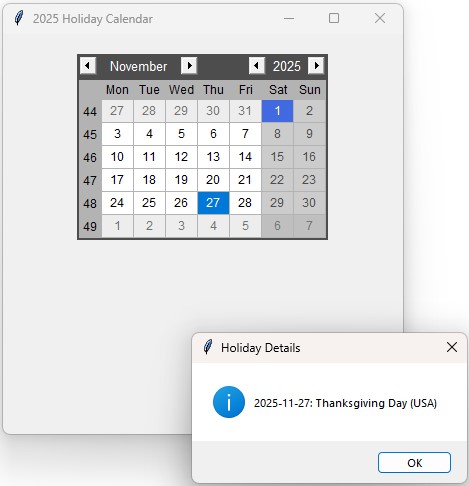
With the SQLite database created, the next step is to build the Tkinter GUI that will allow users to view holidays for specific dates. The GUI features a calendar widget and allows users to browse holiday information for 2025. When a holiday date is selected, a pop-up displays the holiday details. This part of the project showcases how to use Tkinter to interact with databases and provide a seamless user experience.
import sqlite3
import os
import tkinter as tk
from tkinter import messagebox
from tkcalendar import Calendar
from datetime import datetime

# Get the current directory of the running script
current_directory = os.path.dirname(os.path.abspath(__file__))
db_path = os.path.join(current_directory, "holidays_2025.db")

# Function to fetch holidays from the database
def fetch_holidays():
    conn = sqlite3.connect(db_path)
    cursor = conn.cursor()
    cursor.execute("SELECT date, holiday_details FROM holidays")
    holidays = cursor.fetchall()
    conn.close()
    return holidays

# Function to display holiday details on clicking a date
def show_holiday_details(event):
    selected_date_str = calendar.get_date()
    selected_date = datetime.strptime(selected_date_str, "%Y-%m-%d").date()
    if selected_date in holiday_dict:
        holiday = holiday_dict[selected_date]
        messagebox.showinfo("Holiday Details", f"{selected_date_str}: {holiday}")
    else:
        messagebox.showinfo("Holiday Details", f"No holiday on {selected_date_str}")


# Fetch holidays and prepare a dictionary
holidays = fetch_holidays()
holiday_dict = {}
for holiday in holidays:
    # Convert date string to datetime.date object
    date_obj = datetime.strptime(holiday[0], "%Y-%m-%d").date()
    holiday_dict[date_obj] = holiday[1]

# Initialize Tkinter root window
root = tk.Tk()
root.title("2025 Holiday Calendar")
root.geometry("400x400")

# Calendar widget
calendar = Calendar(root, selectmode="day", year=2025, date_pattern="yyyy-mm-dd")
calendar.pack(pady=20)

# Highlight holiday dates
for date, holiday in holiday_dict.items():
    calendar.calevent_create(date, holiday, "holiday")

# Bind the event to show holiday details on click
calendar.bind("<<CalendarSelected>>", show_holiday_details)

# Run the application
root.mainloop() # keep the window open
3. Building the Application by bundling with SQLite database 🔝
Use PyInstaller's --add-data option to include the SQLite database in the executable. The syntax differs between operating systems:show_calendar.py : Source code or our main file. D:\\testing\\calendar_2025\\show_calendar_2025.py : Full Path to our source file. D:\\testing\\calendar_2025\\holidays_2025.db : Full path to our SQLite database file. D:\\my_app : Destination path where our executable file will be stored.
Command to create executable file by using PyInstaller.
>PyInstaller --onefile --windowed --add-data "D:\\testing\\calendar_2025\\holidays_2025.db;." --distpath D:\\my_app D:\\testing\\calendar_2025\\show_calendar.pyThis is a useful example of using Python to create practical, standalone applications for everyday use. We also use PyInstaller to convert our Python script into an executable file, making it easier to share and distribute.
Part II : Packaging Application with SQLite database as Standalone Executable
Creating Applications by using PyInstaller Part I: Browse and connect to SQLite database ( without bundling )

Subhendu Mohapatra
Author & Instructor at plus2net
I write and maintain practical tutorials on Python, PHP, SQL, JavaScript, HTML, jQuery, and web development at plus2net. The tutorials focus on clear explanations, working examples, and code that readers can test and adapt while learning.
Connect:


Subscribe to our YouTube Channel here
This article is written by plus2net.com team.
https://www.plus2net.com

 Python Video Tutorials