Tkinter Directory Browser with Pandas DataFrame Sorting
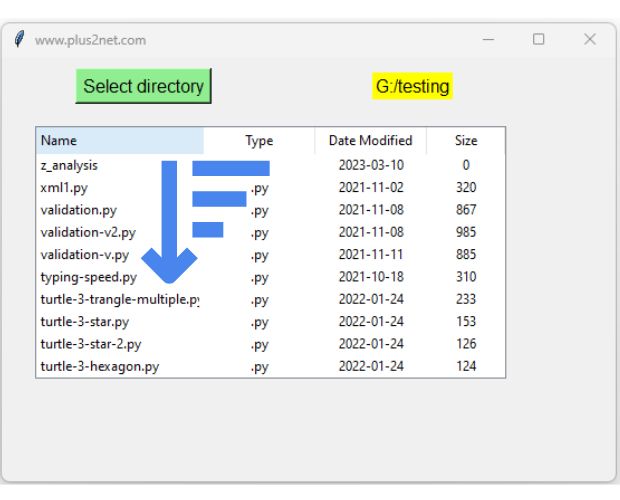
This project creates a directory browser using Tkinter, Pandas and Treeview. After selecting a directory, the application collects the name, file type, modification date and file size of each item and stores the details in a Pandas DataFrame.
Clicking a Treeview heading sorts the DataFrame using sort_values(). Clicking the same heading again reverses that column between ascending and descending order.
Select directory
       |
       v
os.scandir()
       |
       v
File metadata
       |
       v
Pandas DataFrame
       |
       v
Tkinter Treeview
       |
       v
Click heading
       |
       v
sort_values()
       |
       v
Refresh rowsDirectory Browser Layout Top ↑
The GUI contains:
- a Button to select a directory;
- a Label showing the selected path;
- a Treeview displaying file details;
- vertical and horizontal Scrollbars;
- a status Label showing the number of directory items.
The Treeview columns are:
Name
Type
Date Modified
Size
Select a Directory Top ↑
Tkinter askdirectory() lets the user choose a folder:
directory=filedialog.askdirectory(
    title='Select directory'
)

if not directory:
    return
When the user cancels the dialog, the current directory listing remains unchanged.
Read File and Folder Details with os.scandir() Top ↑
The older program used:
files=os.listdir(path)
f_path=path+'\\'+f
The backslash makes this path construction Windows-specific.
The revised application uses:
with os.scandir(directory) as entries:
    for entry in entries:
        stat=entry.stat(
            follow_symlinks=False
        )
os.scandir() provides directory entries containing the name and access to file metadata without manually joining a directory string and filename.
Create a Pandas DataFrame Top ↑
Each directory entry becomes one dictionary:
rows.append({
    'Name':entry.name,
    'Type':file_type,
    'Date Modified':modified,
    'Size':size
})
The complete list creates the DataFrame:
df=pd.DataFrame(
    rows,
    columns=[
        'Name',
        'Type',
        'Date Modified',
        'Size'
    ]
)
The DataFrame contains the actual values used for sorting. Formatting for display is handled separately.
Create the Treeview Only Once Top ↑
The older program created another Treeview every time a directory was selected.
The revised application creates one Treeview when the program starts:
tree=ttk.Treeview(
    table_frame,
    columns=(
        'Name',
        'Type',
        'Date Modified',
        'Size'
    ),
    show='headings'
)
Loading or sorting data only replaces its rows.
for item in tree.get_children():
    tree.delete(item)
Keep File Size Numeric but Display KB or MB Top ↑
File size is stored in the DataFrame as bytes:
size=stat.st_sizeThis means numeric sorting remains correct.
The display function converts the byte count into a readable value:
def format_size(size):
    if pd.isna(size):
        return ''

    value=float(size)

    for unit in (
        'B','KB','MB','GB','TB'
    ):
        if value<1024 or unit=='TB':
            return f'{value:.1f} {unit}'
        value/=1024
This avoids sorting text values such as:
1 KB
20 MB
950 KB
which would not produce a correct numeric size order.
Sort Each Column Independently Top ↑
The original program used one Boolean variable:
order=Trueso clicking one column changed the next sorting direction for every other column.
The revised application uses a dictionary:
sort_state={}Get the next direction for the clicked column:
ascending=sort_state.get(
    column_name,
    True
)
Sort the DataFrame:
df=df.sort_values(
    by=column_name,
    ascending=ascending,
    na_position='last',
    kind='stable'
).reset_index(
    drop=True
)
Store the opposite direction for the next click:
sort_state[column_name]=not ascendingThis follows the same pattern used in our Tkinter Pandas column sorting tutorial.
Store Modification Time as datetime Top ↑
The old program converted the modification time immediately to:
2026-09-07This loses the time of day.
The revised DataFrame stores:
modified=datetime.fromtimestamp(
    stat.st_mtime
)
Treeview displays a formatted version:
modified.strftime(
    '%Y-%m-%d %H:%M'
)
The DataFrame still contains a real datetime value, so sorting is based on the complete timestamp rather than display text.
Handle Files and Folders Differently Top ↑
For a directory:
Type = Folder
Size = blank
For a normal file:
report.pdf
    |
    +--> Type = .pdf
    +--> Size = actual file bytes
A file without an extension is displayed as:
Type = FileThe application does not attempt to calculate the complete recursive size of folders. Doing that would require scanning all nested files and can make directory browsing much slower.
Complete Tkinter Pandas Directory Browser Top ↑
Why os.scandir() Is Better for This Project Top ↑
The older workflow required several operations:
os.listdir()
      |
      v
filename
      |
      v
manually build path
      |
      v
os.path.getmtime()
os.path.getsize()
os.path.splitext()
The revised program works with a directory entry:
os.scandir()
      |
      v
entry
      |
      +--> entry.name
      +--> entry.stat()
      +--> entry.is_dir()
      +--> entry.is_file()
This also removes the Windows-specific:
path + '\\' + filenameWhy Size Is Formatted Only for Display Top ↑
Consider:
950 KB
1.2 MB
80 KB
If those strings are stored directly in the DataFrame, sorting is textual rather than numeric.
Instead:
DataFrame Size
--------------
972800
1258291
81920
Treeview can display:
950.0 KB
1.2 MB
80.0 KB
The user gets readable output while Pandas retains the correct numeric values for sorting.
Independent Sorting for Each Heading Top ↑
Each column begins with ascending sorting independently:
Name          ASC -> DESC -> ASC
Type          ASC -> DESC -> ASC
Date Modified ASC -> DESC -> ASC
Size          ASC -> DESC -> ASC
This avoids the old behaviour where sorting Name could unexpectedly determine the first sorting direction of Size.
Continue the Tkinter Pandas Projects Top ↑
Use the same heading-click sorting pattern with regular DataFrame records:
Treeview Column SortingAdd DataFrame searching:
Search DataFrame RecordsLet the user choose which DataFrame columns are visible:
Select DataFrame ColumnsFrequently Asked Questions Top ↑
Use filedialog.askdirectory(). It returns the selected directory path or an empty value when the user cancels the dialog.
The application reads each directory entry with os.scandir(), creates a dictionary containing its name, type, modification time and size, and then creates a DataFrame from the list of dictionaries.
Each heading calls a function that sorts the DataFrame with sort_values() and then refreshes the Treeview rows.
Numeric byte values sort correctly. Human-readable KB, MB and GB strings are generated only when the values are displayed in Treeview.
The size stored on a directory entry is not the total size of all files inside that folder. Calculating complete folder size would require recursively scanning its contents.
A datetime value preserves both the date and time and allows Pandas to perform chronological sorting correctly.
No. The existing Treeview and Scrollbars are reused. Only the DataFrame and displayed rows are replaced.
DataFrame Sorting DataFrame Search Select Columns
Tkinter Projects Tkinter Pandas Projects

Subhendu Mohapatra
Author & Instructor at plus2net
I write and maintain practical tutorials on Python, PHP, SQL, JavaScript, HTML, jQuery, and web development at plus2net. The tutorials focus on clear explanations, working examples, and code that readers can test and adapt while learning.


Subscribe to our YouTube Channel here

 Python Video Tutorials