Pagination of MySQL Records in Tkinter Treeview
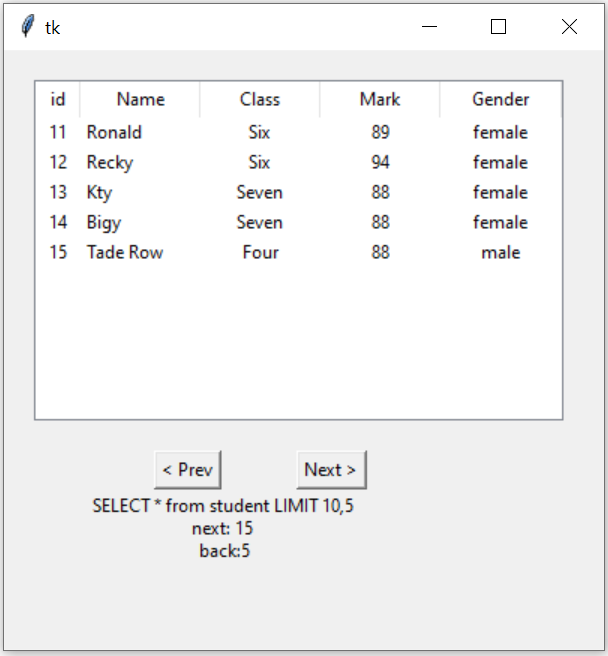
When a MySQL table contains more rows than we want to display at one time, we can divide the records into pages and show one page inside a Tkinter Treeview.
MySQL LIMIT controls how many records are returned, while OFFSET controls where that page starts.
SELECT id,name,class,mark,gender
FROM student
ORDER BY id
LIMIT 5 OFFSET 0
The next page changes the offset:
LIMIT 5 OFFSET 5and the following page uses:
LIMIT 5 OFFSET 10Show Table of Contents
- How Pagination Works
- Count Total MySQL Records
- LIMIT and OFFSET
- Why ORDER BY Is Important
- Create Treeview Once
- Load One Page
- Clear Previous Rows
- Previous and Next Buttons
- Page Number and Record Range
- Complete Pagination Program
- Handling Inserts and Deletes
- Large Tables and OFFSET
- Common Mistakes
- FAQs
- Summary
How MySQL Pagination Works 🔝
Assume the student table contains 23 rows and we want to display five rows per page.
| Page | LIMIT | OFFSET | Rows |
|---|---|---|---|
| 1 | 5 | 0 | 1 to 5 |
| 2 | 5 | 5 | 6 to 10 |
| 3 | 5 | 10 | 11 to 15 |
| 4 | 5 | 15 | 16 to 20 |
| 5 | 5 | 20 | 21 to 23 |
The page size stays fixed:
PAGE_SIZE=5Only the offset changes.
Count the Total Number of MySQL Records 🔝
We need the total number of rows to calculate the number of pages and decide when the Next button should be disabled.
count_query=text('SELECT COUNT(*) FROM student')

with engine.connect() as conn:
    total_records=conn.execute(count_query).scalar_one()
If:
total_records=23
PAGE_SIZE=5
the total number of pages is:
total_pages=(total_records+PAGE_SIZE-1)//PAGE_SIZEResult:
5Fetch One Page with LIMIT and OFFSET 🔝
query=text('''SELECT id,name,class,mark,gender
FROM student
ORDER BY id
LIMIT :limit OFFSET :offset''')
Pass the pagination values separately:
result=conn.execute(
    query,
    {'limit':PAGE_SIZE,'offset':current_offset}
)
Then collect the rows:
rows=result.mappings().all()Why ORDER BY Is Important for Pagination 🔝
A pagination query should have a predictable row order.
Use:
ORDER BY idbefore LIMIT and OFFSET.
ORDER BY, SQL does not guarantee that rows will always be returned in the same order. Stable ordering is important when dividing results into pages.Create the Treeview Only Once 🔝
The original program created another Treeview every time my_display() was called. Instead, create it once:
tree=ttk.Treeview(
    root,
    columns=('id','name','class','mark','gender'),
    show='headings',
    selectmode='browse',
    height=PAGE_SIZE
)
The buttons are also created once.
Only the Treeview items and button states change when a new page is requested.
Load One Page into Treeview 🔝
def load_page(requested_offset):
    global current_offset,total_records

    count_query=text('SELECT COUNT(*) FROM student')
    data_query=text('''SELECT id,name,class,mark,gender
    FROM student
    ORDER BY id
    LIMIT :limit OFFSET :offset''')

    with engine.connect() as conn:
        total_records=conn.execute(count_query).scalar_one()

        if total_records:
            last_offset=((total_records-1)//PAGE_SIZE)*PAGE_SIZE
            current_offset=max(0,min(requested_offset,last_offset))
        else:
            current_offset=0

        rows=conn.execute(
            data_query,
            {'limit':PAGE_SIZE,'offset':current_offset}
        ).mappings().all()
The offset is clamped so it cannot go below zero or beyond the final page.
Clear the Previous Page before Inserting New Rows 🔝
for item in tree.get_children():
    tree.delete(item)
Then insert the new records:
for row in rows:
    tree.insert(
        '',
        tk.END,
        iid=str(row['id']),
        values=(row['id'],row['name'],row['class'],row['mark'],row['gender'])
    )
Because the previous page is cleared first, the same MySQL primary key can safely continue to be used as the Treeview iid.
Previous, Next, First and Last Buttons 🔝
Previous Page
def previous_page():
    load_page(current_offset-PAGE_SIZE)
Next Page
def next_page():
    load_page(current_offset+PAGE_SIZE)
First Page
def first_page():
    load_page(0)
Last Page
def last_page():
    if total_records:
        offset=((total_records-1)//PAGE_SIZE)*PAGE_SIZE
        load_page(offset)
Enable or Disable Navigation
prev_btn.config(state=tk.DISABLED if current_offset==0 else tk.NORMAL)

next_btn.config(
    state=tk.DISABLED
    if current_offset+PAGE_SIZE>=total_records
    else tk.NORMAL
)
Display Current Page and Record Range 🔝
Instead of displaying the raw SQL query to the application user, show useful pagination information.
For example:
Page 3 of 5 | Records 11-15 of 23Calculate this using:
page_number=current_offset//PAGE_SIZE+1
total_pages=(total_records+PAGE_SIZE-1)//PAGE_SIZE
first_record=current_offset+1
last_record=min(current_offset+PAGE_SIZE,total_records)
Complete Tkinter MySQL Pagination Program 🔝
import tkinter as tk
from tkinter import ttk, messagebox
from sqlalchemy import create_engine, text
from sqlalchemy.exc import SQLAlchemyError

engine=create_engine('mysql+mysqldb://id:pw@localhost/my_db')

PAGE_SIZE=5
current_offset=0
total_records=0

root=tk.Tk()
root.geometry('620x370')
root.title('MySQL Treeview Pagination - plus2net')

page_var=tk.StringVar()
status_var=tk.StringVar()

tree=ttk.Treeview(root,columns=('id','name','class','mark','gender'),show='headings',selectmode='browse',height=PAGE_SIZE)
tree.grid(row=0,column=0,columnspan=4,padx=20,pady=20)

tree.column('id',width=50,anchor='center')
tree.column('name',width=130,anchor='w')
tree.column('class',width=90,anchor='center')
tree.column('mark',width=70,anchor='center')
tree.column('gender',width=90,anchor='center')

tree.heading('id',text='ID')
tree.heading('name',text='Name')
tree.heading('class',text='Class')
tree.heading('mark',text='Mark')
tree.heading('gender',text='Gender')

def load_page(requested_offset):
    global current_offset,total_records

    count_query=text('SELECT COUNT(*) FROM student')
    data_query=text('''SELECT id,name,class,mark,gender
    FROM student
    ORDER BY id
    LIMIT :limit OFFSET :offset''')

    try:
        with engine.connect() as conn:
            total_records=conn.execute(count_query).scalar_one()

            if total_records>0:
                last_offset=((total_records-1)//PAGE_SIZE)*PAGE_SIZE
                current_offset=max(0,min(requested_offset,last_offset))
            else:
                current_offset=0

            rows=conn.execute(data_query,{'limit':PAGE_SIZE,'offset':current_offset}).mappings().all()

    except SQLAlchemyError as e:
        print(e)
        messagebox.showerror('Database Error','Unable to load records.')
        return

    for item in tree.get_children():
        tree.delete(item)

    for row in rows:
        tree.insert('',tk.END,iid=str(row['id']),values=(row['id'],row['name'],row['class'],row['mark'],row['gender']))

    update_navigation()

def update_navigation():
    if total_records==0:
        page_var.set('No records found')
        first_btn.config(state=tk.DISABLED)
        prev_btn.config(state=tk.DISABLED)
        next_btn.config(state=tk.DISABLED)
        last_btn.config(state=tk.DISABLED)
        return

    total_pages=(total_records+PAGE_SIZE-1)//PAGE_SIZE
    page_number=current_offset//PAGE_SIZE+1
    first_record=current_offset+1
    last_record=min(current_offset+PAGE_SIZE,total_records)

    page_var.set(f'Page {page_number} of {total_pages} | Records {first_record}-{last_record} of {total_records}')

    first_btn.config(state=tk.DISABLED if current_offset==0 else tk.NORMAL)
    prev_btn.config(state=tk.DISABLED if current_offset==0 else tk.NORMAL)
    next_btn.config(state=tk.DISABLED if current_offset+PAGE_SIZE>=total_records else tk.NORMAL)
    last_btn.config(state=tk.DISABLED if current_offset+PAGE_SIZE>=total_records else tk.NORMAL)

def first_page():
    load_page(0)

def previous_page():
    load_page(current_offset-PAGE_SIZE)

def next_page():
    load_page(current_offset+PAGE_SIZE)

def last_page():
    if total_records>0:
        last_offset=((total_records-1)//PAGE_SIZE)*PAGE_SIZE
        load_page(last_offset)

first_btn=tk.Button(root,text='<< First',command=first_page)
first_btn.grid(row=1,column=0,padx=4)

prev_btn=tk.Button(root,text='< Previous',command=previous_page)
prev_btn.grid(row=1,column=1,padx=4)

next_btn=tk.Button(root,text='Next >',command=next_page)
next_btn.grid(row=1,column=2,padx=4)

last_btn=tk.Button(root,text='Last >>',command=last_page)
last_btn.grid(row=1,column=3,padx=4)

tk.Label(root,textvariable=page_var).grid(row=2,column=0,columnspan=4,pady=12)

load_page(0)
root.mainloop()What Happens if Records Are Added or Deleted? 🔝
The revised load_page() runs:
SELECT COUNT(*) FROM studentevery time a page is loaded.
This means the page count and button states are refreshed if another operation adds or deletes rows.
The requested offset is also checked against the current last page:
last_offset=((total_records-1)//PAGE_SIZE)*PAGE_SIZE
current_offset=max(0,min(requested_offset,last_offset))
For example, if deleting the only record on the final page reduces the number of pages, reloading automatically moves the view back to the new final valid page.
OFFSET Pagination and Very Large Tables 🔝
LIMIT/OFFSET pagination is simple and works well for learning projects and moderate datasets.
However, a very deep page can require the database to pass over many earlier rows before returning the requested records.
For example:
LIMIT 20 OFFSET 500000can be less efficient than early pages.
For very large datasets, applications can use indexed filters or keyset pagination based on a value such as the last displayed primary key.
For this beginner Treeview project, LIMIT/OFFSET remains the clearest method because it provides familiar Previous, Next and page-number navigation.
Common Treeview Pagination Mistakes 🔝
1. Creating a New Treeview for Every Page
Create Treeview once. Clear and replace its rows when the page changes.
2. Creating New Navigation Buttons on Every Click
Create the buttons once and update their state.
3. Not Using ORDER BY
Pagination requires a predictable record order.
ORDER BY id4. Naming a Variable next
next is a Python built-in function. Prefer names such as:
next_offsetor avoid storing it entirely by calculating:
current_offset+PAGE_SIZE5. Confusing Treeview height with SQL LIMIT
height=5controls approximately five visible GUI rows.
LIMIT 5controls how many rows MySQL returns.
6. Allowing Negative OFFSET
Clamp the requested page to zero or greater.
7. Allowing OFFSET beyond the Last Page
Calculate the last valid offset from the current record count.
8. Keeping One Database Connection Open
Create the SQLAlchemy Engine once and use a connection context when queries are executed.
9. Using SELECT * with a Fixed Treeview Layout
Use explicit columns:
SELECT id,name,class,mark,genderwhen the GUI is designed for those five values.
10. Loading Every Record and Paginating Only in Python
The database should return only the current page. Do not retrieve thousands of rows and then slice them only in the Tkinter program.
Frequently Asked Questions 🔝
It is the number of database records requested for one page. In this example, PAGE_SIZE=5.
OFFSET tells MySQL how many ordered rows to skip before returning the current page.
ORDER BY gives the query a predictable row sequence so successive pages follow the same ordering rule.
No. Create one Treeview and replace its items when the current page changes.
The total record count and page size determine the final valid offset and total number of pages.
Refreshing the total record count allows the program to recalculate the last valid page and navigation-button states.
It is simple and useful for many applications, but very deep offsets can become inefficient. Larger systems may use indexed or keyset pagination.
MySQL Treeview Pagination Summary 🔝
- Use
COUNT(*)to calculate the total number of records. PAGE_SIZEcontrols records per page.OFFSETcontrols the starting position.- Use
ORDER BYfor predictable pagination. - Create one Treeview and reuse it for every page.
- Clear old Treeview items before inserting the next page.
- Create navigation buttons once.
- Disable Previous on the first page.
- Disable Next on the final page.
- First and Last buttons improve navigation.
- Show the current page, total pages and visible record range.
- Recalculate the record count when loading a page.
- Clamp the requested offset to a valid page.
- Use explicit SQL columns for a fixed Treeview layout.
- The MySQL primary key can continue to be used as Treeview
iid. - Treeview
heightand SQLLIMITserve different purposes. - For very large tables, consider alternatives to very deep OFFSET pagination.
Treeview insert() Select, Edit and Update MySQL Records

Subhendu Mohapatra
Author & Instructor at plus2net
I write and maintain practical tutorials on Python, PHP, SQL, JavaScript, HTML, jQuery, and web development at plus2net. The tutorials focus on clear explanations, working examples, and code that readers can test and adapt while learning.


Subscribe to our YouTube Channel here

 Python Video Tutorials