Pandas std(): Sample and Population Standard Deviation
Use std() to describe variation in selected numeric measures. Choose the sample or population convention, report the available count and compare values in the same units.
Measure spread around the mean 🔝
std() describes variation and has the same units as the input measure. Pandas defaults to ddof=1, dividing the sum of squared deviations by N-1 before taking its square root. ddof=0 divides by N and describes the supplied population. Choose according to what the observations represent; it is not a formatting option. Use axis=0 for columns or axis=1 for rows, skipna for missing values and numeric_only deliberately. Omit the removed level argument and avoid axis=None because its behaviour is changing.
Calculate standard deviation for the mark column 🔝
This synthetic table has repeated IDs and student names. The calculation treats every row as an observation; determine whether repeated records are legitimate before interpreting it. Select mark rather than numeric identifiers.
import pandas as pd
import numpy as np
def marks_data():
    return pd.DataFrame({"id": [1, 2, 3, 4, 5, 4, 2], "name": ["John", "Max", "Arnold", "Krish", "John", "Krish", "Max"], "class1": ["Four", "Three", "Three", "Four", "Four", "Four", "Three"], "mark": [75, 85, 55, 60, 60, 60, 85], "sex": ["female", "male", "male", "female", "female", "female", "male"]})
df = marks_data()
print(df[["mark"]].std(axis=0))
print("Mark standard deviation:", df["mark"].std())
assert np.isclose(df["mark"].std(), 12.817398889233116)
Expected output
mark    12.817399
dtype: float64
Mark standard deviation: 12.817398889233116
Inspect numeric_only without treating IDs as measures 🔝
numeric_only=True includes id as well as mark. This reproduces the numeric-column calculation, but the ID spread does not describe student performance. numeric_only=False is the current default and cannot compute numeric spread from names.
df = marks_data()
print(df.std(numeric_only=True))
try:
    df.std(numeric_only=False)
except TypeError:
    print("Select measure columns; text fields are not numeric measures.")
assert np.isclose(df["id"].std(), np.sqrt(2))
Expected output
id       1.414214
mark    12.817399
dtype: float64
Select measure columns; text fields are not numeric measures.
Compare sample and population conventions 🔝
For the same non-constant observations, ddof=1 gives a larger result than ddof=0. These formulas alone do not establish that the records form a random or representative sample.
marks = marks_data()["mark"]
sample = marks.std(ddof=1)
population = marks.std(ddof=0)
print("ddof=1:", sample)
print("ddof=0:", population)
assert np.isclose(population, 11.866605516908785)
assert sample > population
assert np.isclose(sample / population, np.sqrt(len(marks) / (len(marks) - 1)))
Expected output
ddof=1: 12.817398889233116
ddof=0: 11.866605518454394
Calculate row spread across comparable scores 🔝
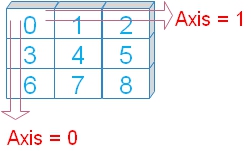 Use axis=1 on comparable score columns. The id/mark pair is included separately only to demonstrate the numeric axis behaviour; its spread is not a useful performance measure.
df = marks_data()
print("Numeric id/mark axis demonstration:")
print(df[["id", "mark"]].std(axis=1))
scores = pd.DataFrame({"MATH": [80, 40, 70], "ENGLISH": [80, 70, 40]})
print("Spread between comparable marks:")
print(scores.std(axis=1, ddof=1))
assert scores.std(axis=1).iloc[0] == 0
assert np.isclose(scores.std(axis=1).iloc[1], 30 / np.sqrt(2))
Expected output
Numeric id/mark axis demonstration:
0    52.325902
1    58.689863
2    36.769553
3    39.597980
4    38.890873
5    39.597980
6    58.689863
dtype: float64
Spread between comparable marks:
0     0.000000
1    21.213203
2    21.213203
dtype: float64
Compare available-value and complete-value results 🔝
skipna=True excludes missing observations. The available English count is five, while MATH has six. skipna=False returns a missing result for a column containing a missing value. Report counts alongside spread.
scores = pd.DataFrame({"MATH": [80, 40, 70, 70, 70, 30], "ENGLISH": [80, 70, np.nan, 50, 60, 30]})
print("Available-value spread:")
print(scores.std(skipna=True))
print("Require complete columns:")
print(scores.std(skipna=False))
print("Available counts:")
print(scores.count())
assert scores["MATH"].std() == 20
assert np.isclose(scores["ENGLISH"].std(), np.sqrt(370))
assert scores["ENGLISH"].count() == 5
assert pd.isna(scores["ENGLISH"].std(skipna=False))
Expected output
Available-value spread:
MATH       20.000000
ENGLISH    19.235384
dtype: float64
Require complete columns:
MATH       20.0
ENGLISH     NaN
dtype: float64
Available counts:
MATH       6
ENGLISH    5
dtype: int64
Distinguish too few observations from zero spread 🔝
With ddof=1, one available observation cannot supply a sample standard deviation. Two equal observations have spread zero. All-missing observations give a missing result. Do not replace these different cases with the same zero.
cases = {"one": pd.Series([10.0]), "equal_pair": pd.Series([10.0, 10.0]), "all_missing": pd.Series([np.nan, np.nan])}
for label, values in cases.items():
    print(label, "known:", values.count(), "sample std:", values.std(ddof=1))
assert pd.isna(cases["one"].std())
assert cases["equal_pair"].std() == 0
assert pd.isna(cases["all_missing"].std())
assert cases["one"].std(ddof=0) == 0
Expected output
one known: 1 sample std: nan
equal_pair known: 2 sample std: 0.0
all_missing known: 0 sample std: nan
Compare Pandas, NumPy and statistics using the same ddof 🔝
NumPy std() defaults to ddof=0, whereas Pandas std() defaults to ddof=1. Python statistics.stdev() uses the sample convention and pstdev() the population convention. Match both the included observations and the convention before comparing results. See the standard deviation comparison tutorial.
import statistics
values = pd.Series([10.0, 20.0, 30.0])
print("Pandas sample:", values.std(ddof=1))
print("NumPy sample:", np.std(values.to_numpy(), ddof=1))
print("statistics sample:", statistics.stdev(values.tolist()))
print("Population:", statistics.pstdev(values.tolist()))
assert np.isclose(values.std(ddof=1), np.std(values.to_numpy(), ddof=1))
assert np.isclose(values.std(ddof=0), statistics.pstdev(values.tolist()))
Expected output
Pandas sample: 10.0
NumPy sample: 10.0
statistics sample: 10.0
Population: 8.16496580927726
Compare group spread with group counts 🔝
Group means and standard deviations answer different questions. A class with one available reading would have a missing sample standard deviation. Group spread values cannot be averaged to recover the overall spread.
df = marks_data()
summary = df.groupby("class1").agg(known_marks=("mark", "count"), mean_mark=("mark", "mean"), sample_std=("mark", "std"))
print(summary)
assert summary["known_marks"].sum() == 7
assert summary.loc["Four", "known_marks"] == 4
Expected output
        known_marks  mean_mark  sample_std
class1
Four              4      63.75    7.500000
Three             3      75.00   17.320508
Build a delivery-time variation report 🔝
For this synthetic extract, one row is one delivery and the measure is duration in minutes. Parse values, review missing or negative readings, and compare carriers using known counts, means, medians and sample spread. The observations describe this extract; they do not establish why a carrier differs.
raw = pd.DataFrame({"delivery_id": [101, 102, 103, 104, 105, 106, 107], "carrier": ["A", "A", "A", "B", "B", "B", "C"], "minutes": ["10", "20", "30", "19", "20", "bad", "25"]})
cleaned = raw.copy()
cleaned["minutes"] = pd.to_numeric(raw["minutes"], errors="coerce").astype("Float64")
valid = cleaned["carrier"].notna() & cleaned["minutes"].ge(0).fillna(False)
accepted = cleaned.loc[valid].copy()
review = raw.loc[~valid].copy()
report = accepted.groupby("carrier", as_index=False).agg(known_deliveries=("delivery_id", "size"), mean_minutes=("minutes", "mean"), median_minutes=("minutes", "median"), sample_std_minutes=("minutes", "std"))
print(report)
print("Review original readings:")
print(review)
assert len(accepted) == 6 and len(review) == 1
assert report.loc[report["carrier"].eq("A"), "sample_std_minutes"].iloc[0] == 10
assert pd.isna(report.loc[report["carrier"].eq("C"), "sample_std_minutes"].iloc[0])
Expected output
  carrier  known_deliveries  mean_minutes  median_minutes  sample_std_minutes
0       A                 3          20.0            20.0                10.0
1       B                 2          19.5            19.5            0.707107
2       C                 1          25.0            25.0                <NA>
Review original readings:
   delivery_id carrier minutes
5          106       B     bad
Inspect unusual values without automatically deleting them 🔝
A large reading can change both mean and standard deviation. Compare a valid source value with an unusually large value to see the effect, then investigate the original record. A standard deviation threshold is not proof of an error and does not justify automatic removal.
ordinary = pd.Series([10.0, 20.0, 30.0])
with_large = pd.Series([10.0, 20.0, 300.0])
print("Ordinary:", ordinary.mean(), ordinary.std())
print("With large reading:", with_large.mean(), with_large.std())
assert with_large.std() > ordinary.std()
assert with_large.median() == ordinary.median() == 20
Expected output
Ordinary: 20.0 10.0
With large reading: 110.0 164.62077633154328
Export the report with its counts and units 🔝
Keep the known count and the sample_std_minutes name in the export so the convention and unit remain visible. Missing spread for a one-observation group remains missing. For fuller inspection use describe(), groupby() and plots.
print(report.to_csv(index=False).rstrip())
assert report["known_deliveries"].sum() == len(accepted)
# Optional Colab export:
# report.to_csv("delivery_spread_report.csv", index=False)
Expected output
carrier,known_deliveries,mean_minutes,median_minutes,sample_std_minutes
A,3,20.0,20.0,10.0
B,2,19.5,19.5,0.7071067811865476
C,1,25.0,25.0,
Common questions 🔝
Why is NumPy’s answer different? Match ddof and missing-value treatment. Why is a one-row group missing? Its count is not greater than ddof=1. Does spread have squared units? Variance does; standard deviation has the original units. Does zero spread mean perfect data? It means the included values are equal, not that the source is correct. Can I compare spread from different units? Convert to comparable units and consider the context first. Does a small spread prove better service? Evaluate the mean, population, coverage and other relevant measures as well. Continue with mean(), min(), sum(), text lengths and row selection.
Exercise: compare equal and varying readings 🔝
Compare [20, 20, 20] with [10, 20, 30]. Predict the mean and sample standard deviation of each group. Then calculate population spread for the varying group.
Exercise solution 🔝
Both means are 20. The equal group has sample spread zero; the varying group has sample spread 10 and population spread about 8.165.
equal = pd.Series([20.0, 20.0, 20.0])
varying = pd.Series([10.0, 20.0, 30.0])
print("Equal mean/std:", equal.mean(), equal.std(ddof=1))
print("Varying mean/std:", varying.mean(), varying.std(ddof=1))
print("Varying population std:", varying.std(ddof=0))
assert equal.mean() == varying.mean() == 20
assert equal.std(ddof=1) == 0
assert varying.std(ddof=1) == 10
assert np.isclose(varying.std(ddof=0), np.sqrt(200 / 3))
Expected output
Equal mean/std: 20.0 0.0
Varying mean/std: 20.0 10.0
Varying population std: 8.16496580927726
Practice in Google Colab 🔝
Open in Google Colab View on GitHub
Run the examples in order, change readings, missing values and ddof, then compare spread and available counts. Save your own copy to keep edits. All sample tables are included in the notebook.
Continue with the Data Cleaning hub, where(), loc, at, NumPy where(), fillna() and iloc.
Reference: Pandas DataFrame.std documentation.

Subhendu Mohapatra
Author & Instructor at plus2net
I write and maintain practical tutorials on Python, PHP, SQL, JavaScript, HTML, jQuery, and web development at plus2net. The tutorials focus on clear explanations, working examples, and code that readers can test and adapt while learning.


Subscribe to our YouTube Channel here

 Python Video Tutorials