Pandas mean(): Averages and Missing-Value Policies
Use mean() to calculate arithmetic averages for selected measures. Choose the axis, define how missing values affect the denominator and report available counts alongside each average.
Choose the measures and the averaging axis 🔝
The arithmetic mean is the sum of included values divided by their count. Select comparable measures explicitly. axis=0 gives a mean per column, axis=1 per row and axis=None one mean across both axes. skipna=True excludes missing values by default; numeric_only=False is the current default. Numeric identifiers and Boolean flags may be included by numeric_only=True, so it is not a substitute for choosing meaningful measures.
Calculate column means for student marks 🔝
The synthetic table has NAME, ID, MATH and ENGLISH. Select the two score columns so ID does not enter the calculation. MATH averages 60 and ENGLISH 55.
import pandas as pd
import numpy as np
def student_data():
    return pd.DataFrame({"NAME": ["Ravi", "Raju", "Alex", "Ron", "King", "Jack"], "ID": [1, 2, 3, 4, 5, 6], "MATH": [80, 40, 70, 70, 70, 30], "ENGLISH": [80, 70, 40, 50, 60, 30]})
df = student_data()
means = df[["MATH", "ENGLISH"]].mean(axis=0)
print(means)
assert means.to_dict() == {"MATH": 60.0, "ENGLISH": 55.0}
Expected output
MATH       60.0
ENGLISH    55.0
dtype: float64
Calculate one mean and select records below it 🔝
A Series mean returns a scalar. Use the same known-score population when calculating the threshold and selecting records. A missing score does not establish that a student is below the mean.
df = student_data()
math_mean = df["MATH"].mean()
below = df.loc[df["MATH"].le(math_mean)]
print("MATH mean:", math_mean)
print(below)
assert math_mean == 60
assert below["ID"].tolist() == [2, 6]
Expected output
MATH mean: 60.0
   NAME  ID  MATH  ENGLISH
1  Raju   2    40       70
5  Jack   6    30       30
Calculate each student’s mean across subjects 🔝
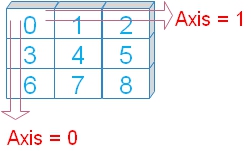 Use axis=1 on the selected score columns. All selected values should represent comparable measurements. Averaging ID with marks would have no useful interpretation.
df = student_data()
df["mean_mark"] = df[["MATH", "ENGLISH"]].mean(axis=1)
print(df)
assert df["mean_mark"].tolist() == [80, 55, 55, 60, 65, 30]
Expected output
   NAME  ID  MATH  ENGLISH  mean_mark
0  Ravi   1    80       80       80.0
1  Raju   2    40       70       55.0
2  Alex   3    70       40       55.0
3   Ron   4    70       50       60.0
4  King   5    70       60       65.0
5  Jack   6    30       30       30.0
Average all available cells with axis=None 🔝
For a DataFrame, axis=None reduces both axes to one scalar. With complete, equally sized score columns, the overall mean is also the average of the subject means. With unequal missingness those two approaches can differ.
scores = student_data()[["MATH", "ENGLISH"]]
overall = scores.mean(axis=None)
print("Overall score mean:", overall)
assert overall == 57.5
assert overall == scores.mean().mean()
Expected output
Overall score mean: 57.5Understand numeric_only and mixed columns 🔝
numeric_only=True includes numeric columns, including ID in this table. Select measures explicitly for analysis. numeric_only=False does not convert student names into numbers; a mixed-text calculation raises TypeError.
df = student_data()
print("All numeric columns, including ID:")
print(df.mean(numeric_only=True))
try:
    df.mean(numeric_only=False)
except TypeError:
    print("Choose measure columns; NAME is not a numeric measure.")
assert df.mean(numeric_only=True)["ID"] == 3.5
Expected output
All numeric columns, including ID:
ID          3.5
MATH       60.0
ENGLISH    55.0
dtype: float64
Choose measure columns; NAME is not a numeric measure.
Compare skipna=True and skipna=False 🔝
Make Alex’s ENGLISH mark missing. The available English mean becomes 58 from five values. skipna=False gives a missing result when a selected column contains a missing value. Always report the available count alongside a mean.
df = student_data()
df.loc[2, "ENGLISH"] = np.nan
scores = df[["MATH", "ENGLISH"]]
print("Available-value means:")
print(scores.mean(skipna=True))
print("Require no missing values:")
print(scores.mean(skipna=False))
print("Available counts:")
print(scores.count())
assert scores["ENGLISH"].mean() == 58
assert scores["ENGLISH"].count() == 5
assert pd.isna(scores["ENGLISH"].mean(skipna=False))
Expected output
Available-value means:
MATH       60.0
ENGLISH    58.0
dtype: float64
Require no missing values:
MATH       60.0
ENGLISH     NaN
dtype: float64
Available counts:
MATH       6
ENGLISH    5
dtype: int64
Require both marks for a student average 🔝
With the default skipna=True, a row with one known mark gets an average based on that one mark. If the rule requires two marks, use skipna=False or mask results where the count is below two. Do not fill an unknown mark with zero unless the scoring rules support it.
df = student_data()
df.loc[2, "ENGLISH"] = np.nan
scores = df[["MATH", "ENGLISH"]]
available_mean = scores.mean(axis=1)
complete_mean = scores.mean(axis=1, skipna=False)
print(pd.DataFrame({"available_mean": available_mean, "complete_mean": complete_mean, "known_marks": scores.count(axis=1)}))
assert available_mean.iloc[2] == 70
assert pd.isna(complete_mean.iloc[2])
Expected output
   available_mean  complete_mean  known_marks
0            80.0           80.0            2
1            55.0           55.0            2
2            70.0            NaN            1
3            60.0           60.0            2
4            65.0           65.0            2
5            30.0           30.0            2
Group a MultiIndex level before averaging 🔝
Use groupby(level=...) instead of the removed mean(level=...) argument. This example keeps the hierarchical index with ID, math and eng labels and averages the associated marks values by math level.
index = pd.MultiIndex.from_arrays([[1, 2, 3, 4, 5, 6], [80, 40, 70, 70, 70, 30], [80, 70, 40, 50, 60, 30]], names=["id", "math", "eng"])
values = pd.Series([4, 2, 0, 8, 3, 4], name="marks", index=index)
grouped = values.groupby(level="math", sort=False).mean()
print(grouped)
assert np.isclose(grouped.loc[70], 11 / 3)
assert grouped.loc[80] == 4
Expected output
math
80    4.000000
40    2.000000
70    3.666667
30    4.000000
Name: marks, dtype: float64
Distinguish an overall mean from a mean of means 🔝
Averaging group means equally gives every group the same weight, even when their sizes differ. An overall mean weights each available observation equally. Choose the denominator that matches the question.
data = pd.DataFrame({"store": ["A", "A", "A", "B"], "amount": [10, 10, 10, 100]})
group_means = data.groupby("store")["amount"].mean()
print("Group means:")
print(group_means)
print("Equal-weight mean of stores:", group_means.mean())
print("Mean of orders:", data["amount"].mean())
assert group_means.mean() == 55
assert data["amount"].mean() == 32.5
Expected output
Group means:
store
A     10.0
B    100.0
Name: amount, dtype: float64
Equal-weight mean of stores: 55.0
Mean of orders: 32.5
Calculate a quantity-weighted unit price 🔝
mean() is an unweighted arithmetic mean. A quantity-weighted unit price is total quantity-times-price divided by total quantity. Validate non-negative weights, known prices and a positive denominator before dividing.
sales = pd.DataFrame({"qty": [1, 3], "unit_price": [10, 20]})
assert sales[["qty", "unit_price"]].notna().all().all()
assert sales["qty"].ge(0).all() and sales["qty"].sum() > 0
weighted = (sales["qty"] * sales["unit_price"]).sum() / sales["qty"].sum()
print("Mean recorded price:", sales["unit_price"].mean())
print("Weighted unit price:", weighted)
assert sales["unit_price"].mean() == 15
assert weighted == 17.5
Expected output
Mean recorded price: 15.0
Weighted unit price: 17.5
Report average paid-order value with known counts 🔝
This synthetic extract contains a test order, an invalid amount and a missing amount. Select paid orders first and report the number with known non-negative amounts. The average describes those known orders, not every paid order.
raw = pd.DataFrame({"order_id": [101, 102, 103, 104, 105, 106], "store": ["A", "A", "B", "B", "A", "B"], "status": ["paid", "paid", "paid", "test", "paid", "paid"], "amount": ["10", "20", "30", "100", "bad", None]})
cleaned = raw.copy()
cleaned["amount"] = pd.to_numeric(raw["amount"], errors="coerce").astype("Float64")
paid = cleaned.loc[cleaned["status"].eq("paid")].copy()
valid = paid["amount"].ge(0).fillna(False)
known = paid.loc[valid].copy()
review = raw.loc[paid.index[~valid]].copy()
summary = known.groupby("store", as_index=False).agg(known_orders=("order_id", "size"), known_revenue=("amount", "sum"), mean_order=("amount", "mean"), median_order=("amount", "median"))
print(summary)
print("Paid orders:", len(paid), "Known orders:", len(known))
print("Review original values:")
print(review)
assert len(paid) == 5 and len(known) == 3
assert known["amount"].mean() == 20
assert summary["known_revenue"].sum() == 60
Expected output
  store  known_orders  known_revenue  mean_order  median_order
0     A             2           30.0        15.0          15.0
1     B             1           30.0        30.0          30.0
Paid orders: 5 Known orders: 3
Review original values:
   order_id store status amount
4       105     A   paid    bad
5       106     B   paid    NaN
Reconcile the mean and export the summary 🔝
The sum of known revenue divided by the count of known orders reproduces the overall mean. A grouped mean is not additive. Compare the median and inspect unusually large values before interpreting an average; see describe() and nlargest().
overall = summary["known_revenue"].sum() / summary["known_orders"].sum()
print("Overall known-order mean:", overall)
print(summary.to_csv(index=False).rstrip())
assert overall == known["amount"].mean() == 20
# Optional Colab export:
# summary.to_csv("mean_order_report.csv", index=False)
Expected output
Overall known-order mean: 20.0
store,known_orders,known_revenue,mean_order,median_order
A,2,30.0,15.0,15.0
B,1,30.0,30.0,30.0
Common questions 🔝
Why does mean() fail on a mixed table? Select measure columns or use numeric_only deliberately. Does skipping missing values mean they were zero? No; they are excluded from the numerator and denominator. Why is a row mean based on one mark? skipna=True averages available fields. What if every value is missing? The mean is missing; report the available count. How do I average by group? Use groupby(). How do I calculate a moving mean? Use rolling(). Is the mean always typical? Skew and outliers can make the median a useful companion. Continue with sum(), min(), max(), std(), text lengths, row selection and plots.
Exercise: average known values without filling 🔝
For amounts 10, 20 and a missing value, calculate the available count and mean. Compare that mean with the result of filling the missing amount with zero. State why they answer different questions.
Exercise solution 🔝
The available-value mean is 15 from two values. Filling introduces an assumed zero and changes the denominator to three, producing 10.
amounts = pd.Series([10, 20, pd.NA], dtype="Float64")
print("Known count:", amounts.count())
print("Known mean:", amounts.mean())
print("Mean after assumed zero:", amounts.fillna(0).mean())
assert amounts.count() == 2
assert amounts.mean() == 15
assert amounts.fillna(0).mean() == 10
Expected output
Known count: 2
Known mean: 15.0
Mean after assumed zero: 10.0
Practice in Google Colab 🔝
Open in Google Colab View on GitHub
Run the examples in order, change missing values and populations, then compare averages and available counts. Save your own copy to keep edits. All sample tables are included in the notebook.
Continue with the Data Cleaning hub, where(), loc, at, NumPy where(), fillna() and iloc.
Reference: Pandas DataFrame.mean documentation.

Subhendu Mohapatra
Author & Instructor at plus2net
I write and maintain practical tutorials on Python, PHP, SQL, JavaScript, HTML, jQuery, and web development at plus2net. The tutorials focus on clear explanations, working examples, and code that readers can test and adapt while learning.


Subscribe to our YouTube Channel here

 Python Video Tutorials