Pandas min(): Minimum Values, Missing Data and Matching Records
DataFrame.min() returns the lowest value down each column or across each row. Select comparable measures, decide how missing values affect the answer, and retrieve matching records separately. For grouped reports, include valid counts so an unknown minimum is not mistaken for zero.
| Question | Approach |
|---|---|
| Minimum per selected column | min(axis=0) |
| Minimum per row | min(axis=1) |
| One minimum across a numeric table | min(axis=None) |
| Require complete observations | min(skipna=False) |
| First minimum label | idxmin(), after checking known values |
| All matching records | Compare values with their minimum |
Create the Student DataFrame
This sample includes names, numeric IDs and two subject scores. A numeric ID is not a score, so select the subjects deliberately when comparing marks. For more practice, use the student sample-data page.
import pandas as pd

def student_data():
    return pd.DataFrame({"NAME": ["Ravi", "Raju", "Alex", "Ron", "King", "Jack"],
                         "ID": [1, 2, 3, 4, 5, 6],
                         "MATH": [80, 40, 70, 70, 70, 30],
                         "ENGLISH": [80, 70, 40, 50, 60, 30]})

df = student_data()
print(df)
assert df.shape == (6, 4)
Expected output
   NAME  ID  MATH  ENGLISH
0  Ravi   1    80       80
1  Raju   2    40       70
2  Alex   3    70       40
3   Ron   4    70       50
4  King   5    70       60
5  Jack   6    30       30
Column Minimums with axis=0
The default axis=0 returns one minimum for each column. Text is compared lexicographically, so NAME returns Alex rather than a mark. Select MATH and ENGLISH to answer the score question. min returns values; it does not identify the student.
df = student_data()
print("All columns:")
print(df.min(axis=0))
print("Score columns:")
print(df[["MATH", "ENGLISH"]].min(axis=0))
assert df["MATH"].min() == df["ENGLISH"].min() == 30
Expected output
All columns:
NAME       Alex
ID            1
MATH         30
ENGLISH      30
dtype: object
Score columns:
MATH       30
ENGLISH    30
dtype: int64
Find the Record with the Lowest MATH Score
Compare the score column with its minimum to retain the complete matching record. The same Boolean filter retains every tie. Use loc to select rows and specific report columns.
df = student_data()
lowest = df["MATH"].min()
result = df.loc[df["MATH"].eq(lowest)]
print("Minimum MATH:", lowest)
print(result)
assert result["NAME"].tolist() == ["Jack"]
Expected output
Minimum MATH: 30
   NAME  ID  MATH  ENGLISH
5  Jack   6    30       30
Row Minimums with axis=1
axis=1 compares columns within each row. Only compare fields with compatible meaning and units. Including ID would make the small ID look like the lowest score; row-wise comparison of mixed text and numbers can fail.
df = student_data()
df["LOWEST_SCORE"] = df[["MATH", "ENGLISH"]].min(axis=1)
print(df[["NAME", "MATH", "ENGLISH", "LOWEST_SCORE"]])
assert df["LOWEST_SCORE"].tolist() == [80, 40, 40, 50, 60, 30]
Expected output
   NAME  MATH  ENGLISH  LOWEST_SCORE
0  Ravi    80       80            80
1  Raju    40       70            40
2  Alex    70       40            40
3   Ron    70       50            50
4  King    70       60            60
5  Jack    30       30            30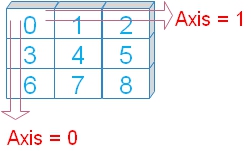
numeric_only Does Not Select Relevant Measures
numeric_only=True includes numeric and Boolean columns. It also includes ID here. Current Pandas defaults to numeric_only=False. Selecting score columns explicitly is clearer than assuming every numeric field belongs in the calculation.
df = student_data()
print("Numeric column minima, including ID:")
print(df.min(numeric_only=True))
print("Row minima including ID:")
print(df.min(axis=1, numeric_only=True))
assert df.min(axis=1, numeric_only=True).tolist() == [1, 2, 3, 4, 5, 6]
Expected output
Numeric column minima, including ID:
ID          1
MATH       30
ENGLISH    30
dtype: int64
Row minima including ID:
0    1
1    2
2    3
3    4
4    5
5    6
dtype: int64
One Minimum across Selected Rows and Columns
For a DataFrame, axis=None reduces across both axes and returns one scalar. Restrict the data to comparable score fields first. This is different from a Series of per-column minima.
scores = student_data()[["MATH", "ENGLISH"]]
minimum = scores.min(axis=None)
print("Lowest score anywhere:", minimum)
assert minimum == 30
Expected output
Lowest score anywhere: 30skipna: Available Values versus Complete Data
skipna=True excludes missing values; it does not replace them. skipna=False propagates missing data in the relevant row or column. An available-value minimum can be useful, but it is not the minimum of a fully observed dataset.
df = student_data()
df.loc[2, "ENGLISH"] = float("nan")
scores = df[["MATH", "ENGLISH"]]
print("Available-value column minima:")
print(scores.min(skipna=True))
print("Require complete columns:")
print(scores.min(skipna=False))
print("Require both scores in each row:")
print(scores.min(axis=1, skipna=False))
assert scores["ENGLISH"].min() == 30
assert pd.isna(scores["ENGLISH"].min(skipna=False))
Expected output
Available-value column minima:
MATH       30.0
ENGLISH    30.0
dtype: float64
Require complete columns:
MATH       30.0
ENGLISH     NaN
dtype: float64
Require both scores in each row:
0    80.0
1    40.0
2     NaN
3    50.0
4    60.0
5    30.0
dtype: float64
Empty or All-Missing Data Has No Known Minimum
An all-missing numeric Series or an empty numeric Series has a missing minimum. Do not fill unknown scores with zero just to make a minimum appear: it would invent a low score. Check for known observations before looking up a minimum record.
unknown = pd.Series([pd.NA, pd.NA], dtype="Float64")
empty = pd.Series([], dtype="float64")
print("All missing:", unknown.min())
print("Empty:", empty.min())
assert pd.isna(unknown.min()) and pd.isna(empty.min())
if unknown.notna().any():
    print(unknown.idxmin())
else:
    print("No known value; no minimum record to select.")
Expected output
All missing: <NA>
Empty: nan
No known value; no minimum record to select.
idxmin Returns a Label; Handle Ties Deliberately
min returns the value, while idxmin returns the label of the first minimum in the current order. It does not return an integer position or every tie. With unique labels, use loc to retrieve that record. Guard empty or all-missing data before idxmin. For all tied records, use the Boolean comparison.
df = student_data().set_index("ID")
df.loc[2, "MATH"] = 30
values = df["MATH"]
assert df.index.is_unique
first_label = values.idxmin()
print("First minimum label:", first_label)
print(df.loc[[first_label]])
all_ties = df.loc[values.eq(values.min())]
print("All tied records:")
print(all_ties)
assert first_label == 2
assert all_ties.index.tolist() == [2, 6]
Expected output
First minimum label: 2
    NAME  MATH  ENGLISH
ID
2   Raju    30       70
All tied records:
    NAME  MATH  ENGLISH
ID
2   Raju    30       70
6   Jack    30       30
Grouped Minimums for a MultiIndex
Use groupby() with level="math" for this hierarchical index. Grouping and min are separate operations. sort=False retains the first-seen group order.
index = pd.MultiIndex.from_arrays(
    [[1, 2, 3, 4, 5, 6], [80, 40, 70, 70, 70, 30], [80, 70, 40, 50, 60, 30]],
    names=["id", "math", "eng"])
marks = pd.Series([4, 2, 0, 8, 3, 4], name="marks", index=index)
result = marks.groupby(level="math", sort=False).min()
print(result)
assert result.to_dict() == {80: 4, 40: 2, 70: 0, 30: 4}
Expected output
math
80    4
40    2
70    0
30    4
Name: marks, dtype: int64
Convert Text Numbers before Finding the Minimum
Text values use text ordering: "100" can appear before "20". Use to_numeric with a deliberate error policy, retain raw values and review invalid nonblank inputs. Missing values are not automatically invalid supplied measurements.
raw = pd.Series(["100", "20", "9", "bad", None], dtype="string")
print("Text minimum:", raw.min())
numeric = pd.to_numeric(raw, errors="coerce")
invalid = raw.notna() & numeric.isna()
print(pd.DataFrame({"raw": raw, "numeric": numeric, "invalid": invalid}))
print("Numeric minimum:", numeric.min())
assert numeric.min() == 9 and invalid.sum() == 1
Expected output
Text minimum: 100
    raw  numeric  invalid
0   100      100    False
1    20       20    False
2     9        9    False
3   bad     <NA>     True
4  <NA>     <NA>    False
Numeric minimum: 9
Minimum Dates and Durations
Datetime and Timedelta columns support minimums. Parse date text with to_datetime(), or convert elapsed minutes with to_timedelta(). A minimum date is the earliest date; a minimum valid duration is the shortest elapsed time.
dates = pd.to_datetime(pd.Series(["2024-03-01", "2024-01-15", None]), format="%Y-%m-%d")
durations = pd.to_timedelta(pd.Series([90, 30, 60]), unit="min")
print("Earliest date:", dates.min())
print("Shortest duration:", durations.min())
assert dates.min() == pd.Timestamp("2024-01-15")
assert durations.min() == pd.Timedelta(minutes=30)
Expected output
Earliest date: 2024-01-15 00:00:00
Shortest duration: 0 days 00:30:00
Practical Dataset: Find the Lowest Valid Supplier Quote
These synthetic quotes are all in the same currency and cover the same product specification. A negative price is invalid in this scenario; missing quotes remain unknown. Keep a review flag before finding the minimum. For real purchasing decisions, also compare tax, delivery and quantity basis.
def quote_data():
    return pd.DataFrame({"quote_id": [101, 102, 103, 104, 105, 106],
                         "product": ["Notebook", "Notebook", "Notebook", "Pen", "Pen", "Folder"],
                         "supplier": ["A", "B", "C", "A", "B", "C"],
                         "price": [12.5, 12.5, -1, 3.0, 4.0, None]})

quotes = quote_data()
quotes["needs_review"] = quotes["price"].isna() | quotes["price"].lt(0)
valid = quotes.loc[~quotes["needs_review"]].copy()
print(quotes.to_string(index=False))
assert len(valid) == 4 and quotes["needs_review"].sum() == 2
Expected output
 quote_id  product supplier  price  needs_review
      101 Notebook        A   12.5         False
      102 Notebook        B   12.5         False
      103 Notebook        C   -1.0          True
      104      Pen        A    3.0         False
      105      Pen        B    4.0         False
      106   Folder        C    NaN          True
Report Minimums with Valid and Review Counts
Report every product, including Folder, which has no valid quote. Mask invalid values before aggregating so a negative price cannot win. A missing minimum means no known valid quote; it does not mean a free product.
quotes = quote_data()
quotes["needs_review"] = quotes["price"].isna() | quotes["price"].lt(0)
quotes["valid_price"] = quotes["price"].mask(quotes["needs_review"])
report = quotes.groupby("product").agg(
    minimum_price=("valid_price", "min"), records=("quote_id", "size"),
    valid_quotes=("valid_price", "count"), review_records=("needs_review", "sum"))
print(report)
assert report.loc["Notebook", "minimum_price"] == 12.5
assert report.loc["Pen", "minimum_price"] == 3
assert pd.isna(report.loc["Folder", "minimum_price"])
assert report["records"].sum() == len(quotes)
assert (report["valid_quotes"] + report["review_records"]).equals(report["records"])
Expected output
          minimum_price  records  valid_quotes  review_records
product
Folder              NaN        1             0               1
Notebook           12.5        3             2               1
Pen                 3.0        2             2               0
Return All Suppliers Tied for the Lowest Valid Price
transform broadcasts a group minimum back to each record. Compare valid prices with that value to retain all ties and their supplier details. Compare unrounded numeric values; rounding for display can create apparent ties that are not equal in the source.
quotes = quote_data()
quotes["needs_review"] = quotes["price"].isna() | quotes["price"].lt(0)
valid = quotes.loc[~quotes["needs_review"]].copy()
group_min = valid.groupby("product")["price"].transform("min")
winners = valid.loc[valid["price"].eq(group_min)]
print(winners[["quote_id", "product", "supplier", "price"]].to_string(index=False))
assert winners["quote_id"].tolist() == [101, 102, 104]
Expected output
 quote_id  product supplier  price
      101 Notebook        A   12.5
      102 Notebook        B   12.5
      104      Pen        A    3.0
Common Minimum-Value Problems
ID wins a row minimum: select the intended measures. Text comparison error: check types and convert text numbers before comparing. Unknown result: inspect missing values and valid counts. Only one tied row: idxmin returns the first label; use a Boolean filter for all ties. Wrong record from iloc: idxmin returns a label, so use loc with unique labels. Grouped values needed: groupby then min. Unexpected zero: check whether missing values were filled before reduction. Review describe() and data cleaning before interpreting extremes.
Exercise: Lowest Score for Complete Student Records
Set Alex ENGLISH to missing. Find the lowest subject score per student only when both scores are available. Then identify all students with the lowest valid row minimum. Predict Alex as missing and Jack as the lowest valid record at 30.
Exercise Solution
skipna=False requires complete rows for this exercise. Check the missing flag and the selected student, not only the scalar value.
df = student_data()
df.loc[2, "ENGLISH"] = float("nan")
df["LOWEST_SCORE"] = df[["MATH", "ENGLISH"]].min(axis=1, skipna=False)
known = df["LOWEST_SCORE"].notna()
lowest = df.loc[known, "LOWEST_SCORE"].min()
result = df.loc[known & df["LOWEST_SCORE"].eq(lowest)]
print(df[["NAME", "LOWEST_SCORE"]])
print("Lowest valid students:", result["NAME"].tolist())
assert pd.isna(df.loc[2, "LOWEST_SCORE"])
assert lowest == 30 and result["NAME"].tolist() == ["Jack"]
Expected output
   NAME  LOWEST_SCORE
0  Ravi          80.0
1  Raju          40.0
2  Alex           NaN
3   Ron          50.0
4  King          60.0
5  Jack          30.0
Lowest valid students: ['Jack']
Practice in Google Colab
Open in Google Colab View on GitHub
All synthetic sample data is included. Run the examples, compare minimum values with matching records, and try the exercise. Save a copy in Drive before making changes.
Continue with Data Exploration and Analysis, max(), mean(), sum() and std(). Reference: Pandas min documentation.

Subhendu Mohapatra
Author & Instructor at plus2net
I write and maintain practical tutorials on Python, PHP, SQL, JavaScript, HTML, jQuery, and web development at plus2net. The tutorials focus on clear explanations, working examples, and code that readers can test and adapt while learning.


Subscribe to our YouTube Channel here

 Python Video Tutorials