Pandas DataFrame Attributes: Inspect and Select
Inspect DataFrame labels, types, dimensions, values and styling; select by label or position and replace removed legacy attributes.
Show Table of Contents ↓Choose an inspection or selection task 🔝
Select an operation below for the full examples. The reference material further down remains available.
Inspect labels, types and dimensions
- columns — Inspect column labels and select or rename fields.
- dtypes — Inspect the type of each column.
- shape, size and ndim — Check table dimensions and element counts.
- info() — Summarise types and non-missing counts.
Select or update values
- loc — Select by labels or Boolean conditions.
- iloc — Select by integer position.
- at — Read or update one value by label.
Continue by task
- Data Analysis — Explore, summarise and prepare reports.
- Data Cleaning — Review missing values, duplicates and text fields.
- NumPy conversion — Explore array representations of a DataFrame.
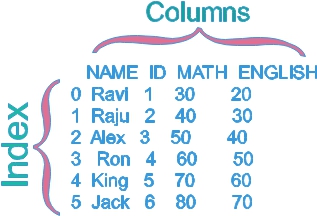
Create the original six-student table 🔝
import pandas as pd
my_data = pd.DataFrame({"NAME": ["Ravi", "Raju", "Alex", "Ron", "King", "Jack"],
    "ID": [1, 2, 3, 4, 5, 6], "MATH": [30, 40, 50, 60, 70, 80],
    "ENGLISH": [20, 30, 40, 50, 60, 70]})
print(my_data)
assert my_data.shape == (6, 4)
Expected output
   NAME  ID  MATH  ENGLISH
0  Ravi   1    30       20
1  Raju   2    40       30
2  Alex   3    50       40
3   Ron   4    60       50
4  King   5    70       60
5  Jack   6    80       70
Discover attributes and methods 🔝
names = dir(my_data)
print([name for name in ["columns", "index", "shape", "size", "ndim", "empty", "dtypes", "loc", "iloc"] if name in names])
assert all(name in names for name in ["columns", "loc", "shape"])
assert "DataFrame" in dir(pd)
Expected output
['columns', 'index', 'shape', 'size', 'ndim', 'empty', 'dtypes', 'loc', 'iloc']Transpose rows and columns with T 🔝
transposed = my_data.T
print(transposed)
assert transposed.shape == (4, 6)
assert transposed.loc["MATH", 2] == 50
assert my_data.shape == (6, 4)
Expected output
            0     1     2    3     4     5
NAME     Ravi  Raju  Alex  Ron  King  Jack
ID          1     2     3    4     5     6
MATH       30    40    50   60    70    80
ENGLISH    20    30    40   50    60    70
Read one scalar by label with at 🔝
print(my_data.at[3, "ENGLISH"])
assert my_data.at[3, "ENGLISH"] == 50
Expected output
50Inspect column labels 🔝
print(my_data.columns)
print(my_data.columns.tolist())
assert my_data.columns.tolist() == ["NAME", "ID", "MATH", "ENGLISH"]
Expected output
Index(['NAME', 'ID', 'MATH', 'ENGLISH'], dtype='str')
['NAME', 'ID', 'MATH', 'ENGLISH']
Inspect each column dtype 🔝
print(my_data.dtypes)
assert pd.api.types.is_integer_dtype(my_data["MATH"])
assert my_data["NAME"].iloc[0] == "Ravi"
Expected output
NAME         str
ID         int64
MATH       int64
ENGLISH    int64
dtype: object
Distinguish empty tables from missing values 🔝
print("Student table empty:", my_data.empty)
print("No rows:", my_data.iloc[:0].empty)
print("No columns:", my_data.iloc[:, :0].empty)
missing = pd.DataFrame({"mark": [float("nan")]})
print("All-missing table empty:", missing.empty)
assert not missing.empty and missing.isna().all().all()
Expected output
Student table empty: False
No rows: True
No columns: True
All-missing table empty: False
Read one scalar by integer position with iat 🔝
print(my_data.iat[2, 3])
assert my_data.iat[2, 3] == 40
Expected output
40Select rows and columns by position with iloc 🔝
selected = my_data.iloc[1:3, [0, 2]]
print(selected)
assert selected["NAME"].tolist() == ["Raju", "Alex"]
Expected output
   NAME  MATH
1  Raju    40
2  Alex    50
Inspect and choose row labels 🔝
print(my_data.index)
labeled = my_data.set_index("ID")
print("Label 3 MATH:", labeled.at[3, "MATH"])
print("Position 3 MATH:", labeled.iloc[3]["MATH"])
assert labeled.at[3, "MATH"] == 50
assert labeled.iloc[3]["MATH"] == 60
Expected output
RangeIndex(start=0, stop=6, step=1)
Label 3 MATH: 50
Position 3 MATH: 60
Replace removed is_copy guidance 🔝
independent = my_data.copy(deep=True)
independent.loc[0, "MATH"] = 99
print("Original mark:", my_data.at[0, "MATH"])
print("Copied mark:", independent.at[0, "MATH"])
assert my_data.at[0, "MATH"] == 30
Expected output
Original mark: 30
Copied mark: 99
Replace removed ix with explicit selection 🔝
print(my_data.loc[2, "MATH"])
assert my_data.loc[2, "MATH"] == 50
Expected output
50Select rows and columns by label with loc 🔝
print(my_data.loc[1:2, ["NAME", "MATH"]])
passed = my_data.loc[my_data["MATH"].ge(60), ["NAME", "MATH"]]
print(passed)
assert passed["NAME"].tolist() == ["Ron", "King", "Jack"]
Expected output
   NAME  MATH
1  Raju    40
2  Alex    50
   NAME  MATH
3   Ron    60
4  King    70
5  Jack    80
Compare ndim, shape and size 🔝
print("ndim:", my_data.ndim)
print("shape:", my_data.shape)
print("size:", my_data.size)
assert my_data.ndim == 2 and my_data.size == 24
assert my_data.size == my_data.shape[0] * my_data.shape[1]
Expected output
ndim: 2
shape: (6, 4)
size: 24
Access a Styler for HTML presentation 🔝
import importlib.util
if importlib.util.find_spec("jinja2") is None:
    print("Styler HTML skipped: install Jinja2, then rerun this cell")
else:
    styled = my_data.style.format({"MATH": "{:.0f}", "ENGLISH": "{:.0f}"})
    table_html = styled.to_html()
    assert "<table" in table_html and "Ravi" in table_html
    print("Styler HTML generated and checked")
assert my_data.at[0, "MATH"] == 30
Expected output
Styler HTML skipped: install Jinja2, then rerun this cellConvert values to a NumPy representation 🔝
print(my_data.values)
array = my_data.to_numpy(copy=True)
print("Array shape:", array.shape)
print("Array dtype:", array.dtype)
assert array.shape == (6, 4) and array[2, 0] == "Alex"
assert array[2, 2] == 50
Expected output
[['Ravi' 1 30 20]
 ['Raju' 2 40 30]
 ['Alex' 3 50 40]
 ['Ron' 4 60 50]
 ['King' 5 70 60]
 ['Jack' 6 80 70]]
Array shape: (6, 4)
Array dtype: object
Exercise: inspect a subset 🔝
Exercise solution 🔝
subset = my_data.loc[my_data["NAME"].isin(["King", "Jack"]), ["NAME", "MATH"]]
print(subset)
print("Shape:", subset.shape)
print("Jack mark:", subset.at[5, "MATH"])
assert subset.shape == (2, 2) and subset.at[5, "MATH"] == 80
Expected output
   NAME  MATH
4  King    70
5  Jack    80
Shape: (2, 2)
Jack mark: 80
Practice in Google Colab 🔝
Open in Google Colab View on GitHub
Run examples in order, inspect table attributes and try the exercise. Save a copy to keep edits.
Reference: Pandas DataFrame Attributes documentation.

Subhendu Mohapatra
Author & Instructor at plus2net
I write and maintain practical tutorials on Python, PHP, SQL, JavaScript, HTML, jQuery, and web development at plus2net. The tutorials focus on clear explanations, working examples, and code that readers can test and adapt while learning.


Subscribe to our YouTube Channel here

 Python Video Tutorials