NumPy ones(): Generating One-Initialized Arrays in Python
The numpy.ones() function returns a new ndarray of specified shape and data type, filled entirely with ones.
Multiplicative Identity & Weight Scaling: Arrays of ones provide baseline matrices for linear algebra scaling, probability distributions, and neural network weights. Define multi-dimensional dimensions with shape tuples, enforce precision with dtype, or clone existing geometries with numpy.ones_like(). For zero-filled arrays or arbitrary constants, explore numpy.zeros() and numpy.full().
1. Syntax & Formal Parameter Specifications 🔝
The numpy.ones() function accepts target array dimensions and optional configuration parameters:
# Formal syntax of numpy.ones()
numpy.ones(shape, dtype=float, order='C', *, like=None)| Parameter | Type | Default | Description & Operational Rule |
|---|---|---|---|
shape |
int or tuple of ints |
Required | Shape of the new array (e.g., 4 for 1D, (3, 4) for 2D). |
dtype |
data-type | numpy.float64 |
Desired numerical data type (e.g., int, float, bool). |
order |
{'C', 'F'} |
'C' |
Memory layout in RAM: 'C' (row-major) or 'F' (column-major). |
like |
array_like | None |
Reference object for non-NumPy array creation. |
| Return | ndarray |
N/A | One-filled array with the specified shape, dtype, and memory order. |
2. Array Shapes: 1D Vectors, 2D Matrices & 3D Tensors 🔝
Passing an integer creates a 1D vector; passing a tuple defines multi-dimensional coordinate axes:
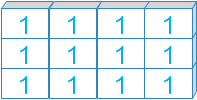 Shape (3, 4): 3 Rows, 4 Columns (2D)
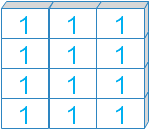 Shape (4, 3): 4 Rows, 3 Columns (2D)
# 1. 1D vector, 2D matrix, and 3D tensor of ones
import numpy as np

vec = np.ones(4)                      # 1D vector of 4 floats (1.0)
mat = np.ones((3, 4))                   # 2D matrix (3 rows x 4 cols)
cube = np.ones((2, 3, 2), dtype=int)    # 3D tensor (2x3x2)

print("1D Vector: ", vec)
print("2D Matrix:\n", mat)
print("3D Tensor shape:", cube.shape)
Terminal Output:
1D Vector:  [1. 1. 1. 1.]
2D Matrix:
 [[1. 1. 1. 1.]
 [1. 1. 1. 1.]
 [1. 1. 1. 1.]]
3D Tensor shape: (2, 3, 2)
3. Data Types (dtypes): Enforcing Precision 🔝
numpy.ones() defaults to 64-bit floats (float64). Specify custom precision with dtype:
# 2. Specifying dtypes: int, bool, complex, and string
import numpy as np

o_int = np.ones(3, dtype=int)        # Integer 1
o_bool = np.ones(3, dtype=bool)      # Boolean True
o_cplx = np.ones(3, dtype=complex)   # Complex 1. + 0.j
o_str = np.ones(3, dtype=str)        # String '1'

print("Integer: ", o_int)
print("Boolean: ", o_bool)
print("Complex: ", o_cplx)
print("String:  ", o_str)
Terminal Output:
Integer:  [1 1 1]
Boolean:  [ True  True  True]
Complex:  [1.+0.j 1.+0.j 1.+0.j]
String:   ['1' '1' '1']
4. Memory Layout Order: Row-Major ('C') vs. Column-Major ('F') 🔝
The order parameter specifies row-major ('C') or column-major ('F') physical memory layout:
# 3. Storage layout: Row-Major ('C') vs. Column-Major ('F')
import numpy as np

c_arr = np.ones((3, 3), order='C')
f_arr = np.ones((3, 3), order='F')

print("C-contiguous (row-major):   ", c_arr.flags['C_CONTIGUOUS'])
print("F-contiguous (column-major):", f_arr.flags['F_CONTIGUOUS'])
Terminal Output:
C-contiguous (row-major):    True
F-contiguous (column-major): True
5. Mirroring Geometries with numpy.ones_like() 🔝
Use numpy.ones_like() to allocate a one-filled array mirroring an existing array's shape and dtype:
# 4. Mirroring prototype arrays with numpy.ones_like()
import numpy as np

source = np.array([[10, 20, 30], [40, 50, 60]], dtype=np.int16)
cloned = np.ones_like(source)

print("Source shape and dtype:", source.shape, source.dtype)
print("Mirrored ones array:\n", cloned)
Terminal Output:
Source shape and dtype: (2, 3) int16
Mirrored ones array:
 [[1 1 1]
 [1 1 1]]
6. Comparing Constructors: ones vs. zeros vs. full vs. empty 🔝
NumPy provides specialized constructors depending on your initialization needs:
| Function | Initial Contents | Speed | When to Use |
|---|---|---|---|
np.ones() |
All ones (1.0 or 1) |
Fast | Unit weights, normalization bases, identity scaling. |
np.zeros() |
All zeros (0.0 or 0) |
Fast | Accumulators, image masks, zero padding. |
np.full() |
Arbitrary scalar fill value | Fast | Sentinel constants (e.g. -1 or NaN). |
np.empty() |
Uninitialized memory | Fastest | Arrays immediately overwritten in loops. |
7. Production Recipes 🔝
Initializing normalized prior probabilities and layer bias vectors:
# 5. Production Recipe: Normalized Weight Matrix & Bias Vectors
import numpy as np

# Initializing a uniform probability distribution over 5 classes
n_classes = 5
uniform_priors = np.ones(n_classes, dtype=np.float64) / n_classes

# Initializing affine transformation bias vector (size 4)
layer_bias = np.ones((4, 1), dtype=np.float32) * 0.01

print("Uniform priors: \n", uniform_priors)
print("Layer bias:     \n", layer_bias)
Terminal Output:
Uniform priors:
 [0.2 0.2 0.2 0.2 0.2]
Layer bias:
 [[0.01]
 [0.01]
 [0.01]
 [0.01]]
Creating an active baseline mask with diagonal attenuation:
# 6. Production Recipe: Multiplicative Scaling and Baseline Masking
import numpy as np

# Creating an active baseline mask where all channels are enabled (1)
channel_mask = np.ones((3, 3), dtype=np.uint8)

# Selectively attenuate diagonal elements by 50%
np.fill_diagonal(channel_mask, 0)
print("Attenuated filter mask:\n", channel_mask)
Terminal Output:
Attenuated filter mask:
 [[0 1 1]
 [1 0 1]
 [1 1 0]]
8. Common Developer Pitfalls 🔝
Pass multi-dimensional shapes as a single tuple rather than separate arguments:
# 7. Common traps: Tuple shape omission and float default
import numpy as np

# Trap: Passing separate ints instead of a single tuple
try:
    np.ones(3, 4)
except TypeError as err:
    print("Caught TypeError:", err)

# Correct: Pass dimensions as a tuple (3, 4)
correct = np.ones((3, 4))
print("Correct shape:   ", correct.shape)
Terminal Output:
Caught TypeError: Cannot interpret '4' as a data type
Correct shape:    (3, 4)
9. Interactive Practice Notebook 🔝
Practice one-array creation and buffer allocation in our companion notebook:
Interactive Companion Jupyter Notebook
Run interactive cells, test 2D/3D shapes, benchmark memory order, and run assertions.
View on GitHub Run in Google ColabSelf-Verifying Assertion Suite
Run unit assertions to verify numpy.ones() mechanics:
# 8. Self-verifying unit test suite for numpy.ones()
import numpy as np

# Test 1: 1D vector shape and one values
v = np.ones(5)
assert v.shape == (5,) and np.all(v == 1.0)

# Test 2: Multi-dimensional int matrix
m = np.ones((3, 4, 2), dtype=int)
assert m.shape == (3, 4, 2) and m.size == 24
assert m.dtype == int and np.all(m == 1)

# Test 3: ones_like matching shape and dtype
proto = np.zeros((2, 5), dtype=np.float32)
o = np.ones_like(proto)
assert o.shape == (2, 5) and o.dtype == np.float32
assert np.all(o == 1)

print("All numpy.ones() unit assertions successfully verified!")
Terminal Output:
All numpy.ones() unit assertions successfully verified!10. FAQ 🔝
Default data type?
The default dtype is numpy.float64 (represented as 1.0).
Why does np.ones(3, 4) fail?
The 2nd argument is dtype. Pass shapes as a single tuple: np.ones((3, 4)).
np.ones() vs np.full()?
np.ones(s) produces 1s; np.full(s, val) fills with any specified constant.
Mirroring array shape?
Use np.ones_like(arr) to copy shape and dtype automatically.
Further Reading & Related Tutorials 🔝
- NumPy zeros() Method — Generating arrays filled with zeros.
- NumPy full() Method — Generating arrays filled with arbitrary constants.
- NumPy empty() Method — Fast uninitialized memory allocation.
- NumPy Array Shape — Inspecting and reshaping multi-dimensional dimensions.
- NumPy ndarray Object — Complete architecture and attributes of NumPy arrays.
- NumPy arange() Function — Creating regularly spaced sequences.
- NumPy Master Overview — Central guide to array computing with NumPy.

Subhendu Mohapatra
Author & Instructor at plus2net
I write and maintain practical tutorials on Python, PHP, SQL, JavaScript, HTML, jQuery, and web development at plus2net. The tutorials focus on clear explanations, working examples, and code that readers can test and adapt while learning.


Subscribe to our YouTube Channel here

 Python Video Tutorials