NumPy Shape: Dimensions, Elements and Practical Checks
A NumPy array’s shape is a tuple giving the length of each axis. Read it with array.shape, or call np.shape(a). The tuple describes the array layout; ndim counts axes and size counts elements.
| Shape | Meaning |
|---|---|
() | Scalar array; ndim=0, size=1 |
(n,) | One axis of length n |
(rows, columns) | Two axes; usual table convention |
(a, b, c) | Three axis lengths; assign their meanings explicitly |
(a, b, c, d) | Four axis lengths |
(0, columns) | Empty 2D table with defined column count |
array.shape Is an Attribute; np.shape() Is a Function
Use array.shape without parentheses for an ndarray. Call np.shape(a) for the function form, which also accepts rectangular array-like inputs. Both return a tuple containing axis lengths; neither creates or reshapes an array.
import numpy as np
import math
a = np.array([[1, 2, 3], [4, 5, 6]])
print("Attribute:", a.shape)
print("Function:", np.shape(a))
print("Nested list:", np.shape([[1, 2, 3], [4, 5, 6]]))
assert a.shape == np.shape(a) == (2, 3)
Expected output
Attribute: (2, 3)
Function: (2, 3)
Nested list: (2, 3)
One-Dimensional Array: The Comma Matters
The shape (3,) is a one-element tuple describing one axis of length three. It is not a row matrix or a column matrix. Create the original sample with ones().
ar = np.ones((3,))
print(ar)
print("Shape:", ar.shape)
print("Dimension:", ar.ndim)
assert ar.shape == (3,) and ar.ndim == 1
Expected output
[1. 1. 1.]
Shape: (3,)
Dimension: 1
Two Dimensions: Rows and Columns
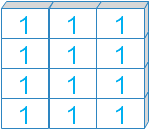
In the usual table convention, shape (3, 2) means three rows and two columns. shape[0] is the first axis length and shape[1] is the second. This interpretation depends on how your data is arranged.
ar = np.ones((3, 2))
print(ar)
print("Shape:", ar.shape)
print("Dimension:", ar.ndim)
rows, columns = ar.shape
print("Rows / columns:", rows, columns)
assert (rows, columns) == (3, 2)
Expected output
[[1. 1.]
 [1. 1.]
 [1. 1.]]
Shape: (3, 2)
Dimension: 2
Rows / columns: 3 2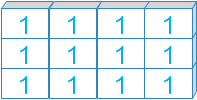
Three Dimensions: Name the Axes
The shape (3, 2, 3) has three axes with lengths three, two and three. They might represent batches, rows and columns, but shape itself does not assign those labels.
ar = np.ones((3, 2, 3))
print(ar)
print("Shape:", ar.shape)
print("Dimension:", ar.ndim)
assert ar.shape == (3, 2, 3) and ar.size == 18
Expected output
[[[1. 1. 1.]
  [1. 1. 1.]]

 [[1. 1. 1.]
  [1. 1. 1.]]

 [[1. 1. 1.]
  [1. 1. 1.]]]
Shape: (3, 2, 3)
Dimension: 3
Four Dimensions: Read Every Tuple Entry
The original shape (3, 2, 3, 4) has four axes and 72 elements. The number of tuple entries is ndim; the product of those entries is size. Do not mistake the first entry for the number of dimensions.
ar = np.ones((3, 2, 3, 4))
print(ar)
print("Shape:", ar.shape)
print("Dimension:", ar.ndim)
print("Size:", ar.size)
assert ar.ndim == 4 and ar.size == 72
Expected output
[[[[1. 1. 1. 1.]
   [1. 1. 1. 1.]
   [1. 1. 1. 1.]]

  [[1. 1. 1. 1.]
   [1. 1. 1. 1.]
   [1. 1. 1. 1.]]]


 [[[1. 1. 1. 1.]
   [1. 1. 1. 1.]
   [1. 1. 1. 1.]]

  [[1. 1. 1. 1.]
   [1. 1. 1. 1.]
   [1. 1. 1. 1.]]]


 [[[1. 1. 1. 1.]
   [1. 1. 1. 1.]
   [1. 1. 1. 1.]]

  [[1. 1. 1. 1.]
   [1. 1. 1. 1.]
   [1. 1. 1. 1.]]]]
Shape: (3, 2, 3, 4)
Dimension: 4
Size: 72
shape, ndim, size and len Answer Different Questions
shape lists axis lengths, ndim counts axes and size counts all elements. For an array with at least one dimension, len returns the first axis length, not the total element count. Dtype and storage size are separate properties; see data types.
a = np.ones((3, 4), dtype=np.float64)
print("shape:", a.shape)
print("ndim:", a.ndim)
print("size:", a.size)
print("len:", len(a))
print("Buffer bytes:", a.nbytes)
assert len(a.shape) == a.ndim
assert math.prod(a.shape) == a.size == 12
assert len(a) == 3 and a.nbytes == 96
Expected output
shape: (3, 4)
ndim: 2
size: 12
len: 3
Buffer bytes: 96
A Scalar Array Has Shape ()
A zero-dimensional array has an empty shape tuple, ndim zero and size one. It contains one value but has no axis to index with shape[0]. len is undefined for this scalar array.
a = np.array(7)
print("shape / ndim / size:", a.shape, a.ndim, a.size)
print("Scalar value:", a.item())
try:
    len(a)
except TypeError:
    print("len(scalar array): TypeError")
else:
    raise AssertionError('Expected TypeError')
assert a.shape == () and a.ndim == 0 and a.size == 1
Expected output
shape / ndim / size: () 0 1
Scalar value: 7
len(scalar array): TypeError
An Empty Array Can Still Have Multiple Axes
A shape containing zero has no elements, while other axis lengths remain defined. This differs from a scalar shape (). An empty table of shape (0, 3) still defines three columns.
for shape in [(0,), (0, 3), (2, 0, 4)]:
    a = np.empty(shape)
    print("shape / ndim / size:", a.shape, a.ndim, a.size)
    assert a.size == 0 and a.ndim == len(shape)
Expected output
shape / ndim / size: (0,) 1 0
shape / ndim / size: (0, 3) 2 0
shape / ndim / size: (2, 0, 4) 3 0
(n,), (1, n) and (n, 1) Are Different Shapes
A 1D transpose does not turn a vector into a column. Add an axis explicitly using None or expand_dims. The resulting orientation affects broadcasting.
a = np.array([10, 20, 30])
row = a[None, :]
column = a[:, None]
print("Vector:", a.shape)
print("Row:", row.shape)
print("Column:", column.shape)
print("1D transpose:", a.T.shape)
assert row.shape == (1, 3) and column.shape == (3, 1)
np.testing.assert_array_equal(column, np.expand_dims(a, axis=1))
Expected output
Vector: (3,)
Row: (1, 3)
Column: (3, 1)
1D transpose: (3,)
Integer Indexing Removes an Axis; Slicing Retains It
Selecting a single row with an integer produces a 1D array. A one-row slice retains two dimensions. Check shape before a later join or reduction. See indexing and slicing.
a = np.arange(12).reshape(3, 4)
print("Integer row:", a[0].shape)
print("One-row slice:", a[0:1].shape)
print("Integer column:", a[:, 0].shape)
print("One-column slice:", a[:, 0:1].shape)
assert a[0].shape == (4,) and a[0:1].shape == (1, 4)
assert a[:, 0:1].shape == (3, 1)
Expected output
Integer row: (4,)
One-row slice: (1, 4)
Integer column: (3,)
One-column slice: (3, 1)
Use reshape to Change Shape while Preserving Size
Use the reshape method rather than assigning to the shape attribute. The element count must match, and one -1 can infer a dimension. A reshape may return a view or need a copy, so shape compatibility alone does not determine memory sharing. See reshape().
a = np.arange(12)
b = a.reshape(3, 4)
c = a.reshape(4, 3)
print("Shapes:", a.shape, b.shape, c.shape)
print("Inferred:", a.reshape(2, -1).shape)
try:
    a.reshape(5, 3)
except ValueError:
    print("Mismatched element count: ValueError")
else:
    raise AssertionError('Expected ValueError')
assert a.size == b.size == c.size == 12
Expected output
Shapes: (12,) (3, 4) (4, 3)
Inferred: (2, 6)
Mismatched element count: ValueError
Transpose Changes Axis Order, Not Element Count
For 2D arrays, .T swaps rows and columns. For 3D arrays, specify the desired permutation when the full reversal is not intended. Name the axes first so the permutation reflects the data meaning.
a = np.arange(12).reshape(3, 4)
t = np.arange(24).reshape(2, 3, 4)
print("2D transpose:", a.T.shape)
print("3D default reversal:", t.T.shape)
print("3D permutation (1, 0, 2):", t.transpose(1, 0, 2).shape)
assert a.T.shape == (4, 3)
assert t.transpose(1, 0, 2).shape == (3, 2, 4)
Expected output
2D transpose: (4, 3)
3D default reversal: (4, 3, 2)
3D permutation (1, 0, 2): (3, 2, 4)
Reductions Remove Axes unless keepdims Is Used
For a (3, 4) table, axis=0 reduction leaves four column results; axis=1 leaves three row results. keepdims retains the reduced axes with length one for later broadcasting. See axis reduction.
a = np.arange(12).reshape(3, 4)
print("Column sums:", a.sum(axis=0).shape)
print("Row sums:", a.sum(axis=1).shape)
print("Retained row sums:", a.sum(axis=1, keepdims=True).shape)
print("Overall sum:", np.shape(a.sum()))
assert a.sum(axis=1, keepdims=True).shape == (3, 1)
Expected output
Column sums: (4,)
Row sums: (3,)
Retained row sums: (3, 1)
Overall sum: ()
Unequal Nested Row Lengths Do Not Form a Regular 2D Array
Rectangular numeric arrays need consistent nested lengths. An explicit object array can hold unequal Python lists, but its shape describes the outer container rather than a regular table. Clean or deliberately represent ragged data before numeric table operations.
rows = [[1, 2], [3, 4, 5]]
try:
    np.array(rows)
except ValueError:
    print("Unequal row lengths: ValueError")
else:
    raise AssertionError('Expected ValueError')
objects = np.array(rows, dtype=object)
print("Object container shape:", objects.shape)
print("Contained lengths:", [len(row) for row in objects])
assert objects.shape == (2,)
Expected output
Unequal row lengths: ValueError
Object container shape: (2,)
Contained lengths: [2, 3]
Practical Sales Table: Validate Shape and Column Meaning
This synthetic table has days down rows and Books, Pens and Gifts across columns. Validate dimensions and product order before multiplying by prices. A price vector of shape (3,) broadcasts across days. A table shape check alone cannot catch mislabelled product columns.
products = ['Books', 'Pens', 'Gifts']
price_products = ['Books', 'Pens', 'Gifts']
units = np.array([[2, 3, 1], [0, 4, 2], [1, 0, 3], [3, 2, 0]])
prices = np.array([10, 2, 5])
assert units.ndim == 2
assert units.shape[1] == len(products)
assert prices.shape == (units.shape[1],)
assert products == price_products
revenue = units * prices
daily = revenue.sum(axis=1)
print("Table / prices / daily:", units.shape, prices.shape, daily.shape)
print("Daily revenue:", daily)
np.testing.assert_array_equal(daily, [31, 18, 25, 34])
Expected output
Table / prices / daily: (4, 3) (3,) (4,)
Daily revenue: [31 18 25 34]
Common Shape Mistakes
Do not call array.shape as a function. np.shape takes an array-like input, not creation arguments such as dtype or order. A tuple entry gives an axis length; tuple length gives ndim. size and len are not interchangeable. A 1D array has no shape[1]. Matching shapes do not establish business meaning, and compatible broadcasting can still produce the wrong calculation. Continue with shape-error debugging and appending rows or columns.
Exercise: Retain Row Totals as a Column
Create values 0 through 11 with shape (4, 3). Calculate one sum per row while retaining the column axis, then append those totals as a fourth column. Predict shape (4, 4) and totals [3, 12, 21, 30].
Exercise Solution
keepdims returns totals shaped (4, 1), which can be joined horizontally to the original (4, 3) table.
a = np.arange(12).reshape(4, 3)
totals = a.sum(axis=1, keepdims=True)
report = np.append(a, totals, axis=1)
print("Input / totals / report:", a.shape, totals.shape, report.shape)
print(report)
assert totals.shape == (4, 1) and report.shape == (4, 4)
np.testing.assert_array_equal(report[:, -1], [3, 12, 21, 30])
Expected output
Input / totals / report: (4, 3) (4, 1) (4, 4)
[[ 0  1  2  3]
 [ 3  4  5 12]
 [ 6  7  8 21]
 [ 9 10 11 30]]
Practice in Google Colab
Open in Google Colab View on GitHub
All sample data is embedded. Run the examples and practise inspecting shapes, axes and table layouts. Save a copy in Drive to keep your changes.
Continue with NumPy tutorials, reshape(), eye(), arange() and linspace(). Reference: NumPy shape documentation and ndarray shape attribute.

Subhendu Mohapatra
Author & Instructor at plus2net
I write and maintain practical tutorials on Python, PHP, SQL, JavaScript, HTML, jQuery, and web development at plus2net. The tutorials focus on clear explanations, working examples, and code that readers can test and adapt while learning.


Subscribe to our YouTube Channel here

 Python Video Tutorials