NumPy ndarray: Dimensions, Shape, Strides & Memory Layout
The ndarray (N-dimensional array) is the core data structure of NumPy, storing homogeneous elements in a contiguous memory block for fast vectorized math.
Vectorized Memory Architecture: Unlike standard Python lists that store pointer references to scattered objects, an ndarray packs raw binary buffers of uniform data types. Key attributes such as ndim, shape, size, and strides control indexing across coordinate axes. See related constructors: arange(), zeros(), ones(), and array reshaping.

1. Complete NumPy ndarray Attributes Reference 🔝
Every NumPy ndarray exposes metadata attributes describing its shape, element type, and memory stride stepping:
| Attribute | Type | Description & Operational Role |
|---|---|---|
ndarray.ndim |
int |
Number of array axes (dimensions). 1 for vectors, 2 for matrices, 3 for tensors. |
ndarray.shape |
tuple of ints |
Tuple indicating the size of each dimension (e.g. (rows, cols)). |
ndarray.size |
int |
Total number of elements across all dimensions. |
ndarray.dtype |
numpy.dtype |
Data type of elements stored in the array (e.g. int32, float64). |
ndarray.itemsize |
int |
Length of one array element in bytes (e.g. 4 for int32, 8 for float64). |
ndarray.nbytes |
int |
Total bytes consumed by elements: size * itemsize. |
ndarray.strides |
tuple of ints |
Bytes to step in memory when advancing one index along each axis. |
ndarray.base |
object / None |
Base object if memory is shared via a view, or None if array owns memory. |
2. Single-Dimensional (1D) Arrays: Vectors & Memory Properties 🔝
A 1D array represents a continuous vector with ndim = 1 and a shape tuple (N,):

# 1. 1D array creation and attribute inspection
import numpy as np

arr1d = np.array([0, 1, 2], dtype=np.int32)
print("arr1d.dtype:   ", arr1d.dtype)
print("arr1d.ndim:    ", arr1d.ndim)
print("arr1d.shape:   ", arr1d.shape)
print("arr1d.size:    ", arr1d.size)
print("arr1d.strides: ", arr1d.strides)
Terminal Output:
arr1d.dtype:    int32
arr1d.ndim:     1
arr1d.shape:    (3,)
arr1d.size:     3
arr1d.strides:  (4,)
3. Two-Dimensional (2D) Arrays: Matrices & Coordinate Axes 🔝
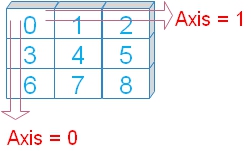
A 2D array arranges elements across rows (Axis 0) and columns (Axis 1):

# 2. 2D array coordinates and axis strides
import numpy as np

arr2d = np.array([[0, 1, 2], [3, 4, 5], [6, 7, 8]], dtype=np.int32)
print("Element at row 1, col 2:", arr2d[1, 2])
print("arr2d.shape:  ", arr2d.shape)
print("arr2d.strides:", arr2d.strides)
Terminal Output:
Element at row 1, col 2: 5
arr2d.shape:   (3, 3)
arr2d.strides: (12, 4)
4. Three-Dimensional (3D) Tensors & Higher Dimensions 🔝
3D arrays stack matrices along depth (Axis 0), rows (Axis 1), and columns (Axis 2):

# 3. 3D tensor coordinates and strides
import numpy as np

arr3d = np.array([
    [[0, 1, 2], [3, 4, 5], [6, 7, 8]],
    [[9, 10, 11], [12, 13, 14], [15, 16, 17]],
    [[18, 19, 20], [21, 22, 23], [24, 25, 26]]
], dtype=np.int32)
print("arr3d[2, 2, 1]:", arr3d[2, 2, 1])
print("arr3d.shape:   ", arr3d.shape)
print("arr3d.strides: ", arr3d.strides)
Terminal Output:
arr3d[2, 2, 1]: 25
arr3d.shape:    (3, 3, 3)
arr3d.strides:  (36, 12, 4)
5. Understanding Strides & Memory Layout Under the Hood 🔝
Strides tell NumPy how many bytes to step in memory to reach the next element along each dimension. For a 2D array of 4-byte integers with shape (3, 3), stepping down one row jumps 12 bytes, while stepping across one column jumps 4 bytes, yielding strides (12, 4):
# 5. Memory layout: C-contiguous vs Fortran-contiguous
import numpy as np

c_arr = np.array([[1, 2, 3], [4, 5, 6]], order='C')
f_arr = np.array([[1, 2, 3], [4, 5, 6]], order='F')

print("C-Order Strides (row-major):   ", c_arr.strides)
print("F-Order Strides (column-major):", f_arr.strides)
Terminal Output:
C-Order Strides (row-major):    (24, 8)
F-Order Strides (column-major): (8, 16)
6. Adding and Expanding Dimensions 🔝
Promote lower-dimensional vectors into higher-dimensional arrays using ndmin or np.newaxis:
# 4. Expanding dimensions: ndmin and np.newaxis
import numpy as np

arr = np.array([0, 1, 2])
arr_3d = np.array([0, 1, 2], ndmin=3)
col_vec = arr[:, np.newaxis]

print("Original shape: ", arr.shape)
print("ndmin=3 shape:  ", arr_3d.shape)
print("Column vector:  ", col_vec.shape)
Terminal Output:
Original shape:  (3,)
ndmin=3 shape:   (1, 1, 3)
Column vector:   (3, 1)
7. Production Recipe: Vectorized Column Normalization 🔝
Standardizing features down matrix columns using NumPy broadcasted operations:
# 6. Production Recipe: Vectorized Column Normalization
import numpy as np

matrix = np.array([
    [10.0, 200.0],
    [20.0, 400.0],
    [15.0, 300.0]
])

col_mean = matrix.mean(axis=0)
col_std = matrix.std(axis=0)
normalized = (matrix - col_mean) / col_std

print("Column Means:
", col_mean)
print("Normalized Matrix:
", np.round(normalized, 2))
Terminal Output:
Column Means:
 [ 15. 300.]
Normalized Matrix:
 [[-1.22 -1.22]
 [ 1.22  1.22]
 [ 0.    0.  ]]
8. Interactive Practice & Companion Jupyter Notebook 🔝
Practice NumPy array creation, inspect dimensional strides, test vectorization, and run self-validating assertions in our interactive companion Jupyter Notebook:
Interactive Companion Jupyter Notebook
Explore interactive code cells, inspect array strides, memory layouts, axis operations, and run self-validating unit assertions.
View on GitHub Run in Google ColabSelf-Verifying Assertion Suite
Run these unit checks directly in Python or your local environment to verify ndarray attributes:
# 7. Self-verifying unit test suite for ndarray attributes
import numpy as np

arr = np.arange(24).reshape((2, 3, 4))
assert arr.ndim == 3
assert arr.shape == (2, 3, 4)
assert arr.size == 24
assert arr.nbytes == arr.size * arr.itemsize

v = arr.reshape(4, 6)
assert v.base is not None

print("All NumPy ndarray attribute unit assertions successfully verified!")
Terminal Output:
All NumPy ndarray attribute unit assertions successfully verified!9. Frequently Asked Questions (FAQ) 🔝
What is the difference between shape and size?
shape is a tuple indicating the length of each axis (e.g. (3, 4)), whereas size is an integer representing the total count of elements (e.g. 12).
Why is ndarray faster than Python lists?
NumPy arrays store raw homogeneous data in continuous memory buffers. CPU cache locality and SIMD vectorization enable operations to execute up to 100x faster than pointer-based Python lists.
How do strides affect performance?
C-contiguous arrays jump continuously through memory along rows, maximizing cache hits. Non-contiguous or heavily strided arrays can lead to cache misses during sequential loops.
How do I verify if an array is a view or copy?
Check array.base. If array.base is None, the array owns its memory buffer. If it references another object, it is a view.
Further Reading & Related Tutorials 🔝
- NumPy Array Shape & Reshaping — Modifying dimensions without data duplication.
- NumPy arange() Function — Generating evenly spaced sequences.
- NumPy zeros() Function — Initializing zero-filled arrays.
- NumPy ones() Function — Initializing unit-filled arrays.
- NumPy bincount() Method — Counting frequency bins in integer arrays.
- NumPy Master Overview — Complete master reference for Python NumPy.

Subhendu Mohapatra
Author & Instructor at plus2net
I write and maintain practical tutorials on Python, PHP, SQL, JavaScript, HTML, jQuery, and web development at plus2net. The tutorials focus on clear explanations, working examples, and code that readers can test and adapt while learning.


Subscribe to our YouTube Channel here

26-02-2024 | |
| Very well written, visuals have really helped. Great job, thanks! | |
 Python Video Tutorials