Draw Filled Rectangles with imagefilledrectangle()
Draw a filled rectangle on a true-color image
Allocate the color on the same image resource and keep the coordinates inside the canvas.
<?php
$image = imagecreatetruecolor(400, 240);
$background = imagecolorallocate($image, 255, 255, 255);
$blue = imagecolorallocate($image, 40, 110, 210);
imagefilledrectangle($image, 0, 0, 399, 239, $background);
imagefilledrectangle($image, 60, 50, 340, 190, $blue);

header('Content-Type: image/png');
imagepng($image);
?>
Example: Drawing a Filled Rectangle

<?php
header("Content-type: image/png");
$width = 300;
$height = 200;
$image = imagecreate($width, $height);

// Define colors
$background = imagecolorallocate($image, 255, 255, 255);
$fill_color = imagecolorallocate($image, 0, 102, 204); // Blue

imagefilledrectangle($image, 50, 50, 250, 150, $fill_color);

imagepng($image);
?>
Syntax of imagefilledrectangle()
imagefilledrectangle($image, $x1, $y1, $x2, $y2, $color);$image | Image resource created using imagecreate() |
$x1, $y1 | Upper-left corner coordinates |
$x2, $y2 | Bottom-right corner coordinates |
$color | Fill color allocated using imagecolorallocate() |
Example: Multiple Filled Rectangles
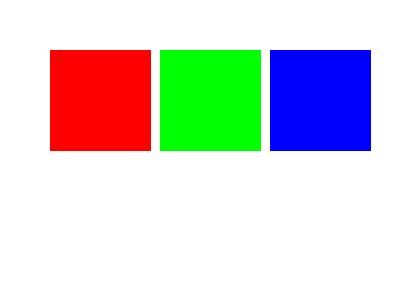
<?php
header("Content-type: image/png");
$width = 400;
$height = 300;
$image = imagecreate($width, $height);

// Define colors
$white = imagecolorallocate($image, 255, 255, 255);
$red = imagecolorallocate($image, 255, 0, 0);
$green = imagecolorallocate($image, 0, 255, 0);
$blue = imagecolorallocate($image, 0, 0, 255);

// Draw rectangles
imagefilledrectangle($image, 50, 50, 150, 150, $red);
imagefilledrectangle($image, 160, 50, 260, 150, $green);
imagefilledrectangle($image, 270, 50, 370, 150, $blue);

imagepng($image);
?>
Creating Gradient Effect Using imagefilledrectangle()

A gradient effect can be achieved using imagefilledrectangle() by drawing multiple rectangles with slight color variations. This creates a smooth transition from one color to another.
Example: Vertical Gradient
<?php
header("Content-type: image/png");
$width = 300;
$height = 200;
$image = imagecreate($width, $height);

// Background color
$white = imagecolorallocate($image, 255, 255, 255);

// Loop to create gradient effect
for ($i = 0; $i < $height; $i++) {
    $color = imagecolorallocate($image,0,($i * 255 / $height),255);
    imagefilledrectangle($image, 0, $i, $width, $i + 1, $color);
}

imagepng($image);
?>
Code Explanation
- Loops through each row of the image.
- Creates a color variation for each row.
- Applies filled rectangles for each row with progressively changing colors.
- Generates a gradient effect from cyan to blue .
Using imagefilledrectangle() to Highlight Text

We can use imagefilledrectangle() to create a highlight effect for text. This is useful for generating banners, notifications, or emphasized text elements in an image.
Example: Highlighted Text
<?php
header("Content-type: image/png");
$width = 400;
$height = 100;
$image = imagecreate($width, $height);

// Define colors
$white = imagecolorallocate($image, 255, 255, 255);
$highlight = imagecolorallocate($image, 255, 223, 186); // Light orange
$black = imagecolorallocate($image, 0, 0, 0);

// Draw highlight rectangle
imagefilledrectangle($image, 20, 30, 380, 70, $highlight);

// Add text over highlighted area
imagestring($image, 5, 40, 40, "Highlighted Text", $black);

imagepng($image);
?>
Code Explanation
- Creates a background image using imagecreate().
- Defines a highlight color (light orange).
- Draws a rectangle behind the text using imagefilledrectangle().
- Adds text on top of the highlighted area using imagestring().
- Outputs the image as PNG for display.
Generating Multiple Rectangles with Common Center Using Random Colors
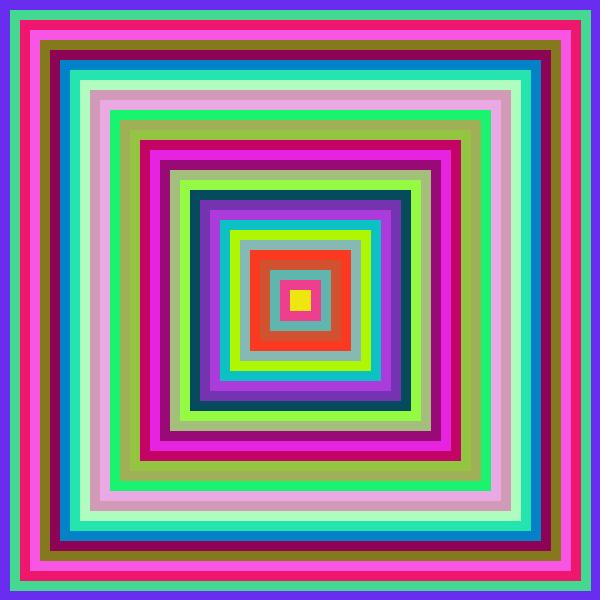
By using imagefilledrectangle(), we can draw multiple rectangles that share a common center while filling them with random colors. This technique creates a visually appealing effect with a nested rectangle pattern.
Example: Nested Rectangles with Random Colors
<?php
header("Content-type: image/jpeg");
$width = 600;
$height = 600;

$im = imagecreate($width, $height)
    or die("Cannot Initialize new GD image stream");

$thickness = 10; // Gap between rectangles

// Loop to create multiple rectangles
for ($i = 0; $i <= $width / 2; $i += $thickness) {

    // Generate Random Colors
    $r = rand(1, 255);
    $g = rand(1, 255);
    $b = rand(1, 255);

    $box_color = imagecolorallocate($im, $r, $g, $b);

    // Draw rectangle with random color
    imagefilledrectangle($im, $i, $i,
        $width - $i, $height - $i, $box_color);
}

// Output the image as JPEG
imagejpeg($im);
?>
Code Explanation
- Creates an image canvas of 600x600 pixels.
- Defines a background color (white).
- Uses a loop to generate rectangles, shrinking each step.
- Generates random colors for each rectangle.
- Draws rectangles using imagefilledrectangle(), keeping a common center.
- Outputs the final image as a JPEG.
Output
By running this script, you will see multiple colorful rectangles, each smaller than the previous one, creating a nested effect with a common center.
This is a useful technique for creating geometric patterns dynamically in PHP!
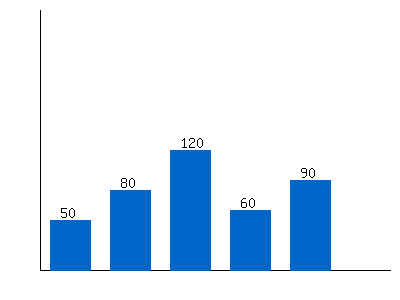
Creating a Simple Bar Chart Using PHP GD Library imagefilledrectangle
<?php
// Set the image width and height
$width = 400;
$height = 300;
$image = imagecreate($width, $height);

// Define colors
$white = imagecolorallocate($image, 255, 255, 255); // Background color
$black = imagecolorallocate($image, 0, 0, 0);       // Axis and text color
$blue = imagecolorallocate($image, 0, 102, 204);    // Bar color

// Sample Data
$data = [50, 80, 120, 60, 90]; // Values for bars
$bar_width = 40;               // Width of each bar
$gap = 20;                     // Space between bars
$base = $height - 30;          // Base of bars

// Draw axes
imageline($image, 40, 10, 40, $base, $black); // Y-axis
imageline($image, 40, $base, $width - 10, $base, $black); // X-axis

// Draw bars
$x = 50; // Initial x position for first bar
foreach ($data as $value) {
    imagefilledrectangle($image, $x, $base - $value, $x + $bar_width, $base, $blue);
    imagestring($image, 4, $x + 10, $base - $value - 15, $value, $black);
    $x += $bar_width + $gap; // Move x position for next bar
}

// Output the image
header("Content-Type: image/png");
imagepng($image);
?>
- Image Creation: We create a blank image of 400x300 pixels using imagecreate().
- Color Allocation: The function imagecolorallocate() is used to define colors for:
- White background
- Black for axes and labels
- Blue for the bars
- Drawing Axes:
- The imageline() function is used to draw the X-axis and Y-axis.
- The Y-axis starts at `(40,10)` and extends to `(40, base)`.
- The X-axis extends from `(40, base)` to the right edge of the image.
- Drawing Bars:
- A `foreach` loop iterates over the data values.
- Each bar is drawn using imagefilledrectangle(), with the height corresponding to the value.
- Text labels are placed above the bars using imagestring().
- The `$x` position is incremented for the next bar.
- Outputting the Image:
- header("Content-Type: image/png") ensures the image is displayed as a PNG.
- imagepng() sends the image to the browser.
- On PHP 8+, the GdImage object is released automatically when it is no longer referenced.
Inserting GD Bar chat in PDF documents by using FPDF
Including this graph in a web page
We can keep the above code in a page test1.php and use this page like this.<img src="test1.php?time=<?php echo time(); ?>" alt="Dynamic Image">Conclusion
The imagefilledrectangle() function is a useful tool for creating filled rectangles in PHP GD. It can be used for:
- Highlighting text in generated images
- Creating UI elements such as buttons and boxes
- Generating bar charts dynamically

Subhendu Mohapatra
Author & Instructor at plus2net
I write and maintain practical tutorials on Python, PHP, SQL, JavaScript, HTML, jQuery, and web development at plus2net. The tutorials focus on clear explanations, working examples, and code that readers can test and adapt while learning.


Subscribe to our YouTube Channel here

