Multi-Row Selection in Tkinter Treeview Without Holding Ctrl Key
Introduction
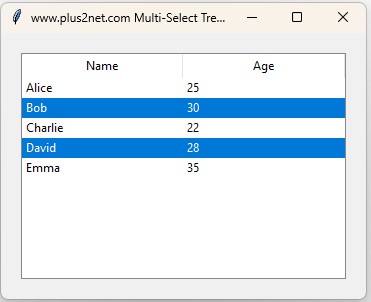
By default, Tkinter Treeview allows multiple row selection only when holding the Ctrl key. In this tutorial, we modify the behavior so that users can select multiple rows just by clicking, without holding any key.
- Understand how Tkinter handles row selection.
- Modify selection logic using event bindings.
- Ensure previous selections remain intact.
1. Importing Required Modules
# Import necessary libraries
import tkinter as tk
from tkinter import ttk
- Tkinter: Used for GUI development.
- ttk: Provides themed widgets like Treeview.
2. Creating the Main Application Window
# Initialize Tkinter window
root = tk.Tk()
root.title("Treeview Multi-Select Example")
root.geometry("600x400")
- Creates the main application window.
- Sets the title and size.
3. Creating the Treeview Widget
# Define Treeview with column headings
tree = ttk.Treeview(root, columns=("Name", "Age"), show="headings", selectmode="extended")
tree.heading("Name", text="Name")
tree.heading("Age", text="Age")

# Insert sample data
data = [("Alice", 25), ("Bob", 30), ("Charlie", 22)]
for person in data:
    tree.insert("", "end", values=person)

tree.pack(pady=20)
- Defines Treeview: Columns for Name and Age.
- Populates it with sample data.
4. Custom Selection Logic
# Function to allow row selection without Ctrl key
def on_row_click(event):
    item = tree.identify_row(event.y) # Get clicked row
    if item:
        if item in tree.selection():
            tree.selection_remove(item)  # Deselect if already selected
        else:
            tree.selection_add(item)  # Add row to selection
    return "break"
- Ensures multiple rows remain selected on click.
- Deselects a row if clicked again.
- Prevents Tkinter’s default selection clearing.
5. Binding Click Event
# Bind click event to the Treeview
tree.bind("<Button-1>", on_row_click)
- Binds **left mouse click** to trigger selection logic.
6. Running the Application
# Run the Tkinter event loop
root.mainloop()
import tkinter as tk
from tkinter import ttk

def on_row_click(event):
    """ Allow multiple row selection without holding Ctrl key """
    item = tree.identify_row(event.y)  # Get row under cursor
    if item:
        if item in tree.selection():
            tree.selection_remove(item)  # Toggle off selection if already selected
        else:
            tree.selection_add(item)  # Add new row to selection

    return "break"  # Prevent default Tkinter selection behavior

# Create main window
root = tk.Tk()
root.title("Multi-Select Treeview Without Ctrl key")

# Create Treeview with 'extended' mode (allows multiple selection)
tree = ttk.Treeview(root, columns=("Name", "Age"),
    show="headings", selectmode="extended")
tree.heading("Name", text="Name")
tree.heading("Age", text="Age")

# Insert some rows
data = [("Alice", 25), ("Bob", 30), ("Charlie", 22), ("David", 28), ("Emma", 35)]
for person in data:
    tree.insert("", "end", values=person)

tree.pack(padx=20, pady=20, fill="both", expand=True)

# Bind single-click event to prevent default selection clearing
tree.bind("<Button-1>", on_row_click)

root.mainloop()
Conclusion
Now, users can select multiple rows **just by clicking**, without needing the Ctrl key. This approach is useful for interactive applications where users frequently select multiple items.

Subhendu Mohapatra
Author & Instructor at plus2net
I write and maintain practical tutorials on Python, PHP, SQL, JavaScript, HTML, jQuery, and web development at plus2net. The tutorials focus on clear explanations, working examples, and code that readers can test and adapt while learning.
Connect:


Subscribe to our YouTube Channel here
This article is written by plus2net.com team.
https://www.plus2net.com

 Python Video Tutorials