The ttk.Sizegrip widget to resize the window
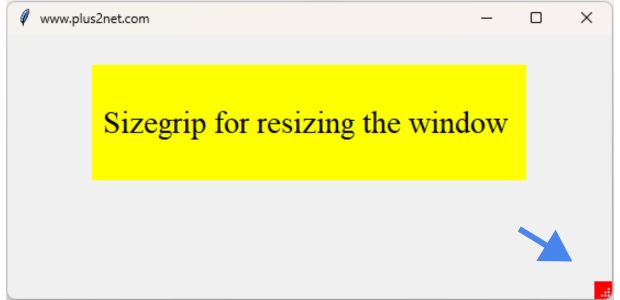
The ttk Sizegrip widget is a small yet powerful tool in the Tkinter toolkit that allows users to resize a window by dragging the grip handle.
sizegrip = ttk.Sizegrip(my_w)
sizegrip.grid(row=2,column=1,sticky='se')
TTK Sizegrip in Tkinter: Resizing Windows with Grid, Pack, and Place Layouts
Adding Style to Sizegrip
s = ttk.Style()
s.configure('TSizegrip', background='red')
How to align Sizegrip at bottom right in Grid Layout
More details on Grid Layout here. Use rowconfigure() and columnconfigure() here.sticky : must be a string containing n, e, s, and/or w
from tkinter import ttk
import tkinter as tk

my_w = tk.Tk()
my_w.geometry("550x240") # width and height of window
my_w.title("www.plus2net.com") # title

my_w.rowconfigure(1,weight=1)
my_w.rowconfigure(2,weight=4)
my_w.columnconfigure(1,weight=1)

s = ttk.Style()
s.configure('TSizegrip', background='red')
font1=['Times',22,'normal'] # font family , size and style

lb1=tk.Label(my_w,text=' Sizegrip for resizing the window  ',
             height=3, bg='yellow',font=font1)
lb1.grid(row=1,column=1,padx=20,pady=20)

sizegrip = ttk.Sizegrip(my_w)
sizegrip.grid(row=2,column=1,sticky='se')

my_w.mainloop()  # Keep the window open
How to align Sizegrip at bottom right in Pack Layout
More on Pack Layout.Check how different combination of side and anchor values can position the Sizegrip.
side: must be top, bottom, left, or rightanchor : must be n, ne, e, se, s, sw, w, nw, or center
import tkinter as tk
from tkinter import ttk

# Creating the main window
my_w = tk.Tk()
my_w.geometry('300x200')

s = ttk.Style()
s.configure('TSizegrip', background='red')
# Adding the Sizegrip widget
sizegrip = ttk.Sizegrip(my_w)
#sizegrip.pack(side='bottom',anchor='se')
#sizegrip.pack(side='right',anchor='s')
sizegrip.pack(side='left',anchor='s')

my_w.mainloop()
How to align Sizegrip at bottom right in Place layout
More on place layout here.from tkinter import ttk
import tkinter as tk
my_w = tk.Tk()
my_w.geometry("550x240") # width and height of window
my_w.title("www.plus2net.com") # title
s = ttk.Style()
s.configure('TSizegrip', background='red')
font1=['Times',22,'normal'] # font family , size and style
lb1=tk.Label(my_w,text=' Sizegrip for resizing the window ',
height=3, bg='yellow',font=font1)
lb1.place(x=20,y=10)
sizegrip = ttk.Sizegrip(my_w)
sizegrip.place(x=530,y=220)
my_w.mainloop() # Keep the window opensizegripi.place(relx=0.96,rely=0.93)Preventing resizing of window
We can manage the resizable() method of parent window.my_w.resizable(width=0,height=0) # No resize
#my_w.resizable(width=1,height=0) # Only width resize is allowed
#my_w.resizable(width=0,height=1) # Only height resize is allowed
#my_w.resizable(width=1,height=1) # Both height and width resize is allowed ( default )import tkinter as tk
from tkinter import ttk
# Creating the main window
my_w = tk.Tk()
my_w.geometry('300x200')
my_w.resizable(width=0,height=0) # No resize of window
#my_w.resizable(width=1,height=0) # Only width resize is allowed
#my_w.resizable(width=0,height=1) # Only height resize is allowed
#my_w.resizable(width=1,height=1) # Both height and width resize is allowed ( default )
s = ttk.Style()
s.configure('TSizegrip', background='red')
# Adding the Sizegrip widget
sizegrip = ttk.Sizegrip(my_w)
sizegrip.pack(side='bottom',anchor='se')
my_w.mainloop()Positioning the ttk Sizegrip widget
With the pack manager, placing the Sizegrip at the bottom right can be achieved by setting side='right' and anchor='se'For the grid system, you might reserve the bottom right cell for the Sizegrip by adjusting its row and column index appropriately, ensuring it's the last widget added to maintain its position.
When using place, precise positioning is possible by specifying the Sizegrip's relx and rely coordinates directly, usually based on the window's width and height to anchor it at the bottom right corner.
Event Binding for ttk Sizegrip Resizing window
We will print the size ( width and height ) of the window on resizing.from tkinter import ttk
import tkinter as tk
my_w = tk.Tk()
my_w.geometry("550x240") # width and height of window
my_w.title("www.plus2net.com") # title
my_w.rowconfigure(1,weight=1)
my_w.rowconfigure(2,weight=4)
my_w.columnconfigure(1,weight=1)
def my_resize(event):
lb1.config(text="Width : " + str(my_w.winfo_width())+ ", Height :" + str(my_w.winfo_height()))
s = ttk.Style()
s.configure('TSizegrip', background='red')
font1=['Times',16,'normal'] # font family , size and style
lb1=tk.Label(my_w,text='',height=3, bg='yellow',font=font1)
lb1.grid(row=1,column=1,padx=20,pady=20)
sizegrip = ttk.Sizegrip(my_w)
sizegrip.grid(row=2,column=1,sticky='se')
my_w.bind("<Configure>", my_resize)
my_w.mainloop() # Keep the window openQuestions 🔝
- How do you add a ttk Sizegrip to a Tkinter window?
- What is the primary function of the ttk Sizegrip widget?
- Can the ttk Sizegrip be styled using ttk themes?
- How does the ttk Sizegrip interact with different window managers in Tkinter?
- Is it possible to disable the ttk Sizegrip in certain situations?
- What events can be bound to the ttk Sizegrip for dynamic interaction?
- How do you ensure the ttk Sizegrip works properly on all platforms?
- Can the ttk Sizegrip be integrated with a ttk Statusbar?
- What limitations exist when using the ttk Sizegrip in a Tkinter application?
- How does the ttk Sizegrip affect the layout of other widgets in a window?
- What are some common issues developers face when using the ttk Sizegrip?
- How can you make the ttk Sizegrip more visually appealing?
- Is there a way to make the ttk Sizegrip larger for better user interaction?
- Can the ttk Sizegrip be used in a full-screen mode application?
- What are the best practices for positioning the ttk Sizegrip within a resizable window?
- How does resizing behavior with ttk Sizegrip differ from traditional window resizing?
- Are there any performance considerations when using the ttk Sizegrip in large applications?
- How to debug issues related to ttk Sizegrip not functioning as expected?
- Can the ttk Sizegrip handle multiple resizing events simultaneously?
- What are some alternative widgets or methods if the ttk Sizegrip does not meet application requirements?

Subhendu Mohapatra
Author & Instructor at plus2net
I write and maintain practical tutorials on Python, PHP, SQL, JavaScript, HTML, jQuery, and web development at plus2net. The tutorials focus on clear explanations, working examples, and code that readers can test and adapt while learning.
Connect:


Subscribe to our YouTube Channel here
This article is written by plus2net.com team.
https://www.plus2net.com

 Python Video Tutorials