The ttk.Separator widget to display a horizontal or vertical separator bar

from tkinter import ttk
import tkinter as tk

my_w = tk.Tk()
my_w.geometry("550x440") # width and height of window
my_w.title("www.plus2net.com") # title
font1=['Times',32,'normal'] # font family , size and style


lb1=tk.Label(my_w,text=' Label 1 \n at top side ',
             height=3, width=15,bg='yellow',font=font1)
lb1.grid(row=1,column=1,padx=20,pady=20)

sp1=ttk.Separator(my_w,orient='horizontal')
sp1.grid(row=2,column=1,sticky='ew')

lb2=tk.Label(my_w,text='Label 2 \n at bottom side',
             height=3,width=15,bg='yellow',font=font1)
lb2.grid(row=3,column=1,padx=10,pady=20)

my_w.mainloop()  # Keep the window open
vertical separator

from tkinter import ttk
import tkinter as tk

my_w = tk.Tk()
my_w.geometry("550x440") # width and height of window
my_w.title("www.plus2net.com") # title
font1=['Times',32,'normal'] # font family , size and style


lb1=tk.Label(my_w,text='Label 1 \n at Left side',height=6,bg='yellow',font=font1)
lb1.grid(row=1,column=1,padx=20,pady=20)

sp1=ttk.Separator(my_w,orient='vertical')
sp1.grid(row=1,column=2,sticky='ns')

lb2=tk.Label(my_w,text='Label 2 \n at Right side',height=6,bg='yellow',font=font1)
lb2.grid(row=1,column=3,padx=10,pady=20)

my_w.mainloop()  # Keep the window open
With Style
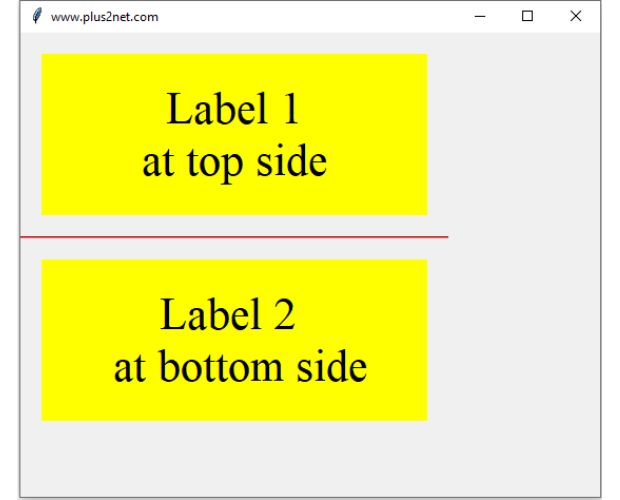
from tkinter import ttk
import tkinter as tk

my_w = tk.Tk()
my_w.geometry("550x440") # width and height of window
my_w.title("www.plus2net.com") # title
font1=['Times',32,'normal'] # font family , size and style

s = ttk.Style()
s.configure('TSeparator', foreground='blue',background='red')

lb1=tk.Label(my_w,text=' Label 1 \n at top side ',
             height=3, width=15,bg='yellow',font=font1)
lb1.grid(row=1,column=1,padx=20,pady=20)

sp1=ttk.Separator(my_w,orient='horizontal')
sp1.grid(row=2,column=1,sticky='ew')

lb2=tk.Label(my_w,text='Label 2 \n at bottom side',
             height=3,width=15,bg='yellow',font=font1)
lb2.grid(row=3,column=1,padx=10,pady=20)

my_w.mainloop()  # Keep the window open
Tkinter Separators: Vertical & Horizontal Orientations
Dynamically Adding Separators in Tkinter by looping

While iterating through my data to dynamically create labels in Tkinter, I also incorporate ttk separators for enhanced visual organization. For each label generated from the data, I instantiate a ttk Separator and place it directly below the corresponding label. This approach helps me visually distinguish between different rows of information, greatly improving the clarity and aesthetic appeal of my GUI, especially when displaying numerous data entries from a database or various sources.
import tkinter  as tk
from tkinter import ttk
my_w = tk.Tk()
font1=('Times',28,'normal') # font family, size, style
width,height=400,200
d=str(width)+"x"+str(height)
my_w.geometry(d)  # width and height of the window

l1=[['abc','def','ghi','jkl'],
    ['mno','pkr','frt','qwr'],
    ['asd','air','abc','zpq'],
    ['zae','vbg','qir','zab']]

my_row,my_col=1,0 # First row and first column values are set here
my_labels=[] # to store the reference of all Labels

for data in l1: # get each row of the list as data
    for my_col in range(len(data)): # get each element of the row of data
        my_label=tk.Label(my_w,text=data[my_col],font=font1)
        my_label.grid(row=my_row,column=my_col,padx=10,pady=5)
        my_labels.append(my_label) # add the reference

    sp=ttk.Separator(my_w,orient='horizontal')
    sp.grid(row=my_row+1,column=0,sticky='ew',columnspan=my_col+1)
    my_row=my_row+2 # Jump by two rows

height=my_row*30 #  calculate new height based on number of rows
d=str(width)+"x"+str(height) # string with new height
my_w.geometry(d) # Update the dimension of the window
my_labels[4].config(bg='yellow')

my_w.mainloop()
Dynamically adding rows and columns to create a grid
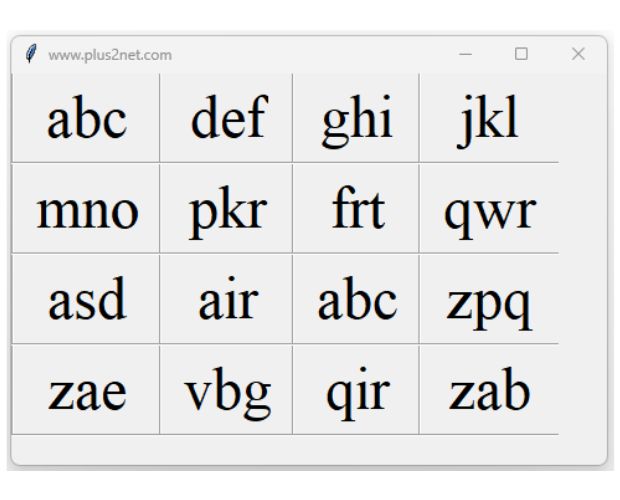
In above code inside the for loop we will add vertical sparators so we can create a grid and display our data
import tkinter  as tk
from tkinter import ttk
my_w = tk.Tk()
my_w.title("www.plus2net.com")  # Adding a title
font1=('Times',36,'normal') # font family, size, style
width,height=480,300
d=str(width)+"x"+str(height)
my_w.geometry(d)  # width and height of the window

l1=[['abc','def','ghi','jkl'],
    ['mno','pkr','frt','qwr'],
    ['asd','air','abc','zpq'],
    ['zae','vbg','qir','zab']]

my_row=1 # First row  value set here
my_labels=[] # to store the reference of all Labels

for data in l1: # get each row of the list as data
    for my_col in range(len(data)): # get each element of the row of data
        my_label=tk.Label(my_w,text=data[my_col],font=font1)
        my_label.grid(row=my_row,column=my_col+2,padx=15,pady=5)

        sp1=ttk.Separator(my_w,orient='vertical')
        sp1.grid(row=my_row,column=my_col+1,sticky='nse')

        my_labels.append(my_label) # add the reference

    sp2=ttk.Separator(my_w,orient='horizontal')
    sp2.grid(row=my_row+1,column=0,sticky='ew',columnspan=my_col+4)
    my_row=my_row+2 # Jump  to Next row

height=my_row*35 #  calculate new height based on number of rows
d=str(width)+"x"+str(height) # string with new height
my_w.geometry(d) # Update the dimension of the window

my_w.mainloop()
Subhendu Mohapatra
Author & Instructor at plus2net
I write and maintain practical tutorials on Python, PHP, SQL, JavaScript, HTML, jQuery, and web development at plus2net. The tutorials focus on clear explanations, working examples, and code that readers can test and adapt while learning.
Connect:


Subscribe to our YouTube Channel here
This article is written by plus2net.com team.
https://www.plus2net.com

 Python Video Tutorials