Displaying random record from Database
Use the appropriate lines for SQLite or MySQL database by commenting and un-commenting them.
Connection to Database
Use proper path ( for SQLite database ) or use userid and password for MySQL database.from sqlalchemy import create_engine, text
my_conn = create_engine("mysql+mysqldb://id:pw@localhost/my_tutorial") # MySQL
#my_conn = create_engine("sqlite:///G:\\testing\\my_db\\my_db.db") # SQLite
my_conn = my_conn.connect()
Connection to SQLite database
Connection to MySQL database
Query to get Random records from student table.
Showing non-repeating random records in Tkinter window from MySQL or SQLite database table
Use one of the two lines below based on the database used.
#q="SELECT id,name,class,mark,gender FROM student2 ORDER BY RANDOM() LIMIT 0,1"#SQlite
q="SELECT id,name,class,mark,gender FROM student2 ORDER BY RAND() LIMIT 0,1"#MySQL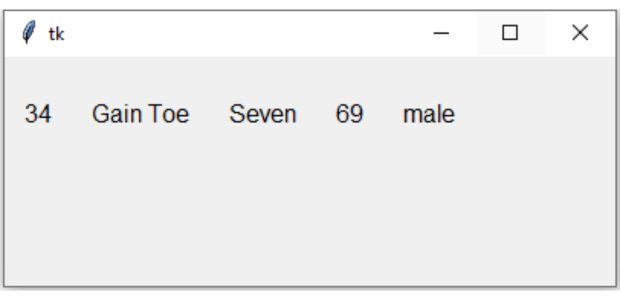
import tkinter as tk
from tkinter import *

my_w = tk.Tk()
my_w.geometry("400x250") # Width and height of the window

from sqlalchemy import create_engine, text
#my_conn = create_engine("mysql+mysqldb://id:pw@localhost/my_tutorial") # MySQL
my_conn = create_engine("sqlite:///E:\\testing\\sqlite\\my_db.db") # SQLite
my_conn = my_conn.connect()

#q="SELECT id,name,class,mark,gender FROM student2 WHERE status=False ORDER BY RAND() LIMIT 0,1" # MySQL
q = "SELECT id, name, class, mark, gender FROM student2 WHERE status=False ORDER BY RANDOM() LIMIT 0,1" # SQLite
my_cursor = my_conn.execute(text(q))
data_row = my_cursor.fetchone()

print(data_row)

i = 0
for student in data_row:
    my_label = tk.Label(my_w, text=str(student), font=20)
    my_label.grid(row=1, column=i, padx=10, pady=25)
    i = i + 1

my_w.mainloop()
On button click show record
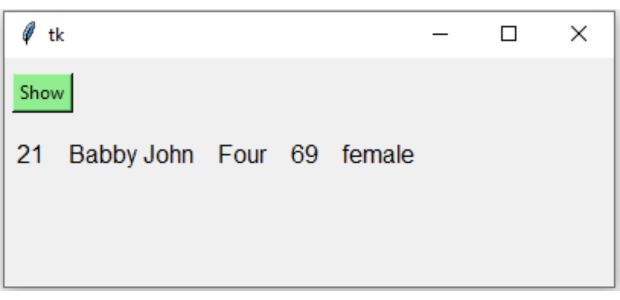
On every click of the button one random record is displayed.
import tkinter as tk
from tkinter import *

my_w = tk.Tk()
my_w.geometry("400x150")

from sqlalchemy import create_engine, text
#my_conn = create_engine("mysql+mysqldb://id:pw@localhost/my_tutorial")
my_conn = create_engine("sqlite:///E:\\testing\\sqlite\\my_db.db") # SQLite
my_conn = my_conn.connect()

#q = "SELECT id, name, class, mark, gender FROM student2 WHERE status=False ORDER BY RAND() LIMIT 0,1" # MySQL
q = "SELECT id, name, class, mark, gender FROM student2 WHERE status=False ORDER BY RANDOM() LIMIT 0,1" # SQLite

b1 = tk.Button(my_w, text='Show', command=lambda: my_display())
b1.grid(row=0, column=0, padx=5, pady=10, columnspan=2, sticky='w')

def my_display(): # To show random record
    my_cursor = my_conn.execute(text(q))
    data_row = my_cursor.fetchone()
    #print(data_row)
    i = 0
    for w in my_w.grid_slaves(2): # Remove all elements of 2nd row
        w.grid_forget()
    for student in data_row:
        my_label = tk.Label(my_w, text=str(student), font=20)
        my_label.grid(row=2, column=i, padx=5, pady=5)
        i = i + 1

my_w.mainloop()
Getting random record without repeating
As we are getting records from Database and each time one random row from the full list is collected, there is always chance that record will be repeated from the list.To make it one time only we will update one more column of the table by True or False to indicate that the record is returned or not.
Boolean Data in Tinyint(1) column
The query is here.
q="SELECT id,name,class,mark,gender FROM student2 WHERE status=False ORDER BY RANDOM() LIMIT 0,1"#SQlite
#q="SELECT id,name,class,mark,gender FROM student2 WHERE status=False ORDER BY RAND() LIMIT 0,1"#MySQL'UPDATE student2 set status=1 WHERE id='+ str(data_row[0])import tkinter as tk
from tkinter import *
my_w = tk.Tk()
my_w.geometry("400x150")
from sqlalchemy import create_engine, text
#my_conn = create_engine("mysql+mysqldb://id:pw@localhost/my_tutorial") # MySQL
my_conn = create_engine("sqlite:///E:\\testing\\sqlite\\my_db.db") # SQLite
my_conn = my_conn.connect()
#q = "SELECT id, name, class, mark, gender FROM student2 WHERE status=False ORDER BY RAND() LIMIT 0,1" # MySQL
q = "SELECT id, name, class, mark, gender FROM student2 WHERE status=False ORDER BY RANDOM() LIMIT 0,1" # SQLite
b1 = tk.Button(my_w, text='Show', command=lambda: my_display(), bg='lightgreen')
b1.grid(row=0, column=0, padx=5, pady=10, columnspan=2, sticky='w')
def my_display(): # To show random record
my_cursor = my_conn.execute(text(q))
data_row = my_cursor.fetchone()
[w.grid_forget() for w in my_w.grid_slaves(2)] # Remove all previous data
if data_row: # Once the data is collected (not None)
my_conn.execute(text('UPDATE student2 set status=1 WHERE id=' + str(data_row[0])))
#print(data_row)
i = 0
for student in data_row:
my_label = tk.Label(my_w, text=str(student), font=20)
my_label.grid(row=2, column=i, padx=5, pady=5)
i = i + 1
else: # No record is available to show
my_label = tk.Label(my_w, text='No more records', font=20)
my_label.grid(row=2, column=0, columnspan=4, padx=5, pady=5)
my_w.mainloop()Reset records
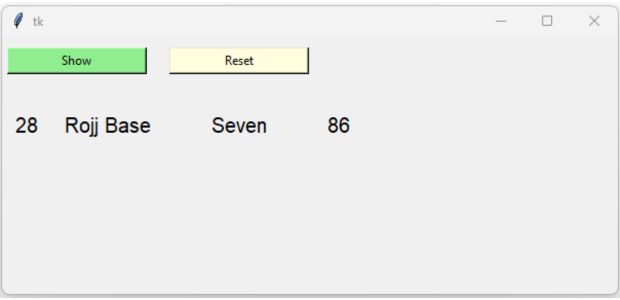
To reset all rows with status=False
UPDATE student2 SET status=Falsedef my_reset():
my_conn.execute('UPDATE student2 set status=0' )
my_label=tk.Label(my_w,text='Records Resetted',font=20)
my_label.grid(row=2,column=0,columnspan=4,padx=5,pady=5)import tkinter as tk
from tkinter import *
my_w = tk.Tk()
my_w.geometry("400x150")
from sqlalchemy import create_engine, text
#my_conn = create_engine("mysql+mysqldb://root:test@localhost/my_tutorial") # MySQL
my_conn = create_engine("sqlite:///E:\\testing\\sqlite\\my_db.db") # SQLite
my_conn = my_conn.connect()
#q = "SELECT id, name, class, mark, gender FROM student2 WHERE status=False ORDER BY RAND() LIMIT 0,1" # MySQL
q = "SELECT id, name, class, mark, gender FROM student2 WHERE status=False ORDER BY RANDOM() LIMIT 0,1" # SQLite
b1 = tk.Button(my_w, text='Show', command=lambda: my_display(), bg='lightgreen', width=18)
b1.grid(row=0, column=0, padx=5, pady=10, columnspan=2, sticky='w')
b2 = tk.Button(my_w, text='Reset', command=lambda: my_reset(), bg='lightyellow', width=18)
b2.grid(row=0, column=2, padx=5, pady=10, sticky='w')
def my_display(): # To show random record
my_cursor = my_conn.execute(text(q))
data_row = my_cursor.fetchone()
[w.grid_forget() for w in my_w.grid_slaves(2)] # Remove all previous data
if data_row: # Once the data is collected (not None)
my_conn.execute(text('UPDATE student2 set status=1 WHERE id=' + str(data_row[0])))
#print(data_row)
i = 0 # To increment column value
for student in data_row:
my_label = tk.Label(my_w, text=str(student), font=20)
my_label.grid(row=2, column=i, padx=5, pady=5)
i = i + 1 # Next column number
else: # No record is available to show
my_label = tk.Label(my_w, text='No more record', font=20)
my_label.grid(row=2, column=0, columnspan=4, padx=5, pady=5)
def my_reset():
my_conn.execute(text('UPDATE student2 set status=0')) # For all records update status
[w.grid_forget() for w in my_w.grid_slaves(2)] # Remove all previous data
my_label = tk.Label(my_w, text='Records Resetted', font=20)
my_label.grid(row=2, column=0, columnspan=4, padx=5, pady=5)
my_w.mainloop()Creating student2 table with data using MySQL database
Structure of the student2 tableCREATE TABLE `student2` (
`id` int(2) NOT NULL DEFAULT 0,
`name` varchar(50) NOT NULL DEFAULT '',
`class` varchar(10) NOT NULL DEFAULT '',
`mark` int(3) NOT NULL DEFAULT 0,
`gender` varchar(6) NOT NULL DEFAULT 'male',
`status` tinyint(1) NOT NULL DEFAULT 0
);INSERT INTO `student2` (`id`, `name`, `class`, `mark`, `gender`, `status`) VALUES
(1, 'John Deo', 'Four', 75, 'female', 0),
(2, 'Max Ruin', 'Three', 85, 'male', 0),
(3, 'Arnold', 'Three', 55, 'male', 0),
(4, 'Krish Star', 'Four', 60, 'female', 0),
(5, 'John Mike', 'Four', 60, 'female', 0),
(6, 'Alex John', 'Four', 55, 'male', 0),
(7, 'My John Rob', 'Five', 78, 'male', 0),
(8, 'Asruid', 'Five', 85, 'male', 0),
(9, 'Tes Qry', 'Six', 78, 'male', 0),
(10, 'Big John', 'Four', 55, 'female', 0),
(11, 'Ronald', 'Six', 89, 'female', 0),
(12, 'Recky', 'Six', 94, 'female', 0),
(13, 'Kty', 'Seven', 88, 'female', 0),
(14, 'Bigy', 'Seven', 88, 'female', 0),
(15, 'Tade Row', 'Four', 88, 'male', 0),
(16, 'Gimmy', 'Four', 88, 'male', 0),
(17, 'Tumyu', 'Six', 54, 'male', 0),
(18, 'Honny', 'Five', 75, 'male', 0),
(19, 'Tinny', 'Nine', 18, 'male', 0),
(20, 'Jackly', 'Nine', 65, 'female', 0),
(21, 'Babby John', 'Four', 69, 'female', 0),
(22, 'Reggid', 'Seven', 55, 'female', 0),
(23, 'Herod', 'Eight', 79, 'male', 0),
(24, 'Tiddy Now', 'Seven', 78, 'male', 0),
(25, 'Giff Tow', 'Seven', 88, 'male', 0),
(26, 'Crelea', 'Seven', 79, 'male', 0),
(27, 'Big Nose', 'Three', 81, 'female', 0),
(28, 'Rojj Base', 'Seven', 86, 'female', 0),
(29, 'Tess Played', 'Seven', 55, 'male', 0),
(30, 'Reppy Red', 'Six', 79, 'female', 0),
(31, 'Marry Toeey', 'Four', 88, 'male', 0),
(32, 'Binn Rott', 'Seven', 90, 'female', 0),
(33, 'Kenn Rein', 'Six', 96, 'female', 0),
(34, 'Gain Toe', 'Seven', 69, 'male', 0),
(35, 'Rows Noump', 'Six', 88, 'female', 0),
(39, '', '', 0, 'Female', 0);Full code to create SQLite database with student2 table
from sqlalchemy import create_engine, text
my_conn = create_engine("sqlite:///E:\\testing\\sqlite\\my_db.db") # Update path
my_conn = my_conn.connect()

my_conn.execute(text("CREATE TABLE `student2` (\
  `id` int(2) NOT NULL DEFAULT 0,\
  `name` varchar(50) DEFAULT '',\
  `class` varchar(10) DEFAULT '',\
  `mark` int(3) DEFAULT 0,\
  `gender` varchar(6) DEFAULT 'male',\
  `status` tinyint(1) DEFAULT 0\
);"))

data = [\
(1, 'John Deo', 'Four', 75, 'female', 0),\
(2, 'Max Ruin', 'Three', 85, 'male', 0),\
(3, 'Arnold', 'Three', 55, 'male', 0),\
(4, 'Krish Star', 'Four', 60, 'female', 0),\
(5, 'John Mike', 'Four', 60, 'female', 0),\
(6, 'Alex John', 'Four', 55, 'male', 0),\
(7, 'My John Rob', 'Five', 78, 'male', 0),\
(8, 'Asruid', 'Five', 85, 'male', 0),\
(9, 'Tes Qry', 'Six', 78, 'male', 0),\
(10, 'Big John', 'Four', 55, 'female', 0),\
(11, 'Ronald', 'Six', 89, 'female', 0),\
(12, 'Recky', 'Six', 94, 'female', 0),\
(13, 'Kty', 'Seven', 88, 'female', 0),\
(14, 'Bigy', 'Seven', 88, 'female', 0),\
(15, 'Tade Row', 'Four', 88, 'male', 0),\
(16, 'Gimmy', 'Four', 88, 'male', 0),\
(17, 'Tumyu', 'Six', 54, 'male', 0),\
(18, 'Honny', 'Five', 75, 'male', 0),\
(19, 'Tinny', 'Nine', 18, 'male', 0),\
(20, 'Jackly', 'Nine', 65, 'female', 0),\
(21, 'Babby John', 'Four', 69, 'female', 0),\
(22, 'Reggid', 'Seven', 55, 'female', 0),\
(23, 'Herod', 'Eight', 79, 'male', 0),\
(24, 'Tiddy Now', 'Seven', 78, 'male', 0),\
(25, 'Giff Tow', 'Seven', 88, 'male', 0),\
(26, 'Crelea', 'Seven', 79, 'male', 0),\
(27, 'Big Nose', 'Three', 81, 'female', 0),\
(28, 'Rojj Base', 'Seven', 86, 'female', 0),\
(29, 'Tess Played', 'Seven', 55, 'male', 0),\
(30, 'Reppy Red', 'Six', 79, 'female', 0),\
(31, 'Marry Toeey', 'Four', 88, 'male', 0),\
(32, 'Binn Rott', 'Seven', 90, 'female', 0),\
(33, 'Kenn Rein', 'Six', 96, 'female', 0),\
(34, 'Gain Toe', 'Seven', 69, 'male', 0),\
(35, 'Rows Noump', 'Six', 88, 'female', 0),\
(39, '', '', 0, 'Female', 0)]

query = "INSERT INTO `student2` (`id`, `name`, `class`, `mark`, `gender`, `status`) VALUES (:id, :name, :class, :mark, :gender, :status)"

# Insert rows using a loop
for row in data:
    id = my_conn.execute(text(query), {"id": row[0], "name": row[1], "class": row[2], "mark": row[3], "gender": row[4], "status": row[5]})
    print(id.rowcount)
my_conn.commit()
To delete table or Check the data
from sqlalchemy import create_engine, text
from sqlalchemy.exc import SQLAlchemyError
#my_conn = create_engine("sqlite:///E:\\testing\\sqlite\\my_db.db") # update Path
my_conn = create_engine("mysql+mysqldb://root:test@localhost/my_tutorial")
my_conn = my_conn.connect()

#r_set=my_conn.execute(text("DROP table student2")) # Delete the table
#my_conn.commit() # Confirm the delete operation

r_set = my_conn.execute(text("select * FROM student2"))
for row in r_set:
    print(row)
Display Random Database Records in Tkinter GUI | #Python #Tkinter #PythonGUI #SQLite #sql
display rows from MySQL.
Download my_db_random.db file with student2 table
Applications using Tkinter with MySQL database

Subhendu Mohapatra
Author & Instructor at plus2net
I write and maintain practical tutorials on Python, PHP, SQL, JavaScript, HTML, jQuery, and web development at plus2net. The tutorials focus on clear explanations, working examples, and code that readers can test and adapt while learning.
Connect:


Subscribe to our YouTube Channel here
This article is written by plus2net.com team.
https://www.plus2net.com

 Python Video Tutorials