Reset Button to Delete user inputs
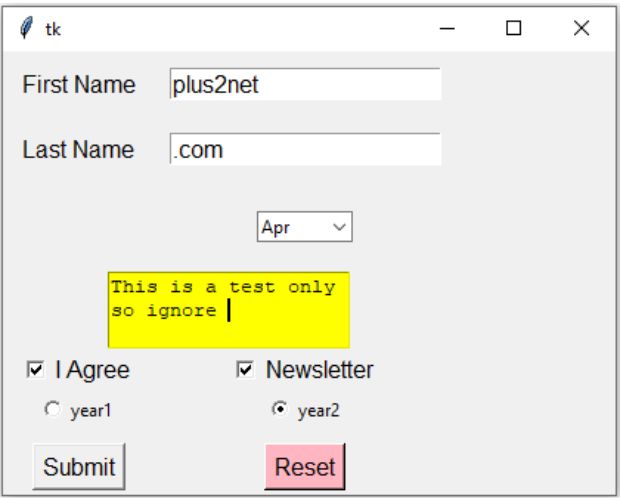
winfo_children() : Returns the list of all child widgets. isinstance() : Checks if input object is instance of the given class.
Entry widget
We can clear data from all the entry widgets present in the application.We are using winfo_children() to get the list of all child classes and then checking if the widget is an Entry class or not by using isinstance().
Irrespective of number of Entry widgets used, we are removing data from all.
for widget in my_w.winfo_children():
        if isinstance(widget, tk.Entry):  # If this is an Entry widget
            widget.delete(0,'end') # Delete all entries
Combobox
Inside the above for loop, we will add the code to reset the Combobox. Note that here Combobox is a instance of ttk( Not tk ). if isinstance(widget,ttk.Combobox):
widget.delete(0,'end')Text
We use text widgets for multi-line text entries. Here is the code to remove all data from all the Text widgets of the application.for widget in my_w.winfo_children():
if isinstance(widget, tk.Text): # If this is an Entry widget
widget.delete(0,'end') # Delete all entries Checkbutton
We can un-check the checkbuttons by using deselect(). if isinstance(widget,tk.Checkbutton):
widget.deselect()Radiobutton
To reset a set of Radiobuttons we have to update the value of variables to Noneif isinstance(widget,tk.Radiobutton):
my_r.set(None)
Tkinter Reset button to remove all user input data and selections from widgets by winfo_children()
Full code is here
import tkinter as tk # Python 3
from tkinter import ttk
my_w = tk.Tk() # Parent window
my_w.geometry("415x300") # width and hight of the window
def my_reset():
for widget in my_w.winfo_children():
if isinstance(widget, tk.Entry): # If this is an Entry widget class
widget.delete(0,'end') # delete all entries
        if isinstance(widget,ttk.Combobox):
            widget.delete(0,'end')
if isinstance(widget,tk.Text):
widget.delete('1.0','end') # Delete from position 0 till end
        if isinstance(widget,tk.Checkbutton):
            widget.deselect()
if isinstance(widget,tk.Radiobutton):
    my_r.set(None)
#print(widget.winfo_class()) # List of classes
l1=tk.Label(my_w,text='First Name',font=28)
l1.grid(row=0,column=0,padx=10,pady=10)
e1=tk.Entry(my_w,font=28)
e1.grid(row=0,column=1,padx=10,pady=10)
l1=tk.Label(my_w,text='Last Name',font=28)
l1.grid(row=1,column=0,padx=10,pady=10)
e1=tk.Entry(my_w,font=28)
e1.grid(row=1,column=1,padx=10,pady=10)
months=['Jan','Feb','Mar','Apr','May','Jun'] # List for Combobox values
cb1 = ttk.Combobox(my_w, values=months,width=7)
cb1.grid(row=2,column=1,padx=10,pady=20)
t1 = tk.Text(my_w, height=3, width=20,bg='yellow')# one text box
t1.grid(row=3,column=0,columnspan=2)
ck1=tk.Checkbutton(my_w,text='I Agree',font=18)
ck1.grid(row=4,column=0)
ck2=tk.Checkbutton(my_w,text='Newsletter',font=18)
ck2.grid(row=4,column=1)
my_r=tk.StringVar()
r2 = tk.Radiobutton(my_w, text='year1',value=1,variable=my_r)
r2.grid(row=5,column=0,padx=5)
r3 = tk.Radiobutton(my_w, text='year2',value=2,variable=my_r)
r3.grid(row=5,column=1,padx=5)
my_r.set(2)
b1=tk.Button(my_w,text='Submit',font=22)
b1.grid(row=6,column=0,padx=10,pady=10)
b2=tk.Button(my_w,text='Reset',font=22,bg='lightpink',command=lambda:my_reset())
b2.grid(row=6,column=1,padx=10,pady=10)
my_w.mainloop()Images used over button to create ON / Off switch

Subhendu Mohapatra
Author & Instructor at plus2net
I write and maintain practical tutorials on Python, PHP, SQL, JavaScript, HTML, jQuery, and web development at plus2net. The tutorials focus on clear explanations, working examples, and code that readers can test and adapt while learning.
Connect:


Subscribe to our YouTube Channel here
This article is written by plus2net.com team.
https://www.plus2net.com

 Python Video Tutorials