Show Hide Password of tkinter Entry
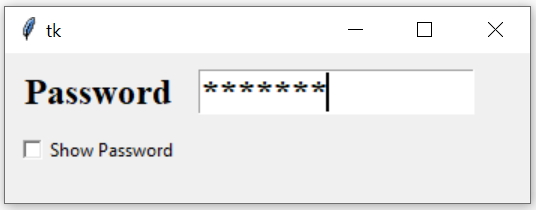
Tkinter display and mask password in an entry box based on Checkbutton click event using show option
We can control to show or hide chars in an Entry widget using click event of a Checkbutton.
Function my_show()
This function based on the Checkbutton status will show or hide the chars of Entry box. Here c_v1 is one IntVar. It will hold the value 1 ( onvalue ) if Checkbutton is checked, otherwise 0def my_show():
if(c_v1.get()==1):
e1.config(show='') # display the chars
else:
e1.config(show='*')# hide the chars using maskEntry box with option show
e1 = tk.Entry(my_w,font=font1,show='*',textvariable=e1_str)
e1.grid(row=1,column=2,padx=5,pady=5)
Triggering the checkbutton to execute the function
c1 = tk.Checkbutton(my_w,text='Show Password',variable=c_v1,
onvalue=1,offvalue=0,command=my_show)from tkinter import *
import tkinter as tk
my_w = tk.Tk()
my_w.geometry("350x100")
font1=('Times',18,'bold')
sv = tk.StringVar() # connected to 1st Label and Spinbox
l1=tk.Label(my_w,text='Password',font=font1)
l1.grid(row=1,column=1,padx=10,pady=10)
e1_str=tk.StringVar() # string variable
e1 = tk.Entry(my_w,font=font1,width=15,show='*',textvariable=e1_str)
e1.grid(row=1,column=2,padx=5,pady=5)
c_v1=IntVar(value=0)
def my_show():
if(c_v1.get()==1):
e1.config(show='')
else:
e1.config(show='*')
c1 = tk.Checkbutton(my_w,text='Show Password',variable=c_v1,
onvalue=1,offvalue=0,command=my_show)
c1.grid(row=2,column=1)
my_w.mainloop() # Keep the window openTkinter Text How to Validate user entered data

Subhendu Mohapatra
Author & Instructor at plus2net
I write and maintain practical tutorials on Python, PHP, SQL, JavaScript, HTML, jQuery, and web development at plus2net. The tutorials focus on clear explanations, working examples, and code that readers can test and adapt while learning.
Connect:


Subscribe to our YouTube Channel here
This article is written by plus2net.com team.
https://www.plus2net.com

 Python Video Tutorials