ID Card using Image and Data
Interactive Google Colab Practice Notebook
Practice building single ID cards, batch ID card generation from list data, and reading BLOB photo records directly from an SQLite database using ReportLab directly inside Google Colab.
View on GitHub
Template file tk_id_card_temp.py and main file tk_id_card_main.py are the two files we will use. Inside the template file tk_id_card_temp.py, we keep our logo image and static labels, while in the main file tk_id_card_main.py, we inject dynamic ID card data.
We import the template function into the main script:
from tk_id_card_temp import my_temp # import the templateInside the template file, we place the logo image, header labels, copyright notice, and a background watermark rotated at 35 degrees:
c.rotate(35)
c.setFillColorCMYK(0, 0, 0, 0.08) # light watermark fill
c.setFont("Helvetica", 100)
c.drawString(-1.1 * inch, -0.5 * inch, "SAMPLE") # watermarking
c.rotate(-35)
Template File: tk_id_card_temp.py 🔝
from reportlab.lib.units import inch

def my_temp(c):
    c.translate(inch, inch)
    c.setFont("Helvetica", 14)
    c.setStrokeColorRGB(0.1, 0.8, 0.1)
    c.setFillColorRGB(0, 0, 1) # font color

    # Watermark
    c.rotate(35)
    c.setFillColorCMYK(0, 0, 0, 0.08)
    c.setFont("Helvetica", 100)
    c.drawString(-1.1 * inch, -0.5 * inch, "SAMPLE")
    c.rotate(-35)

    c.setFillColorRGB(1, 0, 0)
    c.setFont("Helvetica", 25)
    c.drawRightString(1.7 * inch, 2.3 * inch, 'Identity Card')

    c.setFillColorRGB(0, 0, 0)
    c.setFont("Helvetica", 24)
    c.drawRightString(0.3 * inch, 1.7 * inch, 'ID:')
    c.drawRightString(0.3 * inch, 1.3 * inch, 'Name:')
    c.drawRightString(0.3 * inch, 0.9 * inch, 'Class:')
    c.drawRightString(0.3 * inch, 0.5 * inch, 'Gender:')
    c.drawRightString(4.0 * inch, -0.5 * inch, 'Signature')

    c.line(-1.1, -0.7 * inch, 5 * inch, -0.7 * inch)
    c.setFont("Helvetica", 8)
    c.setFillColorRGB(1, 0, 0)
    c.drawString(0, -0.9 * inch, "\u00A9 plus2net.com")

    return c
Main File: tk_id_card_main.py 🔝
from pathlib import Path
from reportlab.pdfgen import canvas
from reportlab.lib.units import inch
from tk_id_card_temp import my_temp

output_dir = Path('output')
output_dir.mkdir(exist_ok=True)
my_path = output_dir / 'single_id_card.pdf'

c = canvas.Canvas(str(my_path), pagesize=(400, 300))
c = my_temp(c)

my_image = 'photos/1.png'
my_id, my_name, my_class, my_gender = 18, 'Kalu', 'Four', 'Female'

c.drawImage(my_image, 2.2 * inch, 0.7 * inch)

c.setFillColorRGB(0, 0, 1)
c.setFont("Helvetica", 20)
c.drawString(0.5 * inch, 1.7 * inch, str(my_id))
c.drawString(0.5 * inch, 1.3 * inch, my_name)
c.drawString(0.5 * inch, 0.9 * inch, my_class)
c.drawString(0.5 * inch, 0.5 * inch, my_gender)

c.showPage()
c.save()
print(f"Single ID Card generated: {my_path}")
Creating Multiple ID Cards from a List 🔝
Our list of student details is structured as follows:
my_students = [
    [1, 'Alex J', 'Four', 'Female', '1.png'],
    [2, 'Ramana K', 'Three', 'Male', '2.png'],
    [3, 'Jack', 'Five', 'Female', '3.png'],
    [4, 'Ronne', 'Six', 'Female', '4.png']
]
Full batch generation code:
from pathlib import Path
from reportlab.pdfgen import canvas
from reportlab.lib.units import inch
from tk_id_card_temp import my_temp

output_dir = Path('output')
output_dir.mkdir(exist_ok=True)
my_path = output_dir / 'batch_id_cards.pdf'
img_path = Path('photos')

my_students = [
    [1, 'Alex J', 'Four', 'Female', '1.png'],
    [2, 'Ramana K', 'Three', 'Male', '2.png'],
    [3, 'Jack', 'Five', 'Female', '3.png'],
    [4, 'Ronne', 'Six', 'Female', '4.png']
]

c = canvas.Canvas(str(my_path), pagesize=(400, 300))

for ids in my_students:
    c = my_temp(c)
    my_image = str(img_path / ids[4])
    c.drawImage(my_image, 2.2 * inch, 0.7 * inch)
    c.setFillColorRGB(0, 0, 1)
    c.setFont("Helvetica", 20)
    c.drawString(0.5 * inch, 1.7 * inch, str(ids[0]))
    c.drawString(0.5 * inch, 1.3 * inch, ids[1])
    c.drawString(0.5 * inch, 0.9 * inch, ids[2])
    c.drawString(0.5 * inch, 0.5 * inch, ids[3])
    c.showPage()

c.save()
print(f"Batch ID Cards generated: {my_path}")
Creating ID Cards Using Data & BLOB Images from SQLite Database 🔝
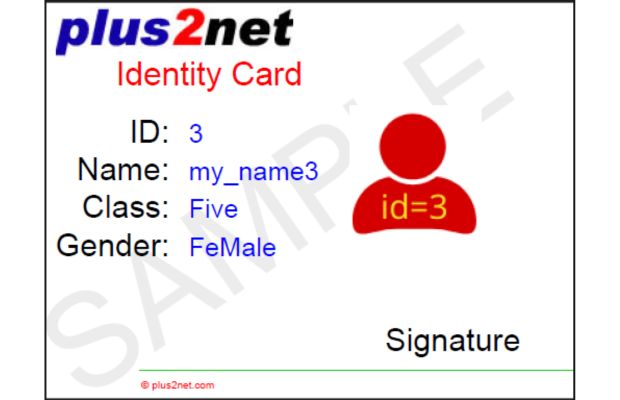
Download the SQLite database containing student BLOB photo records:
Creating SQLite database file with images Download student SQLite database file with imagesimport io
import sqlite3
from pathlib import Path
from reportlab.pdfgen import canvas
from reportlab.lib.units import inch
from reportlab.lib.utils import ImageReader
from tk_id_card_temp import my_temp
output_dir = Path('output')
output_dir.mkdir(exist_ok=True)
my_path = output_dir / 'sqlite_blob_id_cards.pdf'
my_conn = sqlite3.connect('student_blob_2.db')
r_set = list(my_conn.execute('SELECT * from student_b'))
c = canvas.Canvas(str(my_path), pagesize=(400, 300))
for ids in r_set:
my_image = ImageReader(io.BytesIO(ids[4])) # Read BLOB image data
c = my_temp(c)
c.drawImage(my_image, 2.2 * inch, 0.7 * inch)
c.setFillColorRGB(0, 0, 1)
c.setFont("Helvetica", 20)
c.drawString(0.5 * inch, 1.7 * inch, str(ids[0]))
c.drawString(0.5 * inch, 1.3 * inch, ids[1])
c.drawString(0.5 * inch, 0.9 * inch, ids[2])
c.drawString(0.5 * inch, 0.5 * inch, ids[3])
c.showPage()
c.save()
print(f"SQLite BLOB ID Cards generated: {my_path}")Practical Uses of PDF ID Card Generation
Automated ID card generation using ReportLab canvas templates is widely used across educational and corporate institutions:
- Student & Employee ID Badges: Generate custom-sized printable ID cards (e.g. 400x300 points or standard credit card format) with photos, titles, and dynamic text fields.
- Database BLOB Photo Ingestion: Read photo binaries directly from SQLite or MySQL BLOB columns into memory using
io.BytesIOand ReportLab'sImageReader. - Batch Printing Workflows: Loop over thousands of student records to generate multi-page PDF documents where each page represents a ready-to-print ID card.
Common Errors & Troubleshooting
- Invalid Image Source for `drawImage`: When drawing BLOB images stored in a database, wrap binary data with
io.BytesIO(ids[4])before passing it toImageReader()to prevent file system errors. - Custom Page Size Misconfiguration: Ensure custom canvas dimensions like
pagesize=(400, 300)match your target card dimensions, and verify thatc.translate(inch, inch)origin shifts fit within printable bounds. - Missing `showPage()` Call in Loop: Always invoke
c.showPage()at the end of each student iteration to commit the current ID card page and reset canvas state for the next card.
Frequently Asked Questions (FAQ)
Q: How do I change the size of the generated ID card?
A: Set custom dimensions in the canvas.Canvas(filename, pagesize=(width, height)) constructor.
Q: Can I load images from external Web URLs instead of local files?
A: Yes, fetch the raw image bytes using Python `requests.get(url).content` and pass them to ImageReader(io.BytesIO(content)).
Further Reading & Related Tutorials
- Python ReportLab PDF Generation Hub Page
- ID Card from User Inputs in Tkinter
- Working with SQLite BLOB Data in Python
- PDF Mark Sheet by Using Data from SQLite Database
- Generate PDF Invoice Using Sales Data
- Table from Different Data Sources to PDF File
- Create Report in PDF using Charts, Images, Tables, and Paragraphs
PDF ID card from user Inputs in Tkinter
PDF Mark sheet by using data from SQLite database Generate PDF Invoice using Sales data Table from different data sources to PDF file Table from Pandas DataFrame to PDF file PDF Circles & Shapes
Create Report in PDF using Charts, images, tables and Paragraphs
Bar charts in PDF Line charts in PDF Pie Charts Paragraph
Python

Subhendu Mohapatra
Author & Instructor at plus2net
I write and maintain practical tutorials on Python, PHP, SQL, JavaScript, HTML, jQuery, and web development at plus2net. The tutorials focus on clear explanations, working examples, and code that readers can test and adapt while learning.


Subscribe to our YouTube Channel here

 Python Video Tutorials