Pandas to_pickle(): Save and Verify DataFrame Checkpoints
Save a DataFrame checkpoint with to_pickle() and verify the file by reading it back.
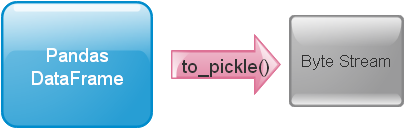
Create and save the original DataFrame 🔝
import pandas as pd
import pickle
import tempfile
import sqlite3
from pathlib import Path
from io import BytesIO, StringIO
df = pd.DataFrame({"NAME": ["Ravi", "Raju", "Alex"], "ID": [1, 2, 3],
    "MATH": [30, 40, 50], "ENGLISH": [20, 30, 40]})
print(df)
with tempfile.TemporaryDirectory(dir=Path.cwd()) as folder:
    target = Path(folder) / "my_data.pkl"
    result = df.to_pickle(target)
    restored = pd.read_pickle(target)
    pd.testing.assert_frame_equal(restored, df)
    assert result is None
    print("Saved and restored rows:", len(restored))
Expected output
   NAME  ID  MATH  ENGLISH
0  Ravi   1    30       20
1  Raju   2    40       30
2  Alex   3    50       40
Saved and restored rows: 3
Choose a destination folder 🔝
Path(r"D:\my_data") / "my_data.pkl" avoids escape sequences. Create the parent folder first. Writing to an existing destination replaces it; choose a new name when retaining versions.with tempfile.TemporaryDirectory(dir=Path.cwd()) as folder:
target = Path(folder) / "exports" / "my_data.pkl"
target.parent.mkdir(parents=True, exist_ok=True)
df.to_pickle(target)
pd.testing.assert_frame_equal(pd.read_pickle(target), df)
print("Created exports/my_data.pkl")Expected output
Created exports/my_data.pklInfer gzip compression from the extension 🔝
with tempfile.TemporaryDirectory(dir=Path.cwd()) as folder:
    target = Path(folder) / "my_data.pkl.gz"
    df.to_pickle(target)
    restored = pd.read_pickle(target)
    pd.testing.assert_frame_equal(restored, df)
    print("Gzip round trip passed")
Expected output
Gzip round trip passedMatch explicit ZIP compression when reading 🔝
with tempfile.TemporaryDirectory(dir=Path.cwd()) as folder:
    target = Path(folder) / "my_data.pkl"
    df.to_pickle(target, compression="zip")
    restored = pd.read_pickle(target, compression="zip")
    pd.testing.assert_frame_equal(restored, df)
    print("Explicit ZIP round trip passed")
Expected output
Explicit ZIP round trip passedChoose a pickle protocol 🔝
with tempfile.TemporaryDirectory(dir=Path.cwd()) as folder:
    for protocol in (4, pickle.HIGHEST_PROTOCOL):
        target = Path(folder) / f"marks_protocol_{protocol}.pkl"
        df.to_pickle(target, protocol=protocol)
        pd.testing.assert_frame_equal(pd.read_pickle(target), df)
    print("Protocol 4 and current highest protocol passed")
Expected output
Protocol 4 and current highest protocol passedRead CSV, then save a pickle 🔝
csv_text = "id,name,mark\n001,John Deo,75\n002,Max Ruin,85\n003,Arnold,55\n"
students = pd.read_csv(StringIO(csv_text), dtype={"id": "string"})
with tempfile.TemporaryDirectory(dir=Path.cwd()) as folder:
    target = Path(folder) / "student.pkl"
    students.to_pickle(target)
    restored = pd.read_pickle(target)
    pd.testing.assert_frame_equal(restored, students)
    print(restored)
    assert restored["id"].tolist() == ["001", "002", "003"]
Expected output
    id      name  mark
0  001  John Deo    75
1  002  Max Ruin    85
2  003    Arnold    55
Read Excel, then save a pickle 🔝
with tempfile.TemporaryDirectory(dir=Path.cwd()) as folder:
    workbook = Path(folder) / "student.xlsx"
    df.to_excel(workbook, index=False, engine="openpyxl")
    imported = pd.read_excel(workbook, engine="openpyxl")
    target = Path(folder) / "student.pkl"
    imported.to_pickle(target)
    pd.testing.assert_frame_equal(pd.read_pickle(target), df)
    print("Excel to pickle rows:", len(imported))
Expected output
Excel to pickle rows: 3Read database records, then save a pickle 🔝
connection = sqlite3.connect(":memory:")
try:
    df.to_sql("student", connection, index=False, if_exists="replace")
    imported = pd.read_sql("SELECT * FROM student ORDER BY ID LIMIT 10", connection)
finally:
    connection.close()
with tempfile.TemporaryDirectory(dir=Path.cwd()) as folder:
    target = Path(folder) / "student.pkl"
    imported.to_pickle(target)
    pd.testing.assert_frame_equal(pd.read_pickle(target), df)
    print("Database to pickle rows:", len(imported))
Expected output
Database to pickle rows: 3Write to a binary buffer 🔝
buffer = BytesIO()
df.to_pickle(buffer, compression=None)
buffer.seek(0)
restored = pd.read_pickle(buffer, compression=None)
pd.testing.assert_frame_equal(restored, df)
print("Binary buffer rows:", len(restored))
Expected output
Binary buffer rows: 3Check index and dtypes after saving 🔝
typed = pd.DataFrame({"units": pd.array([2, None], dtype="Int64"),
    "status": pd.Categorical(["ready", "review"]),
    "day": pd.to_datetime(["2026-01-02", "2026-01-03"])},
    index=pd.Index(["001", "002"], name="order_id"))
with tempfile.TemporaryDirectory(dir=Path.cwd()) as folder:
    target = Path(folder) / "orders.pkl"
    typed.to_pickle(target)
    restored = pd.read_pickle(target)
    pd.testing.assert_frame_equal(restored, typed)
    print(restored.dtypes)
    print("Index:", restored.index.tolist())
Expected output
units              Int64
status          category
day       datetime64[us]
dtype: object
Index: ['001', '002']
Parameters and format choices 🔝
| Parameter | Purpose |
|---|---|
path | Required destination path or binary writable buffer. |
compression | Defaults to infer; None disables compression. gzip, bz2, zip, xz, zstd and tar options depend on their required libraries. |
protocol | Pickle format version; highest supported protocol by default. |
storage_options | Options forwarded to supported storage backends. |
Use pickle for controlled Python checkpoints. Record Python, Pandas and dependency versions when retaining an artifact. Choose CSV for readable interchange or a suitable schema-aware format for wider interoperability. A file extension does not prove a file is safe: unpickling may execute code. Only reload files whose source and integrity you trust. Do not publish credentials or arbitrary objects inside a shared pickle.
Exercise: save high mathematics marks 🔝
Exercise solution 🔝
selected = df.loc[df["MATH"].ge(40)].copy()
with tempfile.TemporaryDirectory(dir=Path.cwd()) as folder:
    target = Path(folder) / "selected.pkl.gz"
    selected.to_pickle(target)
    restored = pd.read_pickle(target)
    pd.testing.assert_frame_equal(restored, selected)
    assert restored["ID"].tolist() == [2, 3]
    print(restored)
# Optional Colab download: save selected to a permanent filename first.
# selected.to_pickle("selected.pkl.gz")
# from google.colab import files
# files.download("selected.pkl.gz")
Expected output
   NAME  ID  MATH  ENGLISH
1  Raju   2    40       30
2  Alex   3    50       40
Practice in Google Colab 🔝
Open in Google Colab View on GitHub
Run examples in order. The notebook creates all practice files. Save a copy to keep edits.
Reference: Pandas to_pickle documentation.

Subhendu Mohapatra
Author & Instructor at plus2net
I write and maintain practical tutorials on Python, PHP, SQL, JavaScript, HTML, jQuery, and web development at plus2net. The tutorials focus on clear explanations, working examples, and code that readers can test and adapt while learning.


Subscribe to our YouTube Channel here

 Python Video Tutorials