PHP code to Generate Video object with Schema Markup for Rich Result using YouTube API
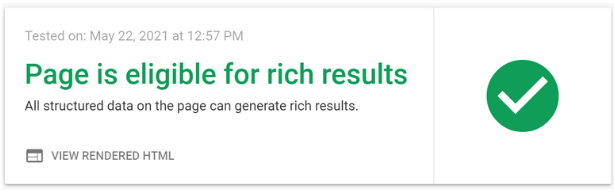
How to add Video object with schema markup to the web page? We can see videos appearing in search result. How to generate structured data so the same can be used as markup for the YouTube published videos.
We will be using Google YouTube API to connect and fetch data. Read more on Google Developers YouTube API
Current approach: generate structured data from validated API values and prefer a JSON-LD
VideoObject block because it keeps structured data separate from the visible markup.Current VideoObject JSON-LD pattern
<?php
$video = [
    '@context' => 'https://schema.org',
    '@type' => 'VideoObject',
    'name' => $title,
    'description' => $description,
    'thumbnailUrl' => [$thumbnailUrl],
    'uploadDate' => $uploadDate,
    'embedUrl' => 'https://www.youtube.com/embed/' . rawurlencode($videoId),
];

echo '<script type="application/ld+json">';
echo json_encode($video, JSON_UNESCAPED_SLASHES | JSON_UNESCAPED_UNICODE | JSON_HEX_TAG);
echo '</script>';
?>
Developing the schema in PHP
We will first extract the video id from the URL we copied from YouTube. Here we can use one form so we can easily paste the URL in a textbox and submit the form to same page.
Generating Schema Code in PHP for Rich results while using Video inside Webpage using YouTube API
After receiving the URL we will break the string by using explode() and get the video id part.
echo "<form method=post action=''>
<input type=text name=t1 class='Form-control'>
<input type=submit value='Go'></form>";
$url = trim($_POST['t1'] ?? ''); // Collect the submitted YouTube URL from this POST form

//$url="https://youtu.be/8myaNdeRKwk"; // sample to try

$ar=explode("/",$url); // breaking the string
$videoId=$ar[3];   // get the last part , the id only
$vidioId we will use Google Developers YouTube API to get data from YouTube.We need the following ( minimum ) data from YouTube to generate our code.
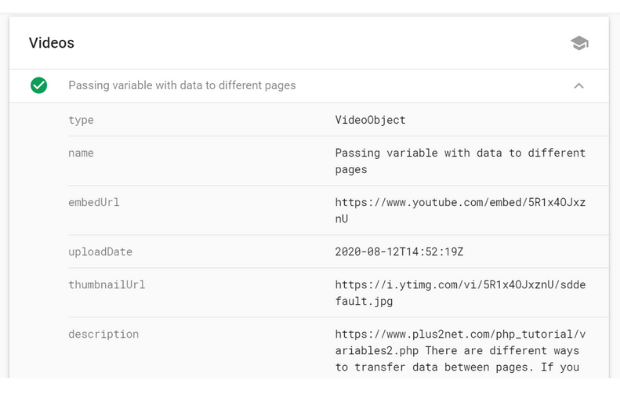
Name : the title of the video embedUrl : the URL of the video uploadDate : Date of upload of video to the YouTubethumbnailURL : URL of the thumbnail used for the video. Description : the Description we submitted while uploading the video or edited afterwards.
We are preparing a variable
$str with the code and finally we will display the value of the string variable $str inside one Textbox for the user to select and copy the code.
$apikey = 'YOUR_API_KEY_HERE';
//$videoId='DLF2wvDqrwo'; // sample to try
if(strlen($videoId) >3){
$path="https://www.googleapis.com/youtube/v3/videos?key=";
$path=$path.$apikey."∂=snippet&id=".$videoId;
$data = file_get_contents($path);
$json = json_decode($data);
$title_4983=$json->items[0]->snippet->title;
$uploadDate_4983=$json->items[0]->snippet->publishedAt;
$embedUrl_4983='https://www.youtube.com/embed/'.$videoId;
$thumbnailUrl_4983=$json->items[0]->snippet->thumbnails->standard->url;
$description_4983=$title=$json->items[0]->snippet->description;
// with these variables start creating the
// string variable with code
$str="
<div itemprop=\"video\"
itemscope itemtype=\"http://schema.org/VideoObject\">
<span itemprop=\"name\">$title_4983</span><br>
<meta itemprop=\"embedURL\" content=\"$embedUrl_4983\"/>
<meta itemprop=\"uploadDate\" content=\"$uploadDate_4983\" />
<meta itemprop=\"thumbnailUrl\" content=\"$thumbnailUrl_4983\"/>
<meta itemprop=\"description\" content=\"$description_4983\"/>
<iframe width=\"560\" height=\"315\" src=\"$embedUrl_4983\"
 title=\"$title_4983\" frameborder=\"0\"
 allow=\"accelerometer; autoplay; clipboard-write;
 encrypted-media; gyroscope; picture-in-picture\"
 allowfullscreen>
</iframe></div>";
}else{
	$str='';
}
$str is ready with the code, let us display it inside one textarea.
echo "<textarea name='code_dump' rows=10  id='code_dump'>
$str
</textarea>";
YouTube playlist Videos with all details Check your page for Rich results ( Google ) Generate Thumbnail URL of your Video
All PHP Scripts PHP Home

Subhendu Mohapatra
Author & Instructor at plus2net
I write and maintain practical tutorials on Python, PHP, SQL, JavaScript, HTML, jQuery, and web development at plus2net. The tutorials focus on clear explanations, working examples, and code that readers can test and adapt while learning.
Connect:


Subscribe to our YouTube Channel here
This article is written by plus2net.com team.
https://www.plus2net.com

