Managing Newsletter Subscribers and Campaigns
Current practice: restrict this area to authenticated administrators, store passwords as hashes, require CSRF tokens for delete/status/send actions, send only to confirmed subscribers, and process large lists in controlled batches through a mail provider rather than a long browser request.
Selecting confirmed subscribers safely
<?php
$stmt = $pdo->prepare(
    'SELECT email FROM newsletter_subscribers WHERE status = :status ORDER BY subscriber_id'
);
$stmt->execute(['status' => 'active']);

while ($row = $stmt->fetch(PDO::FETCH_ASSOC)) {
    $recipient = $row['email'];
    // Queue the message with your mail provider here.
}
?>
- Site admin should able to login.
- Admin can delete members
- Change the status from Fresh to Active and Active to Fresh.
- Compose text for the newsletter and save them as draft
- Update common header and footer message which is part of the each newsletter
- Post a test mail to a particular user to check the content of the mail.
- Post newsletter and that will be stored in an archive
- Admin should able to download all member data in CSV format
- Install script file to add admin login details.
Admin area.
Newsletter subscription script Admin area need not be close to the general subscription files. It can be any where. It can be integrated to the part of your site admin making it a common admin area.List Page
It will display all the subscribers with their status.Listing will be done by paging of records and by default it is set to 10 records per page.
Admin can delete any member or can change the status to Active or to Fresh.
Post Page
Admin can enter subject of the newsletter and can compose the newsletter. After this the newsletter can be posted to all subscribers or it can be saved to post it in future.Clean confirm table
Many visitors will subscribe but fail to confirm by visiting the link. This may happen due to various reasons but we need not keep those records for longer period. We can't expect someone to visit the confirmation page through the email link after two days of submitting the email address.So one page is kept to remove such address which are more than 2 days old. The number of days can be changed by changing the days inside the SQL delete query.
Download in CSV format.
Inside the Admin area there is a link saying Export. This page will generate CSV data of subscribers records and it will prompt for download. CSV file is generated by reading all the records of our nl_email table.How to Install.
Open config.php file and enter all details including database login id and password. Change the base URL path and FROM email address.Use the SQL dump file to create your tables. Inside Admin area there is install.php file. Open this file and enter your admin userid and password. This file will insert your admin userid and password to nl_admin table. After adding admin details, remove install files from Admin area.
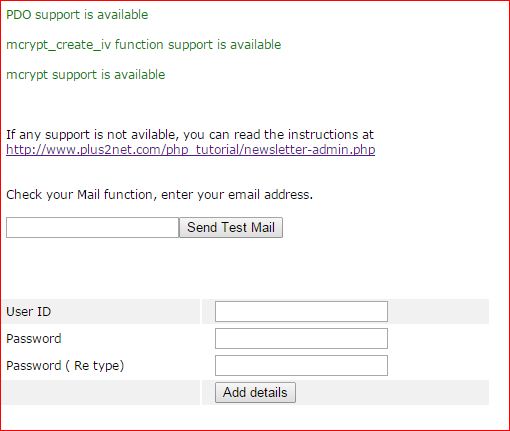
Testing your mail function
There is an option to check your mail function. You can enter your email address and the script will send a test mail to you.If your mail server is not configured then you will get warning message.
You must delete this install.php & installck.php files before using the script. This is a security problem. By using this file any one can create Admin privilege and enter into Admin area.
While login to admin area script will check for install.php & installck.php files and if it is not deleted then login will not be allowed.
Crypt function
Script uses crypt function to encrypt admin password while storing. If your server does not have crypt function support you may go for lower level encryption.Checking your server support to run this script
Install file will check your server configuration and required support. For this there is a check.php file available at root directory. If any required support is not available then you will get message. If you are getting error message then you need to install those supports in your local server. There are links saying you how can enable those supports. After checking you can remove check.php file at root.If crypt function is not available then there is low level encryption available using md5 function. For this you need to change install.php and loginck.php and passwordck.php file inside admin directory.
These three files you can download here

▼ PHP MySQL Scripts
 PHP MySQL ScriptPicture gallery script with admin interface to manage photo and galleryListing tables, database , records etc by simple plus mysql adminNewsletter Script with admin managementVisitors can submit rating for the page in one to five scaleManaging part or full content of a page by using PHP MySQLVisitors can post comment at the end of the page
Frequently Asked Questions (FAQ) script with adding categories and editing the content
Tell a friend script to send URL of the page by email
Online Poll script using PHP MySql
Displaying HTML tags using PHP echo command
Newsletter Script

Subhendu Mohapatra
Author & Instructor at plus2net
I write and maintain practical tutorials on Python, PHP, SQL, JavaScript, HTML, jQuery, and web development at plus2net. The tutorials focus on clear explanations, working examples, and code that readers can test and adapt while learning.
Connect:


Subscribe to our YouTube Channel here
This article is written by plus2net.com team.
https://www.plus2net.com

| Prabakar | 03-09-2014 |
| How can i login for Admin.,? | |
| ads | 22-09-2014 |
| i got it | |
| Sam | 29-10-2014 |
| Inserted username password through install admin, then removed that, still cannot login. It goes for ever. Any help is appreciated. Thank you. | |
| smo | 12-11-2014 |
| Login to MySQL admin or phpmyadmin of your server, delete the record which stores admin login details. Then return to your site and start the install process again. Keep a record of your admin login details. | |
| Houssam Amine | 21-01-2015 |
| Dear sir i inserted username password through install.php but every time giving me the error message: Please use characters or numbers for your User ID User ID should not be less than 4 and more than 15 character length Password should not be less than 6 length Please help I can not install the newsletter-v1 Scripts | |
| smo | 24-01-2015 |
| there is no problem in installing the script. One screen shot is added now. Just enter correct details. | |
| Mauricio | 10-04-2015 |
| Hi, can it be tested on localhost? I´d installed this one over wamp server, already ran check.php and says all functions are available, can login to admin area, but when I enter an email address for test purposes nothing happen, no error msg, no email send to that address, no record on database, just reload the page and that´s all. What I´m missing? thks | |
| smo1234 | 13-04-2015 |
| Download a fresh copy and use. Now while installing you can check your mail function also. In localhost if you have not installed mail server then you can't send outgoing mails. | |
