
A pillar page is an organizational strategy, not a special Google requirement
“Pillar page” and “topic cluster” are SEO and content-strategy terms used to describe a well-organized group of related pages. Google does not require a page to be labelled as a pillar page, and there is no special pillar-page schema or ranking switch.
The value comes from something more practical: useful internal links, logical site structure, clear coverage of related subtopics and an easier path for both users and crawlers to discover relevant pages.
One broad hub connects focused supporting pages
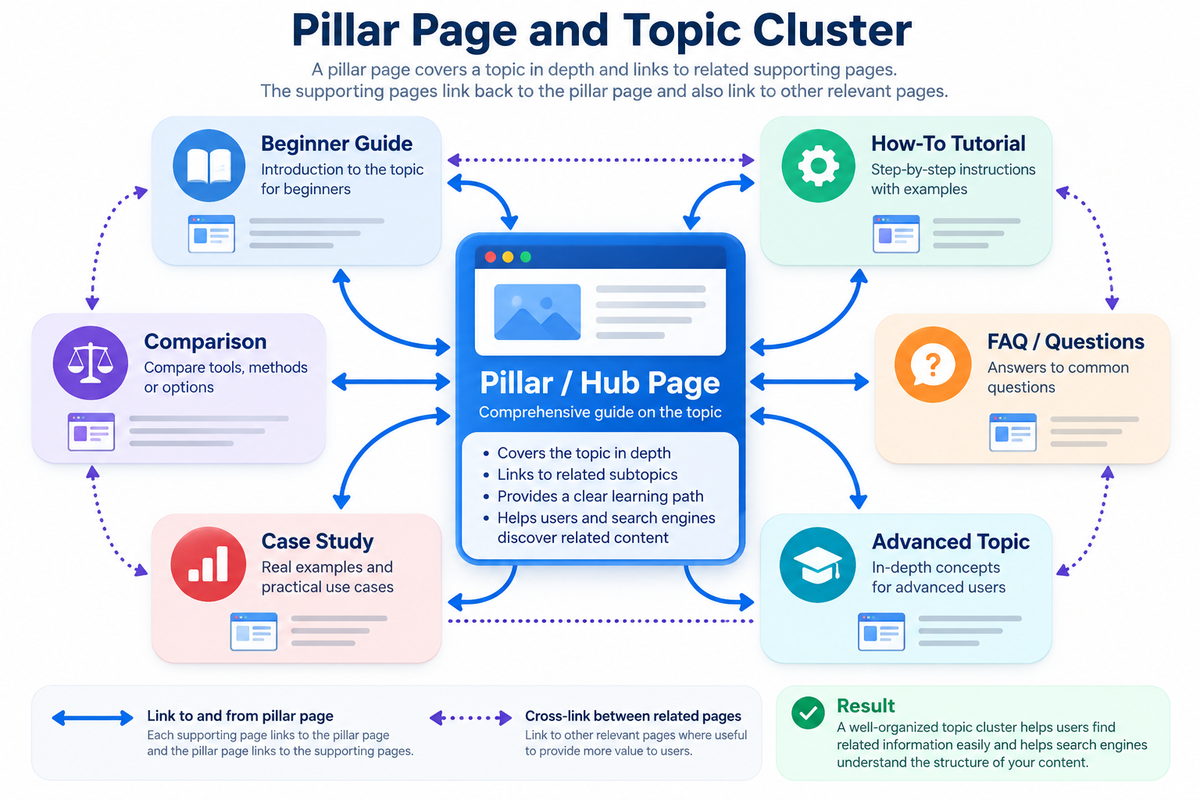
A useful cluster often includes several page types:
- Pillar/hub page: gives the broad overview and provides routes into the major subtopics.
- Beginner guide: introduces the fundamentals for users who are new to the topic.
- How-to pages: solve specific tasks step by step.
- Comparison pages: help users choose between methods, tools or approaches.
- FAQs or troubleshooting pages: answer narrower questions.
- Advanced pages: provide depth without making the main hub overwhelming.
Build the hub after you understand the topic map
- Define the broad topic: choose a subject important enough to support several meaningful pages.
- Inventory existing URLs: review the relevant sitemap or section URL list before creating new pages.
- Group by user intent: separate learning, comparison, troubleshooting and task-oriented needs.
- Choose the hub: decide whether an existing page can become the pillar or whether a new hub is needed.
- Identify gaps: create new supporting content only where the cluster is genuinely incomplete.
- Map internal links: decide how the hub and supporting pages should connect.
- Webpage Audit Framework
Link the first natural occurrence when another page genuinely explains the concept better
A pillar page should link to its supporting pages, and supporting pages should link back to the hub.
The anchor text at supporting page should use natural words. Don't use like Hub page for PHP Date, Use instead More on PHP Date.
Supporting pages can also cross-link to one another when the relationship is useful.
For a large tutorial site, use the relevant section sitemap or URL inventory to find link opportunities. When a topic keyword first appears naturally in the content, link it to the strongest supporting page if that helps the reader.
Cross-section linking of different supporting pages can be especially useful. For example, a Python MySQL tutorial discussing a SELECT statement
can link the first useful occurrence of SELECT to a detailed tutorial in the SQL section about SELECT Query.
A cluster can be well linked and still be badly designed
- Keyword cannibalization: several pages answer essentially the same intent with minor wording changes.
- Orphan supporting pages: useful tutorials exist but the hub or related pages never link to them.
- Bloated pillar page: every detail is forced onto the hub instead of letting supporting pages provide depth.
- Empty hub: the “pillar” is only a list of links and provides little value by itself.
- Forced anchors: links are inserted for SEO rather than because they help the reader.
- Stale cluster: old screenshots, discontinued tools or dead supporting pages weaken the experience.
How the Articles section can evolve from one index into multiple topic hubs
The current Plus2Net Articles homepage can remain the broad entry point. As the number of modernized pages grows, narrower hubs can provide better navigation and stronger contextual relationships.
These hubs should be created because they improve navigation and learning paths—not merely because “pillar pages rank better.”
Evaluate whether the cluster actually improves discovery and engagement
After reorganizing a topic cluster, watch:
- Search Console impressions, clicks and query coverage for the hub and supporting pages.
- Whether previously orphaned pages begin receiving more internal discovery and search visibility.
- GA4 landing-page engagement and navigation to related tutorials.
- Broken links and outdated URLs after pages are merged, redirected or renamed.
- Whether multiple pages continue competing for the same search intent.
Run the Plus2Net webpage audit on the hub and its most important supporting pages after implementation.
A pillar page should make the site easier to understand
The best topic cluster is not the one with the most pages. It is the one where the hub explains the broad topic, each supporting page has a distinct purpose, and internal links help users move naturally to the next useful piece of information.



