
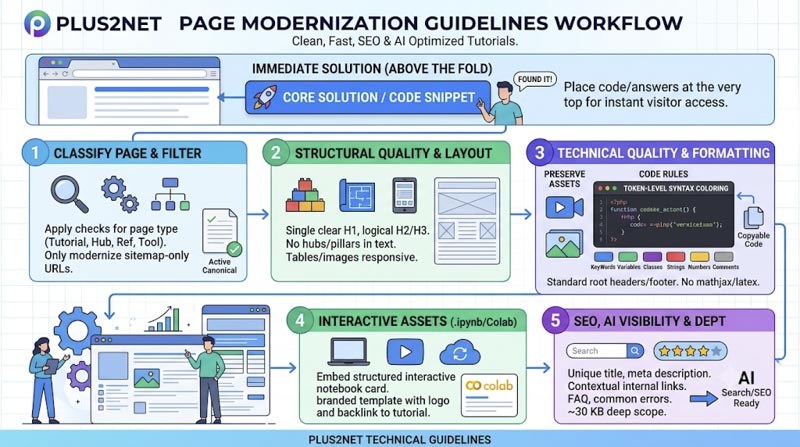
Plus2Net Technical & Code Execution Rules (Top Priority)
1. Above-the-Fold & Initial Page Layout
- Immediate Solution (Above the Fold): Place the core code snippet, syntax, or direct answer right at the top so visitors find what they need instantly without scrolling.
- Minimize Top-Level Text: Avoid text-heavy introductory blocks or long conceptual explanations before delivering the primary solution.
- Direct opening: Important questions are answered early before secondary background.
- Prioritize Fast Navigation: Ensure a clean hierarchy and prompt access to key sections to maximize user engagement and satisfaction.
2. Technical Architecture & Code Formatting
- Template & Asset Consistency: Standard root headers (head_jq_bs4.php, top_bs4.php, body_start.php) and common footer (bottom-common.php).
- No LaTeX / MathJax / KaTeX: Do not load MathJax or KaTeX by default in
.phppages to prevent raw code rendering issues in standard browsers. - Token-level syntax coloring: Learner-facing code should visually distinguish meaningful tokens such as keywords, strings, variables, comments, and SQL clauses rather than applying one color to the whole block.
- Code remains copyable: Syntax highlighting and HTML escaping must not alter, hide, or corrupt the code a learner copies.
- Group Related PHP Logic: Avoid unnecessary repeated PHP open/close boundaries (
<?php ... ?>) when nearby server-side operations belong together[cite: 5].
3. Navigation, Breadcrumbs & Internal Linking
- No Hub/Pillar Terminology: Never use words like "Hub" or "Pillar page" in links or page text. Hierarchical context must be established exclusively via top breadcrumb navigation (avoid phrases like "Cluster Navigation: This tutorial is part of the NumPy Array Creation Hub").
- Breadcrumb follows the real learner path: Place the breadcrumb at the actual top of the learner content and make it reflect the page's primary information hierarchy. Include the relevant pillar or sub-pillar when one genuinely exists. The current page should be the final plain-text item, not a clickable self-link.
- Table of contents for long pages: Long tutorials should provide jump navigation near the top so users can move directly to the section they need.
- Section anchors and long-page navigation: Every TOC link should use a unique working ID, and very long pages should make returning to the top or moving between sections easy.
- Related topics and learning path: Provide genuinely relevant parent, sibling, previous, next, or practical follow-up tutorials so the learner is not left at a dead end. Use descriptive anchor text and avoid linking the current page to itself. A shared generic footer can support navigation, but it should not replace page-specific contextual links or useful Further Reading recommendations.
- Pillar or hub relationship: Important pages should belong to a clear primary subject hub or learning cluster. The hub should provide normal crawlable links to its intentional substantive child pages, while overlapping topics can receive contextual links from secondary hubs where useful. An XML sitemap should support discovery, not replace the site's learner-facing internal-link architecture.
- Sitemap-assisted contextual internal linking: Review the relevant section sitemap or site URL inventory, identify natural topic matches in the page text, and link (relative) the first useful occurrence of a matching term to the best supporting tutorial. The link may stay inside the same section or cross into another section when that helps learning. For example, a Python MySQL tutorial can link the first natural mention of
SELECTorWHEREto the corresponding SQL tutorial. Avoid forcing links, repeating the same link on every occurrence, or linking terms that do not genuinely help the reader. - 100% Pillar-to-Child Coverage: Every real topic cluster must maintain a crawlable HTML link to every intentional substantive child page directly from the pillar hub. XML sitemap discovery does not substitute for contextual hub links[cite: 5].
4. Interactive Companion Assets (.ipynb / Colab)
-
Interactive companion notebook integration: Main tutorial tracks for data-heavy and runtime environments (specifically Python Basics, NumPy, and Pandas) must embed a unified layout card linking directly to practical execution environments. The block must feature a structured Bootstrap container:
Python/NumPy/Pandas Practice Files: Provide a companion
Interactive Companion Jupyter Notebook
Explore interactive code cells, dynamically generate classes, test type vs isinstance comparisons, and run self-validating assertions.
View on GitHub
.ipynbfile using the established template, featuring the plus2net logo, a back-link to the tutorial page, a GitHub repository link, and the standard SVG badge (https://colab.research.google.com/assets/colab-badge.svg) linking to Colab. Do not change file names.
Repository and workspace compliance: Every linked practice notebook repository must maintain a consistent branding profile, including the official plus2net.com logo and a distinct, prominent contextual anchor link routing the learner back to the core host tutorial page.
5. Content Depth, Structure & Quality
- Comprehensive Content Depth: Ensure every sub-topic covers all practical aspects thoroughly, targeting a comprehensive scope (~30 KB minimum scope for sub-topic pages).
- Original value: Include first-hand experience, examples, uses, calculations, screenshots, data, templates, or observations when appropriate.
- Intent match: The content answers the problem implied by the target query rather than merely repeating keywords.
- Complete coverage: Answer the important subquestions without padding the article with unrelated sections.
- FAQ and Related tutorials: Towards the end, add FAQs, common errors, issues, etc., as required based on the topic. Keep one related tutorials section at the end with matching links and descriptions.
6. Media, Images & Responsive Assets
- Preserve Existing Assets: Always retain existing practice links, video links & images (make them responsive), and embedded assets unless explicitly instructed otherwise.
- Responsive images and screenshots: Instructional images should scale correctly on mobile while retaining useful dimensions, alt text, and context.
- Responsive video embeds: YouTube and other embedded videos should use the approved responsive container and must not overflow the page on mobile.
7. Modernization Workflow & Scope Filters
- Classify the page before modernization: Determine whether the URL is a substantive tutorial or reference page, hub/index page, demo or helper, exercise or quiz, redirect, shared include/template, tool, or downloadable resource. Apply the checks appropriate to that page type instead of forcing every URL to behave like a normal article.
- Sitemap-only modernization filter: Limit structural content expansions and modernizations strictly to active, canonical URLs explicitly indexed within
sitemap.xml. Do not modify redirect stubs, obsolete URL fragments, or unlisted staging and test files.
Universal On-Page & Technical SEO
- Unique title: Accurately describe the page and make the main topic clear.
- Useful meta description: Summarize the page for searchers without keyword stuffing.
- One clear H1: Align the visible headline with the page topic and search intent.
- Logical H2/H3 structure: Headings should help readers scan the answer in a meaningful order.
- Descriptive internal links: Connect the page to relevant tutorials, hubs, and supporting pages using natural contextual anchors. Prefer links that genuinely help the reader continue the topic rather than adding links only for SEO.
- Authoritative outbound sources: Cite original documentation, standards, or research when it adds trust or context.
- Descriptive image alt text: Describe informative images for accessibility; decorative images do not need keyword-heavy alt text.
- Breadcrumbs: Help users and search engines understand where the page sits within the site structure.
- Relevant structured data: Use supported markup that matches visible content. Do not add schema simply because a type exists on Schema.org.
- Canonical is correct: All pages present in sitemap.xml must have matching canonical tags, no duplicates, and should not send conflicting canonical signals.
<link rel="canonical" href="https://www.plus2net.com/python/numpy-adding.php">
Technical SEO, Indexing and Performance
1. Core Web Vitals & Page Experience
- LCP (Largest Contentful Paint): Optimize the loading of the main visible content, especially large hero images, fonts, and render-blocking resources[cite: 1].
- INP (Interaction to Next Paint): Keep interactions responsive by reducing long JavaScript tasks and unnecessary main-thread work[cite: 1].
- CLS (Cumulative Layout Shift): Reserve space for images, ads, and embedded media to avoid disruptive layout shifts[cite: 1].
2. Mobile Usability & Crawl Architecture
- Mobile usability: Content, controls, tables, and navigation should work on small screens without hiding essential information[cite: 1].
- Broken links and crawl traps: Fix broken internal links and control unnecessary URL combinations, internal search, or faceted-navigation patterns[cite: 1].
Core Web Vitals matter, but they are not the whole ranking strategy. Google states that there is no single “page experience signal”; relevance and helpful content remain fundamental[cite: 1].
Trust, Usability, Accessibility and Conversion
1. Publisher Transparency & Trust Signals
- Author/publisher context: Make it clear who created the content when that information helps users judge trust[cite: 1].
- About/contact transparency: Make business or publisher information easy to find when relevant[cite: 1].
- Commercial disclosure: Label sponsored, affiliate, or paid relationships appropriately[cite: 1].
2. Content Standards & User Intent
- Higher standards for high-stakes topics: Health, finance, legal, and safety content should use strong sourcing, appropriate expertise, and clear limitations[cite: 1].
- CTA matches user intent: The next action should be relevant rather than interrupting the task[cite: 1].
Code Block Syntax Highlighting Rules
- Variables (Red): All Python variables and object instances (e.g.,
q,my_conn,r_set,my_cursor,row,e) must be styled usingclass="text-danger". - SQL Keywords (Blue, Uppercase): All SQL commands and clauses (e.g.,
SELECT,FROM,WHERE,AS,LIMIT,GROUP BY,BETWEEN,AND) must be strictly uppercase and styled usingclass="text-primary". - Database Identifiers, Tables & Strings (Green): All database table names, column identifiers, string literals, and aliases (e.g.,
student,student3,id,name,mark,social,math,science,class,grade_A,grade_B,grade_C,Result,'PASS','FAIL') must be styled usingclass="text-success". - Functions & Methods (Cyan): All built-in database functions, Python methods, and constructors (e.g.,
IIF(),SUM(),COUNT(),text(),print(),execute(),connect()) must be styled usingclass="text-info". - Numeric Values & Limits (Yellow): All integers, floats, and numeric thresholds (e.g.,
60,200,50,69,70,10,0,1) must be styled usingclass="text-warning".
Pandas & Data Science Tutorial Standards
All new and modernized pages within the Python Pandas cluster must adhere to the following layout, structural, and interlinking standards:
-
Code Block Formatting & Inline Syntax Highlighting:
- Use clean, single-layer
<pre><code>wrappers without redundant CSS outer container classes. - Apply semantic Bootstrap utility classes for comprehensive syntax highlighting directly inside code blocks:
<span class="text-primary">for keywords and booleans (e.g.,import,from,as,True).<span class="text-danger">for variables and object instances (e.g.,app,notebook,tab1).<span class="text-info">for class names and methods (e.g.,Window,Notebook,pack).<span class="text-success">for string literals and values (e.g.,"Notebook Basic Demo","flatly").<span class="text-warning">for numeric integer values and dimensions (e.g.,15,10,260).<span class="text-muted">for code comments (e.g.,# Create Notebook container widget).
- Use clean, single-layer
-
Above-the-Fold & Section Title Rules & content depth:
- Don't keep Section 1 titles ( H1 tag shuld include that) at the top.
- Expand technical abbreviations on first mention in description text (e.g., "Representational State Transfer Application Programming Interface (REST API)").
- Starting from the basic examples/code give minimum 4 sample code blocks focusing on different requirements. The topic must cover practical uses , Common Errors & Troubleshooting, FAQ, where to use, Further Reading & Related Tutorials etc.
Please rewrite and expand the provided text into a deep, production-ready tutorial. Follow these guidelines:- Content Depth & Structure: Cover every practical use case, parameter variations, and edge cases with thorough explanations.
- Code Examples & Methods: Include comprehensive code blocks demonstrating each method in isolation as well as in combined scripts.
- Target Output Size: Provide enough detail, code samples, and practical scenarios so the total output approaches ~30 KB.
-
Non-Technical Context Cards:
- Include a styled Bootstrap summary card (e.g.,
card bg-light border-primary) immediately above the Prerequisites & Required Libraries heading. - Explain in plain, non-technical terms what the script accomplishes, what data it collects, and how it benefits the end user.
- Include a styled Bootstrap summary card (e.g.,
-
Sample Data :
- Use required sample data when required.
For examples the sample student table data available in different formats can be used. Here they are available.
https://www.plus2net.com/python/pandas-student.php
- Use required sample data when required.
-
100% Hub-and-Spoke Interlinking (Pillar-to-Child):
- Every specialized child tutorial must use standard Schema.org breadcrumbs pointing back to its parent hub (e.g.,
pandas-input-output.php). - Child pages must include contextual backlinks to storage and persistence guides (e.g.,
pandas-to_csv.php,pandas-to_excel.php,pandas-to_sql.php,pandas-mysql-to_sql.php). - Parent hub pages must link directly down to new child tutorials to guarantee full crawler coverage.
- Every specialized child tutorial must use standard Schema.org breadcrumbs pointing back to its parent hub (e.g.,
-
Companion Google Colab Notebook (`.ipynb`) Requirements:
- Python/NumPy/Pandas Practice Files: Provide a companion
.ipynbfile using the established template, featuring the plus2net logo at the top.
https://www.plus2net.com/images/top2.jpg
At header of the practice page there must be link back to the specific tutorial page using the full production URL (e.g.,https://www.plus2net.com/python/pandas-api-extraction.php). Never include local development URLs (e.g.,localhost). - The companion practice Notebooks must include all sample code blocks ( of main tutorial page ) and text instructions (on text cells ) , expected output code blocks ( if required ) , and an end-of-page link pointing back to www.plus2net.com .
- From main tutorial page to link to colab practice page use this image tag as anchored image
https://colab.research.google.com/assets/colab-badge.svg - For better visibility use light gray background and light blue border card to place these practice links.
- Keep the above practice link block of practice files towards the end of the main tutorial page.
- Inside a zip file give the main blog page (Example : pandas-add.php) along with the practice notebook (Example : pandas_add_practice.ipynb )
- Here is one sample practice .ipynb file.
https://www.plus2net.com/python/download/pandas_api_extraction.ipynb
Interactive Companion Jupyter Notebook
Explore interactive code cells, dynamically generate classes, test type vs isinstance comparisons, and run self-validating assertions.
View on GitHub
	<div class="card bg-light my-3 border-info">
        <div class="card-body">
          <h5 class="card-title text-info"><i class="fas fa-laptop-code"></i> Interactive Companion Jupyter Notebook</h5>
          <p class="card-text">Explore interactive code cells, dynamically generate classes, test type vs isinstance comparisons, and run self-validating assertions.</p>
          <a href="https://github.com" class="btn btn-outline-dark mr-2 mb-2" target="_blank" rel="noopener noreferrer"><i class="fab fa-github"></i> View on GitHub</a>
          <a href="https://google.com" target="_blank" rel="noopener noreferrer"> <img src="https://colab.research.google.com/assets/colab-badge.svg" alt="Open In Colab" loading="lazy"> </a>
        </div>
     </div>
- Python/NumPy/Pandas Practice Files: Provide a companion
New Page
Rules for Identifying New Page Opportunities (Content Gaps)
- Reject Generic Theory: Avoid broad, definition-based, or basic syntax topics (e.g., "how to use a method") where high-authority documentation and massive sites already dominate.
- Focus on Practical Application: Target real-world, specific automation or data tasks (e.g., "using BeautifulSoup to extract live NAV data from financial sites") rather than abstract tool features.
- Leverage Stack Synergy: Prioritize pages that bridge two or more tools within your existing expertise (e.g., Python + SQLite + Pandas + ReportLab + BS4) to solve unique workflow challenges.
- Deepen Existing Clusters: Build spoke pages that extend your current topical authority pillars rather than introducing isolated, disconnected topics with no supporting hub.
- Target Real-World Friction: Identify specific administrative, developer, or webmaster chores (like building PDF invoices or generating automated ID cards) that require a complete, end-to-end programmatic solution.
Rules for Identifying New Pillar Pages and Broad Areas
- Leverage Existing Stack Synergy: Ensure a new pillar builds naturally upon your core competencies (Python, SQL, PHP, and data automation) rather than introducing completely disconnected ecosystems.
- Focus on Practical Glue-Work: Target real-world integration challenges and workflow intersections (e.g., merging BeautifulSoup data extraction with SQLite storage and ReportLab export) rather than generic software features.
- Avoid High-Competition Theory: Reject broad, definition-based topics dominated by massive documentation sites; instead, anchor new pillars around end-to-end working tools and utilities.
- Capture Downstream Workflows: Identify natural next-step technical hurdles that developers face after mastering your existing tutorials, expanding authority into logical adjacent domains.
- Anchor with Flagship Utilities: Every new pillar area must be driven by complete, hands-on implementations (such as standalone desktop tools, automated audit scripts, or data pipelines) that provide immediate practical value.



