
SEO remains the foundation for Google's generative AI features
Google's current guidance is clear: the same Search fundamentals continue to matter for AI Overviews and AI Mode. A page must be indexed and eligible to appear in Google Search with a snippet before it can be shown as a supporting link in these AI experiences.
There is no special AI Overview schema, no required “AI text file,” and no magic formatting trick that replaces useful content, crawlability, internal linking and page experience. The strategic change is therefore less about a new technical checklist and more about what value your page contributes beyond a generic summary.
Create something more useful than a commodity summary
Google now explicitly emphasizes valuable, unique and non-commodity content when discussing generative AI search. This is especially important for informational publishers because a basic definition or generic list can often be summarized directly in the search experience.
First-hand experience
Show what happened when you used the tool, code, process or product rather than repeating a generic description.
Original examples
Use your own datasets, screenshots, calculations, code samples, experiments and before/after comparisons.
Useful tools & resources
Add calculators, downloadable files, templates, datasets, demos or checklists where they solve a real problem.
Clear judgment
Explain trade-offs, limitations and when an approach should or should not be used instead of presenting every option as equally good.
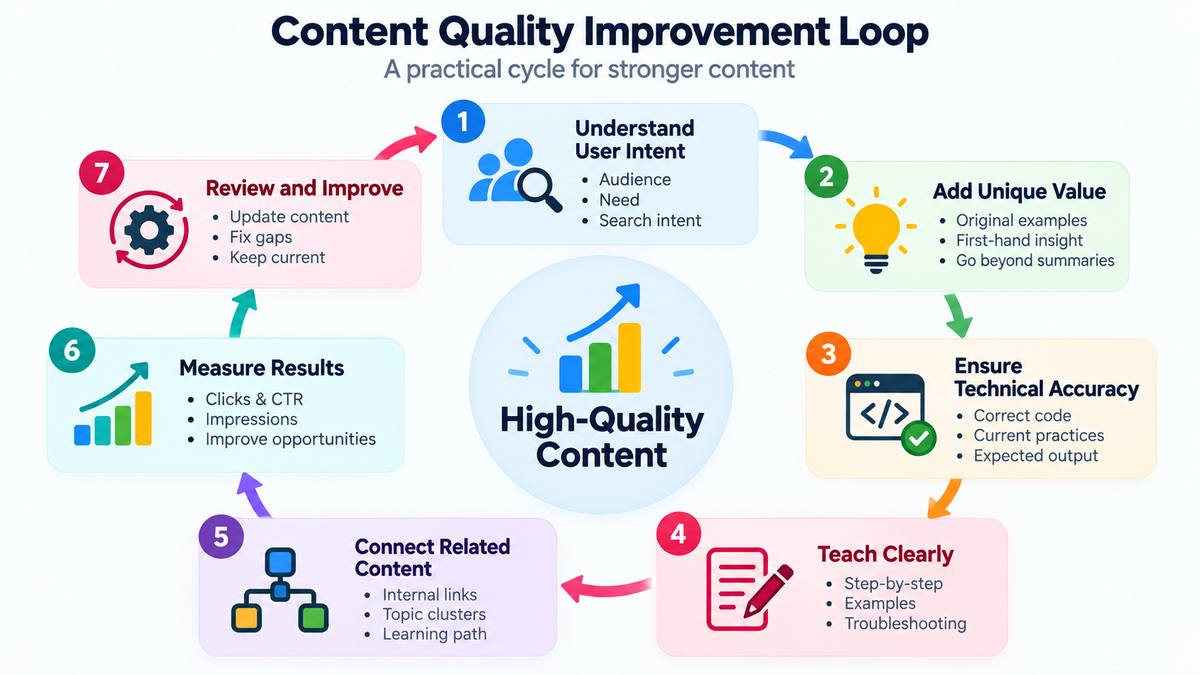
Start from the user's task, not from keyword repetition
A page should quickly answer why the visitor came. Search queries are evidence of intent, but the goal is to satisfy the task behind the query rather than mechanically repeat the phrase.
- Identify the primary user problem.
- Review Search Console queries already associated with the page.
- Use Google Trends to understand seasonality, phrasing and changing interest where appropriate.
- Explore relevant long-tail queries to uncover specific subproblems.
- Decide whether those subproblems belong on the current page or deserve supporting pages of their own.
Build topic clusters and connect them with useful internal links
A strong content collection usually needs a broad hub plus focused supporting pages. The hub helps users understand the topic and discover the next step; supporting pages solve narrower problems in depth. Our pillar-page guide explains this hub-and-spoke approach in more detail.
Internal links should be contextual rather than mechanical. When a relevant concept first appears naturally, link the phrase to the best supporting tutorial — even if that page belongs to another site section.
A Python database tutorial, for example, can link the first natural occurrence of a SQL concept such as SELECT or WHERE to the deeper SQL tutorial.
Make long content easy for humans to scan and navigate
- Use a clear H1 followed by descriptive H2 and H3 sections.
- Answer the main question early instead of forcing readers through a long introduction.
- Use a table of contents or jump navigation on long pages.
- Use lists and tables when they genuinely simplify steps or comparisons.
- Use breadcrumbs so visitors understand the page's position in the site.
- Add related topics and next-step links rather than leaving the page as an isolated endpoint.
- Keep important information available in text even when an infographic or video also explains it.
These same principles form part of the Plus2Net webpage audit framework we use when modernizing technical tutorials.
Make factual claims easy to verify
Trustworthiness becomes more important as the consequence of an error increases. Use primary documentation and authoritative research for changing or high-stakes claims, identify the author/publisher where that context is useful, and update pages when products, interfaces or policies materially change.
- Cite official documentation for technical product behavior and policy claims.
- Show original evidence when describing your own experiment or result.
- Separate facts from interpretation or opinion.
- Keep dates and model/version names current when they affect the instructions.
- Correct outdated advice instead of only adding a new paragraph above it.
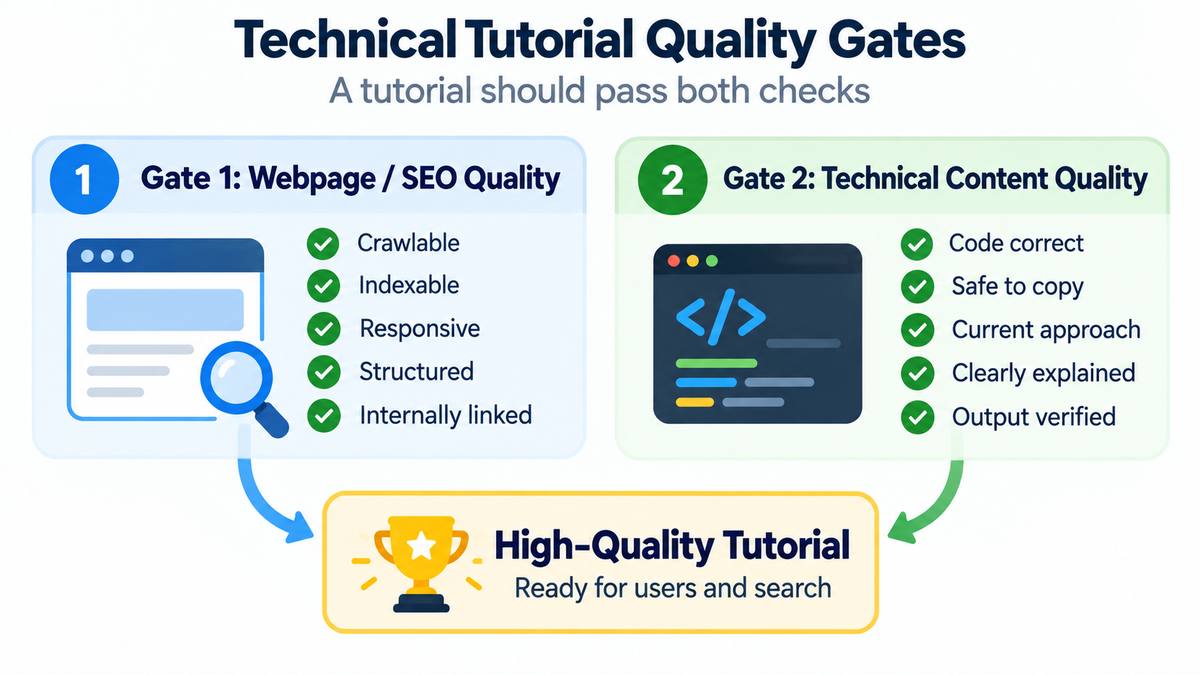
Programming tutorials need a stricter quality standard
A technical tutorial can have a good title, canonical URL, breadcrumb, responsive layout and strong internal links and still fail the learner if the code is wrong, unsafe, outdated or poorly explained. For programming content, page quality therefore needs a second gate beyond presentation and SEO: technical content quality.
Presentation / SEO QA
Indexing, metadata, headings, breadcrumbs, internal links, responsiveness, structured data, accessibility and page experience.
Technical Content QA
Code correctness, current APIs, safe practices, teaching sequence, expected output, troubleshooting, dependencies, demos and downloadable source.
Treat these as independent quality states. A modernized page is not truly complete until both the webpage-level audit and the technical-content review have passed. Use the Webpage Audit Framework for the page-level checks and the following content-quality checkpoints for programming tutorials.
Technical accuracy and execution
- Technically correct: every command, function, API, query and code example should produce the behaviour described by the tutorial.
- Runnable examples are actually validated: syntax-check or execute principal examples where practical rather than assuming visually correct code will run.
- Current recommended approach appears first: teach the current safe and maintainable solution before historical or legacy alternatives.
- Version assumptions are clear: identify relevant Python, PHP, framework, library, database or operating-system requirements when behaviour depends on a version.
- Deprecated behaviour is identified: legacy syntax, APIs, libraries and historical techniques may remain for maintenance value, but learners must be able to distinguish them from the recommended approach.
- The example solves the stated problem: avoid code that technically runs but does not demonstrate the concept claimed by the heading or explanation.
Teaching quality and progression
- Teaching progresses from simple to complete: introduce the concept with the smallest useful example before adding validation, error handling, GUI elements, database integration or other complexity.
- Explain why the code works: do not rely on a large code block alone; explain important variables, control flow, function calls and design choices.
- Show expected output or behaviour: where practical, tell learners what they should see after running the example so they can verify their result.
- Explain common failures: document likely exceptions, configuration problems, incorrect inputs or environment issues that learners may encounter.
- Use realistic examples: prefer small practical tasks and projects over arbitrary syntax demonstrations when a realistic example improves understanding.
- Preserve progressive learning: later examples should build on concepts already introduced instead of unexpectedly depending on unexplained functions, libraries or techniques.
Security and safe copyable code
- Security is taught by default: examples involving user input, SQL, files, sessions, authentication, URLs or HTML output should demonstrate safe handling rather than leaving security as an optional afterthought.
- Do not normalize unsafe shortcuts: if an intentionally simplified example omits production safeguards, say exactly what was omitted and show the safer pattern nearby.
- User input is validated at the correct boundary: validate type, range, format and allowed values before using external data.
- Output is escaped for its destination: HTML, SQL, URLs, JavaScript and other contexts should use the appropriate protection rather than a generic sanitization assumption.
- Database examples use appropriate parameterization: values originating from users or external data should normally use prepared statements or equivalent parameter binding.
- Secrets are not embedded in shareable code: passwords, API keys and tokens should use configuration, environment variables or the platform's appropriate secret facility.
Maintainability, code clarity and supporting assets
- Resources are handled cleanly: database connections, files, GUI resources and similar objects should be closed, disposed or managed appropriately when the example requires it.
- Names are meaningful and consistent: variable, function and file names should help beginners understand their purpose rather than introducing unnecessary ambiguity.
- Code style supports learning: indentation, spacing, casing, comments and layout should be consistent without changing working code merely to satisfy a stylistic preference.
- Comments explain decisions, not obvious syntax: comments should clarify non-obvious behaviour, assumptions and important steps instead of restating every line.
- Dependencies are justified: do not introduce a third-party package when the standard library or an existing dependency provides a clearer solution, unless teaching that package is itself the objective.
- Downloads match the tutorial: downloadable scripts, notebooks, ZIP files, databases and sample data should contain the same corrected implementation taught on the page.
- Demo and source remain synchronized: an online demo should not execute substantially different code from the code learners are shown.
- Cross-topic prerequisites are linked: when a Python tutorial depends on SQL, Pandas or Tkinter knowledge, or a PHP tutorial depends on SQL, HTML or JavaScript concepts, link to the appropriate supporting lesson.
- The learner has a next step: end substantive tutorials with a logical progression to practice, a related concept or a more complete project rather than an arbitrary collection of links.
Language-specific emphasis for Plus2Net
Python
Prioritize code correctness, library/version drift, clear progression, expected output, dependency clarity and validation of runnable examples. Fast-moving libraries such as Pandas, SQLAlchemy, GUI integrations and AI/ML tooling need periodic rechecking.
PHP
Apply stricter security review to user input, SQL, HTML output, files, uploads, sessions, cookies, authentication, redirects, remote URLs and mail. The safest current pattern should be the easiest example for a learner to copy.
Prioritize technical-content findings by severity
| Severity | Typical content issue | Action |
|---|---|---|
| Critical | Principal code does not run, materially false instruction, unsafe vulnerability taught as normal practice | Fix before treating the page as complete |
| High | Deprecated primary approach, incorrect output, insecure copyable example, badly outdated API/library usage | Prioritize in the current quality cycle |
| Medium | Weak progression, missing expected output, sparse troubleshooting, confusing example or naming | Improve after correctness and safety issues |
| Low | Minor wording, comments, formatting or consistency issues with little effect on learning | Backlog unless easy to correct |
Use screenshots, diagrams, video and interactive elements when they clarify the task
Google's AI-search guidance continues to recommend high-quality images and video when they are useful. Multimedia should support the textual explanation rather than replace it.
| Use | Best format |
|---|---|
| Show a software workflow | Current screenshots or a short video walkthrough |
| Explain a process or architecture | Diagram / infographic plus text explanation |
| Compare choices | Table with clear trade-offs |
| Teach code | Complete runnable example plus focused snippets and explanation |
| Let users calculate or test something | Interactive tool, demo or downloadable resource |
Use AI to assist the content process, not to manufacture low-value pages at scale
Google's guidance allows the use of generative AI, but warns that generating many pages without adding value may violate scaled-content-abuse policies. AI is more useful as an accelerator for research organization, outlines, comparison, editing and quality checks than as a reason to publish unreviewed commodity text.
Good uses
- Organize research and notes
- Find missing subtopics
- Generate alternative structures
- Critique clarity and assumptions
- Assist with metadata drafts
Risky uses
- Publishing unchecked factual claims
- Mass-producing near-duplicate pages
- Inventing experience, testing or citations
- Replacing subject expertise with generic text
- Changing dates only to simulate freshness
Optimize the website, not an imaginary “AI-only” layer
Google says there are no additional technical requirements to appear as a supporting link in AI Overviews or AI Mode. Keep the fundamentals strong: crawlability, indexability, internal discovery, helpful text, page experience, useful media and structured data that matches visible content.
Google's systems may use query fan-out to explore related subtopics. That reinforces a practical content-strategy lesson: a useful cluster of focused pages can answer different parts of a complex journey better than one bloated page trying to rank for everything.
Measure qualified outcomes, not only pageviews
Search visibility is valuable only when it reaches the right audience and helps them complete a meaningful task. Combine Search Console and analytics instead of judging content by a single metric.
| Question | Useful signal |
|---|---|
| Is Google showing the page? | Impressions and query coverage in Search Console |
| Is the snippet earning visits? | Clicks and CTR interpreted alongside average position |
| Do visitors use the page? | Engaged sessions, engagement time, scroll / interaction events |
| Does the page support the next step? | Internal-link clicks, sign-ups, enquiries, downloads, purchases or another meaningful conversion |
| Are AI tools sending detectable referrals? | Use the approach in the GA4 AI traffic tracking guide, while remembering that some AI-assisted visits may not retain a clear referrer |
Assess → Improve → Connect → Measure
- Assess: identify pages with impressions, outdated information, weak intent match or poor engagement.
- Improve: update the answer, add original value, strengthen examples and remove obsolete guidance.
- Validate technical content: for programming tutorials, check the principal code, expected output, version assumptions, security-sensitive patterns, demos and downloads before calling the page complete.
- Connect: link the page into the correct hub/cluster and add contextual links to supporting topics.
- Present: improve headings, TOC, breadcrumbs, media, readability and code presentation where applicable.
- Measure: compare Search Console and GA4 before/after performance over a meaningful observation period.
- Repeat: use new Search changes, user questions and practical publishing experience to update the content again when needed.
The durable strategy is to become genuinely useful on a topic
AI search does not make SEO irrelevant. It makes weak, interchangeable information easier to summarize. A stronger content strategy combines solid SEO foundations with original experience, focused topic coverage, contextual internal linking, verifiable evidence and useful media. For technical tutorials, that strategy must go further: the code should be correct, safe to copy, clearly explained, current enough for the stated environment and connected to a logical next learning step.



