
What counts as AI referral traffic?
When a user clicks a link from an AI product and the browser sends referral information, GA4 can usually record that visit using session-scoped traffic-source dimensions such as Session source and Session source / medium.
Examples may include sources such as chatgpt.com, perplexity.ai, gemini.google.com, claude.ai, copilot.microsoft.com, grok.com or other AI platforms that send a detectable referrer.
Quickly check AI traffic in Traffic acquisition
- Open Reports → Acquisition → Traffic acquisition.
- Change the primary dimension to Session source / medium or Session source.
- Use the table search to look for known AI domains one at a time, such as
chatgpt.comorperplexity.ai. - Compare sessions, engaged sessions, engagement rate, key events and revenue where relevant.
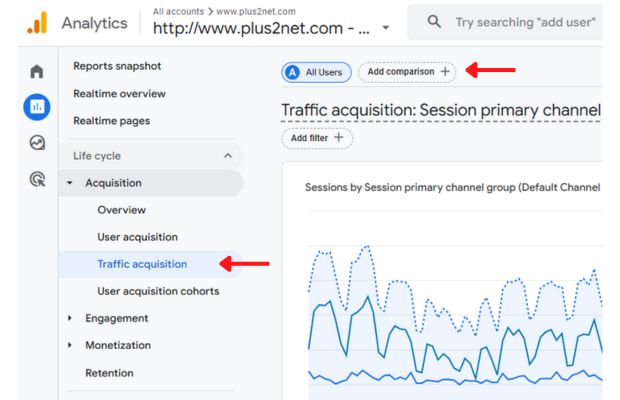
This method is good for a quick check. For a reusable multi-source analysis, use Explorations, because the standard comparison builder is designed around exact and partial matching rather than a flexible regular-expression list.
Build an AI traffic exploration with regex
In GA4, go to Explore → Free form. Add Session source / medium, Landing page + query string and the metrics you want to monitor. In the Exploration filter area, use a regular-expression match for the session source or source/medium dimension.
.*(chatgpt\.com|openai\.com|perplexity\.ai|gemini\.google\.com|claude\.ai|copilot\.microsoft\.com|grok\.com|poe\.com|you\.com).*This is a starter list, not a permanent standard. Referral domains change, new AI products appear, and some products may use more than one hostname. Check your own GA4 source values and update the expression based on what your property actually records.
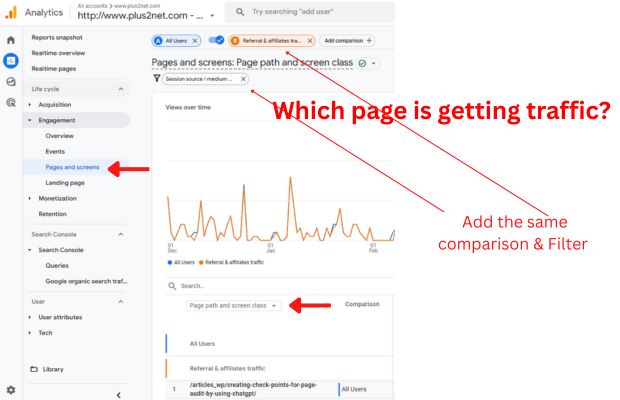
Find which pages receive AI referrals
Knowing that an AI platform sent sessions is only the first step. The more useful question is which page was the entry point and what happened after the visit?
In your Exploration, add Landing page + query string as a row dimension and include metrics such as:
- Sessions
- Engaged sessions
- Engagement rate
- Average engagement time
- Key events
- Total revenue, if your site tracks ecommerce or lead value
Use comparisons when you only need a few sources
GA4 report comparisons can use exact or partial matching for dimension values. If you only need to inspect one or a few known sources, create a comparison using Session source and choose values such as chatgpt.com or perplexity.ai when those values exist in your property.
For a larger changing list of AI domains, an Exploration is usually easier to maintain than stacking many comparison conditions.
Session source vs Session source / medium
| Dimension | Use it when | Example |
|---|---|---|
| Session source | You mainly want to identify the referring platform/domain. | chatgpt.com |
| Session source / medium | You want the source plus how GA4 classified the acquisition method. | chatgpt.com / referral |
| Landing page + query string | You want to understand which entry pages received those sessions. | /articles/example.php |
Measure quality, not just AI session counts
A referral source is useful only when you understand what those visitors do. Compare AI referral sessions with organic search, social, email or direct traffic using the metrics that matter to your site.
For content sites
- Engaged sessions
- Average engagement time
- Pages or screens viewed
- Newsletter signups or other key events
For lead or ecommerce sites
- Quote or contact submissions
- Purchases
- Revenue
- Qualified lead events
Why your AI traffic number is probably incomplete
Referral measurement depends on the browser and referring product passing usable source information. GA4 documents several reasons a session can become (direct) / (none), including missing source data, redirects and privacy or ad-blocking behaviour.
AI also influences discovery without always producing a direct click. A user may see a brand or URL in an AI answer, remember it, and visit later through search or direct navigation. GA4 cannot reliably label that later visit as “AI influenced.”
Maintain your AI source list
- Check Session source values monthly for unfamiliar referral domains.
- Add new confirmed AI referrers to your Exploration regex.
- Remove obsolete sources only after confirming they no longer appear in your reporting period.
- Keep a changelog so year-over-year comparisons are interpreted correctly.
- Annotate major GA4 or platform changes outside GA4 if your team maintains a reporting log.
Track AI Tool Traffic with GA4
The video demonstrates the original workflow. The updated article above separates quick standard-report checks from the more flexible Exploration-based method.
Recommended GA4 workflow for AI referrals
- Start in Traffic acquisition and inspect Session source / medium.
- For multiple AI sources, create a Free-form Exploration.
- Filter the session source with a maintained regex list.
- Add landing pages and engagement or conversion metrics.
- Remember that visible referrals are only part of AI's total influence.



