Generate Payroll Excel using OpenPyXL (Python)
This tutorial shows how to create a payroll Excel using
openpyxl. We generate 10 rows with columns: Sl No, Name, Basic Pay, DA (50%), HRA (30%), Total Pay. DA/HRA/Total are inserted as Excel formulas so they auto-update when Basic Pay changes.
Generate Payroll Excel Using Python (OpenPyXL) | Auto-Calculate DA, HRA & Total Pay
What you will get
- A downloadable Excel file with 10 sample employees
- DA calculated as 50% of Basic Pay
- HRA calculated as 30% of Basic Pay
- Total Pay as Basic + DA + HRA (Excel formula)
Install
Make sure openpyxl is installed:
pip install openpyxlCode (copy & run)
Save this as openpyxl-pay.py and run. It creates an Excel file at the path you set in $file_path.
More on enumerate(): adds a counter to an iterable
from openpyxl import Workbook
from openpyxl.utils import get_column_letter

# sample data
names = ["Alice Johnson", "Bob Smith", "Carol Lee", "David Patel", "Eva Chen",
	"Frank Moore", "Grace Kim", "Henry Brown", "Isha Rao", "John Doe"]

basic_pays = [30000, 45000, 28000, 50000, 36000, 41000, 29500, 47000, 33000, 39000]

wb = Workbook()
ws = wb.active
ws.title = 'Payroll'

# Header row
headers = ['Sl No', 'Name', 'Basic Pay', 'DA (50%)', 'HRA (30%)', 'Total Pay']
ws.append(headers)

# Insert data rows
for i, (n, b) in enumerate(zip(names, basic_pays), start=1):
    row = [
        i,
        n,
        b,
        f"=C{i+1}*0.5",  # DA = 50% of Basic
        f"=C{i+1}*0.3",  # HRA = 30% of Basic
        f"=C{i+1}+D{i+1}+E{i+1}"  # Total Pay
    ]
    ws.append(row)

# Adjust column width (for better readability)
col_widths = [8, 20, 12, 12, 12, 14]
for idx, width in enumerate(col_widths, start=1):
    ws.column_dimensions[get_column_letter(idx)].width = width

# Save file in system
file_path = "D:\\testing3\\openpyxl\\pay.xlsx"
wb.save(file_path)
Tip: DA, HRA and Total are Excel formulas — if you update
More on OpenpyXL Formulas and Calculations
Basic Pay later in Excel, the other columns recalculate automatically.
Sample Output (first 3 rows)
| Sl No | Name | Basic Pay | DA (50%) | HRA (30%) | Total Pay |
|---|---|---|---|---|---|
| 1 | Alice Johnson | 30000 | 15000 | 9000 | 54000 |
| 2 | Bob Smith | 45000 | 22500 | 13500 | 81000 |
| 3 | Carol Lee | 28000 | 14000 | 8400 | 50400 |
Optional Improvements
- Format currency for Basic/DA/HRA/Total (use
number_formatin openpyxl) - Style header row (bold, background color)
- Add conditional formatting (e.g., highlight highest Total Pay)
- Provide a downloadable link/button for the generated file
Optional Improvements (currency format, header styling, conditional formatting & download)
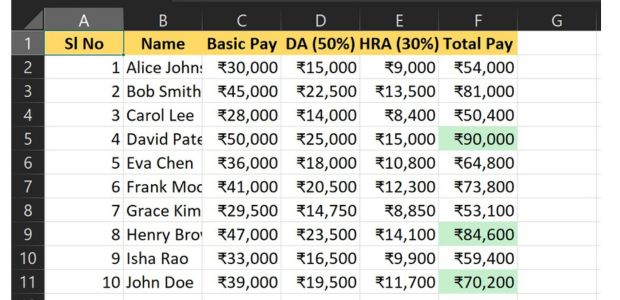
Below code shows how to format Basic / DA / HRA / Total as currency, style the header row (bold + background), add conditional formatting to highlight the highest Total Pay, and create a download button for the generated file.
from openpyxl import Workbook
from openpyxl.utils import get_column_letter
from openpyxl.styles import Font, PatternFill, Alignment
from openpyxl.formatting.rule import CellIsRule

# (reuse your names and basic_pays lists)
# sample data
names = ["Alice Johnson", "Bob Smith", "Carol Lee", "David Patel", "Eva Chen",
	"Frank Moore", "Grace Kim", "Henry Brown", "Isha Rao", "John Doe"]

basic_pays = [30000, 45000, 28000, 50000, 36000, 41000, 29500, 47000, 33000, 39000]

wb = Workbook()
ws = wb.active
ws.title = 'Payroll'

# Header row
headers = ['Sl No', 'Name', 'Basic Pay', 'DA (50%)', 'HRA (30%)', 'Total Pay']
ws.append(headers)

# Style header (bold, background, center)
header_font = Font(bold=True)
header_fill = PatternFill(start_color='FFD966', end_color='FFD966', fill_type='solid')
header_align = Alignment(horizontal='center', vertical='center')

for cell in ws[1]:
    cell.font = header_font
    cell.fill = header_fill
    cell.alignment = header_align

# Insert data rows (same as before)
for i, (n, b) in enumerate(zip(names, basic_pays), start=1):
    row = [
        i, n, b,
        f'=C{i+1}*0.5', f'=C{i+1}*0.3', f'=C{i+1}+D{i+1}+E{i+1}'
    ]
    ws.append(row)

# Apply currency number format to Basic, DA, HRA, Total (columns C-F)
for r in range(2, ws.max_row + 1):
    ws[f"C{r}"].number_format = '₹#,##0'
    ws[f"D{r}"].number_format = '₹#,##0'
    ws[f"E{r}"].number_format = '₹#,##0'
    ws[f"F{r}"].number_format = '₹#,##0'

# Conditional formatting: highlight the highest Total Pay in column F
max_fill = PatternFill(start_color='C6EFCE', end_color='C6EFCE', fill_type='solid')

total_range = f"F2:F{ws.max_row}"
ws.conditional_formatting.add(total_range,
	CellIsRule(operator='equal', formula=[f"MAX(F2:F{ws.max_row})"], fill=max_fill))

# Save file (ensure this path is web-accessible if you want to offer download link)
file_path = 'D:\\testing3\\openpyxl\\pay_styled.xlsx'
wb.save(file_path)
In this extended version of the payroll generation script, we’ve introduced conditional font styling using openpyxl.styles.Font to visually highlight key financial fields. Specifically, the header row is formatted in bold blue for clarity, the Income Tax column is marked in red to indicate deductions, and the Net Pay column is styled in green to emphasize final take-home amounts. This enhancement improves the readability of payroll data in Excel and makes critical information stand out for reviewers and auditors.
from openpyxl import Workbook
from openpyxl.utils import get_column_letter
from openpyxl.styles import Font

# Sample employee data
data = [
    {"EMP_ID": "ET001", "TITLE": "MR.", "Name": "EMP_Name_1", "BASIC": 144200},
    {"EMP_ID": "ET002", "TITLE": "MR.", "Name": "EMP_Name_2", "BASIC": 131400},
    {"EMP_ID": "ET003", "TITLE": "MR.", "Name": "EMP_Name_3", "BASIC": 79900},
    {"EMP_ID": "ET004", "TITLE": "MR.", "Name": "EMP_Name_4", "BASIC": 79900},
    {"EMP_ID": "ET005", "TITLE": "MR.", "Name": "EMP_Name_5", "BASIC": 61200},
]

headers = [
    'S_No', 'MONTH', 'EMP_ID', 'TITLE', 'Name', 'BASIC', 'DA', 'DA_ARR', 'HRA', 'HRA_ARR',
    'TA', 'TA_ARR', 'LTC', 'OTR_ALW', 'NPS_EMPLOYER_14%', 'GROSS_PAY', 'GPF_10%',
    'GPF_ADD', 'GPF_Total', 'NPS_Employee_10%', 'Income_Tax', 'NPS_EMPLOYER_14%',
    'CHS', 'TOTAL_DED', 'NET_PAY'
]

wb = Workbook()
ws = wb.active
ws.title = 'Sheet1'

header_font = Font(bold=True, color="0000FF")
income_tax_font = Font(color="FF0000")
net_pay_font = Font(color="008000")

ws.append(headers)
for col, _ in enumerate(headers, start=1):
    ws.cell(row=1, column=col).font = header_font

for i, emp in enumerate(data, start=1):
    row = [
        i,
        "NOV_2025",
        emp["EMP_ID"],
        emp["TITLE"],
        emp["Name"],
        emp["BASIC"],
        f"=F{i+1}*0.58",
        f"=F{i+1}*0.09",
        f"=F{i+1}*0.20",
        "0",
        "5688",
        "324",
        "0",
        "27" if i == 1 else "0",
        "0",
        f"=F{i+1}+G{i+1}+H{i+1}+I{i+1}+J{i+1}+K{i+1}+L{i+1}+M{i+1}+N{i+1}+O{i+1}",
        f"=F{i+1}*0.10",
        "0",
        f"=Q{i+1}+R{i+1}",
        "0",
        "50000" if i == 1 else ("10000" if i == 2 else "12000" if i == 3 else "5000"),
        "0",
        "0" if i < 3 else "1000",
        f"=S{i+1}+T{i+1}+U{i+1}+V{i+1}+W{i+1}",
        f"=P{i+1}-X{i+1}"
    ]
    ws.append(row)
    ws.cell(row=i+1, column=21).font = income_tax_font
    ws.cell(row=i+1, column=25).font = net_pay_font

for idx in range(1, len(headers)+1):
    ws.column_dimensions[get_column_letter(idx)].width = 16

wb.save("D:\\testing3\\openpyxl\\Payroll_matched.xlsx")
Download the above full source code from Github or run the code in your Google colab platform.
OpenPyxl Payroll
https://github.com/plus2net/Python-basics/blob/main/openpyxl_6_pay.ipynb
OpenPyxl Payroll
https://github.com/plus2net/Python-basics/blob/main/openpyxl_6_pay.ipynb
openpyxl Library Read Data from Excel Styles and formatting
Python XlsxWriter library

Subhendu Mohapatra
Author & Instructor at plus2net
I write and maintain practical tutorials on Python, PHP, SQL, JavaScript, HTML, jQuery, and web development at plus2net. The tutorials focus on clear explanations, working examples, and code that readers can test and adapt while learning.
Connect:


Subscribe to our YouTube Channel here
This article is written by plus2net.com team.
https://www.plus2net.com

 Python Video Tutorials