NumPy mean(): Axes, Missing Values and Meaningful Averages
np.mean() computes the arithmetic mean: the sum of included values divided by their count. Choose the axis, check dtype and decide how to handle unknown observations before treating the result as a useful average.
| Parameter | Meaning |
|---|---|
a | Input array or array-like values |
axis=None | All elements by default; an integer or tuple selects reduction axes |
dtype=None | Computation type; integer input defaults to float64 |
out=None | Destination matching the result shape; its dtype can cast the result |
keepdims=False | Retain reduced axes with length one |
where | Boolean inclusion mask; keyword-only, available from NumPy 1.20 |
Create the Sample Array
The arithmetic mean is the sum of included values divided by their count. This fixed array makes axis results easy to verify. For generated practice data, use a random Generator; the randint page explains the legacy API.
import numpy as np
import warnings

def sample_array():
    return np.array([[6, 3, 2], [2, 6, 2], [6, 2, 3]])

my_data = sample_array()
print(my_data)
print("Sum / count:", my_data.sum(), my_data.size)
assert my_data.sum() == 32 and my_data.size == 9
Expected output
[[6 3 2]
 [2 6 2]
 [6 2 3]]
Sum / count: 32 9
Overall, Column and Row Means
axis=None averages all elements. axis=0 combines rows and leaves one result per column; axis=1 combines columns and leaves one result per row. Link to axis reduction for more shape examples.
a = sample_array()
print("Overall:", a.mean())
print("Column means:", a.mean(axis=0))
print("Row means:", a.mean(axis=1))
np.testing.assert_allclose(a.mean(), 32 / 9)
np.testing.assert_allclose(a.mean(axis=0), [14/3, 11/3, 7/3])
np.testing.assert_allclose(a.mean(axis=1), [11/3, 10/3, 11/3])
Expected output
Overall: 3.5555555555555554
Column means: [4.66666667 3.66666667 2.33333333]
Row means: [3.66666667 3.33333333 3.66666667]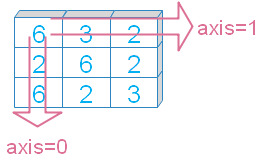
Rectangular Arrays Make the Axis Difference Clear
For shape (3, 4), column means have shape (4,) and row means shape (3,). A square array can hide a mistaken axis because both results have the same length. See shape.
a = np.arange(12).reshape(3, 4)
print("Input:", a.shape)
print("Column means:", a.mean(axis=0), a.mean(axis=0).shape)
print("Row means:", a.mean(axis=1), a.mean(axis=1).shape)
assert a.mean(axis=0).shape == (4,) and a.mean(axis=1).shape == (3,)
Expected output
Input: (3, 4)
Column means: [4. 5. 6. 7.] (4,)
Row means: [1.5 5.5 9.5] (3,)
Default dtype Depends on the Input
For integer inputs, mean defaults to float64. Floating inputs generally retain their dtype; float16 uses float32 intermediates by default. A float64 accumulator can improve accumulation precision for float32 values, but cannot recover precision lost before averaging. See data types.
integers = np.array([1, 2, 3], dtype=np.int32)
floats = np.array([0.1, 0.2, 0.3], dtype=np.float32)
print("Integer mean dtype:", integers.mean().dtype)
print("float32 mean dtype:", floats.mean().dtype)
print("float64 accumulator:", floats.mean(dtype=np.float64))
assert integers.mean().dtype == np.dtype(np.float64)
assert floats.mean().dtype == np.dtype(np.float32)
np.testing.assert_allclose(floats.mean(dtype=np.float64), 0.2, atol=1e-8)
Expected output
Integer mean dtype: float64
float32 mean dtype: float32
float64 accumulator: 0.2000000054637591
Integer dtype Discards Fractional Means
Explicit integer dtype can truncate the result and can also overflow during accumulation. The small original sample fits these integer types, but its row means lose their fractional parts. Prefer floating dtype for ordinary averages.
a = sample_array()
for dtype in [np.int8, np.int32, np.float64, np.complex128]:
    print(dtype.__name__, a.mean(axis=1, dtype=dtype))
np.testing.assert_array_equal(a.mean(axis=1, dtype=np.int32), [3, 3, 3])
np.testing.assert_allclose(a.mean(axis=1, dtype=np.float64), [11/3, 10/3, 11/3])
Expected output
int8 [3 3 3]
int32 [3 3 3]
float64 [3.66666667 3.33333333 3.66666667]
complex128 [3.66666667+0.j 3.33333333+0.j 3.66666667+0.j]
keepdims Retains Reduced Axes with Size One
keepdims preserves the number of dimensions, not the original lengths. Reducing all axes of this 2D array produces shape (1, 1). Row means with keepdims have shape (3, 1), which can broadcast across columns.
a = sample_array()
print("All axes retained:", a.mean(keepdims=True))
print("Default scalar:", a.mean(keepdims=False))
rows = a.mean(axis=1, keepdims=True)
centered = a - rows
print("Row mean shape:", rows.shape)
print("Centered:")
print(np.round(centered, 3))
assert a.mean(keepdims=True).shape == (1, 1)
np.testing.assert_allclose(centered.mean(axis=1), 0, atol=1e-14)
Expected output
All axes retained: [[3.55555556]]
Default scalar: 3.5555555555555554
Row mean shape: (3, 1)
Centered:
[[ 2.333 -0.667 -1.667]
 [-1.333  2.667 -1.333]
 [ 2.333 -1.667 -0.667]]
out Must Match the Result Shape
Provide a floating destination to preserve fractional averages. mean writes into that output and returns it. A scalar result needs a zero-dimensional destination.
a = sample_array()
columns = np.empty(3, dtype=np.float64)
returned = a.mean(axis=0, out=columns)
scalar = np.empty((), dtype=np.float64)
a.mean(out=scalar)
print("Column destination:", columns)
print("Scalar destination:", scalar)
assert returned is columns
np.testing.assert_allclose(columns, [14/3, 11/3, 7/3])
np.testing.assert_allclose(scalar, 32/9)
Expected output
Column destination: [4.66666667 3.66666667 2.33333333]
Scalar destination: 3.5555555555555554
An Integer Destination Truncates the Stored Result
Even when mean uses floating intermediates, an integer output array casts the stored result. This can make averages look like whole counts. Use a floating destination unless this conversion is deliberate.
a = sample_array()
x = np.zeros(3, dtype=np.int64)
y = np.array(1, dtype=np.int64)
a.mean(axis=0, out=x)
a.mean(out=y)
print("Integer column destination:", x)
print("Integer scalar destination:", y)
np.testing.assert_array_equal(x, [4, 3, 2])
assert y == 3
Expected output
Integer column destination: [4 3 2]
Integer scalar destination: 3
where Changes Which Values and Counts Are Included
The mean where argument selects included observations. It is different from the three-argument np.where() selection function. Mask shapes must broadcast with the input. Only included values contribute to the denominator.
a = np.array([[5, 9, 13], [14, 10, 12], [11, 15, 19]])
rows = np.array([[True], [False], [False]])
print("Selected first-row mean:", a.mean(where=rows))
mask = a >= 12
print("Selected values:", a[mask])
print("Selected mean:", a.mean(where=mask))
assert a.mean(where=rows) == 9
np.testing.assert_allclose(a.mean(where=mask), a[mask].mean())
Expected output
Selected first-row mean: 9.0
Selected values: [13 14 12 15 19]
Selected mean: 14.6
mean Propagates NaN; nanmean Ignores It
Use mean when unknown measurements should make the average unknown. nanmean averages the non-NaN observations; that is an observed-data average and may differ from the complete-data average. nanmean does not automatically remove infinity.
a = np.array([10.0, np.nan, 20.0, 0.0])
print("mean:", a.mean())
print("nanmean:", np.nanmean(a))
print("Observed count:", np.count_nonzero(~np.isnan(a)))
assert np.isnan(a.mean())
assert np.nanmean(a) == 10
Expected output
mean: nan
nanmean: 10.0
Observed count: 3
Empty or All-Missing Groups Have No Defined Mean
An empty selection has no denominator, so it produces NaN and a RuntimeWarning. An all-NaN nanmean also warns. Do not replace this undefined mean with zero unless a reporting rule explicitly requires that placeholder.
with warnings.catch_warnings(record=True) as caught:
    warnings.simplefilter('always', RuntimeWarning)
    empty_mean = np.array([], dtype=float).mean()
    missing_mean = np.nanmean([np.nan, np.nan])
print("Empty mean:", empty_mean)
print("All-missing mean:", missing_mean)
print("RuntimeWarning observed:", any(issubclass(w.category, RuntimeWarning) for w in caught))
assert np.isnan(empty_mean) and np.isnan(missing_mean)
assert any(issubclass(w.category, RuntimeWarning) for w in caught)
Expected output
Empty mean: nan
All-missing mean: nan
RuntimeWarning observed: True
Compute Finite Means with Counts and Guarded Division
If the measurement policy rejects both NaN and infinity, use isfinite explicitly. Calculate selected sums and counts, then divide only for positive counts. Initialize other results as NaN. A recorded zero remains an observation.
a = np.array([[10.0, np.nan, 20.0], [np.nan, np.nan, np.inf], [0.0, 0.0, 0.0]])
valid = np.isfinite(a)
counts = valid.sum(axis=1)
sums = np.sum(a, axis=1, where=valid, dtype=np.float64)
means = np.full(counts.shape, np.nan, dtype=float)
np.divide(sums, counts, out=means, where=counts > 0)
print("Counts:", counts)
print("Finite means:", means)
np.testing.assert_allclose(means, [15, np.nan, 0], equal_nan=True)
np.testing.assert_array_equal(counts, [2, 0, 3])
Expected output
Counts: [2 0 3]
Finite means: [15. nan  0.]
Reduce Several Axes in a 3D Array
For an array shaped (2, 3, 4), reducing axes (0, 2) leaves the middle dimension. keepdims=True returns shape (1, 3, 1), preserving positions for later broadcasting.
a = np.arange(24).reshape(2, 3, 4)
result = a.mean(axis=(0, 2))
kept = a.mean(axis=(0, 2), keepdims=True)
print("Means:", result)
print("Retained shape:", kept.shape)
np.testing.assert_allclose(result, [7.5, 11.5, 15.5])
assert kept.shape == (1, 3, 1)
Expected output
Means: [ 7.5 11.5 15.5]
Retained shape: (1, 3, 1)
Use average for Weighted Means
mean weights every included observation equally. np.average accepts weights. For these synthetic groups, a mean of group means treats a group of two observations the same as a group of eight; weighting by counts recovers the pooled mean. Validate nonnegative finite weights and a positive weight sum for this use case.
group_means = np.array([10.0, 20.0])
counts = np.array([2, 8])
print("Equal group weighting:", group_means.mean())
print("Count-weighted mean:", np.average(group_means, weights=counts))
pooled = np.array([10.0] * 2 + [20.0] * 8)
assert counts.sum() > 0 and (counts >= 0).all()
np.testing.assert_allclose(np.average(group_means, weights=counts), pooled.mean())
assert pooled.mean() == 18
Expected output
Equal group weighting: 15.0
Count-weighted mean: 18.0
Practical Sales: Observed-Day Mean and Coverage
This synthetic table has days down rows and Books, Pens and Gifts across columns. NaN is an unknown quantity; zero is a recorded zero. Report the observed-day mean per product with its observation count. Missing days can bias comparisons, so disclose coverage rather than presenting this as a complete-period daily average.
sales = np.array([[12.0, 3.0, 0.0], [8.0, np.nan, 2.0],
                  [10.0, 4.0, 1.0], [np.nan, np.nan, np.nan]])
valid = np.isfinite(sales)
counts = valid.sum(axis=0)
subtotals = sales.sum(axis=0, where=valid, dtype=np.float64)
means = np.full(3, np.nan)
np.divide(subtotals, counts, out=means, where=counts > 0)
print("Books / Pens / Gifts observed means:", means)
print("Observed days:", counts)
print("Coverage:", counts / sales.shape[0])
np.testing.assert_allclose(means, [10, 3.5, 1])
np.testing.assert_array_equal(counts, [3, 2, 3])
Expected output
Books / Pens / Gifts observed means: [10.   3.5  1. ]
Observed days: [3 2 3]
Coverage: [0.75 0.5  0.75]
Mean Daily Total: Complete Days versus Known Subtotals
A known subtotal for a partially observed day is not its complete total. Here only days one and three contain all products, so the average complete-day total is 15. Reporting the mean of all known subtotals answers a different question.
sales = np.array([[12.0, 3.0, 0.0], [8.0, np.nan, 2.0],
                  [10.0, 4.0, 1.0], [np.nan, np.nan, np.nan]])
valid = np.isfinite(sales)
counts = valid.sum(axis=1)
known = sales.sum(axis=1, where=valid, dtype=np.float64)
complete = counts == sales.shape[1]
complete_totals = known[complete]
mean_complete = complete_totals.mean() if complete_totals.size else np.nan
print("Known subtotals:", known)
print("Complete-day totals:", complete_totals)
print("Complete-day mean:", mean_complete)
assert mean_complete == 15 and complete_totals.size == 2
Expected output
Known subtotals: [15. 10. 15.  0.]
Complete-day totals: [15. 15.]
Complete-day mean: 15.0
Common Mean Mistakes
Check the averaging population, denominator and axis before interpreting the number. Integer dtype or integer out can discard fractions. Missing values are not zero. Use observation counts for empty groups. Averages of group means require appropriate weights when group sizes differ. keepdims keeps reduced axes with length one. Floating-point comparisons need an appropriate tolerance. Compare sum(), max() and min() for other summaries.
Exercise: Average Included Products per Day
Using the sales matrix, include Books and Gifts, exclude Pens and ignore nonfinite measurements. Return one observed-product mean per day and its included count. Predict means [6, 5, 5.5, NaN] and counts [2, 2, 2, 0]. This averages included product measurements, not complete daily sales totals.
Exercise Solution
Combine the product mask with the finite-value mask. Divide selected sums by selected counts only when a count is positive.
sales = np.array([[12.0, 3.0, 0.0], [8.0, np.nan, 2.0],
                  [10.0, 4.0, 1.0], [np.nan, np.nan, np.nan]])
products = np.array([True, False, True])
include = products & np.isfinite(sales)
counts = include.sum(axis=1)
totals = sales.sum(axis=1, where=include, dtype=np.float64)
means = np.full(counts.shape, np.nan, dtype=float)
np.divide(totals, counts, out=means, where=counts > 0)
print("Included-product means:", means)
print("Included counts:", counts)
np.testing.assert_allclose(means, [6, 5, 5.5, np.nan], equal_nan=True)
np.testing.assert_array_equal(counts, [2, 2, 2, 0])
Expected output
Included-product means: [6.  5.  5.5 nan]
Included counts: [2 2 2 0]
Practice in Google Colab
Open in Google Colab View on GitHub
All sample data is embedded. Run the examples and practise averages, missing-value counts and sales coverage. Save a copy in Drive to keep your changes.
Continue with NumPy tutorials, axis reduction, sum() and NaN and data types. Reference: NumPy mean documentation.

Subhendu Mohapatra
Author & Instructor at plus2net
I write and maintain practical tutorials on Python, PHP, SQL, JavaScript, HTML, jQuery, and web development at plus2net. The tutorials focus on clear explanations, working examples, and code that readers can test and adapt while learning.


Subscribe to our YouTube Channel here

 Python Video Tutorials