ASP & IIS7
Classic ASP is an optional IIS application-development feature. The preferred setup is to install/enable the IIS ASP feature rather than manually registering asp.dll as a new script map.
Enable the ASP feature
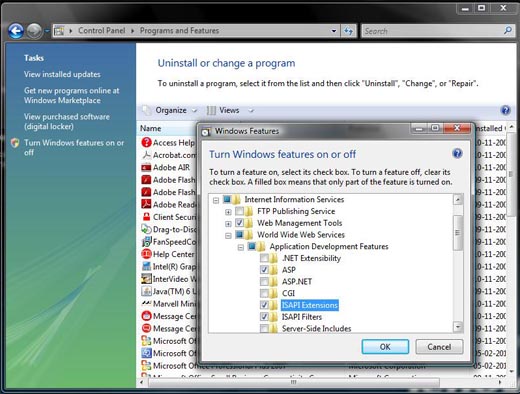
- Open Windows Features (or Server Manager on Windows Server).
- Expand Internet Information Services → World Wide Web Services → Application Development Features.
- Enable ASP. Required ISAPI components are selected as needed.
- Open IIS Manager, select the site/application, and verify that Classic ASP is available.
- Request a simple
.aspfile through the site to confirm execution.
Historical IIS 7 note: older instructions often describe manually adding an
*.asp handler mapped to asp.dll. On a normal current IIS installation, enabling the ASP role service/module is the safer starting point; manually editing handler mappings should only be done when you understand the server's configuration.After enabling ASP, continue with the first ASP script or local IIS website setup.
ASP Home

Subhendu Mohapatra
Author & Instructor at plus2net
I write and maintain practical tutorials on Python, PHP, SQL, JavaScript, HTML, jQuery, and web development at plus2net. The tutorials focus on clear explanations, working examples, and code that readers can test and adapt while learning.
Connect:


