Managing Google sheet from Python

Authorization through Google drive API to connect to google sheets from Python pygsheets library
Authorizing pygsheets
Read more about Authorizing pygsheets here .https://pygsheets.readthedocs.io/en/stable/authorization.html
Google Sheets API
After logging in to your google account, visit this URLhttps://console.cloud.google.com/apis/
GO to APIs overview
(Create a new project if not created.)
Click Credentials ( at left side menu )

Create credentials > Service Account

Service Account Details ( enter details )
Select the service account just created.
Visit Keys tab at top
Add Key > Create a New Key ( download the JSON file Save it in your computer and note the path. )
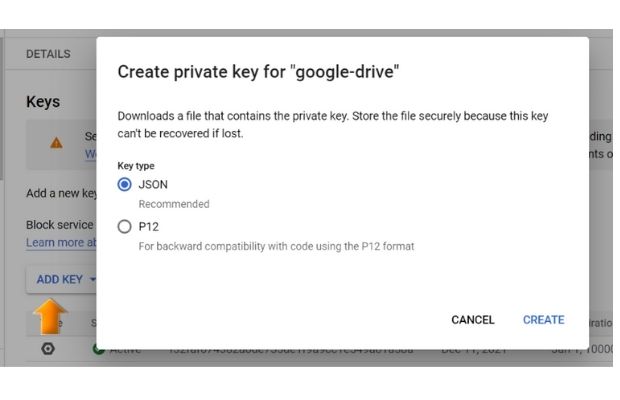
Service account email address (select service account details for edit ) to be given share access to the directory or to the file or directory to work with. Don't forget to enable Google Drive API for your project.
Connecting to google drive
import pygsheets
path='G:\\My drive\\testing\\google-sheet\\creds1.json'
gc = pygsheets.authorize(service_account_file=path)
Opening the file and adding data
sh = gc.open('pythontest') # Open the google sheet phthontest
wks = sh[0] # select the first sheet
wks.update_col(2,['ab','cd','ef']) # add list to 2nd column
Information about the google sheet
sh = gc.open('pythontest') # Open the google sheet phthontest
print(sh.id) #  id of the sheet
print(sh.title) # pythontext  output as title
print(sh.url) # address of the file to open in browser
print(sh.updated) # last updated date and time of the filewk1 = sh[0] # select the first worksheet
print('Rows: ',wk1.rows) # Rows : 1000
print('Columns: ',wk1.cols) # Columns: 26 print(wk1.get_value('B2')) # data at cell B2
print(wk1.cell((2,2)).value) # data at row_number=2 col_number=2 ( B2)print(wk1.get_all_values(),include_tailing_empty=False)wk1.update_value('A1',5) # Store 5 at A1
wk1.update_value('A2',10) # Store 10 at A2
wk1.update_value('A3','=A1+A2',True) # Add data at A1 and A2 and store at A3
Update the parse to True again and change the value at A1. The SUM will be reflected at A3.
wk1.update_value('A1',20) # Update 20 at A1Delete value using clear
wk1.clear('B3','C5') # clear data from grid B3 to C5
wk1.clear('*','*') # clear all cellsinclude_trailing_empty=True then all blanks after the last value will be included.
print(wk1.get_row(2,include_tailing_empty=False))
#['12', '34', 'ab', 'cd', '55', 'cv']
print(wk1.get_col(3,include_tailing_empty=False))
#['', 'ab', 'Al', '45']
Inserting rows and columns
#insert after row 2 , one row with these values
wk1.insert_rows(row =2, number = 1, values =['BB', 40,'CC',60,'DD'])
#insert after col 3 ,one column with the values
wk1.insert_cols(col =3, number = 1, values =['','kk','tt',34, 40])
Using Google sheets data as option of Combobox

We can collect data from google sheet and add as options for a Combobox by using pygsheets library and google drive API.
Options of Combobox from Google sheet data
Options of Combobox from Google sheet data
Data Transfer from Google sheets to MySQL and vice versa
 By using Pandas DataFrame we can transfer data from MySQL database table to Google sheets and from Google sheets to MySQL.
Data Transfer between Google sheet and MySQL
Data Transfer between Google sheet and SQLite
Collecting kyeword suggestions from Google and storing in Google sheets

Subhendu Mohapatra
Author & Instructor at plus2net
I write and maintain practical tutorials on Python, PHP, SQL, JavaScript, HTML, jQuery, and web development at plus2net. The tutorials focus on clear explanations, working examples, and code that readers can test and adapt while learning.
Connect:


Subscribe to our YouTube Channel here
This article is written by plus2net.com team.
https://www.plus2net.com

 Python Video Tutorials