Validating Email Addresses in Pandas DataFrames
When cleaning customer datasets, user registration rosters, or marketing mailing lists, invalid email formats can compromise pipeline integrity and lead to failed deliverability. In this tutorial, learn two robust approaches to email validation in Pandas: high-speed vectorized pattern validation using native str.match() regular expressions, and syntactic verification using the third-party validate_email library.
Method 1: Vectorized Regex Validation (Fast & Pure Pandas) 🔝
For large production datasets with thousands of rows, avoid Python loops and row-by-row functions. Use Pandas' native str.match() with an RFC-compliant email pattern. This method executes directly in C/vectorized code and requires no third-party package dependencies:
import pandas as pd

df_users = pd.DataFrame({
    "email": [
        "Ravi",
        "abc@example.com",
        "Alex",
        "Ron.23@my_domain.com",
        "invalid@domain..com",
        "support@plus2net.com"
    ]
})

# Vectorized regex pattern matching standard email format
email_regex = r"^[a-zA-Z0-9_.+-]+@[a-zA-Z0-9_-]+(?:\.[a-zA-Z0-9_-]+)+$"
df_users["is_valid"] = df_users["email"].astype("str").str.match(email_regex, na=False)

print("Validation Results:
", df_users)

# Filter strictly for valid emails
valid_records = df_users[df_users["is_valid"]]
print("
Valid Records Only:
", valid_records)

assert len(valid_records) == 3
Method 2: Using the validate_email Library with .apply() 🔝
If you prefer an established validator package, install validate_email and map it across your DataFrame column using apply():
import pandas as pd
try:
    from validate_email import validate_email

    my_email = {"email": ["Ravi", "abc@example.com", "Alex", "Ron.23@my_domain.com"]}
    df = pd.DataFrame(data=my_email)
    df["valid_email"] = df["email"].apply(lambda x: bool(validate_email(x)))

    print(df)
    print("
Only Valid Emails:
", df[df["valid_email"]])
except ImportError:
    print("validate_email library not installed. Install via pip or conda.")
Expected Output:
                  email  valid_email
0                  Ravi        False
1       abc@example.com         True
2                  Alex        False
3  Ron.23@my_domain.com         True

                  email  valid_email
1       abc@example.com         True
3  Ron.23@my_domain.com         True
Installing validate_email in Anaconda & Virtual Environments 🔝
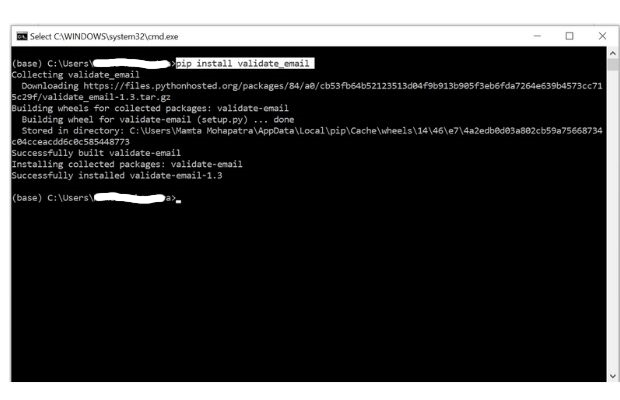
If you encounter ModuleNotFoundError: No module named 'validate_email', install the module via terminal or your Anaconda Navigator environment:
pip install validate_emailAnaconda Navigator GUI Walkthrough:
- Open Anaconda Navigator and select Environments from the left sidebar navigation:
- Select your active base or project environment (e.g.
base (root)), click the play icon, and choose Open Terminal: - In the terminal prompt, execute the installation command:


Hands-on Exercise: Cleaning a Customer Mailing List 🔝
Given a raw signup list with mixed casing, extra whitespace, and invalid addresses, perform a comprehensive cleaning pipeline: strip whitespace, convert email addresses to lowercase, identify valid addresses with regex, and separate valid subscribers from rejected entries.
import pandas as pd

subscribers = pd.DataFrame({
    "name": ["Sita", "Ramesh", "David", "Anita"],
    "raw_email": [
        " Sita.Devi@Example.COM ",
        "ramesh.invalid@",
        "david_99@plus2net.org",
        "not_an_email"
    ]
})

# 1. Clean whitespace and normalize casing
subscribers["clean_email"] = subscribers["raw_email"].str.strip().str.lower()

# 2. Vectorized pattern matching
regex_pattern = r"^[a-zA-Z0-9_.+-]+@[a-zA-Z0-9_-]+(?:\.[a-zA-Z0-9_-]+)+$"
subscribers["is_valid"] = subscribers["clean_email"].str.match(regex_pattern, na=False)

valid_list = subscribers[subscribers["is_valid"]]
rejected_list = subscribers[~subscribers["is_valid"]]

print(f"Valid Subscribers: {len(valid_list)}")
print(valid_list[["name", "clean_email"]])

assert len(valid_list) == 2
assert len(rejected_list) == 2
assert valid_list.iloc[0]["clean_email"] == "sita.devi@example.com"
Practice in Google Colab & GitHub 🔝
Open in Google Colab View on GitHub
Run vectorized regex validators and email sanitation pipelines interactively in Google Colab.
More Details & Related Tutorials 🔝
- Data Cleaning Hub — Overview of missing value imputation, type casting, and filtering.
- apply() — Row-wise and element-wise custom function evaluation.
- str.contains() — Regular expression pattern matching on text columns.
- str.replace() — Cleaning and sanitizing messy text characters.
- SEO Reports & Keyword Analysis — Real-world search engine telemetry analytics.
- Python Regular Expressions (re) — Complete guide to Python regex syntax and tokens.

Subhendu Mohapatra
Author & Instructor at plus2net
I write and maintain practical tutorials on Python, PHP, SQL, JavaScript, HTML, jQuery, and web development at plus2net. The tutorials focus on clear explanations, working examples, and code that readers can test and adapt while learning.


Subscribe to our YouTube Channel here

 Python Video Tutorials