Python math.sqrt(): Principal Square Root Function
The math.sqrt(x) function computes the non-negative principal square root of a real number x (√x). Because it strictly enforces real-number arithmetic at the C library level, the input x must be non-negative (x ≥ 0.0), and the return value is always a float.
Domain Safety: Passing a negative number raises a ValueError: math domain error. This protects numeric pipelines by failing immediately rather than silently injecting complex numbers.
Syntax & Parameters 🔝
The math.sqrt() function belongs to Python's standard math module:
import math

root = math.sqrt(x)| Parameter | Type | Description |
|---|---|---|
x |
float or int |
Required. A non-negative numeric value (≥ 0.0). |
| Return Value | float |
The principal square root of x, satisfying root ≥ 0.0 and root2 ≈ x. |
ValueError |
Exception | Raised when x < 0.0 (e.g. math.sqrt(-16)). |
TypeError |
Exception | Raised when passing non-numeric types (e.g. strings, lists, None). |
Basic Usage & Precision Examples 🔝
Whether inputting integers, floating-point decimals, or zero, math.sqrt() always returns a 64-bit float:
import math

# Perfect squares
print("sqrt(4):   ", math.sqrt(4))      # Output: 2.0
print("sqrt(16):  ", math.sqrt(16))     # Output: 4.0
print("sqrt(100): ", math.sqrt(100))    # Output: 10.0

# Non-perfect squares
print("sqrt(2):   ", round(math.sqrt(2), 6))   # Output: 1.414214
print("sqrt(20):  ", round(math.sqrt(20), 6))  # Output: 4.472136

# Decimal fractions and zero
print("sqrt(0.25):", math.sqrt(0.25))   # Output: 0.5
print("sqrt(0.0): ", math.sqrt(0.0))    # Output: 0.0
print("sqrt(-0.0):", math.sqrt(-0.0))   # Output: -0.0 (preserves sign)
Output:
sqrt(4):    2.0
sqrt(16):   4.0
sqrt(100):  10.0
sqrt(2):    1.414214
sqrt(20):   4.472136
sqrt(0.25): 0.5
sqrt(0.0):  0.0
sqrt(-0.0): -0.0
math.sqrt() vs. ** 0.5 vs. cmath.sqrt() 🔝
Python developers often wonder whether to use math.sqrt(), the power operator ** 0.5, or the cmath module:
| Feature | math.sqrt(x) |
x ** 0.5 |
cmath.sqrt(x) |
|---|---|---|---|
| Speed | Fastest (Direct C library call) | Slightly slower (operator dispatch) | Slower (complex arithmetic engine) |
| Negative Numbers | Raises ValueError | Returns complex number | Returns pure complex number |
| Code Intent | Explicit mathematical square root | General fractional exponentiation | Complex analysis |
| Precision on Negatives | Guards real pipeline integrity | Can introduce tiny float noise in real part | Exact imaginary number (e.g. 2j) |
import math
import cmath

# Negative input behavior
try:
    math.sqrt(-16)
except ValueError as err:
    print("math.sqrt(-16):  ", err)

print("cmath.sqrt(-16): ", cmath.sqrt(-16))
print("(-16) ** 0.5:    ", (-16) ** 0.5)
Output:
math.sqrt(-16):   math domain error
cmath.sqrt(-16):  4j
(-16) ** 0.5: (2.4492935982947064e-16+4j)math.sqrt() over x ** 0.5? When developing financial, geospatial, or physical software, a negative number where a positive value was expected is almost always a bug. math.sqrt() halts execution immediately with an informative ValueError, whereas ** 0.5 silently injects complex numbers that cause confusing errors deep inside downstream calculations.
Integer Square Roots: math.sqrt() vs. math.isqrt() 🔝
Introduced in Python 3.8, the companion function math.isqrt(n) calculates the exact integer floor square root (⌊√n⌋) for any non-negative integer n without ever converting the number to a float.
Because standard 64-bit floats have only 53 bits of precision (~15 to 17 decimal digits), using int(math.sqrt(n)) on massive numbers causes precision truncation errors, whereas math.isqrt(n) is exact to unlimited digits:
import math

huge_int = 10**40  # 40-digit integer

exact_root = math.isqrt(huge_int)
print(f"isqrt(10**40):      {exact_root}")
print(f"exact_root**2 == n? {exact_root**2 == huge_int}")  # True
Euclidean Distance in 2D and 3D Geometry 🔝
The primary real-world application of math.sqrt() is calculating Euclidean spatial distances using the Pythagorean theorem:
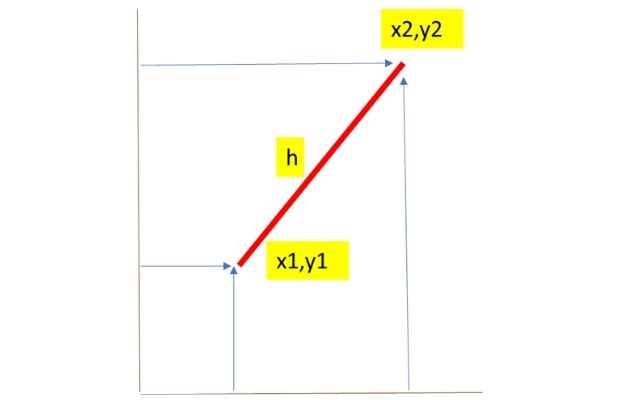
import math

def calculate_2d_distance(x1, y1, x2, y2):
    """Calculates straight-line Euclidean distance between two 2D points."""
    dx = x2 - x1
    dy = y2 - y1
    return math.sqrt(dx**2 + dy**2)

# Surveying coordinates example
p1 = (13639.4, 1554.8)
p2 = (13637.5, 1570.6)
dist_meters = calculate_2d_distance(p1[0], p1[1], p2[0], p2[1])

print(f"Distance in meters: {dist_meters:.2f} m")
print(f"Distance in feet:   {dist_meters * 3.2808:.2f} ft")
Output:
Distance in meters: 15.91 m
Distance in feet:   52.21 ft
Hands-on Exercise: Quadratic Equation Solver with Assertions 🔝
In algebra and physics, the roots of any quadratic polynomial a·x² + b·x + c = 0 are determined by the quadratic formula:
The discriminant Δ = b2 − 4ac determines the nature of the roots. If Δ < 0, there are no real roots, and calling math.sqrt(Δ) raises a ValueError. Let's build an equation solver and verify it with unit assertions:
import math

def solve_quadratic(a, b, c):
    """
    Solves a*x^2 + b*x + c = 0 for real roots.
    Returns:
      - (root1, root2) tuple for 2 distinct real roots
      - (root,) tuple for 1 repeated root
      - () empty tuple if roots are complex (no real roots)
    """
    if a == 0:
        raise ValueError("Coefficient 'a' cannot be zero in a quadratic equation.")

    discriminant = b**2 - 4 * a * c

    if discriminant < 0:
        return ()  # No real solutions
    elif discriminant == 0:
        root = -b / (2.0 * a)
        return (round(root, 4),)
    else:
        sqrt_disc = math.sqrt(discriminant)
        r1 = (-b + sqrt_disc) / (2.0 * a)
        r2 = (-b - sqrt_disc) / (2.0 * a)
        return (round(r1, 4), round(r2, 4))

# Unit Assertions
# Case 1: x^2 - 5x + 6 = 0 -> roots: (3.0, 2.0)
assert solve_quadratic(1, -5, 6) == (3.0, 2.0)

# Case 2: x^2 - 4x + 4 = 0 -> single repeated root: (2.0,)
assert solve_quadratic(1, -4, 4) == (2.0,)

# Case 3: x^2 + 1 = 0 -> discriminant < 0 -> no real roots: ()
assert solve_quadratic(1, 0, 1) == ()

# Case 4: Non-quadratic validation (a = 0)
try:
    solve_quadratic(0, 2, 3)
    assert False, "Should raise ValueError"
except ValueError:
    pass

print("Roots of 2x^2 - 7x + 3 = 0:", solve_quadratic(2, -7, 3))
print("All quadratic equation assertions passed successfully!")
Practice in Google Colab & GitHub 🔝
Open in Google Colab View on GitHub
Run all math.sqrt() examples interactively, contrast precision with cmath.sqrt and math.isqrt, calculate Euclidean coordinates, and solve quadratic polynomials in Google Colab.
More Details & Related Guides 🔝
- Python Math Module Overview — Master arithmetic, trigonometry, and numeric constants in Python.
- math.pow() Function — Floating-point power and exponentiation.
- math.exp() Function — Exponential function e raised to the power x.
- math.fabs() Function — Float absolute value calculation.
- math.round() Guide — Rounding numbers to nearest decimal places.
- Python float Data Type — Complete guide to IEEE 754 floating-point mechanics.
- Python int Data Type — Working with unlimited-precision integers in Python.

Subhendu Mohapatra
Author & Instructor at plus2net
I write and maintain practical tutorials on Python, PHP, SQL, JavaScript, HTML, jQuery, and web development at plus2net. The tutorials focus on clear explanations, working examples, and code that readers can test and adapt while learning.


Subscribe to our YouTube Channel here

04-07-2020 | |
| Why the square root of 16 is 4.0 and why not 4??? | |
05-07-2020 | |
| The output of sqrt is float always. Added the part to convert float data type to integer. | |
 Python Video Tutorials